Presidio

Your store looks fine in a quick demo, but the team knows better. Product pages load a little slower on mobile, the collection grid feels sticky after a few app installs, and PageSpeed Insights keeps drifting in the wrong direction every time marketing adds another widget, banner, or test. That's usually when a shopify speed optimization service becomes a real business conversation instead of a nice-to-have cleanup.
Table of Contents
Why Shopify Stores Get Slow and What a Speed Service Actually Does
Pricing Models and What a Shopify Merchant Should Expect to Pay
Deliverables That Separate a Real Service From a Generic Audit
How to Evaluate and Choose the Right Speed Optimization Provider
Why Shopify Stores Get Slow and What a Speed Service Actually Does
A common pattern shows up over and over. A DTC brand launches on a decent theme, adds a reviews app, a subscription app, a quiz, a few marketing pixels, and a cart drawer, then international expansion adds more scripts and checkout logic. The store still looks polished, but the page experience starts slipping, especially on mobile where the hero image, the product media, and the first interaction all compete for attention.
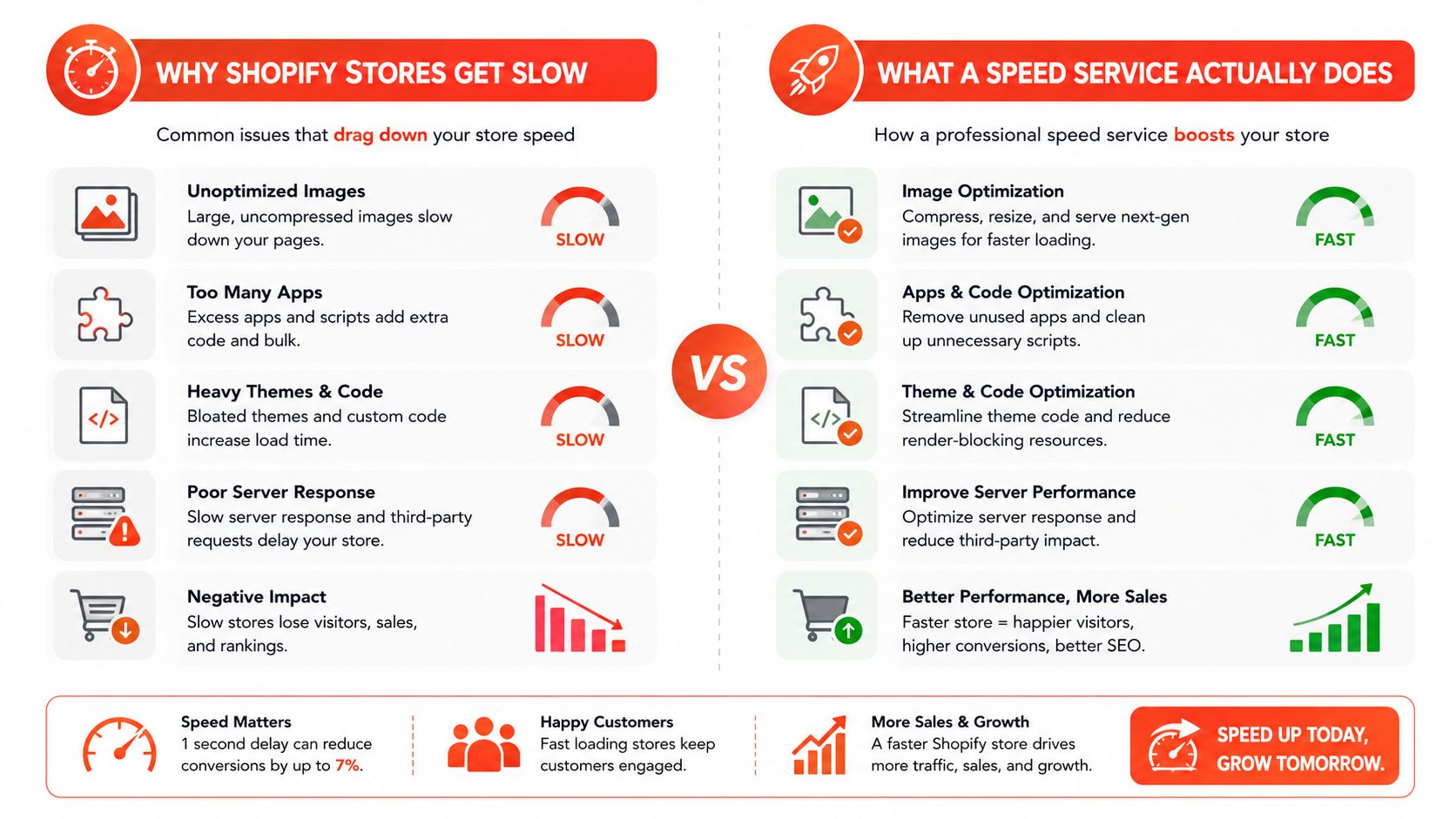
A shopify speed optimization service exists because this problem isn't one fix. Shopify's own guidance says store speed is ongoing work, and the first move is usually to remove unnecessary apps, compress and resize images, enable lazy loading, reduce redirects, and eliminate excess code, while using tools like PageSpeed Insights, GTmetrix, and the Shopify performance report to keep measuring Shopify performance guidance. That's not a redesign brief. It's a structured technical engagement that cuts app bloat, trims theme code, and re-tests the templates that drive revenue.
A fast-looking homepage can still hide a slow product template. If the add-to-cart flow feels delayed, the site is still slow where it matters.
Speed Optimization Service vs Other Shopify Engagements
Engagement | Primary Goal | Typical Trigger | Typical Output |
|---|---|---|---|
Speed optimization service | Reduce template-level latency and improve shopper experience | Core Web Vitals drift, slow mobile product pages, app sprawl | Baseline audit, prioritized fixes, retest results |
Theme redesign | Refresh visual presentation and merchandising | Brand refresh, outdated layout, conversion concerns | New sections, updated UI, revised templates |
CRO audit | Improve persuasion and reduce friction | Traffic exists, but conversion is soft | Hypotheses, testing roadmap, UX recommendations |
Performance tune-up inside development | Patch obvious bottlenecks | New app install, campaign pages, seasonal launch | Targeted code and asset cleanup |
The distinction matters because the right service is not buying “faster Shopify” in the abstract. It's buying measurement, triage, and implementation across the templates that carry sales. If a merchant is watching LCP drift, mobile feel degrade, and apps accumulate faster than anyone can review them, that's the right time to hire.
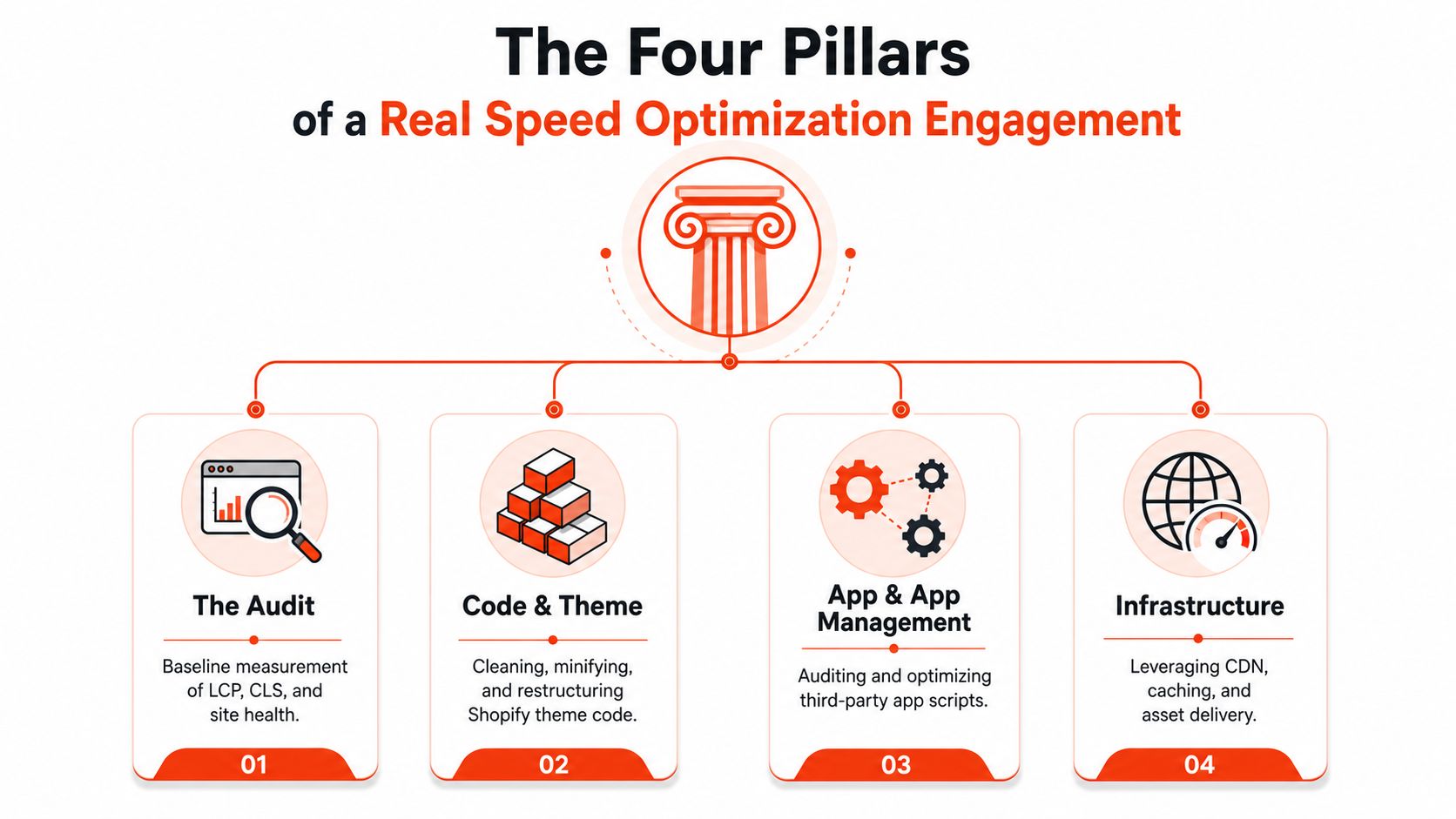
The Four Pillars of a Real Speed Optimization Engagement
A credible engagement starts with measurement on the right templates, not a homepage vanity check. The merchant should expect the homepage, the top product page, and the top collection page to be tested separately on mobile and desktop, because those templates often behave very differently in the wild. A real baseline also needs a script review, since installed apps and third-party code are usually where the hidden drag lives.
The audit comes first
The first pillar is the audit, and it should feel forensic. Shopify's own performance help says the biggest controllable slowdowns are usually the theme, installed apps, and third-party code, and it recommends reviewing Core Web Vitals in Shopify Web Performance reports and PageSpeed Insights before changing code Shopify performance help. A good audit identifies duplicated tags, chat widgets, A/B testing scripts, and anything firing on every page.
Code and asset cleanup is the real work
The second pillar is code and asset reduction. That means image compression, resizing, lazy loading where it helps, and preloading the true LCP element, which is often the hero image or the main product image. Shopify performance guidance also warns that large images and too many high-quality images can slow pages, and practical Shopify speed advice recommends keeping the above-the-fold content lightweight, avoiding slideshow-style heroes, and compressing top-of-page images before upload Shopify video guidance.
Infrastructure is usually a boundary, not a fix
The third pillar is delivery and caching, but many proposals get vague here. Shopify already handles a lot of platform infrastructure, so a merchant usually doesn't need generic server advice. The service should focus on asset delivery rules, static file handling, and whether an additional image CDN is useful for the specific store.
Theme tuning decides whether the gains stick
The fourth pillar is theme tuning. Slideshow heroes, oversized banners, and sections that pull in too much code can drag the page even after app cleanup. Good vendors often rebuild the heaviest sections and remove dead Liquid patterns so the theme stays maintainable after launch.
Expected Outcomes and the Metrics That Actually Matter
The cleanest way to judge a speed engagement is by reading the right metrics on the right templates. A practical benchmark used in Shopify speed guidance is to keep the page load experience under 3 seconds and Largest Contentful Paint, or LCP, below 2.5 seconds Shopify speed benchmarks. That benchmark matters because the hero image, not the whole page, is usually the LCP target.
A merchant should care less about one site-wide number and more about whether product and collection templates are behaving. A homepage can be acceptable while a top seller page feels slow because a large hero, a review widget, or a cart drawer is blocking responsiveness. That's why a credible report should separate pages by template and device, then show what changed after each fix.
What the metrics mean in practice
LCP is the first visible content that anchors perceived speed. If the hero image is too heavy, doesn't preload, or loads late, the page feels sluggish even when the rest of the asset stack is fine. CLS measures visual stability, which matters when product pages jump around as images, badges, and app blocks appear. INP reflects interaction responsiveness, so it's the metric to watch when add-to-cart, variant selection, or cart drawers lag.
The hero image is rarely the only culprit, but it's often the thing shoppers notice first.
What to ask for in reporting
Ask for per-template before-and-after comparisons on mobile and desktop, plus the actual files or scripts that changed. If a vendor only shows a single homepage screenshot, they haven't proven much. A good performance partner can explain why one template improved and why another still needs work.
For teams looking at automation or merchandising tools alongside speed work, Stimulead's AI for ecommerce is worth reviewing as a separate resource, mainly because the more tools a store adds, the more disciplined the performance budget has to become.
Hidden Bottlenecks Most Speed Audits Miss
The usual advice focuses on visible assets, and that's not wrong. It's just incomplete. A store can remove obvious app clutter, compress images, and still feel slow because the bottleneck sits in scripts, event handlers, and checkout logic that fires only in certain contexts.
Scripts create the hidden drag
Duplicated analytics tags, chat widgets, loyalty modules, discount logic, cart drawers, and A/B testing tools can all add latency even when the page looks clean. Recent Shopify performance commentary also points to checkout validation, cross-border flows, and app logic as sources of delay that affect interactivity after the initial paint, which is why the page can look fast but still feel sticky when a shopper tries to act Wgentech speed guidance.
Many audits stop too early. They remove an app and celebrate the cleaner report, but they never inspect whether a tag manager is still firing, whether a widget duplicated its event handlers, or whether a cart drawer is re-rendering too much code on every click. Those are the kinds of problems that hurt INP even after visual polish is complete.
Checkout and cart state need separate testing
The checkout path deserves its own review by region, payment method, and cart behavior. A store with international selling enabled can have different validation or rendering delays depending on market, shipping method, or discount rule. That's why a strong speed engagement treats the journey as a system, not a single page.
The most useful question to ask a vendor is simple. Which scripts are still active, and what happens when a shopper opens the cart, changes quantity, applies a code, or starts checkout from a different market? If the vendor can't answer that cleanly, they're probably doing cosmetic cleanup.
Presidio's theme update guidance is useful in this context because a theme refresh often exposes script conflicts that a quick audit can miss. That doesn't mean a theme update fixes speed by itself. It means performance problems often sit at the intersection of theme structure and runtime logic.
Pricing Models and What a Shopify Merchant Should Expect to Pay
Pricing is messy because scope is messy. A small store with a healthy theme and a modest app stack needs a different engagement than a Shopify Plus brand with subscriptions, international markets, custom cart logic, and ongoing launches. The right model depends on how often the store changes and how much technical risk the merchant is carrying between releases.
The three common pricing models
A flat audit works when the merchant wants a diagnosis and a fix list, sometimes paired with a short implementation sprint. A monthly retainer makes more sense when speed regressions keep returning after app installs, campaign launches, or theme edits. A performance-based model is rarer, but it can work when a brand wants fees tied to agreed Core Web Vitals targets instead of only hours spent.
Flat pricing is easiest to compare. Retainers are easier to sustain when the site changes often.
When each model fits
Model | Best For | Typical Scope | Risk for Merchant |
|---|---|---|---|
Flat audit | Brands with a manageable theme and app footprint | Baseline report, prioritized fixes, one-time sprint | Scope can stop at recommendations if implementation isn't included |
Monthly retainer | Shopify Plus teams shipping constantly | Ongoing monitoring, regressions, updates, new optimizations | Can drift if deliverables aren't measured tightly |
Performance-based | Merchants who want accountability to metrics | Defined targets, implementation, re-testing | Needs clear measurement rules or disputes follow |
What the budget usually reflects
A focused Shopify store can often be optimized in a low four-figure engagement, while enterprise Shopify Plus builds with internationalization, subscriptions, and custom checkout logic typically land in mid-to-high five figures. Those are scope signals, not promises, and they reflect the amount of code, templates, and app logic that has to be reviewed. The more a store depends on custom behavior, the more time the vendor spends untangling dependencies instead of making quick cosmetic fixes.
Presidio's service page is a good example of how broader Shopify support is often packaged alongside speed work, since performance tuning tends to touch theme development, integrations, and ongoing maintenance in the same engagement. That overlap is normal. Speed projects usually sit inside a larger operating model, not outside it.
Deliverables That Separate a Real Service From a Generic Audit
The easiest way to spot a real service is to ask what you'll own at the end. A generic audit gives you a slide deck and a list of suggestions. A real engagement gives you code changes, a baseline, a re-test, and a plan for what happens when the next app install or theme update lands.

The core deliverables
A credible engagement should include a baseline report for LCP, CLS, INP, and FCP on mobile and desktop, plus a prioritized backlog ranked by revenue impact rather than ease of implementation. It should also include code-level changes as reviewable diffs or pull requests, not just screenshots proving that a homepage got faster.
Before-and-after screenshots help, but they're not enough. The merchant needs per-template re-test results, a Lighthouse or PageSpeed Insights comparison, and a monitoring plan that keeps watching for regressions after launch. Speed work on Shopify is never done, because the storefront keeps changing.
What ownership should look like
Baseline Performance Report: Detailed numbers by template and device, not one site-wide summary.
App and Theme Code Audit: Clear identification of bloated scripts, leftover embeds, and inefficient assets.
Optimization Action Plan: A prioritized list that shows what gets fixed first and why.
Before and After Comparison: Evidence that the actual template improved, not just the homepage.
Maintenance Recommendations: Practical guidance for preserving gains after updates and new apps.
The difference between useful and useless documentation is ownership. If the vendor leaves you with no way to review, maintain, or retest the changes, you'll pay for the same cleanup again later. That's especially true on a store with frequent merchandising changes or recurring campaigns.
Custom Shopify theme development guidance is relevant here because some speed improvements are inseparable from theme changes. When the codebase is the problem, performance work and theme engineering need to travel together.
How to Evaluate and Choose the Right Speed Optimization Provider
The best filter is a sales call that gets uncomfortably specific. Ask which templates they test, what tools they use, whether you own the code changes, and how they handle regressions after launch. If they only talk about “making the store feel faster” without naming scripts, themes, or checkout behavior, they're probably selling generic advice.
Questions that separate real engineering from guesswork
Which templates will you test first? You want to hear product, collection, and homepage, plus mobile and desktop.
What tools do you use? PageSpeed Insights, Shopify Web Performance reports, browser dev tools, and theme inspection should come up naturally.
Will I own the code changes? The answer should be yes, with diffs or pull requests.
How do you prevent regressions? Look for a monitoring plan, not a shrug.
Can you show sample work? Ask for anonymized before-and-after results and a sample audit report.
Red flags to walk away from
If a vendor only shows a homepage score, they're skipping the hard parts. If they never mention scripts, app embeds, or checkout logic, they're not doing full-stack Shopify performance work. If they refuse to explain methodology, that usually means the methodology isn't strong enough to defend.
A credible provider should talk about trade-offs plainly. Sometimes the right move is deleting an app. Sometimes it's deferring a script. Sometimes it's rebuilding a section that looked harmless but kept re-rendering too much code. The point is to make the store faster where shoppers feel the delay, not just where the report is easiest to impress.
If your Shopify store feels slower every time a new app, campaign, or theme change lands, Presidio can help audit the templates, scripts, and theme code that are holding it back. Visit Presidio to explore speed optimization, theme work, and ongoing Shopify development support built for stores that need performance to hold up in the real world.



