Presidio

Most brands are treated as though custom Shopify theme development is merely a design upgrade. That advice misses the core issue. A theme usually gets custom because the business has outgrown the way its current storefront handles merchandising, content, subscriptions, integrations, or mobile UX, and the hidden cost arrives later in maintenance, not at launch.
A well-run custom project is less about making a storefront look unique and more about building a system the team can keep changing without breaking it. Since Online Store 2.0 arrived in 2021, Shopify themes have moved toward modular sections, editor-friendly settings, and a workflow built around the CLI, which made modern theme work more repeatable and safer to ship (Shopify theme development overview). That shift changed the job of the agency engineer. The task is no longer just “make the homepage prettier.” It's to decide what should be custom, what should stay standard, and how the codebase will survive the next twelve months of updates.
Table of Contents
Introduction to Custom Shopify Theme Projects
A brand usually reaches this point the same way. The team starts with a decent theme, adds a few apps, customizes a template or two, then discovers that every new request adds another compromise. Merchandising wants a different product layout. Operations wants a cleaner cart flow. Growth wants faster mobile pages. The theme can still be changed, but each change starts to cost more in time, coordination, and future maintenance.
That is the primary reason custom Shopify theme development enters the conversation. The work can include UX discovery, wireframing, section design, Liquid templating, metafields, app embeds, speed tuning, accessibility checks, and deployment workflow. In a healthy build, those pieces fit together so the storefront stays editable for non-developers without breaking every time the business changes direction. For teams trying to compare build scope against long-term ownership, a 2026 breakdown of Shopify development costs gives useful context, but the bigger question is still operational fit.
What a custom build is really solving
The strongest custom projects are usually about removing friction from day-to-day work. They help teams change content faster, support different product types, and reduce the number of apps needed to manage the experience. Shopify's customization model gives merchants plenty of room to adjust settings, templates, and app embeds, but brand-specific requirements often push the work into custom code and a more deliberate theme structure.
A full custom build is not always the smartest answer. It can create a larger surface area for maintenance, more QA after platform updates, and more dependency on the original developer if the structure is too bespoke. Strategic customization often delivers the business value faster, especially when the existing theme already covers part of the need and only a few workflows require custom logic. That trade-off is where the economics usually improve.
A custom theme should make future edits easier, not harder. If every change needs a developer, the build is already working against the business.
The practical question is simple. What needs to be unique, what needs to stay maintainable, and what can remain standard? A good agency should answer that before any code is written, including whether the project really needs a full rebuild or a focused set of changes that preserve flexibility, such as those used for EU compliance for Shopify. A later-stage storefront can also borrow tested patterns from Presidio's Shopify theme work without copying a one-off implementation that will be expensive to support.
Custom Shopify Theme Architecture and Online Store 2.0
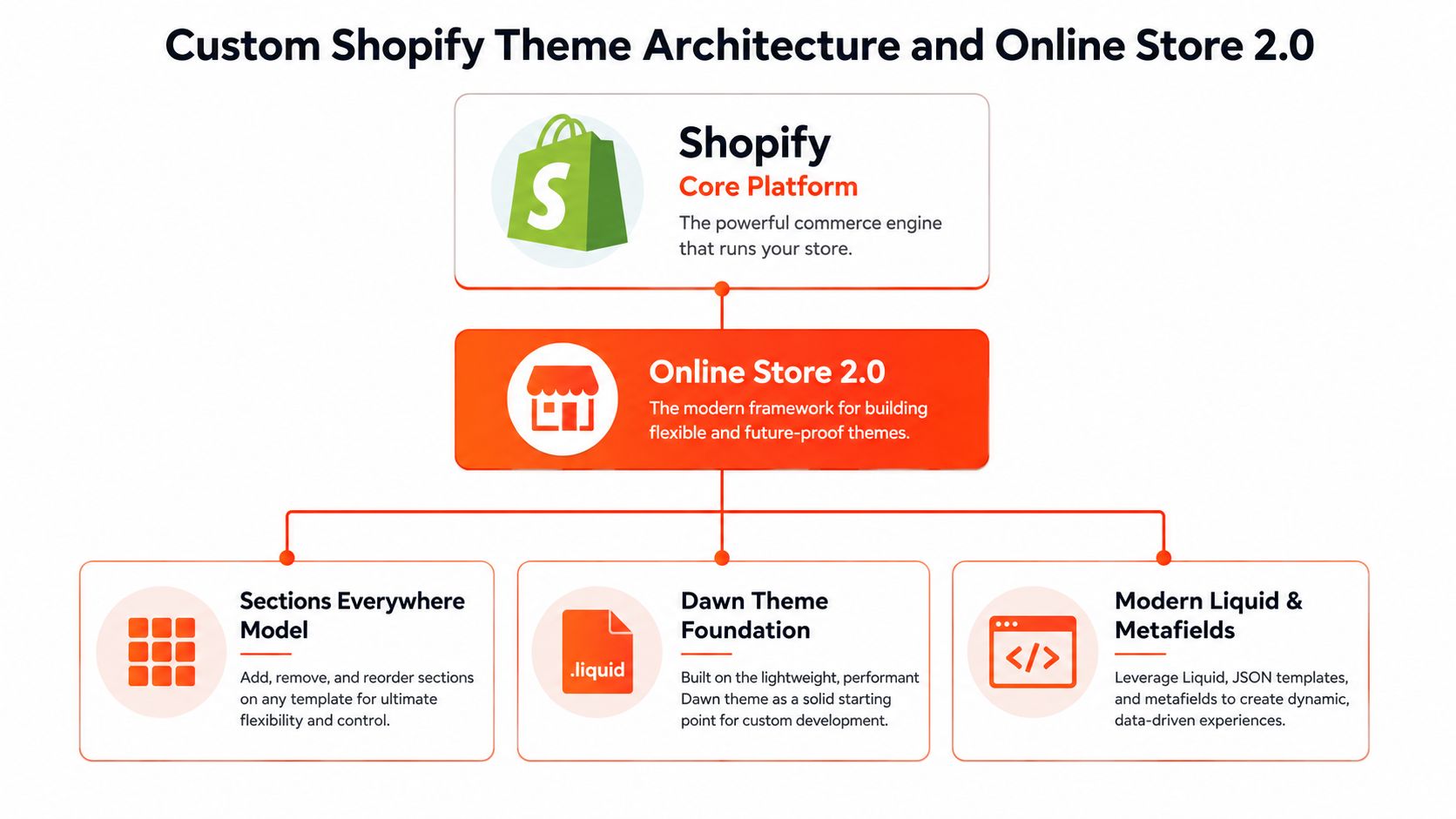
Shopify's Online Store 2.0 changed custom theme work by making storefronts more modular and editable across more page types. The practical effect is that sections are no longer limited to the homepage. They become a system for building templates with reusable blocks, flexible content areas, and settings that merchants can manage without asking a developer to touch every page.
The modern theme stack
The stack breaks down into three layers: the Shopify platform, the editing framework, and the theme code itself. Shopify documents the core workflow with commands like shopify theme init, shopify theme dev, shopify theme push, and shopify theme publish, which support local development, browser previews, and controlled release to production (Shopify theme creation docs). That workflow keeps the build isolated until it is ready, instead of turning the live admin into a staging environment.
For non-engineers, the key point is straightforward. A modern theme is not a pile of one-off page edits. It is built from Liquid templates, sections, metafields, and settings, so the storefront stays editable while still matching a brand's operational needs. That setup is a better fit for merchants who expect to change collections, landing pages, and content patterns over time.
Practical rule: if a feature will be reused across multiple templates, build it as a section or a data-driven module, not as a one-off page hack.
The layer split matters in day-to-day work. Shopify handles the platform, Online Store 2.0 handles the editing framework, and the theme handles brand presentation and custom logic. For brands with compliance-heavy catalog structures or cross-border storefronts, resources like EU compliance for Shopify can also shape how the theme architecture needs to support data display and content organization.
If you want to see how a maintainable theme program is positioned in practice, Presidio's theme work shows the kind of build-oriented approach that fits this model. The architecture only works when the code stays clean enough for future changes to land without a rewrite.
Discovery and Wireframing for Custom Themes
The first costly mistake in a custom Shopify project is writing code before the business agrees on what the storefront must do. Discovery prevents that drift. A solid discovery phase maps the buyer journey, identifies operational friction, and turns vague goals like “make it feel premium” into page-level requirements the team can build against.
Why wireframes save more than design time
Wireframes are not just a design artifact. They surface structural issues before they turn into expensive revisions. If the product page needs comparison tables, subscription messaging, bundles, and a custom trust section, those needs belong in the layout discussion before anyone starts styling sections or writing Liquid. Otherwise the team ends up reworking templates after stakeholders react to the first polished mockup.
Timeline pressure becomes real at this stage. A custom Shopify theme project typically takes 10 to 20 weeks end-to-end, with the build phase usually taking 4 to 8 weeks and testing or revisions taking 1 to 3 weeks (timeline benchmark). Projects that include custom product builders, subscription logic, or multi-currency requirements can stretch to 6 months or more. Those ranges matter because they force stakeholders to decide what belongs in version one.
What good discovery usually produces
A strong discovery package usually includes a few things, even when the format changes by agency:
Journey maps: These show where shoppers hesitate, compare, or abandon.
Template inventory: This identifies which pages need custom layouts versus standard sections.
Content rules: These define what merchants must edit later without developer help.
Risk list: This names integrations, data dependencies, or launch blockers early.
The wireframe stage is also the right place to separate “must ship” features from “nice to have” ideas. If that split does not happen here, it usually happens under deadline pressure during build. That is when the project gets expensive.
The cheapest custom feature is the one removed before design starts.
The other habit that pays off early is tying wireframes to performance constraints before the UI gets too polished. A theme that looks great but loads slowly creates rework later, especially once scripts, apps, and media assets pile up. A close look at Shopify performance optimization guidance helps teams keep those trade-offs visible while the structure is still easy to change.
Development Best Practices for Maintainable Themes
Custom theme work gets expensive when every decision turns into custom code. A maintainable build starts with reusable patterns, clear code paths, and a hard limit on app overlap. That sounds plain, but it is where many projects drift. Teams add one plugin for a narrow exception, then another, and the storefront ends up carrying more moving parts than the business needs.
Lean code beats decorative complexity
Pricing varies because scope does. A pricing guide shows a fully custom Shopify theme built from scratch typically costing $3,000 to $15,000 one-time for smaller to mid-market projects. The same guide places broader custom builds with integrations at $6,000 to $20,000, while enterprise headless or highly bespoke implementations can start around $40,000 and go beyond $200,000. Those ranges are not just a sales conversation. They reflect how quickly custom logic, integration work, and long-term upkeep change the cost of a theme.
A theme is easier to maintain when the merchant can edit data without touching code. Metafields should carry reusable content instead of hardcoded values. JavaScript should stay modular and separated from templates. Section settings need clear labels so merchandisers know what they can change safely. Logic should not be copied across multiple templates, because duplicated code creates hidden bugs and slower updates. A build also needs room for Shopify platform changes, so future updates do not force a rebuild every time the store evolves.
The maintenance burden is usually invisible during launch planning.
What to ask a development partner
A weak implementation is easy to spot if you ask the right questions. Ask how they handle reusable sections, version control, and app overlap. Ask which edits should stay in Liquid, which should move into metafields, and which should be managed in the theme editor. Ask how they keep dead code from stacking up after launch.
If the answer is basically “we'll build whatever you want,” that should slow the conversation down. A strong partner can explain why a feature belongs in Liquid, why another belongs in structured content, and when a third-party app is still the cleaner option. The trade-off is usually between upfront speed and future maintenance, and that decision should be explicit before the build starts.
That same discipline applies to performance work. A theme that looks polished but loads slowly creates rework once scripts, apps, and media assets start accumulating. A close look at Shopify performance optimization guidance helps teams keep those trade-offs visible while the structure is still easy to change.
Maintenance starts during development. If the build does not account for future edits, the theme will become fragile long before the next redesign.
Quality Assurance and Deployment Workflow
A custom Shopify theme should not go live because the code looks finished. It should go live because the release process has already exposed the weak spots. That usually means separating development work from production, testing in a controlled theme copy, and treating deployment as a reviewable step instead of a quick push to live.
Shopify's developer docs on theme deployment and release workflow support that approach, and the practical value is straightforward. You want a setup where changes can be previewed, reviewed, and rolled back without disturbing the live storefront. That is harder to maintain than a one-off launch, but it is also what keeps a theme from becoming fragile the moment real content and app behavior start piling up.
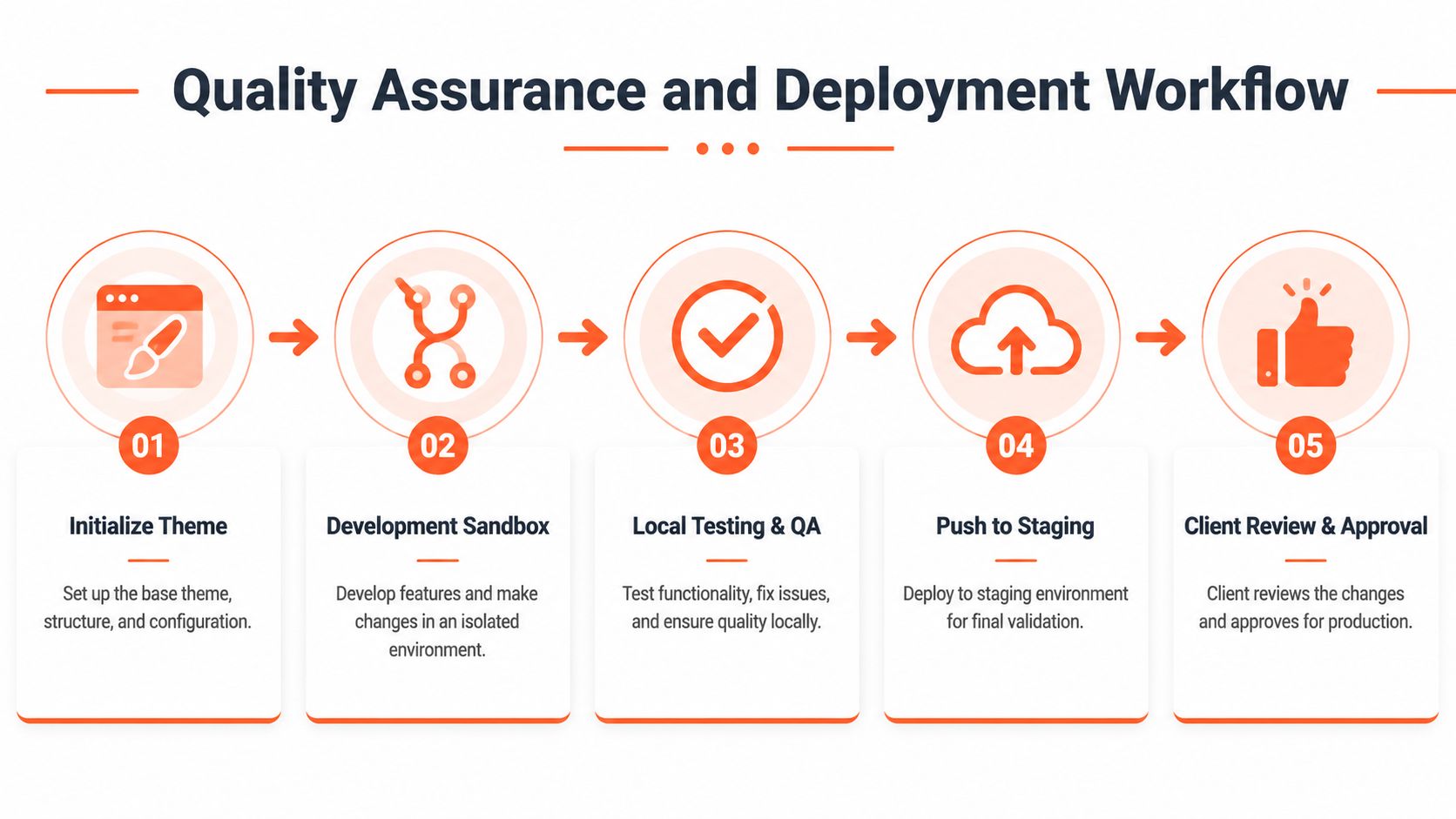
The release path that avoids launch-day surprises
An isolated development theme is useful because it lets the team find problems before customers do. Broken layouts, missing images, bad links, and section conflicts are easier to catch when the storefront is still in a staging environment. It also gives developers and reviewers a shared place to inspect work without relying on live admin changes.
That review process should be more than a visual pass. Real QA needs cross-device checks, accessibility checks, and performance checks, because a theme that behaves on one laptop can still fail on mobile, under slower scripts, or when a merchant edits content in the theme editor. For a practical view of how QA should be organized on the web, the insights from Trackingplan on web QA are useful because they reinforce systematic testing instead of casual spot checks.
What to verify before publishing
Template coverage: Confirm that every expected page type has the right layout and data.
Mobile behavior: Check nav, forms, modals, and sticky elements on real viewport sizes.
Content integrity: Make sure rich text, metafields, and product data display correctly.
Regression risk: Re-test anything the build team touched in a shared snippet or section.
A staging release also gives teams room to catch toolchain issues that do not show up in a simple preview. That includes app conflicts, script ordering problems, and edits that look fine in isolation but break when combined with merchant-managed content. The workflow only works if the team treats the staged theme as the primary checkpoint, not as a place to half-test and hope for the best.
The release process should also fit the way the theme was built. If a store depends on reusable sections and structured content, QA needs to verify those structures under real merchandising changes, not just the default demo data. If the project includes collaborative handoff, version control and change notes matter just as much as browser testing because they make it easier to trace which update caused a regression.
Real World Custom Theme Examples from Presidio
Presidio's work shows how custom theme decisions usually solve operational problems first and aesthetic problems second. Brands like OUAI, OLIPOP, and NOBULL sit in categories where storefront structure, mobile performance, and content flexibility can affect day-to-day ecommerce execution. In those environments, a theme isn't just a display layer. It's part of how the business launches products, presents collections, and reduces friction in the shopping flow.
What transferables matter across brands
The common pattern is not “custom for custom's sake.” It's selective replacement. A custom section can take the place of a third-party app when the app is adding clutter, slowing the page, or limiting layout control. A reusable design system can speed up new page creation because teams stop reinventing blocks for every campaign. Subscription flows can be supported more cleanly when the theme is built to handle them, instead of forcing the storefront to adapt around a generic template.
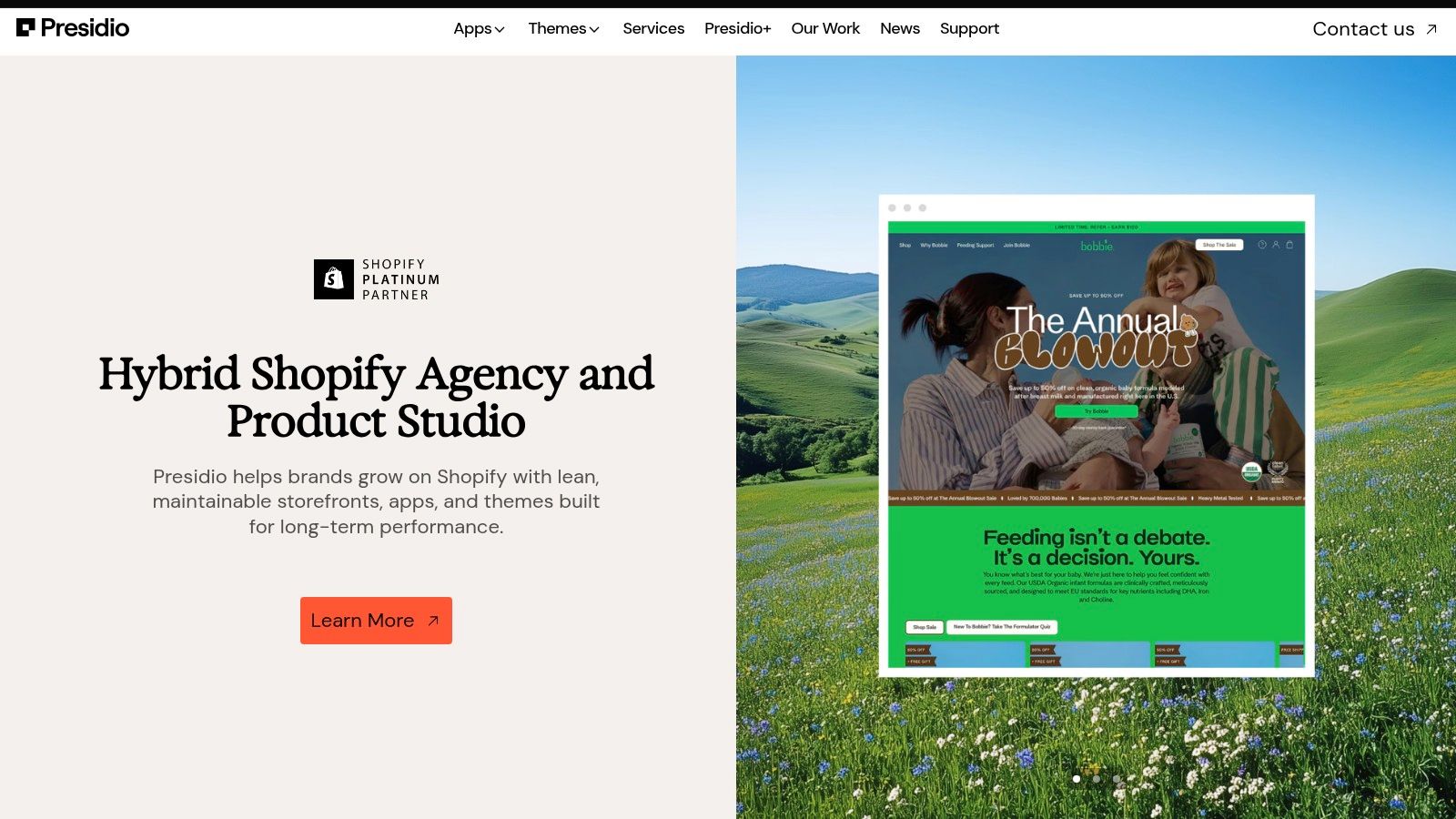
A key lesson from these kinds of projects is that custom theme work pays off when it matches the business model. If a brand needs a more controlled merchandising system, the theme should support that. If the team needs to reduce app sprawl, the codebase should absorb the essential features cleanly. If a page type needs frequent updates, the editor experience should make those updates easy for non-developers.
A theme earns its keep when the merchandising team can move faster without engineering help on every small change.
That's also why agency-plus-studio delivery works well here. The implementation team can build the codebase, while the strategy and design side keep the structure tied to actual commercial needs. Presidio's portfolio is useful as a reference point because it shows this blend in action, with custom builds used as operational tooling, not just brand decoration.
When Strategic Customization Beats Full Builds
The default advice says full custom is always the most future-proof path. That isn't true for many DTC brands. A premium OS 2.0 theme with strategic customization can solve the core problem faster and with less maintenance burden, especially when the business doesn't need every part of the storefront invented from scratch.
Choosing the lighter build on purpose
One planning source argues that a custom build often takes 6 to 12 months and costs roughly $120,000 to $350,000 for a typical DTC brand, while strategic customization runs $35,000 to $90,000 and ships faster (planning ranges). That difference changes the decision. If the business only needs custom sections, alternate templates, metafield-driven modules, or a custom cart experience, starting from a premium theme is often the smarter use of time and budget.
The business case gets even clearer when you pair that with Shopify's own design guidance, which emphasizes trust-building patterns, real-user testing, and reducing purchase friction. Conversion improvements usually come from clarity, mobile performance, and a smoother path to checkout, not from bespoke visuals alone. That's one reason strategic customization often wins when the goal is growth rather than novelty.
A simple decision framework
Start with a premium theme when your main goal is speed to market and a cleaner editor experience.
Customize selectively when only a few high-value pages or modules need differentiation.
Go full custom when product complexity, operational logic, or brand requirements exceed what a premium theme can support.
If you're unsure where your project sits, the update guidance around standard themes is worth reviewing alongside build planning. The practical value of updating your Shopify theme is that it keeps the conversation focused on whether a lighter, better-maintained base can do the job before committing to a larger rebuild.
Conclusion and Ongoing Theme Support Iteration
A custom theme launch is not the finish line. It's the start of a maintenance cycle that either stays controlled or turns into hidden technical debt. The shops that stay healthy keep version control tight, test changes before they go live, and review performance regularly as the catalog, apps, and Shopify itself evolve. Shopify's own guidance on theme development also points toward ongoing performance work, including prototyping, user testing, extracting JavaScript, and removing slow components, which makes it clear that quality is a moving target rather than a one-time deliverable (Shopify theme best practices).
The biggest miss in most guides is the maintenance question. Buyers want to know how much recurring developer time, QA, and regression testing a custom theme will need after launch, and that answer depends on how disciplined the build was in the first place. The more features are layered on without a system for change control, the more fragile the storefront gets.
What healthy post-launch support looks like
A practical support model usually includes incremental updates, performance checks, and QA after each meaningful change. It also includes reviewing whether a feature belongs in the theme at all, or whether it should be simplified, merged, or removed. That discipline matters because Shopify's platform updates and OS 2.0 patterns keep moving, and the theme has to stay aligned with them.
Launch is where the code meets reality. The teams that plan for that moment early usually spend less time rescuing the theme later.
Presidio's mix of agency services, maintainable theme builds, and ongoing optimization fits that reality well. If your storefront already feels harder to change than it should, schedule a theme health review before the next feature request gets added to the queue. The fastest way to improve a custom build is usually to stop treating it like a one-off project and start managing it like a living product.
If you want a partner that can design, build, and support a Shopify theme with maintenance in mind, visit Presidio and start a conversation about the storefront you want to keep improving, not just launch once.



