Presidio

You're staring at a Shopify product page that used to rank, and now it's either gone or pointing to the wrong place. Maybe the handle changed during a cleanup, maybe the catalog got reorganized, or maybe a migration left a trail of dead URLs behind it. That's the moment a 301 redirect stops being a technical detail and becomes the thing protecting your organic traffic.
If you've already watched a few legacy URLs 404 in Search Console, this guide is for the exact mess you're in now. It covers the practical 301 redirect Shopify workflow, where Shopify handles redirects for you, where it doesn't, and how to verify that the redirect works after launch.
Table of Contents
When You Actually Need a 301 Redirect in Shopify
The need usually shows up in a blunt, uncomfortable way. A product URL that used to convert now returns 404, a rebuilt homepage has displaced old landing pages, or a migration from Magento, BigCommerce, or Salesforce Commerce Cloud has left search engines pointing at paths that no longer exist. That's when the question stops being “Should we redirect this?” and becomes “Which old URL deserves the new one?”
The cases that actually call for one
A 301 redirect belongs anywhere the old URL is being retired and you want search engines and users to land on the new destination without losing the ranking signal tied to the old address. Shopify even treats handle changes this way by default, and it automatically creates permanent redirects when you change a product handle, or the handle of a page, collection, or blog article, which is why handle cleanup is usually safe when it's done carefully. Shopify's own redirect guidance also makes clear that search engines update their index over time while preserving the old URL's search ranking signal, which is the whole point of using a 301 instead of leaving the old path dead. Shopify's redirect comparison
Use a 301 when the content moved, the old path was consolidated, or the store architecture changed enough that the original URL shouldn't stay live. That includes product handle updates, collection reorganizations, page merges, blog article URL changes, and full-platform migrations where old URLs need explicit destinations.
Practical rule: if the old URL no longer has a meaningful future on your store, it needs a permanent destination, not a temporary workaround.
A redirect is not the answer when you only need to update a menu item, a button, or an internal link. In those cases, the browser doesn't need to travel anywhere at request time, so the cleaner fix is to replace the link directly. Over-redirecting creates extra hops and more crawl noise than most merchants realize.
If you want a wider framing on why sloppy redirects hurt storefront performance, the guide on redirects for e-commerce is a useful companion read. It reinforces the core idea that a redirect should solve a URL problem, not hide it.
What a 301 Redirect Does and Why It Matters for SEO
A 301 is the permanent version of “this page moved.” In practical terms, the server tells the browser and search engine that the old URL is no longer the canonical home for that content and that the new URL should take over. That's why 301s are the default mechanism for preserving SEO value during storefront migrations and URL changes on Shopify.
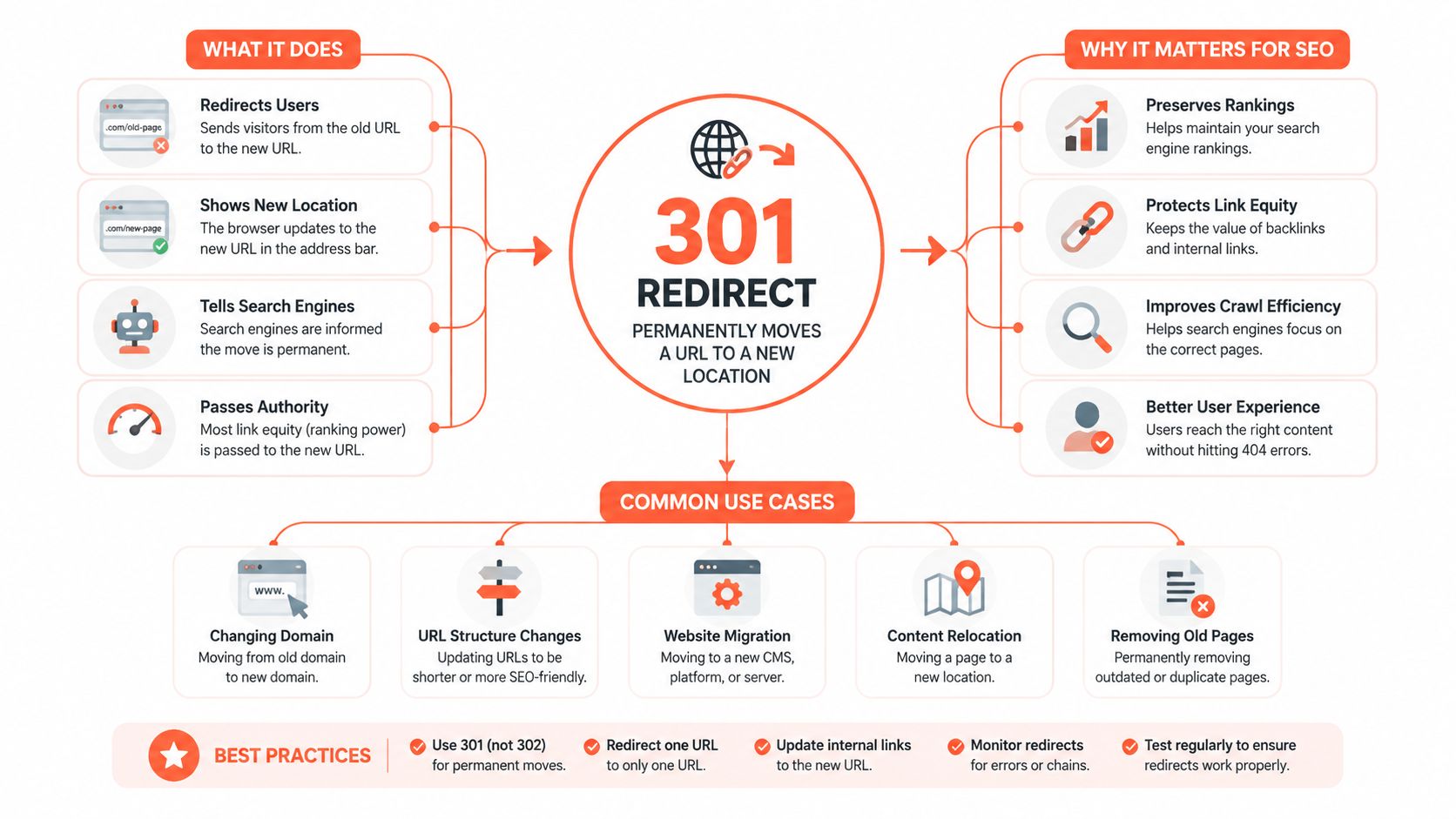
A 302 says something different. It tells search engines the move is temporary, so it's the wrong tool when you've changed the URL for good. A canonical tag is also not a redirect. It can hint at a preferred URL, but it doesn't send visitors or crawlers from the old address to the new one the way a 301 does.
Shopify's behavior lines up with that logic. When you change handles, Shopify automatically creates a permanent redirect rather than leaving the old path to rot. That's a strong signal about how the platform expects merchants to handle URL change, by preserving continuity instead of forcing search engines to guess. The same setup is why manual redirects should be used for intentional changes, not as a substitute for poor information architecture.
Search engines don't need drama, they need a clean signal about where the content lives now.
A migration team should also think in terms of timing, not just correctness. One migration example tracked monthly sessions at 15,000 in month 1, dipped to 14,200 in months 2–3, then recovered to 15,100 by month 4, and the same source estimates full authority transfer typically takes 2–4 weeks. That's not a promise that every store behaves the same way, but it does show why redirect quality matters immediately after launch, not whenever someone gets around to it. Migration timing example and redirect importance
A small but important operational detail, Shopify says the old URL's ranking signal is preserved over time. That means the 301 is a bridge, not a magic reset button. The old link equity still needs a relevant destination to land on, or you'll waste the opportunity.
Setting Up Redirects in the Shopify Admin
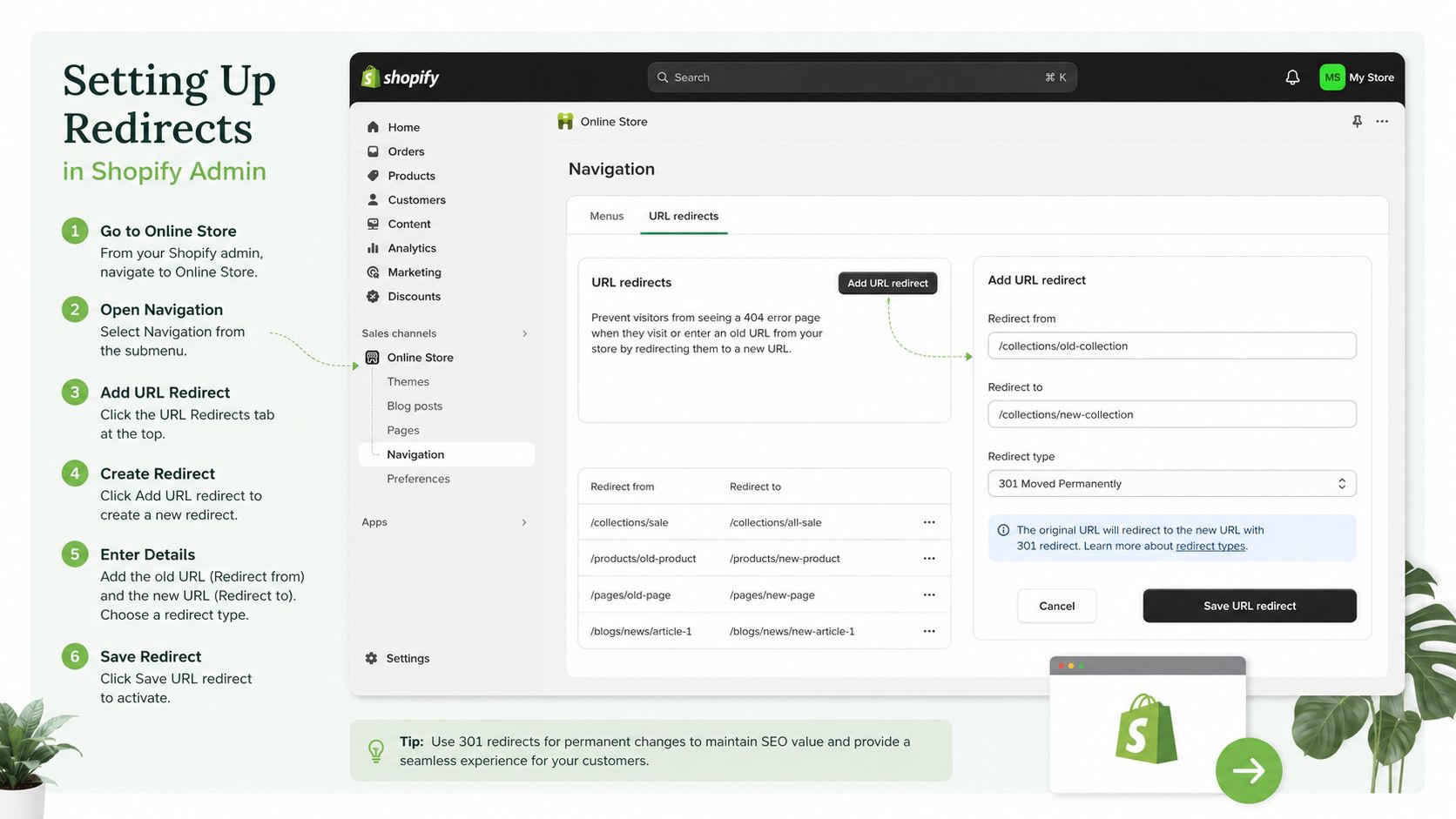
Shopify's native redirect workflow is straightforward, which is part of why people underestimate it. You open the admin, go to Online Store > Navigation, then use the URL redirects tool to create a rule with Redirect from and Redirect to. For a single legacy URL, that's enough to keep a retired page from dying in place and to push traffic where it belongs. Shopify URL redirect help
Single redirects and bulk import
For one-off fixes, enter the old path in Redirect from, enter the destination in Redirect to, then save. The important discipline is to keep the destination specific, because the more precise the landing page, the less likely you are to create a soft 404 feeling for users who expected a particular product or article.
For larger stores, Shopify supports bulk management through CSV import. That matters when you're migrating dozens or hundreds of old URLs, because nobody should be pasting them one by one into the admin if the mapping already exists in a spreadsheet. The CSV route also makes redirect mapping reviewable, which is a real advantage when stakeholders want to sanity-check old-to-new relationships before the rules go live.
What the admin does not cover
Shopify's redirect tool is for URL-level rules, not everything that looks like a redirect problem. Domain-level forwarding is handled separately through the primary domain setting and redirection behavior there, so don't try to solve domain setup inside the URL redirect screen. The tool is also not built for pattern logic or regex-style rules, which becomes a hard limit when you're dealing with migration-scale path structures.
Operational note: the admin is fine for explicit one-to-one mappings, but it's the wrong place to expect pattern intelligence.
If you're planning a migration with SEO-sensitive URL mapping, it helps to think of redirect creation as part of a broader GEO and migration workflow, not a last-minute cleanup task. AY Rank's GEO strategy for shops is a relevant reference point if your team is aligning content, search visibility, and storefront structure together.
Handling Pattern-Based Redirects at Migration Scale
A lot of Shopify guidance falls apart here. Merchants often assume that if they can describe a URL pattern, Shopify can redirect it cleanly, but recent Shopify developer community discussion shows that paths like /collections/*/products/* can still return 200 OK even after manual redirect attempts, which means the platform isn't issuing a true 301 in the way search engines need. Shopify developer discussion on pattern redirects
Why theme hacks don't solve the real problem
Liquid snippets and client-side JavaScript can make a user feel redirected, but that isn't the same as sending a proper server-side 301. A browser can be moved around by code, yet search engines still need the actual HTTP response to reflect the move. If the server says 200 OK, the old URL is still live from a crawler's perspective, which leaves SEO ambiguity on the table.
That distinction matters most on stores with collection-scoped product URLs, especially during platform migration. When you're moving thousands of product paths, the issue isn't whether a single redirect rule can be entered. It's whether the mapping can be expressed reliably at scale without creating a pile of technical debt.
The realistic options
For smaller cases, a redirect app can help centralize management and reduce manual work. For more complex stores, a developer may need to restructure the URL strategy before launch so the old path family maps cleanly to the new destination family. In some cases, the right answer is to prevent the problem upstream by designing the new architecture so you don't need brittle pattern behavior later.
Presidio's Magento to Shopify migration guidance is a useful internal reference if your team is comparing migration approaches and wants to avoid improvising redirect logic after the fact.
When the store is large, the question isn't “Can I add a redirect?” It's “Can I govern thousands of redirects without broken patterns, irrelevant destinations, or hidden gaps?” That's the standard that protects a migration.
Verifying Every Redirect Works After Launch
A redirect that exists in the admin but doesn't resolve correctly is worse than no redirect at all. It looks fine in the back end, but search engines and users still hit dead ends, chains, or the wrong destination. The cleanest way to catch that is to test the response directly, not to trust the UI.
The curl check that matters
Start with curl -I against a sample of legacy URLs. You want to see a true 301 response and the correct Location header pointing to the live destination. If the response is anything else, the redirect isn't doing what you think it's doing.
A crawler can do the same job at scale, but curl is faster for spot checks and for confirming whether a single legacy path behaves properly after deployment. The important part is reading the header, not just opening the URL in a browser and assuming the visual result tells the whole story.
What to inspect after the first pass
Check that redirect chains stay at 1 hop. If old URL A sends to B and then B sends to C, you've added unnecessary complexity and crawl inefficiency. Also confirm that the XML sitemap contains only live URLs, because redirected paths left in the sitemap can keep sending mixed signals to crawlers.
Here's the checklist I'd hand to a launch manager:
Check | What to look for | How to verify |
|---|---|---|
Status code | True 301 | Run |
Destination | Correct live page | Read the Location header |
Redirect depth | 1 hop only | Follow the chain and stop at the first live URL |
Sitemap hygiene | Live URLs only | Inspect the XML sitemap for retired paths |
Search Console | No lingering crawl noise | Compare coverage after launch |
Soft 404 risk | Old products not sent to irrelevant pages | Test key retired product URLs manually |
If you want an external sanity check process for a broader migration, Presidio's ecommerce migration services are worth looking at when redirect QA has to fit into a larger launch plan.
A redirect audit should feel boring. If it feels mysterious, something's still wrong.
Google Search Console should also be part of the post-launch routine, because it will show whether crawlers are still finding broken paths or unresolved destinations. If old product URLs all point to the homepage, watch for the soft-404 pattern. That usually means the redirect is technically present but strategically wrong.
Redirect Mistakes That Quietly Cost You Traffic
The worst redirect failures are the ones that don't look like failures. The site loads, the browser lands somewhere, and everyone assumes the job is done. Meanwhile, search engines are wasting crawl effort, link equity is getting diluted, and old URLs are still sending the wrong signal.
The mistakes I see most often
Redirect chains are the classic one. They turn a simple move into A to B to C, which wastes crawl efficiency and slows recovery. The fix is to collapse the map so the old URL lands directly on the final destination, either in the Shopify admin or in the CSV before import.
Loops are worse, because they break crawlability outright. If URL A points to B and B points back to A, neither users nor search engines get a stable endpoint. That's not a tuning issue, it's a mapping error.
Homepage redirects are another recurring problem. Sending every retired product URL to / feels convenient, but it's usually too generic to satisfy the intent behind the old page. Independent technical SEO guidance warns that this can be treated as a soft 404 by Google, which is exactly the signal you don't want after a migration.
Sitemap leftovers also create quiet damage. If retired URLs remain listed after launch, crawlers keep wasting time on paths that should have been retired cleanly. Remove them and keep only live destinations in the XML sitemap.
Fix the destination, not just the error. A redirect should answer the user's original intent as closely as possible.
The temptation to use 302s is understandable because they feel easier to undo, but they're the wrong default for permanent URL moves. If the content moved for good, the redirect should say that clearly. Anything else invites ambiguity into a process that already has enough moving parts.
Your Redirect Plan and When to Bring in Help
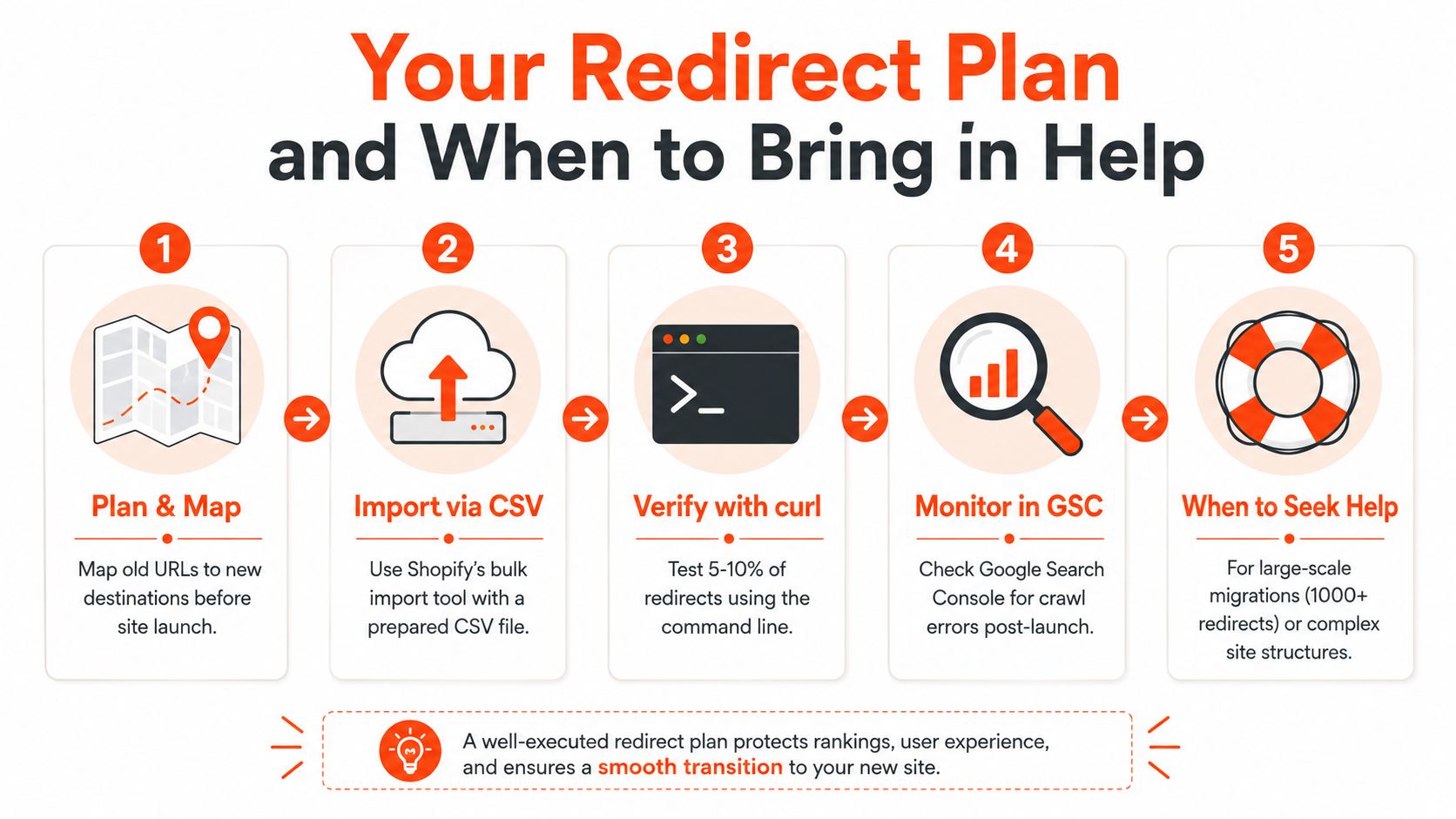
The simplest working sequence is still the one that holds up under pressure. Map old URLs to new destinations before launch, import the rules through Shopify's CSV tool, verify a sample with curl -I, clean up the sitemap, and watch Search Console coverage during the early recovery window. That's the practical rhythm for keeping a migration from turning into a traffic leak.
When DIY stops being enough
Once the list gets beyond a few hundred URLs, or the site has complex handle changes and pattern-based paths like /collections/*/products/*, it's time to bring in a team that does redirect governance for a living. Presidio's Shopify Plus agency work fits that kind of scope, especially when redirects are part of a larger migration or storefront rebuild.
The recovery window is not the moment to guess. Shopify's own guidance says search engines update their index over time, and the migration example cited earlier shows that full authority transfer typically takes 2–4 weeks. That makes the first few weeks after launch a monitoring period, not a “set it and forget it” phase.
If you only remember one thing, make it this. A good redirect map is specific, direct, and testable. A bad one looks fine until the crawl data starts telling a different story.
Presidio builds and supports Shopify storefronts, migrations, and custom app work, which includes the kind of redirect planning that keeps old URLs from turning into SEO loss. If you need a team to map legacy paths, verify them with real checks, and handle the edge cases Shopify's admin doesn't solve cleanly, visit Presidio and talk through your migration or redirect cleanup.

Jamie, Presidio’s Designer, leads the practice alongside Johnnie. With over 10 years of e-commerce experience, Jay is a Shopify expert, known for crafting innovative solutions that prevent tech debt.
Jaime
Senior Product Designer, 2020



