Presidio

Organic search still dominates ecommerce discovery, and the gap between ranking positions is brutal. One industry roundup puts 43% of ecommerce traffic from organic Google search, another says 41% of retail traffic comes from organic search, and the #1 result averages 28.5% CTR while the 10th result averages 2.5% CTR (ecommerce SEO statistics roundup). For product pages, that isn't a vanity metric, it's the difference between a page that sits in the catalog and one that consistently earns high-intent clicks.
That's why product-page SEO on Shopify is never just about stuffing keywords into a title tag. The page has to be indexable, fast, structured, and mapped to the right search intent. The stores that win usually get the boring things right first, then layer in schema, reviews, and a cleaner internal linking system.
Table of Contents
Why Product Page SEO Demands Your Attention
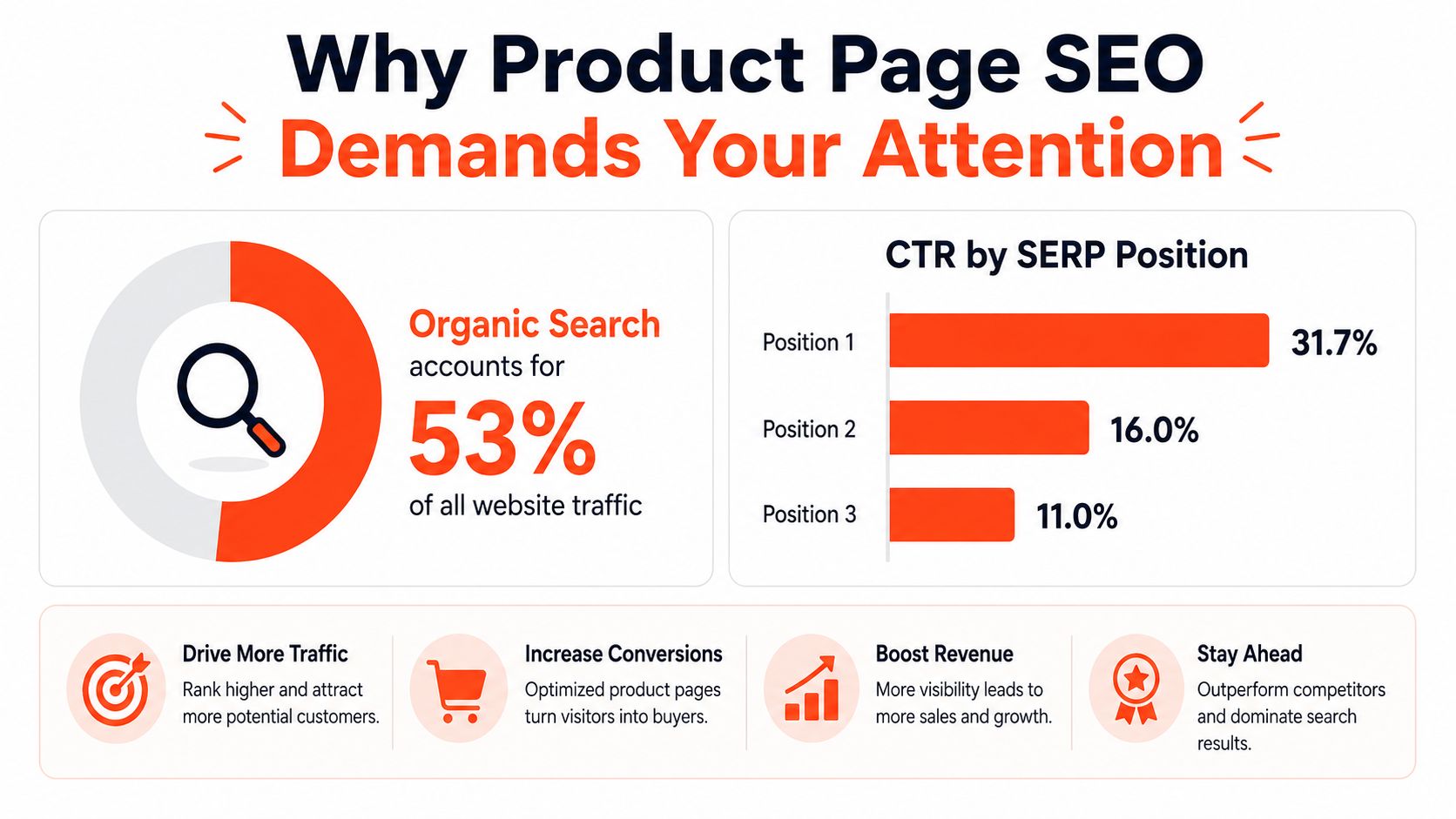
Google's shopping surfaces are changing quickly. Product pages now compete in a search environment where structured product information can appear before a shopper ever reaches the PDP. That changes the job of the page. It has to earn the click, but it also has to be readable by search systems that increasingly summarize, compare, and repackage product data.
For Shopify brands, the implication is straightforward. Thin metadata is not enough, and a product page that looks fine in the theme editor can still underperform if the canonical tags are wrong, performance is weak, or the content does not give search engines enough context to trust the page. I see the same pattern across DTC catalogs: the pages with clean indexability, stable variant handling, and useful copy tend to hold up, while the pages built around app clutter and duplicated templates usually do not.
Practical rule: if a product page cannot win the click, it still has to earn the impression. That usually means clean indexability and solid markup before anything else.
The operational reality is harsher than most guides admit. A widely cited ecommerce statistics roundup reports that many sites still miss canonical tags and that Lighthouse performance often needs work (ecommerce SEO statistics roundup). On Shopify, those gaps usually come from theme choices, app bloat, and variant handling, not from a lack of ambition.
That is why product-page SEO deserves attention even before a redesign starts. The page has to serve search intent, protect the preferred URL when variants change, and avoid stealing traffic from the category page that should own the broader query. For teams planning asset work, video creation tips from LunaBloom is a useful reference before deciding whether a demo clip belongs on the PDP.
Mapping Keywords to the Right Page Type
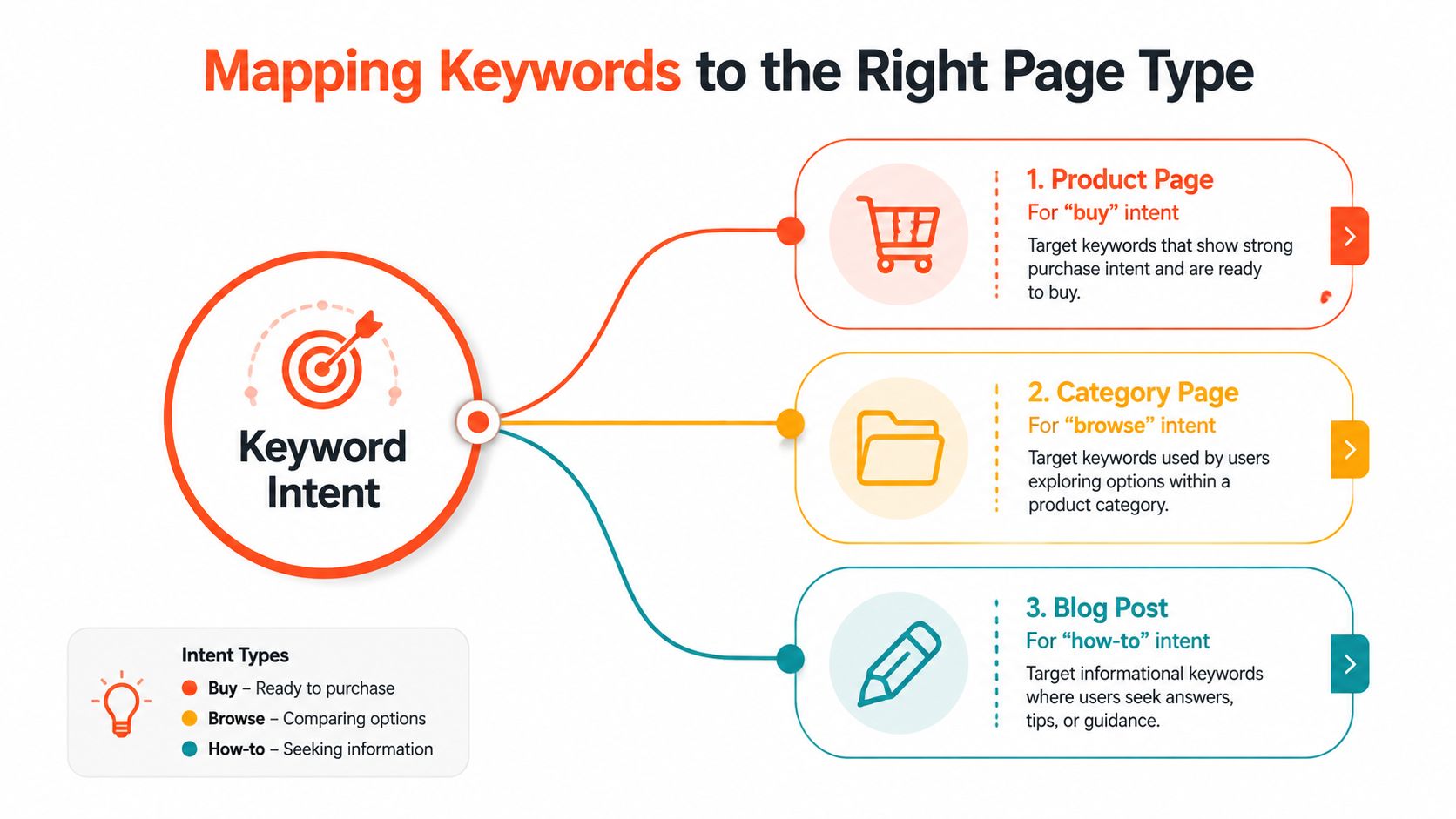
Product-page SEO breaks down when teams force one page to do three jobs. A PDP should usually rank for the exact product, model, or SKU intent, while a collection page should carry the broader browse term. That's not a theoretical distinction. It's the difference between a shopper looking for a specific item and a shopper still comparing options.
Start with intent, not with volume
The cleanest way to map a catalog is to sort queries into buy, browse, and how-to intent. Product pages belong in the buy bucket, because they answer a very narrow transaction. Category pages absorb the broader commercial terms, especially when buyers still need to compare styles, sizes, or brands.
A recent product-page guide makes the point directly, it says to target exact-product queries only when demand exists and to avoid forcing generic head terms onto PDPs that should belong to category pages (product-page keyword targeting guidance). That advice saves a lot of Shopify catalogs from cannibalization.
Audit the catalog the way a merchandiser would
I usually audit in this order:
Primary query match: does the page already sell one clearly named product, or is it really a collection in disguise?
Intent fit: is the keyword asking for a specific item, or for a set of options?
Cannibalization risk: is a collection page already ranking where the product page is trying to compete?
Content ownership: can the PDP answer the query without stretching into category-level language?
A PDP that chases the wrong keyword doesn't just underperform. It can drag down the collection page that should have owned the term.
That's where Shopify teams need discipline. If a product page is built around “women's running shoes,” but the actual product is one shoe model, the broader phrase usually belongs on the category page. The product page should focus on the model name, colorway, or specific configuration.
Optimizing Titles, Descriptions, and On-Page Copy
Titles and copy still do the heavy lifting, but the bar is higher now. A product page needs to be readable for shoppers, specific enough for Google, and stable enough that merchandising changes don't break relevance. On Shopify, that means the title tag, H1, URL slug, and opening copy should all point at the same transactional intent.
Build one keyword path, not five competing signals
The strongest pattern is straightforward. Put the product name in the title tag, H1, URL slug, and first paragraph, then reinforce the topic with a unique description, variant context where needed, and supporting copy that answers obvious buyer questions. That aligns with the practical guidance in GetIntel's SEO terms, which frames on-page SEO as shaping relevance through visible page elements rather than hidden tricks.
For Shopify specifically, keep the URL flat. A slug like /products/classic-tee is cleaner than nesting the item under multiple directories that don't help shoppers or crawlers. If the product has variants, don't let the variant naming take over the whole page title, because the page still needs one primary query.
A simple framework works well:
Title tag: product name first, then one clarifying modifier if needed.
H1: match the product name closely, not creatively.
Meta description: write for click intent, not keyword density.
Opening copy: answer what it is, who it's for, and what makes it distinct.
Image alt text: describe the product image accurately, without repeating the same phrase on every asset.
If you're already tuning product layout for conversion, the internal review checklist in Shopify conversion rate optimization pairs well with this work, because copy and UX usually fail together, not separately.
Keep descriptions unique, even when the catalog is large
Manufacturer copy is the fastest way to create thin pages at scale. It's also the easiest thing for teams to overlook when a catalog gets busy. A better approach is to standardize a lightweight template, then force each PDP to add a specific detail, use case, or comparison that makes the page own its topic.
If two product pages read like duplicates, Google doesn't need to guess which one matters less.
That's especially true for apparel and accessories. A single hero product can carry a more editorial opener, while a routine SKU can stay concise and still be useful. The goal isn't literary quality, it's a clean page structure that matches intent and avoids duplication.
Implementing Structured Data for Rich Results
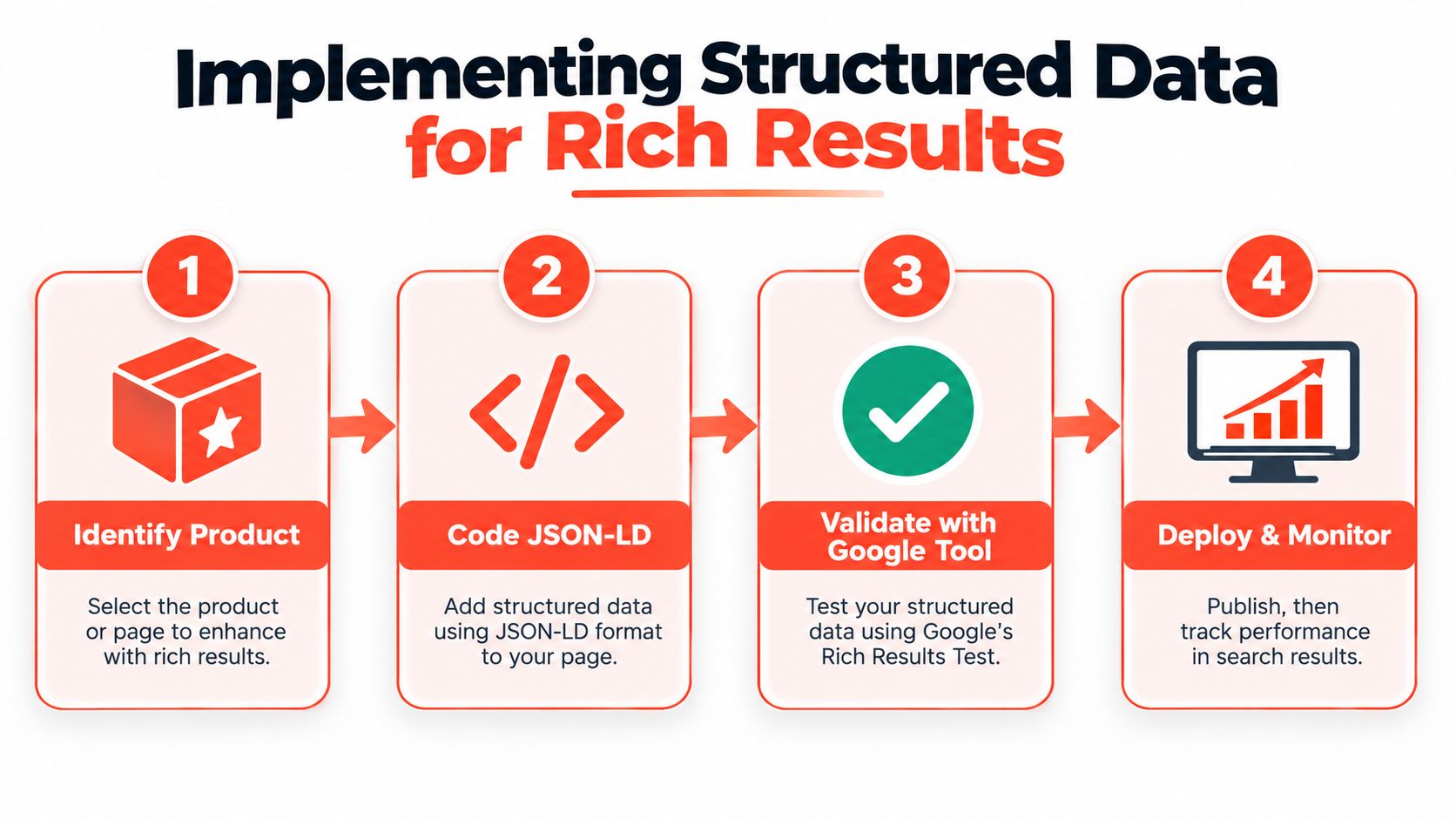
Structured data turns product-page SEO into something Google can read as commerce, not just copy. Product schema helps search engines understand the item, the offer, and review state in a way plain body text cannot. That matters because rich results can make a listing stand out with price, availability, and ratings, which often improves click-through rates more than a standard blue-link result.
Use JSON-LD, not a fragile theme hack
For Shopify, JSON-LD is the cleanest format because it lives in the theme without tangling itself into the visible markup. The minimum useful properties are name, image, description, sku, brand, offers, and aggregateRating when reviews exist. Keep those values aligned with what shoppers see on the page, because schema that disagrees with visible content turns into a maintenance problem fast.
In practice, I usually pull these fields from the product object in Liquid and output one JSON-LD block in the product template. Theme structure changes the exact implementation, but the rule stays the same, the schema should describe the page that exists, not invent a second version of it.
Validate before the page ships
Google's Rich Results Test and the Schema Markup Validator should both be part of the release checklist. If a product page fails validation, the markup is not ready, even if everything looks fine in the browser. That step is tedious, but it keeps broken structured data off your highest-value SKUs.
Review markup deserves the same treatment. As noted earlier, pages with more reviews tend to convert better, and higher-priced items benefit even more once buyers see social proof. The operational takeaway is simple, review capture belongs in the merchandising workflow, and it belongs in the schema setup too.
If old product URLs or merged items need to be consolidated, this guide to 301 redirects in Shopify is the cleaner fix than leaving search engines to sort out competing URLs.
Handling Variants and Duplicate Content at Scale
Variant-heavy catalogs are where Shopify SEO gets messy fast. A shirt in six colors and five sizes can turn into a crawl-heavy tangle if every variant gets treated like a separate page. The usual advice says to use canonicals, but the harder part is deciding which URLs deserve to exist independently and which ones should fold back into the parent product.
Canonicalize aggressively when the offer is the same
For most color or size variants, the parent product should own the ranking signal. That keeps authority in one place and prevents near-duplicate pages from competing with each other. The guidance in 301 redirect Shopify is useful when old product URLs or merged items need to be consolidated, because redirects and canonicals often solve the same underlying problem from different angles.
Use canonical tags when the variant page exists for the user but should not compete in search. Use redirects when a URL should no longer be part of the live catalog at all. Mixing those up is a common mistake, especially after catalog migrations, and it creates avoidable cleanup work later.
Let a variant index only when it changes the intent
Some variants are not duplicates in practice. A bundle, a localized storefront version, or a distinct product configuration may deserve its own indexable URL if the search demand supports it. The key is whether the page answers a different question, since identical SKUs in different colors do not warrant separate indexing.
A useful decision filter looks like this:
Same product, different color: usually canonicalize to the parent.
Same product, different size: usually canonicalize to the parent.
Bundle or kit with its own demand: consider separate indexing if the page has unique copy and offers.
Localized version: keep the structure stable and make sure duplication does not spread across markets.
Crawl efficiency matters more than catalog vanity. If Google has to sort through endless near-duplicates, your important pages get less attention.
The hardest part is usually internal linking. Links from collection pages, editorial content, and related-product modules should point to the canonical version, not the noisy variant endpoints. That keeps the strongest signals aimed at the page you want to rank.
Merged products and retired URLs also need a clean handoff. If a variant family is being collapsed into one live listing, the old addresses should be redirected instead of left to linger, and the redirect path should match the final catalog structure rather than whatever happened to be live before.
Meeting Core Web Vitals on Product Pages
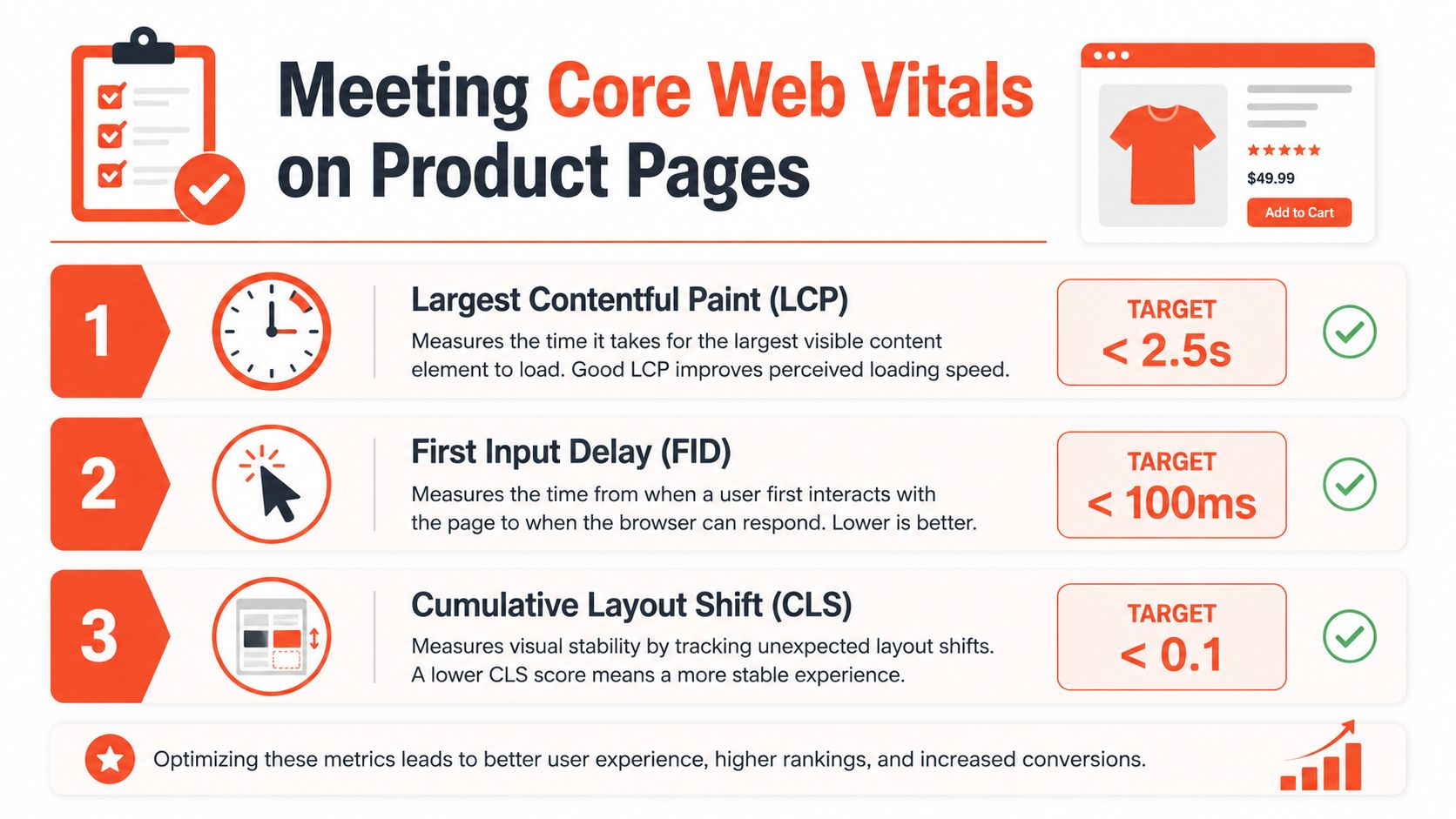
Product pages fail performance audits for predictable reasons. Big hero images load late, review widgets push the layout around, and apps inject scripts that block the rest of the page. The fix is usually boring and mechanical, which is good news, because it means most of the problem is controllable.
Start with the hero image
The practical workflow is to identify the LCP element, which is usually the hero image on a PDP, then compress and resize that asset, reserve its dimensions, and retest until the page clears the benchmark. The target thresholds to aim for are LCP under 2.5 seconds, CLS under 0.1, and INP under 200 milliseconds (PDP performance guidance).
That sounds basic because it is basic. Product pages usually don't need a full redesign, they need fewer render-blocking surprises.
Treat apps like a performance budget
Shopify apps are useful until they aren't. Every extra script needs to justify its place on the product template, especially if it loads above the fold or touches layout. If an app only matters after the purchase decision, delay it or move it lower in the page.
A pre-launch check keeps teams honest:
Test the template in Lighthouse and field tools.
Confirm the hero image loads without shifting the layout.
Audit third-party scripts for unnecessary blocking.
Check the page on mobile, not just desktop.
Retest after apps or merchandising blocks change.
If you're tuning a theme or rebuilding a PDP stack, the operational notes in Shopify performance optimization are useful because performance on product pages usually comes from the theme and app system, not from one isolated asset choice.
Building Internal Links and Review Signals
A strong product page rarely ranks on its own. It gets helped by collection pages, blog posts, comparison pages, and related-item modules that point authority in the right direction. Internal linking is also where most stores get lazy, because the links exist, but they don't reflect search intent or catalog priority.
Push authority from pages that already earn attention
The best links are contextual and specific. A buying guide should send readers to the exact product being discussed, and a category page should reinforce the key products inside the collection with natural anchor text. The Shopify community guidance on internal linking backs this up, it favors relevant anchors, limited repetition to the same URL, and natural placement over mechanical exact-match patterns (Shopify internal linking guidance).
That matters because product pages often need help from pages with broader reach. A blog post that ranks for educational intent can hand off qualified traffic, while a collection page can pass relevance to the most important SKUs.
Reviews are trust signals and structured-data fuel
Reviews do more than decorate the page. They support conversion, provide fresh on-page language, and strengthen schema when ratings are marked up correctly. If you're collecting UGC or comment-style feedback in broader content channels, turn comment sections into ad revenue is a reminder that social proof can be monetized or operationalized, but on a PDP the priority is trust and clarity first.
A sustainable workflow looks like this:
Route links from high-traffic pages to priority products, not to every SKU equally.
Keep anchor text natural, but descriptive enough that the destination is obvious.
Surface related products where they support the shopping decision.
Display reviews visibly on the PDP and keep schema aligned with the visible rating state.
Audit Search Console regularly for pages that drift, then adjust internal links before the loss becomes structural.
The stores that stay ahead do this quarterly, not once. Product-page SEO compounds when the page structure, links, and review signals all point in the same direction.
If your Shopify product pages need cleaner canonical logic, faster templates, or schema that survives release cycles, Presidio builds and supports storefronts with that operational reality in mind. Visit Presidio if you want a partner that can tighten product-page SEO without turning your theme into a maintenance headache.

Jamie, Presidio’s Designer, leads the practice alongside Johnnie. With over 10 years of e-commerce experience, Jay is a Shopify expert, known for crafting innovative solutions that prevent tech debt.
Jaime
Senior Product Designer, 2020



