Outrank AI
Most advice on ecommerce migration services starts in the wrong place. It treats the project like a cleaner file transfer, when the key decision is whether your next platform lowers operating drag or merely moves it somewhere else. The businesses that get the best outcome don't ask, “How do we move fast?” They ask, “What should we stop carrying, what will cost less to run, and how do we protect revenue while we rebuild?”
That shift matters because migration is no longer a rare rescue project. Statista reported that in the first half of 2024, WooCommerce was the platform businesses moved away from most often, at almost 30% of migrated-from platforms, while Magento followed at almost 16%. Independent research also found that 68.4% of retailers now prefer hosted platforms over self-hosted alternatives, with Shopify absorbing 60.8% of migrations in the referenced dataset as summarized in Statista's migration platform data. In practice, that means migration work is tied to platform consolidation, managed commerce adoption, and the slow removal of maintenance burden from the commerce stack.
Table of Contents
Rethinking the Replatforming Project

A migration that only moves data is usually an expensive way to preserve old problems. The smarter version of ecommerce migration services treats the project as an operating-model reset, because the actual cost of a commerce stack shows up after launch, not on go-live day. That's why the best teams don't just compare feature lists. They compare how much work the new environment will create for developers, merchants, and marketing teams over time.
Migration is consolidation, not relocation
The strongest migrations I've seen reduced app sprawl, simplified ownership, and removed brittle custom logic that nobody wanted to maintain. That matters because a platform can be technically modern and still be operationally heavy. You can have a store that launches cleanly but still depends on too many point solutions, too many handoffs, and too much tribal knowledge.
A partner worth hiring should talk about the stack the way an operator does. They should ask which integrations are essential, which customizations are duplicates, and which parts of the old system should not survive the move. If they only talk about CSV imports and theme rebuilds, they're describing a transfer, not a transformation.
When teams approach migration as a reset, they usually make better decisions on scope. That includes pruning duplicated apps, collapsing redundant workflows, and choosing a structure that a smaller team can support without constant intervention. If you want a good external warning sign about adjacent modernization work, this analysis of why your cloud project might fail is a useful reminder that the technical move is rarely the hard part. The hard part is operating the new environment well.
Practical rule: if a proposed migration plan doesn't say what gets removed, the provider probably doesn't understand the full cost of the new stack.
The image of “moving to a new platform” is too narrow. What happens is a redesign of who owns what, what gets automated, and what the business can tolerate maintaining after the launch team leaves.
The Shift Toward Managed Commerce Infrastructure
Merchants are not moving platforms just to modernize their stack. They are moving because the old setup has become expensive to run, hard to staff, and increasingly fragile under growth. A store built on plugins, custom code, separate hosting, security, and support layers can look functional on the surface while consuming margin through maintenance and rework.
Why hosted platforms keep winning migrations
Migration activity keeps pointing in the same direction. The migration platform dataset shows a strong preference for hosted platforms over self-hosted alternatives, with Shopify taking the largest share of migrations and WooCommerce appearing as a meaningful source platform according to the migration platform dataset. Other migration reporting from the same broader market also places WooCommerce among the most common source platforms and Magento close behind in commercetools' migration report. The pattern is consistent. Merchants want fewer moving parts, less maintenance, and an operating model they can support without constant escalation.
That does not mean every brand should pick the same destination or migrate for the same reason. It means the decision starts with infrastructure, not visuals. When a company leaves self-hosted commerce behind, it is usually trying to reduce dependence on dev cycles, lower failure points, and stop carrying custom layers that no longer justify their cost.
Service scope has widened with the market
Modern ecommerce migration services now cover much more than export and import. They have to handle system mapping, URL preservation, checkout validation, integration planning, and post-launch monitoring because the work extends far beyond content transfer. The business case has widened too. A 2024 commercetools report found that 90% of recent migrators experienced sales and revenue improvements after changing platforms, 94% saw significant site-performance improvements, 86% said the new platform offered more customization, and 62% said it was easier for their organization to use in commercetools' migration report.
Key point: hosted infrastructure matters because it shifts effort away from upkeep and toward selling.
A useful adjacent comparison is the operating logic behind what is a merchant of record. In both cases, the platform absorbs part of the operational burden, which leaves the brand with less infrastructure to manage and more time for merchandising, growth, and customer experience.
That is why demand for migration services stays high. Buyers are not just purchasing a launch. They are buying a lower-maintenance operating model, fewer hidden costs, and less chaos once the project team steps away.
Data Triage and the Art of Leaving Things Behind
Bad migrations usually fail because teams move too much, not because they forget to bring over something important. Legacy ecommerce stores collect stale fields, duplicate customer records, outdated scripts, and brittle customizations that survived only because no one had time to clean them out. Once those artifacts are loaded into a new stack, they keep adding noise, distorting reporting, and raising maintenance costs.
Start by classifying data by business value
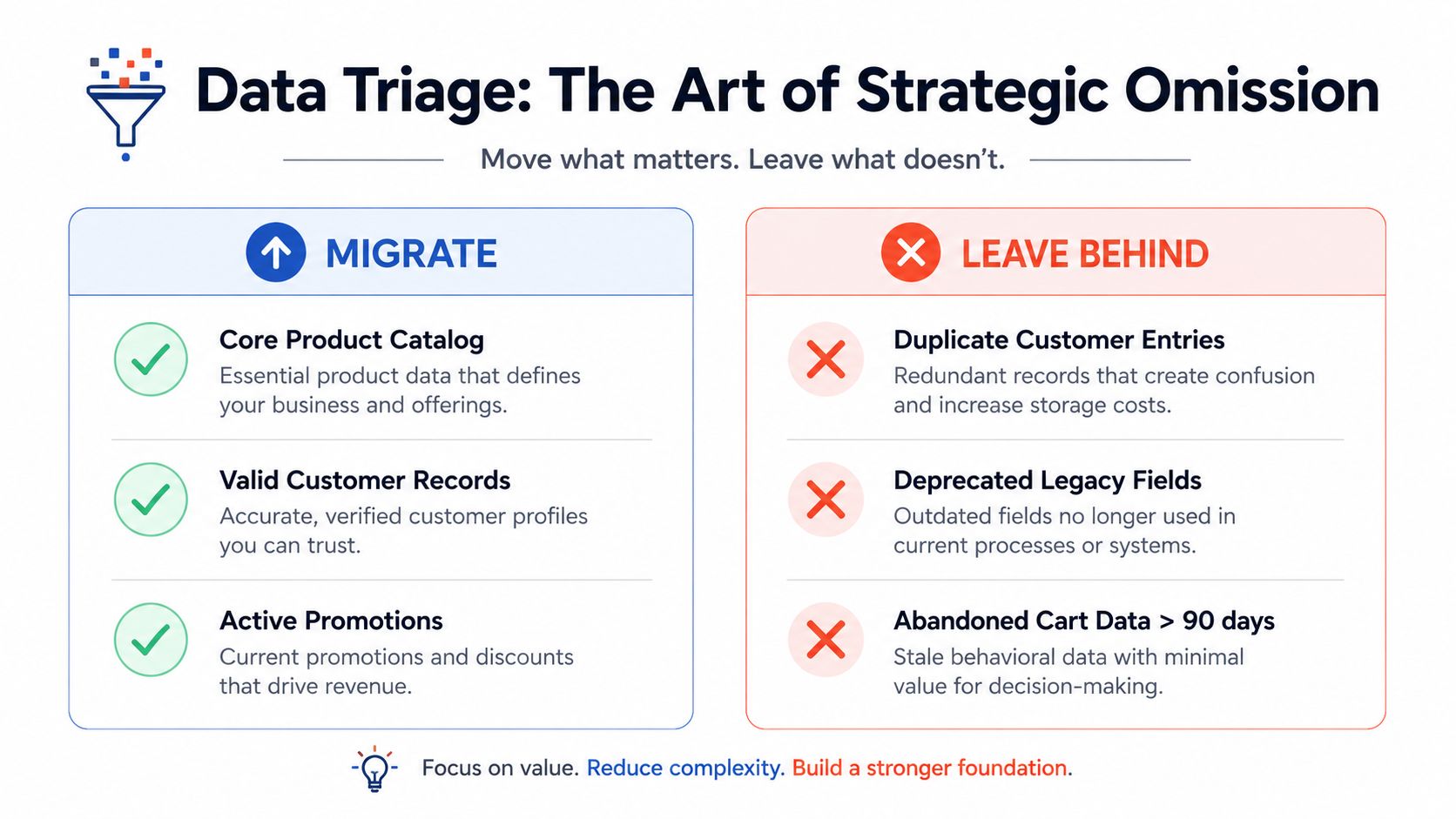
The right question is simple. Does the new store need it to sell, serve, or measure? Product catalog data, valid customer records, and active promotions usually belong in the first wave because they protect launch-day continuity. Duplicate customer entries, deprecated legacy fields, and stale abandoned-cart records usually do not.
That decision matters because source-to-destination mismatches often affect product attributes, variant relationships, customer records, and order history. Validation checkpoints exist to catch cases where prices land in description fields or addresses get mixed up during import, as outlined in migration validation guidance from Deliverable Agency. If you skip triage and rely on raw import tools, you inherit both the data and the confusion around it. The same discipline applies to data migration validation with Digna, where the point is not just moving records, but checking whether those records still make sense in the new system.
A practical triage process usually starts with three buckets.
Must migrate: live catalog, current customers, recent orders, active discount logic, essential integrations.
Review carefully: blog posts, custom attributes, historical records, niche tags, edge-case workflows.
Leave behind: duplicated entries, deprecated fields, obsolete scripts, abandoned content with no business use.
Clean before import, not after launch
Broken taxonomy is cheaper to fix before it reaches the new platform. Duplicate categories and unvetted custom fields can distort navigation, create duplicate content, and muddy analytics after launch. If a legacy field has no clear owner, no reporting value, and no operational purpose, it should be treated as a liability, not an asset.
Practical rule: if a field, script, or record can't be tied to revenue, service, or measurement, it probably doesn't deserve a place in the new stack.
The same logic applies to historical data. Not every old record helps the business. Some records support service history or legal needs, but a lot of legacy clutter only slows the store down. Teams that triage aggressively tend to launch with cleaner reporting and less post-migration cleanup. That is the key payoff, a stack that is easier to trust and cheaper to operate over time.
Preserving Revenue Through Technical Precision
Search equity and customer continuity live or die on execution details. A migration can be strategically right and still damage revenue if redirects break, integrations fail, or metadata disappears in the cutover. Technical precision is not separate from the business outcome. It's how the business outcome survives the move.
Redirects and integrations are revenue controls
When platforms use different URL schemas, APIs, and data structures, the migration team has to map the old environment to the new one with care. That includes ERP, CRM, payment, and marketing integrations, plus a complete 301 redirect plan so old URLs point to the correct new destinations as noted in Virtocommerce's migration guidance. Broken links and missing redirects can cause ranking loss and traffic declines after cutover, which makes redirect planning a revenue protection task, not a housekeeping task.
Many projects get sloppy. Teams build the new storefront, then treat redirects as a last-minute spreadsheet exercise. That's backwards. Redirects should be designed with the information architecture, because the new catalog, collections, and content structure determine what needs to map where. The same is true of integrations. If your ERP or CRM sync breaks, the store may still load, but operations start degrading immediately.
For a practical example of how teams often frame this work in a Shopify context, the internal walkthrough at migrate from BigCommerce to Shopify is relevant because it reflects the same basic discipline, preserve paths, preserve data flow, and test the handoff before launch.
Downtime planning is part of the service
Migration timing also matters because downtime is expensive. Industry guidance often cites average IT downtime at $5,600 per minute, which is why staged launches, rollback planning, and pre-cutover testing have become standard practices in professional migration work as referenced in commercetools' report context. The exact exposure will vary by business, but the lesson doesn't change. A cutover should be treated like a controlled event, not a hopeful swap.
The service provider should be able to show where testing happens, how they validate redirects, and what gets checked before traffic moves. If they can't describe that sequence clearly, they're asking you to accept unnecessary risk.
Search traffic rarely disappears all at once. It usually leaks through a handful of broken pages, one missed redirect, or one overlooked integration.
That is why technical precision is really about revenue stability. The cleaner the handoff, the less the business pays for its own transition.
Evaluating Providers on Total Cost of Ownership
Migration bids get compared too early in the process, and usually on the wrong number. Launch price is easy to quote, so it becomes the shorthand for “cheap.” The true cost shows up later, in app renewals, developer hours, maintenance tickets, and the internal effort needed to keep the stack stable after go-live.
Compare the launch price against the operating bill
BigCommerce explicitly warns merchants to calculate total cost of ownership before migrating and notes that platforms that are cheap to start can become expensive to scale in its ecommerce migration guidance. That is the right lens for provider selection. A storefront is only the starting point, while the next 12 to 24 months bring maintenance, integrations, content updates, and the day-to-day load on your team. Shopify's migration guidance frames replatforming as a broader business decision that includes stakeholders, checkout optimization, and post-launch monitoring, which is a better way to evaluate the work than treating it as a content transfer as reflected in Shopify's migration guidance.
A useful comparison looks like this.
Cost Driver | Short-term Impact | Long-term TCO Impact |
|---|---|---|
Custom theme complexity | Higher build effort | More developer dependency and slower iteration |
App sprawl | Faster initial feature coverage | More license costs and integration upkeep |
Lean theme architecture | Less visual flexibility up front | Lower maintenance and easier updates |
Heavy custom integrations | More migration work | Higher support burden and more failure points |
Clean data model | More prep time | Better reporting and less admin cleanup |
Ask for maintainability, not just capability
A provider can build almost anything if you give them enough budget. That does not mean the result will be healthy to operate. The better test is whether your actual team can maintain the stack without constant rescue work, because the cheapest build on paper often becomes the most expensive one in practice.
That is where lean Shopify builds, clear documentation, and deliberate app selection matter. Performance work also reveals the same problem. If the site is carrying too much weight, every change costs more than it should. A useful reference point is Shopify speed optimization service, because speed issues often come from the way the stack was assembled in the first place.
You should also ask who owns post-launch changes, how often the theme will need updates, and which integrations will require ongoing support. If the answer is vague, the operating model is probably vague too. The right partner leaves you with a stack that can grow because it was built to stay manageable.
Risk Mitigation and the Phased Cutover
A phased cutover is the right answer because it respects a basic truth of ecommerce operations. You can test a migration in staging, but you only learn how a store behaves under live traffic when real customers start using it. That's why the safest migration services use validation checkpoints, staged launches, and rollback readiness instead of a single high-stakes switch.

The sequence should be boring on purpose
The best cutovers are deliberately unexciting. They begin with pre-cutover testing, then move a small slice of traffic, then expand only after the team sees stable behavior. If a provider jumps straight to full launch without proving redirects, checkout, and integrations in the live environment, they're putting your revenue at the mercy of avoidable surprises.
The timeline should look something like this in practice.
Audit and mapping. Confirm what gets migrated, what gets pruned, and which systems need to connect.
Pre-cutover testing. Validate product data, order flows, redirects, and checkout behavior before launch.
Staged launch. Move a small amount of traffic first so the team can watch live behavior.
Expansion with rollback ready. Increase exposure only after the new stack proves stable under real use.
The rollback plan matters more than the slide deck
Every professional migration should have a rollback path that's clear enough to execute under pressure. That means the team knows what triggers a rollback, who approves it, and how customers will be protected if an issue appears after launch. If the provider won't talk plainly about those decisions, they're not really prepared for a live commerce event.
Practical rule: if a migration plan doesn't include a rollback decision point, it's not a plan. It's a hope.
The reason phased cutover works is simple. It limits the blast radius of anything unexpected. It also gives merchants a chance to verify the things that matter most, order placement, payment flow, redirect integrity, and basic reporting, before the whole business depends on the new platform.
That's what separates a managed launch from a rushed one. One protects the revenue curve. The other trusts luck.
Building a Foundation for Post-Launch Growth
A strong migration doesn't end at launch, it starts the next operating chapter. The true payoff shows up when the new platform gives the team room to improve site speed, refine merchandising, and test new ideas without constantly working around technical debt. That's the point where ecommerce migration services become a growth lever instead of a one-time project.
The cleanest migrations I've seen turned into better day-to-day decisions. Merchandisers could launch collections without a developer waiting in the wings. Marketers could test content and landing pages without breaking the stack. Operations teams had fewer hidden dependencies to manage, which made the store easier to scale. For ongoing optimization examples, the internal reference at Shopify performance optimization fits naturally here because post-launch performance work is part of keeping the new foundation healthy.
A good migration partner should stay involved long enough to help the team use the new environment well. That can mean monitoring after launch, trimming friction from key flows, or planning the next phase of growth around the same maintainable structure that made the migration worthwhile. The best outcome is not that the store survives the move. It's that the business can move faster afterward without rebuilding the same infrastructure problems again.
If you're planning an ecommerce migration and want a team that thinks beyond the launch date, Presidio builds and supports Shopify storefronts, migrations, and performance improvements with a focus on maintainable operations. Reach out if you want a migration plan that covers data triage, TCO, and post-launch stability, not just the theme build.

Jamie, Presidio’s Designer, leads the practice alongside Johnnie. With over 10 years of e-commerce experience, Jay is a Shopify expert, known for crafting innovative solutions that prevent tech debt.
Jaime
Senior Product Designer, 2020



