Technology
Presidio

You're staring at a BigCommerce store that still works, but every month it feels a little harder to scale. The catalog has grown, the app stack has accreted, SEO traffic matters more than ever, and the migration conversation keeps getting pushed because it feels easier to keep patching what's already there. That's usually the point where a BigCommerce to Shopify migration becomes less of a platform decision and more of an operating-model decision.
The stores that move well don't treat the project like a data export. They treat it like a chance to simplify merchandising logic, clean up business rules, and set up a stronger post-launch operating rhythm. The stores that struggle usually do the opposite, they copy everything over, launch too fast, and then spend the first month repairing redirects, tracking, payments, and customer trust.
Table of Contents
The Strategic Pre-Migration Audit
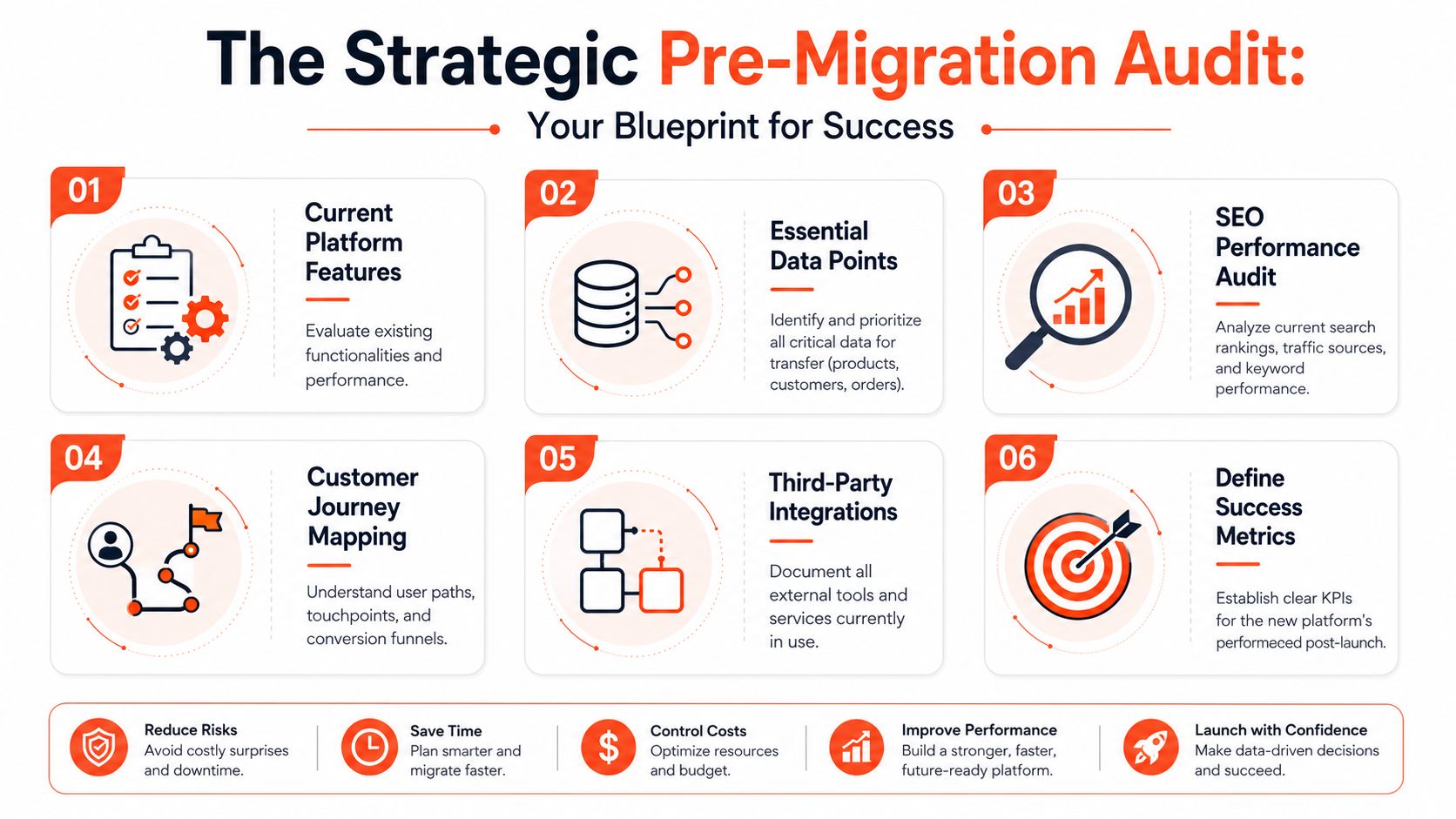
A successful migrate from BigCommerce to Shopify project starts before any export file is touched. The primary question isn't how to move data, it's what deserves to move, what should be rebuilt, and what should be left behind because Shopify gives you a cleaner way to handle it. Recent Shopify guidance makes the same point indirectly, a discovery phase should identify complexity that may no longer be needed, which is often the smartest way to reduce long-term maintenance burden Shopify enterprise migration guide.
Start with the parts of BigCommerce that create drag
BigCommerce stores often accumulate logic that once solved a specific problem but now just creates operational overhead. Discount rules, custom fields, nested category structures, and app-based workarounds are the first things I audit because they tend to be expensive to reproduce one-for-one in Shopify. A lot of teams assume the job is to “preserve everything,” but that mindset usually creates a heavier, more fragile Shopify build.
The smarter move is to sort each feature into one of three buckets. Rebuild it in Shopify, replace it with an app or Shopify Functions, or intentionally drop it. That decision is where the project gets cheaper over time, because you're reducing what your team has to maintain after launch.
A practical tool can help here too. If you want visibility into what's likely to break or bloat during the move, an Automated SEO Audit is useful for surfacing page-level issues before they become migration surprises.
Audit data quality before it moves
Data cleanup before migration saves far more time than post-launch fixes. Product titles, descriptions, images, customer records, and custom fields should be reviewed for duplication, stale values, and inconsistent naming conventions before you map them into Shopify. If your catalog has messy SKUs or overlapping tags, those problems don't disappear during import, they just become harder to untangle in a new system.
Practical rule: if a field doesn't improve merchandising, operations, or customer service, question whether it should be migrated at all.
This is also where you decide how much of BigCommerce-specific merchandising logic you really need to preserve. Shopify's native model won't mirror every category or pricing nuance cleanly, so some logic should be rebuilt differently rather than copied mechanically. If you're updating storefront foundations at the same time, this overview of updating your Shopify theme is a useful companion, because migration and theme decisions affect each other more than teams expect.
Decide what the new store should be, not just what it used to be
The best pre-migration audits end with a simplified operating model. That can mean fewer apps, cleaner collections, fewer custom fields, and tighter ownership over how merchandising works. It also means agreeing internally that some legacy behavior doesn't deserve a rebuild just because it existed before.
That mindset changes the economics of the whole project. A Shopify store that starts leaner is easier to test, easier to support, and easier to extend later. You're not just moving from one platform to another, you're deciding what kind of commerce system you want to run for the next few years.
Executing the Core Data Migration
Once the strategy is settled, the data move becomes more straightforward, but it still needs discipline. The choice usually comes down to three methods, a third-party migration app, manual CSV work, or an agency-led migration with proprietary tooling. Each path can work, but each one fails in different ways.
Choose the transfer method based on complexity, not comfort
Manual CSV import/export works for smaller catalogs and teams that are comfortable cleaning spreadsheets. It gives you control, but it also gives you every chance to make mapping mistakes, especially once variants, tags, and image references get involved. App-based migration is faster and usually a better fit when you need to move several datasets without hand-building everything.
Agency-led migrations are useful when the catalog has lots of edge cases, custom fields, or integration dependencies. A good agency doesn't just move rows from one platform to another, it checks whether the destination structure still makes sense. Presidio's Duplify app is one example of a tool used to streamline that kind of transfer, especially when data has to be copied programmatically and validated carefully.
If you're comparing methods, use one question first. Which option gives you the best chance of preserving data integrity without creating cleanup work that lands on your team after launch?
Practical rule: the transfer method should match the messiness of the source system, not the hope that everything is simple.
Migrate products, customers, and orders in the right order
Products come first because they establish the catalog foundation. That includes titles, descriptions, variants, images, SKUs, and any fields you've decided are still worth keeping. Customer data comes next, but passwords won't transfer in a usable way, so the login experience has to be planned separately. Historical orders usually follow, because support teams need purchase history available when customers start asking questions.
Don't treat SKUs and tags as filler data. SKUs need to stay consistent enough for inventory and reporting, and customer tags often drive segmentation or service workflows. If those fields are dirty in BigCommerce, clean them before import, otherwise Shopify will just inherit the confusion.
Validate the import before anyone touches the storefront
Every import needs spot checks. Compare product counts, variant structures, image attachment, customer records, and order samples against the original store. If the migration app or CSV process handles most of the work, that doesn't remove the need for review, it increases it, because automation makes it easier to move mistakes at scale.
For teams that want to see how an agency frames the migration process, this internal reference on Shopify migration services at Presidio is a good example of how implementation details and post-launch support should fit together. The import stage isn't finished when the files say “complete.” It's finished when the Shopify catalog behaves the way the business expects.
Protecting SEO and Customer Trust
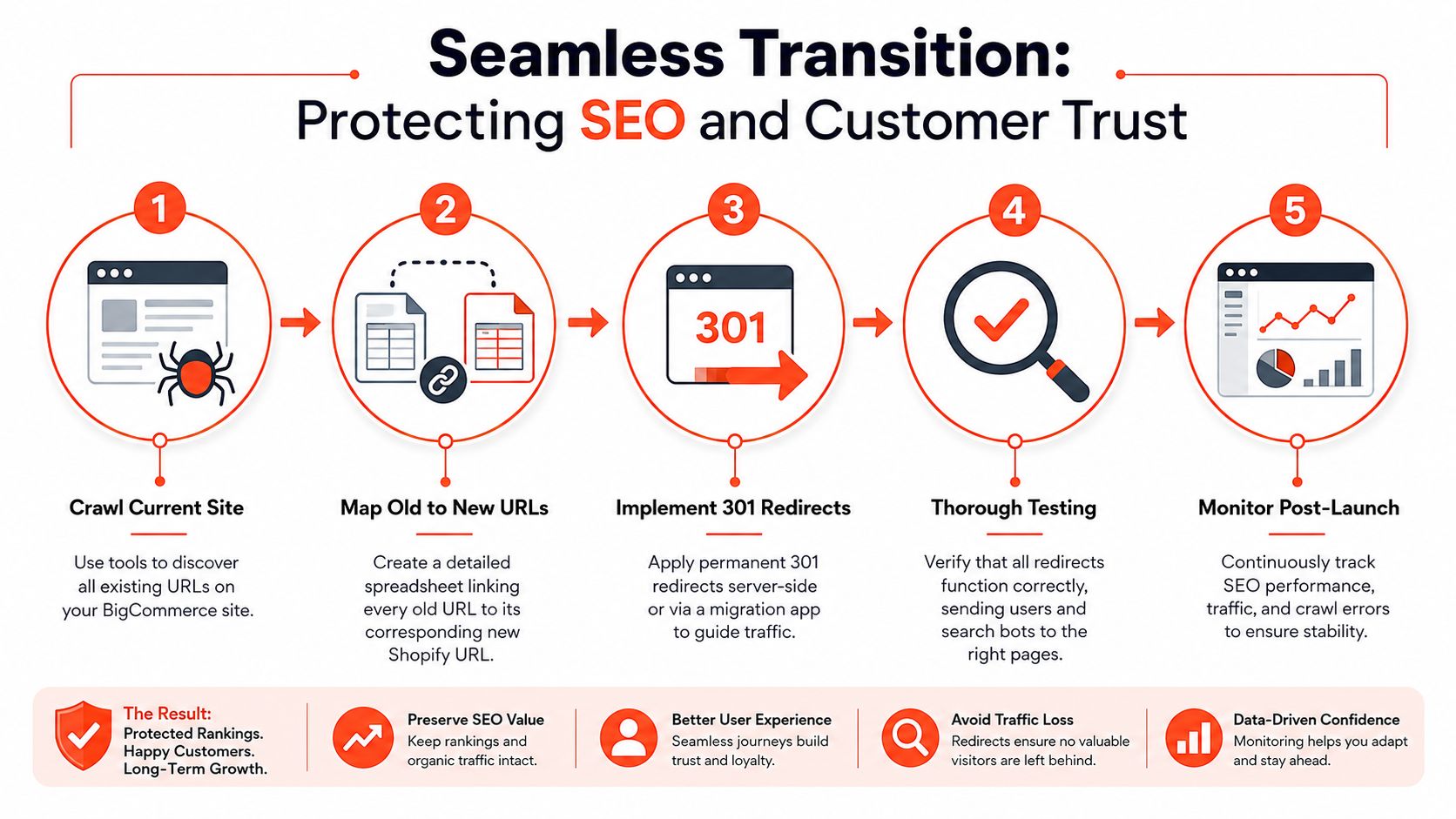
A migration can hurt search performance quickly if the redirect plan is loose. BigCommerce URLs do not carry over to Shopify on their own, so every old link, bookmark, and indexed page needs a deliberate destination. Freeze content before cutover, export the final data, and build the full 301 redirect map before launch. A five-step guide on migrating from BigCommerce to Shopify while protecting SEO and customer trust.
Build the redirect map like a preservation project
Start by crawling the current BigCommerce site and exporting every important URL, products, categories, pages, and any content that brings in traffic or links. Then map each old URL to its new Shopify destination. If a page is being removed, still decide where that traffic should go, because leaving it without a destination turns a business asset into a dead end.
The common mistake is treating only top-selling products as important. Search equity often sits in pages that do not look strategic inside merchandising, but still attract qualified traffic. Redirects keep those paths alive.
Handle URL changes deliberately
Shopify's URL structure will differ from BigCommerce in most cases, so the goal is not to keep URLs identical, it is to preserve relevance and continuity. Redirect validation needs to happen before launch and again after launch. A redirect that technically works but sends users to the wrong product, category, or landing page is still a failure.
Search traffic is easiest to lose during migration because the damage does not always show up on day one.
That is why Shopify's post-launch guidance recommends a 30, 60, 90-day approach, with the first month focused on redirect gaps and 404s. Shopify's post-launch migration guidance keeps the early recovery work centered on the pages most likely to affect rankings and trust. A broken bookmark feels the same to a shopper whether it came from Google or from an email they saved last month.
Test redirects before and after launch
A redirect map should not sit in a spreadsheet and hope for the best. Test the highest-value paths in staging, then test them again after launch once Shopify is live and indexed. If old URLs still resolve incorrectly, fix them immediately, because every unresolved 404 erodes confidence for both shoppers and search engines.
Support teams also need a clean handoff for anything that depends on store logic after launch. For example, moving Shopify Scripts to Functions becomes part of the stabilization work if your promo rules, discounts, or checkout behavior depend on custom logic. For teams that also care about attribution, optimizing Shopify ad spend attribution is a useful companion, because organic search and paid media both depend on clean destination logic, and migration can break both if redirects and tracking are not aligned.
Your Pre-Launch Testing and Cutover Plan
Launch confidence comes from a store that's been tested like a real business, not a demo environment. The point of QA is to verify that products, checkout, shipping, taxes, accounts, analytics, and apps all work together under real conditions. That's especially important because migration timelines are rarely compressed into a few days, even smaller projects commonly take 2–4 weeks, mid-market builds 6–10 weeks, and enterprise builds 12–20+ weeks or more, depending on data volume, integrations, and testing Fyresite migration timeline guide.
Test the full customer journey, not just the product pages
Start with the front end. Product pages should load correctly, images should render, collection browsing should feel coherent, and search should return sensible results. Then move into transactional checks, because a migration can look great visually and still fail where transactions occur.
Test checkout with the payment methods you plan to keep live. Confirm shipping rates, taxes, and customer account creation. If your store uses subscription logic, bundles, or other custom behaviors, test those paths too, because they often break when teams only verify the happy path.
Confirm integrations and edge cases
Email notifications, review apps, fulfillment tools, and analytics tags all need explicit validation. If a third-party app touches the storefront or the checkout, it should be part of the test plan, not an afterthought. A lot of post-launch panic comes from assuming integrations “just work” because they were installed successfully.
Useful cutover rule: if a customer can trigger it on launch day, it needs a test case before launch day.
The final cutover should be controlled, not improvised. Put BigCommerce into maintenance mode when the content freeze is complete, switch over the live destination, and then verify the most important customer paths immediately. If you've built Shopify logic that changes discount behavior, this guide to moving from Shopify Scripts to Functions is a practical reference for understanding how promotion logic behaves in the new environment.
Use the pre-launch window to eliminate avoidable surprises
The goal isn't perfect certainty, because that doesn't exist. The goal is to reduce surprises to the kinds your team can handle quickly, with clear ownership and no guessing. That's what turns launch day from a gamble into a managed event.
Managing the First 30 Days Post-Launch
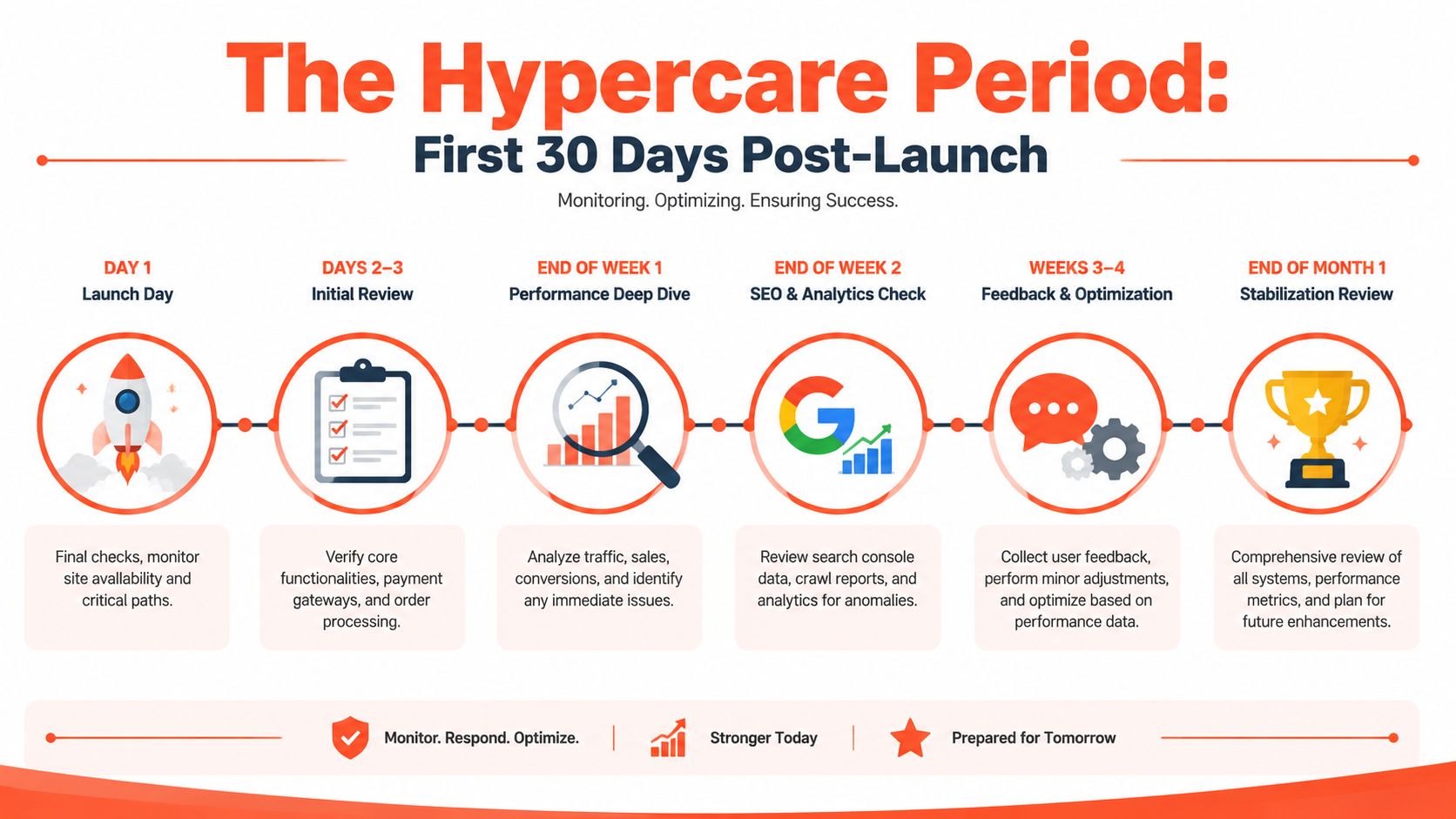
The migration isn't finished at launch. It's entering the stabilization phase, and that's where a lot of teams discover whether the project was ready. Recent migration playbooks recommend named owners and a hypercare period lasting two to four weeks, with attention on 404 spikes, failed payments, checkout drop-offs, and support-ticket volume Refact migration playbook.
Treat the first week like incident response
Day one should focus on availability and critical paths. Orders, payments, account login, and redirect behavior need immediate checks, because any failure there affects real revenue and real customers. By days two and three, the team should be verifying core flows again, looking for failed payments, broken forms, or issues in order processing.
By the end of week one, review traffic and sales behavior against expectation. Not every fluctuation is a crisis, but unusual patterns deserve fast investigation. The right people should already know where to look, because launch ownership was defined before go-live.
Watch SEO and attribution together
End-of-week-two work should include search console review, crawl reports, and analytics checks. 404s are only part of the story. If attribution is broken, paid and organic reporting both become unreliable, which makes it harder to know whether a traffic drop is real or just a measurement problem.
That's why post-launch teams need to look at search health and channel tracking at the same time. If one side is broken, the other can hide it. The first month is less about optimization experiments and more about restoring trustworthy data so growth decisions aren't made on partial information.
Assign named owners for the recovery window
The fastest recovery happens when one person owns each issue type. Someone owns redirects, someone owns payments, someone owns analytics, and someone owns customer support feedback. When ownership is vague, launch issues tend to linger because everyone assumes someone else is handling them.
Post-launch stabilization isn't administrative cleanup. It's the phase where the new store proves it can operate in real traffic.
The first 30 days should end with a review of what still needs attention and what can move into normal operations. Minor fixes, merchandising adjustments, and lifecycle campaigns can follow once the foundation is stable.
Frequently Asked Migration Questions
During the audit and post-launch phases, the same questions surface repeatedly. The answers matter because they shape how much support pressure, catalog cleanup, and operational rework the team faces after cutover.
Will customer passwords transfer from BigCommerce to Shopify
Customer passwords do not transfer in a usable way. Customers need to reset their passwords after launch, and that flow should be easy to find, simple to complete, and written in plain language. If the team explains this before cutover, support volume drops and the launch feels less disruptive.
Can gift cards and discount codes be moved over
Gift cards and discount codes are usually handled with more care than simple catalog data. In many migrations, they are recreated or managed manually rather than copied directly into Shopify, especially when the original records were tied to BigCommerce-specific rules. The right approach depends on the migration method and how those records were used in the old store.
How long will the site be down during cutover
Well-planned migrations keep downtime short, often only long enough to switch the live store and verify that checkout is working. The larger risk is a launch that looks fine on the surface but breaks payments, redirects, or analytics in ways that are not obvious right away.
That is why cutover planning should include more than the technical handoff. The team needs a clear sequence for the switch, a fast way to validate the storefront, and named owners who can resolve issues without debate.
What happens to BigCommerce-specific features like customer groups
They usually need to be rebuilt with Shopify-native constructs, tags, apps, or custom logic. Customer groups, category behavior, and pricing rules rarely map one-to-one, so the migration team has to decide whether to reproduce them, simplify them, or replace them. That decision belongs in the audit phase, before anyone treats the feature set as fixed.
Some stores come through the move cleaner because the old rules were simplified on purpose. Others keep too much of the legacy logic and end up with a Shopify setup that is harder to maintain than the BigCommerce version.
Should every category become a collection in Shopify
Usually, yes, but not in a mechanical one-to-one way. Category hierarchies often need to be flattened or reorganized so Shopify collections stay useful for shoppers and manageable for the merchandising team. The goal is to preserve how customers browse, not to preserve the old information architecture at any cost.
That distinction matters more than it first appears. A direct copy of the old structure can leave the new store harder to filter, harder to merchandise, and harder to scale once real traffic starts flowing.
Do historical orders need to be migrated
If customer service, reporting, or account history matters, yes. Orders are one of the most useful records to bring across because they let support teams answer questions without jumping between systems. If the business does not need the full historical depth inside Shopify, the team can still preserve those records in a separate archive.
The practical question is not whether order history is nice to have. It is whether the team needs it every time a customer asks about a past purchase, a refund, or a repeat order.
Can you keep the exact same URLs
Usually not, because the platforms structure URLs differently. That is why 301 redirects matter so much. The destination URL can change, but the customer and search engine path still needs to resolve cleanly.
This is one of the places where migration quality shows up quickly after launch. If redirects are incomplete, customers hit dead ends and search equity starts leaking into the new build.
How do you know the migration is really finished
It is finished when the store is stable under real traffic, the important redirects work, payment and checkout are reliable, analytics are trustworthy, and the support team is not seeing the same launch issue over and over. Go-live is a handoff to stabilization, not the end of the project.
A migration also feels finished when the business can operate normally without rechecking the same failures every day. At that point, minor fixes, merchandising adjustments, and lifecycle campaigns can move into standard operations.
Technology




