Outrank AI

You have twelve SKUs, a launch six weeks out, and a budget that will not stretch to a paid theme plus a pile of apps. The storefront still has to look credible on a phone, explain ingredients clearly, and take orders without extra plugins. That is the usual moment a team starts looking for the best free theme for Shopify.
The Shopify Theme Store currently lists 24 free themes compared with 1,323 paid themes, so free themes are about 1.8% of the catalog. They still cover fashion, food, publishing, retail, and general ecommerce, including Dawn, Craft, Sense, Refresh, Studio, Taste, Trade, Origin, Publisher, Ride, and Crave. These are configurable Online Store 2.0 foundations, not frozen templates.
Price is the wrong score. Sections, product templates, merchandising, accessibility, and the custom code you will need later decide whether a free theme stays cheap to run. Before traffic arrives, also protect Shopify payments from chargebacks, because a theme cannot fix a dispute workflow.
The seven options below are matched to catalog type and stage. I would shortlist two, then judge them on your real products, not on a demo photo.
Table of Contents
1. Dawn
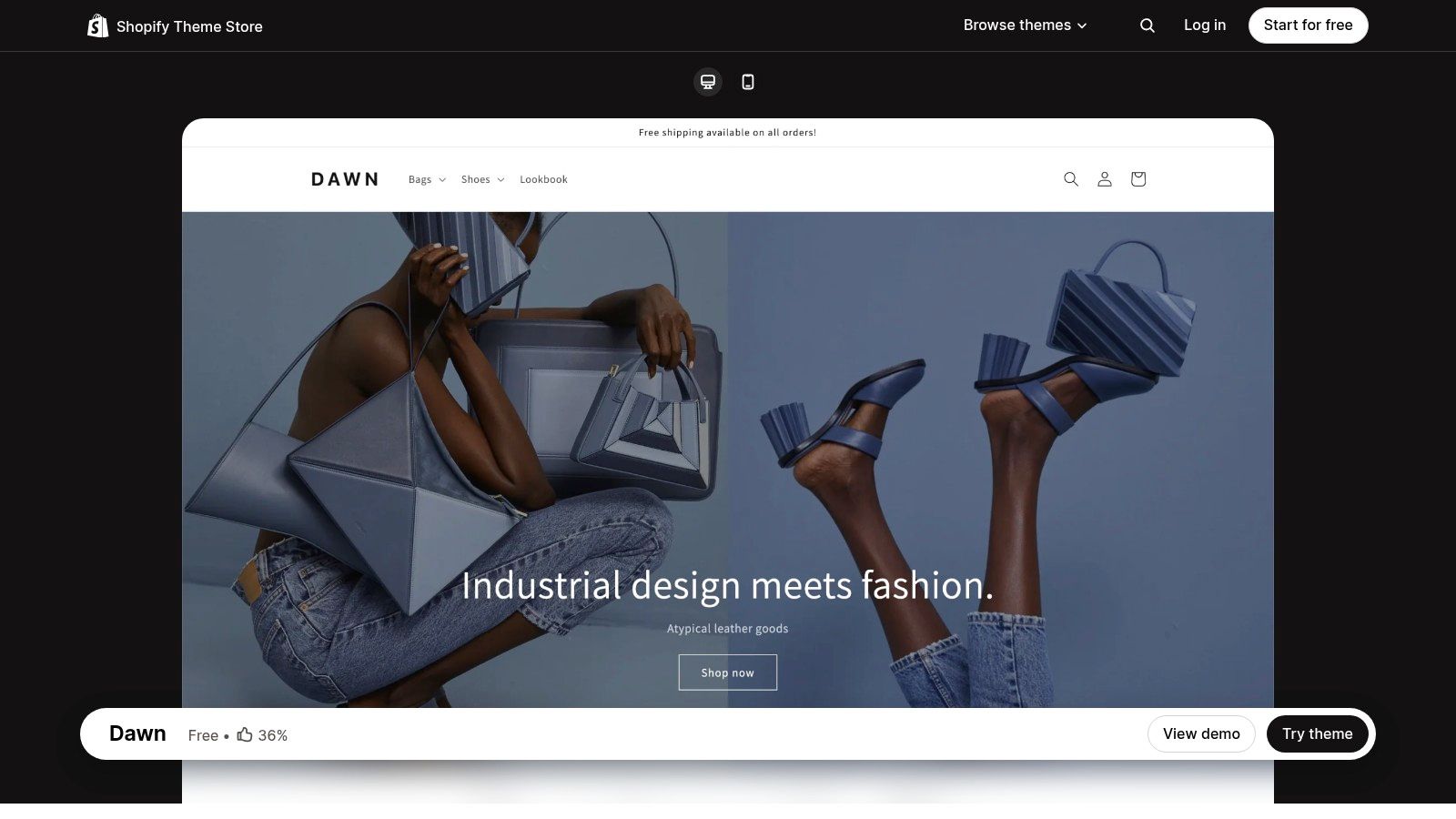
Dawn is the free theme I still reach for when a direct-to-consumer brand needs a quiet, photo-led store and plans to brand it over time. Large media, clear product information, search, and filtering come first. Layouts and design settings are flexible enough for apparel, home, and general catalogs that do not need a special homepage concept on day one.
An independent analysis of official Shopify themes reported that Dawn was used by approximately 15.82% of measured stores and that 88.4% of stores using it passed all mobile Core Web Vitals. The same analysis put the desktop pass rate at 84.9%, and it found free themes had the same median Core Web Vitals pass rate as the most expensive price band. A paid theme is not automatically faster. Image weight, apps, and scripts still decide the result after you customize.
Who should test it first
New and growing DTC stores with a modest catalog and a designer who can restyle type, color, and spacing. The clean look is familiar, so an unbranded Dawn store reads generic. Specialized badges, quizzes, or unusual variant logic usually mean theme edits or an app.
Practical rule: Treat Dawn as a maintainable base, then brand the product template before you add apps.
If the free structure is right but the look is not, compare it with premium Shopify templates only after the catalog and content model are settled. Install it from the Dawn preset.
2. Horizon

Horizon is the newer free foundation for merchants who want layout control without buying a page builder. Nested theme blocks let you rearrange smaller pieces inside sections. Quick view, badges, stock counters, recently viewed items, quick buy, pre-order, a slide-out cart, and back-in-stock alerts are already in the theme. Filtering, swatches, a mega menu, and infinite scroll cover a lot of merchandising that teams often bolt on with apps.
Shopify Changelog records that Shopify launched 10 new free Horizon themes on May 21, 2025. That family is the current direction if you are starting fresh and want first-party blocks rather than a long app list.
The trade-off
More blocks mean more ways to make a page noisy. I would not pick Horizon for a founder who wants a finished look in an afternoon and will not edit on mobile. Highly specific brand layouts can still need custom development. Test the demo with your variant count, not the sample catalog.
If you are choosing between families rather than presets, this guide to choosing a Shopify theme is the decision I would make before you invest in sections. Start from the Horizon preset.
3. Refresh
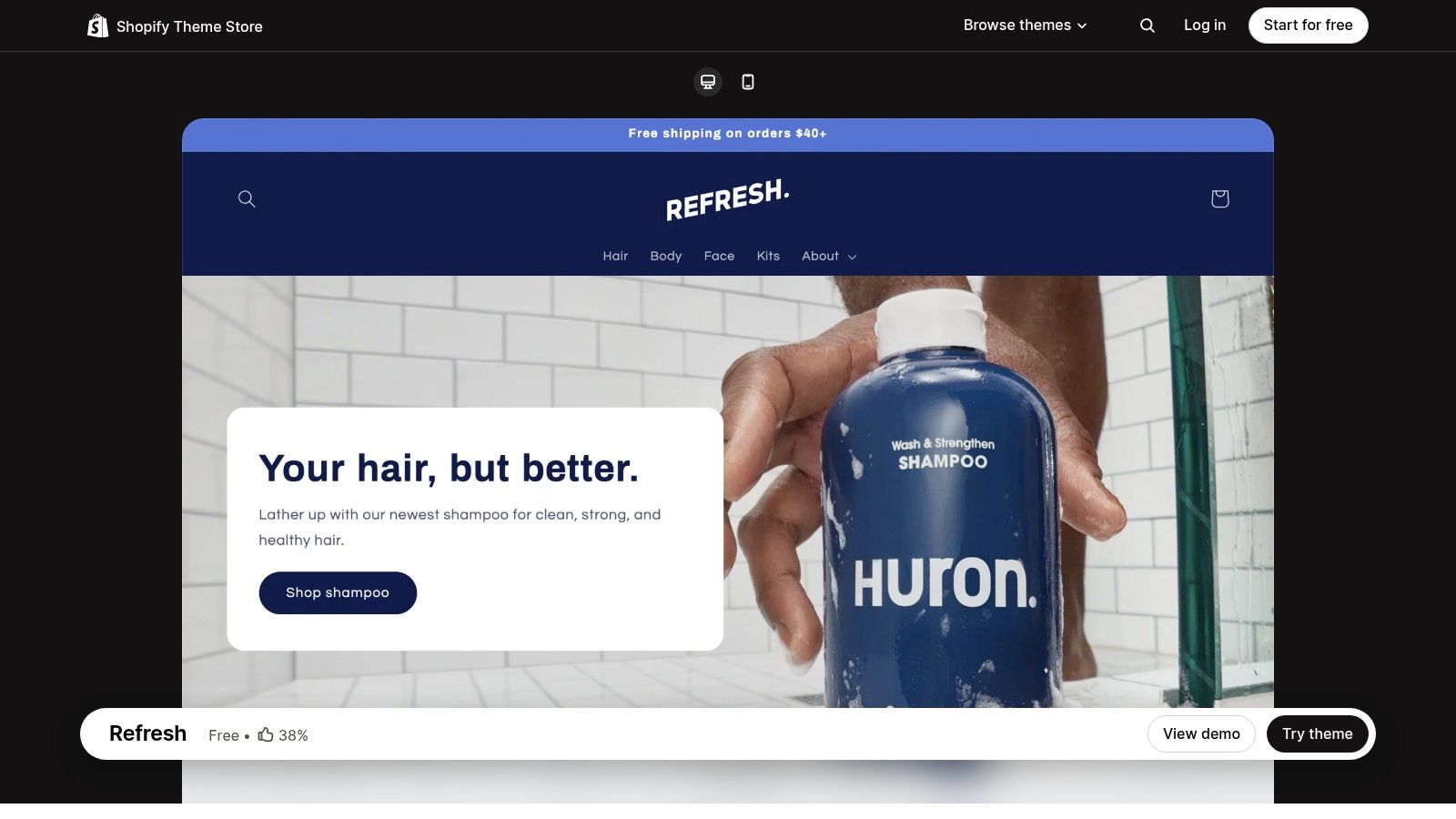
A health or wellness catalog lives on explanation. A supplement needs its ingredient list beside the buy button; a snack brand wants nutrition panels and a usage story. Refresh is the free theme built for that job. Product templates carry ingredients or nutrition, usage, and shipping notes next to video, galleries, and lookbooks. Promo banners, FAQ pages, cross-sells, and recommended products cover reassurance content without a content app on day one. Enhanced search, filters, and a mega menu take over once the catalog grows past a single collection.
The visual direction is bold. A quiet clinical brand, or a luxury line that wants generous whitespace, will fight the defaults rather than bend them. Custom badges and unusual claim layouts usually mean code or an app. Budget that edit before you commit, because discovering it at week five is expensive.
Mobile shoppers are quick to abandon slow homepages and cluttered category navigation, so Refresh will not stay fast if every education block also loads a video, a review widget, and a recommendation script. I would keep long ingredient copy in theme content and metafields, and add an app only when a native section cannot do the job.
For the edit path after install, see how to edit a Shopify theme. The preset lives on the Refresh theme page.
4. Sense
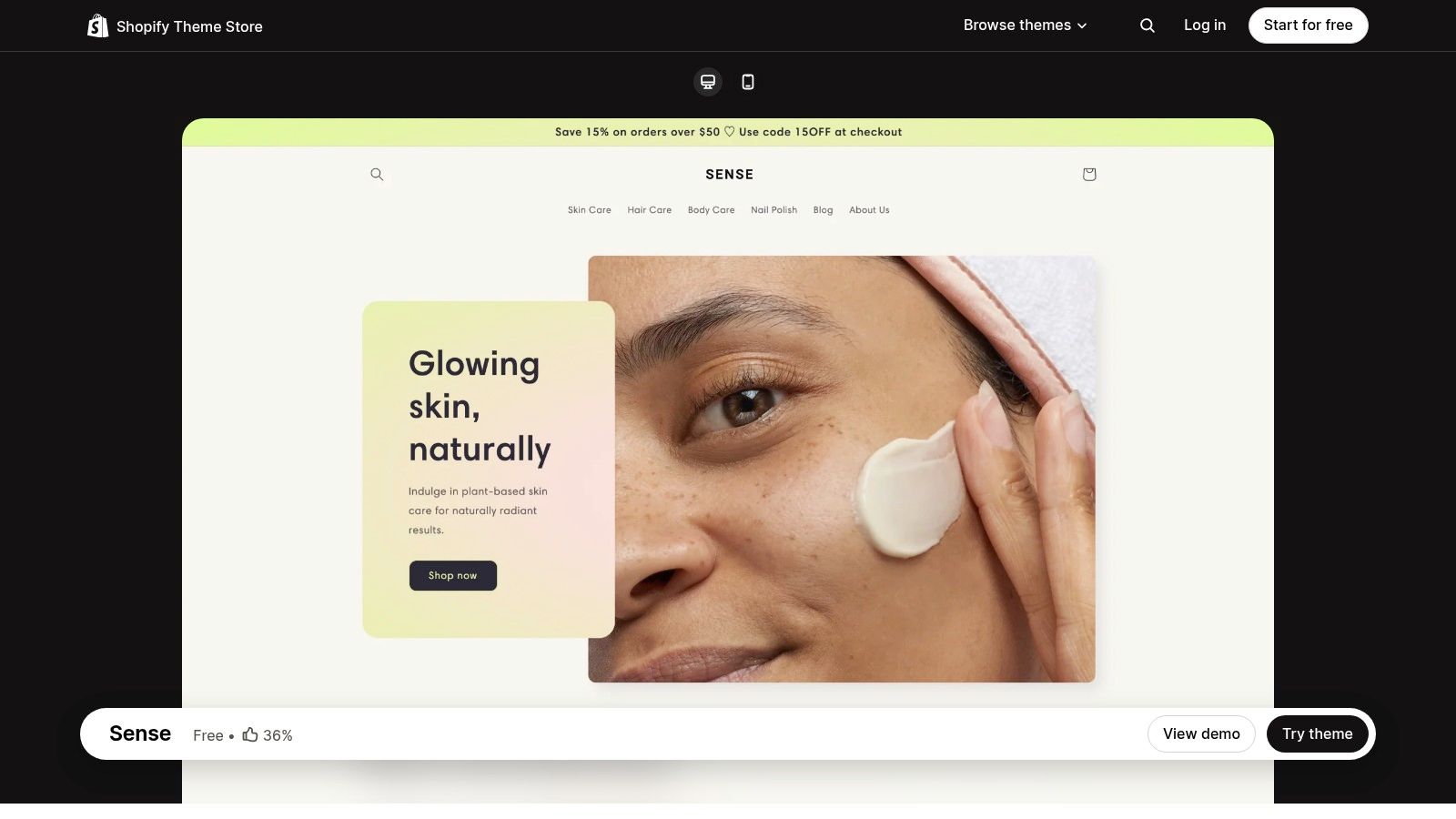
Sense suits beauty, wellness, and specialty goods where a shopper decides from video, swatches, ingredients, and a short usage note, not from a spec table. You also get zoom, galleries, testimonials, press, FAQs, promo banners, filtering, stronger search, and recommended products. That is a lot of decision support at no theme fee, and Shopify builds and supports it.
Where it falls short
The fresh styling will not match every brand without customization. Reviewers have reported issues, so I would test variant selection, sold-out states, and any market-specific pricing before you commit. Custom badges, subscription widgets, or a complex routine builder still mean code or an app. If your catalog is mostly one hero SKU plus refills, Sense can feel busier than you need.
Best catalog: Many SKUs that differ by scent, shade, or formula, where swatches and usage copy do real work.
Weak fit: A utility store that wants dense grids and almost no storytelling.
App risk: Reviews and subscriptions are useful, but each script can undo a light theme. Add them after the product template is stable.
Install the Sense preset and walk one shade through cart on a phone before you judge the homepage.
5. Craft

Craft is for merchants whose materials, process, or origin are part of the price. Generous spacing and editorial type sit next to products, so a ceramics studio, a leather line, or a small-batch food brand can tell the story without a separate blog-only theme. Videos, lookbooks, galleries, high-resolution images, options, size charts, and ingredient or usage details are there, plus search, filtering, a mega menu, and cross-selling.
It is a weak choice for a dense, utility-first catalog. A parts store or a hundred-SKU commodity range will feel slowed by the whitespace. Some layout details still need code if your grid or type scale is strict. Reviews also mention setup and product-display issues, so publish the product, collection, and story templates on an unpublished copy and click through them.
A story section earns its place only when it answers why this product costs more. If it does not, cut the section.
Start from the Craft preset if the brand is design-led and the catalog is small enough that each product can carry a short process note.
6. Spotlight

Spotlight is the straightforward launch theme. Early-stage shops and small catalogs get quick buy, a slide-out cart, video, galleries, options, filtering, enhanced search, a sticky header, FAQs, recommended products, and a stock counter. You do not need a campaign homepage to go live. That simplicity is the point, and it is also the limit. Elaborate storytelling and highly distinctive layouts are not what this structure is for. Reviewers mention limits with review widgets and some text customization, so check those on your own type styles before launch week.
Shopify's guidance on choosing a theme describes free themes as having core features and no-code customization. That does not mean the store you publish meets an accessibility baseline. Keyboard use, visible focus, heading order, contrast, and error messages still have to be tested after your content and apps are in. Picking Spotlight, or any other free theme, does not finish that job. Fix it before custom sections pile up.
Use the Spotlight preset when the goal is a credible first store you can refine, not a flagship editorial site.
7. Trade

Trade is the free theme built for wholesale presentation, not a consumer theme with a wholesale page bolted on. The quick order list lets a buyer add many products or quantities without opening every product page. Filtering, quick view, a mega menu, a slide-out cart, and quick buy support that repeat-order habit.
Volume pricing is listed as requiring Shopify Plus. The theme does not replace customer-specific price lists, net terms, or an ERP. If you sell only to consumers and want lookbooks, Trade will feel spare. If you sell to both, you will still need a clear split between the public catalog and the logged-in buyer view.
Best fit: A B2B or hybrid catalog where buyers reorder across many SKUs.
Plan dependency: Advanced B2B pricing follows your Shopify plan and setup, not the theme alone.
What it will not do: Run your wholesale operations. It only presents ordering more clearly.
Open the Trade preset with a real buyer account and a multi-line order before you call it ready.
How the Seven Free Shopify Themes Compare by Brand Fit
Item | Ideal Brand Fit | Key Strength | Main Limitation |
|---|---|---|---|
Dawn | Broad range of DTC brands and catalogs | Flexible, free theme with strong product imagery | Familiar look may need branding to stand out |
Horizon | Stores seeking flexible layouts and built-in selling tools | Extensive merchandising features and nested blocks | Reviews are mixed; test the demo on mobile |
Refresh | Health, beauty, food, and wellness brands | Supports product education and customer reassurance | Visual style may need customization |
Sense | Beauty, wellness, and specialty consumer goods | Rich product details and discovery features | Reported issues make testing important |
Craft | Handmade, design-led, and premium-feeling brands | Combines editorial storytelling with merchandising | Less suited to dense, utility-first storefronts |
Spotlight | Early-stage businesses and small catalogs | Simple setup with useful product and cart features | Limited support for elaborate or distinctive layouts |
Trade | Wholesale and B2B-style stores | Quick ordering across products and quantities | Some B2B capabilities depend on Shopify Plus and setup |
Choosing Your Free Theme and Knowing When to Upgrade
Shortlist two or three themes that match the catalog, not a single speed score. Load each unpublished demo with your products, variants, and images, then buy something on a phone. Check collection filters, search, the cart, and the story or ingredient blocks you need. If a feature already exists in the theme, do not add an app for it.
A free theme is the wrong long-term base when every campaign needs custom sections, the merchandising logic no longer fits the presets, or international catalogs have outgrown one template. That is the point to look at a premium theme or a custom build instead of stacking more apps. Broadcast, Palo Alto, and Modular are Presidio themes built for stores that have outgrown a free preset: Broadcast for feature-rich selling, Palo Alto for a stronger design system, and Modular for livelier motion. Booking a call is the practical way to plan that move before a replatform becomes a rebuild.
Content still has to leave the store. If Pinterest is part of the launch, sync Shopify listings for Pinterest content so product updates do not live in a separate spreadsheet. Theme choice and distribution should be decided together, or the new storefront launches with an empty content channel.
Presidio builds and supports Shopify and Shopify Plus storefronts, including custom themes, performance work, and accessibility improvements when a free theme is no longer enough. If your catalog, wholesale flow, or brand system has outgrown Dawn, Horizon, or a preset, we can plan the next storefront with you. Visit Presidio to talk through the build.

Jamie, Presidio’s Designer, leads the practice alongside Johnnie. With over 10 years of e-commerce experience, Jay is a Shopify expert, known for crafting innovative solutions that prevent tech debt.
Jaime
Senior Product Designer, 2020



