Presidio

Most advice about custom Shopify app development starts with the wrong question. It jumps straight to architecture, APIs, or app store approval, then assumes a custom build is the answer. In real projects, that assumption is usually how merchants end up with app sprawl, higher support load, and software they didn't need.
The better question is simpler. Is the pain point repeated, differentiated, and stable enough to justify owning the solution long term? If the answer is no, a public app, a theme extension, or a Shopify Function usually wins on speed and maintainability.
Table of Contents
What Custom Shopify Apps Actually Solve
A custom Shopify app is not a fancier public app. It's a private tool built around one merchant's operating rules, one team's workflows, and one store's data model. That distinction matters because many problems merchants think need custom software can be handled by a lighter option, and custom builds get expensive when they're used as the first instinct instead of the last.
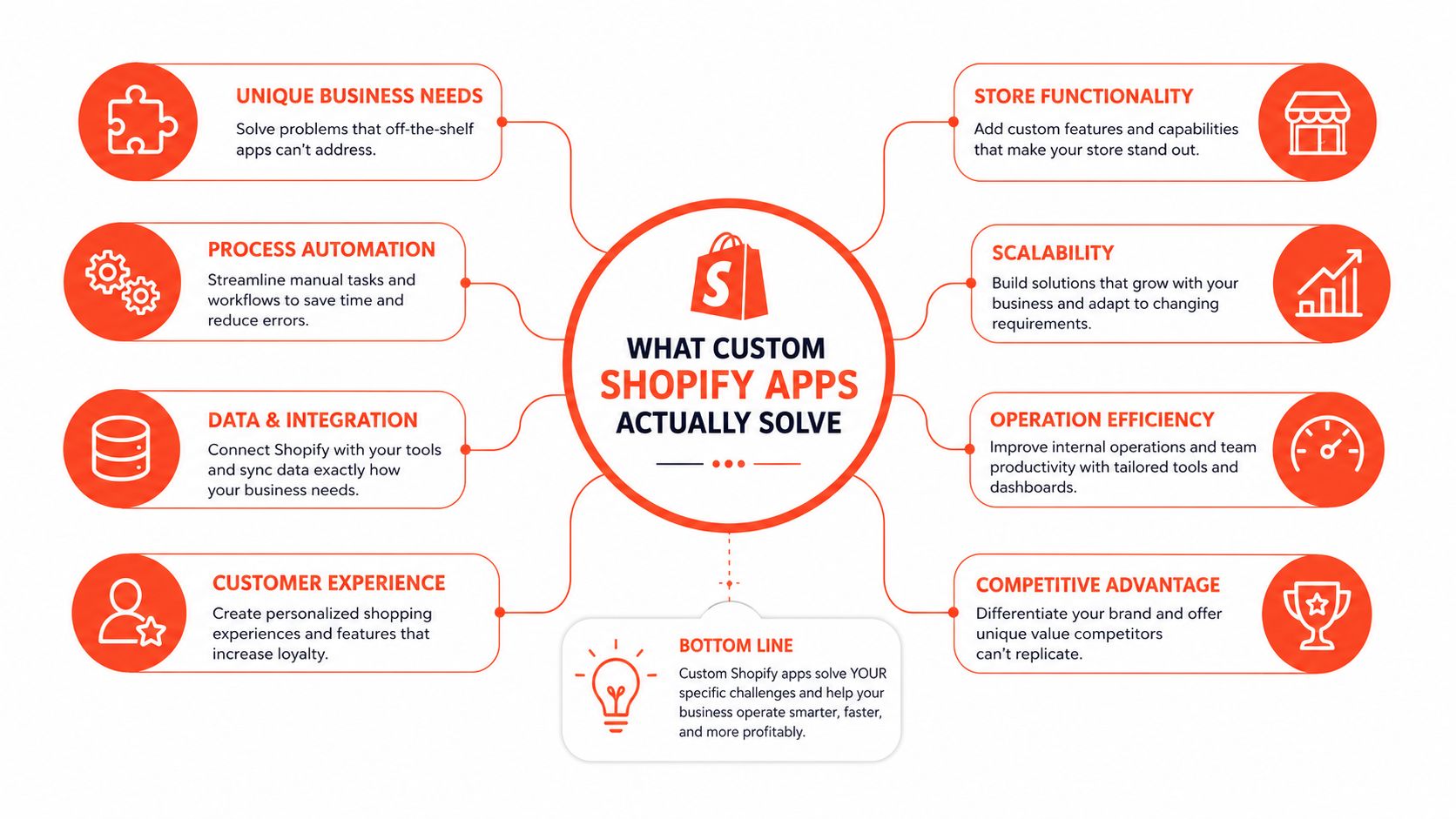
Public apps are built for the broad middle of the market. Custom apps are for cases where the business rule itself is the product, such as a bespoke discount engine, a warehouse-specific fulfillment workflow, or a sync layer between Shopify and an ERP. If the logic has to reflect how your team operates, not how a generic app vendor imagined merchants work, a custom build starts making sense.
The real job custom apps do
The best custom apps remove friction from operations that repeat every day. That often means internal tools, not customer-facing features. A merchant might need to push order data to another system, reconcile inventory across channels, or apply rules that public apps can't model without awkward workarounds.
That's also why so many app sprawl problems start here. A store installs several public apps to approximate one process, then support teams spend their time managing overlaps, conflicts, and update drift. If you're evaluating current tooling, it's worth looking at the patterns in stores already running app stacks and custom tools before deciding whether you need a new build or just a cleaner stack.
Practical rule: if the same merchant pain point appears in daily operations, and current apps only solve pieces of it, that's when custom work deserves a serious look.
Custom software is also useful when visibility matters. Public apps often hide their internal logic behind settings panels that don't map cleanly to how your team thinks. A custom app can expose exactly the controls, logs, and approvals your staff need, which reduces training time and makes errors easier to catch.
The mistake is treating “custom” as a quality label. It isn't. It's a trade-off. You gain control and lose the convenience of someone else handling product decisions, roadmap changes, and maintenance for you. That's a good deal only when the underlying workflow is truly yours.
Build vs Buy Decision Framework
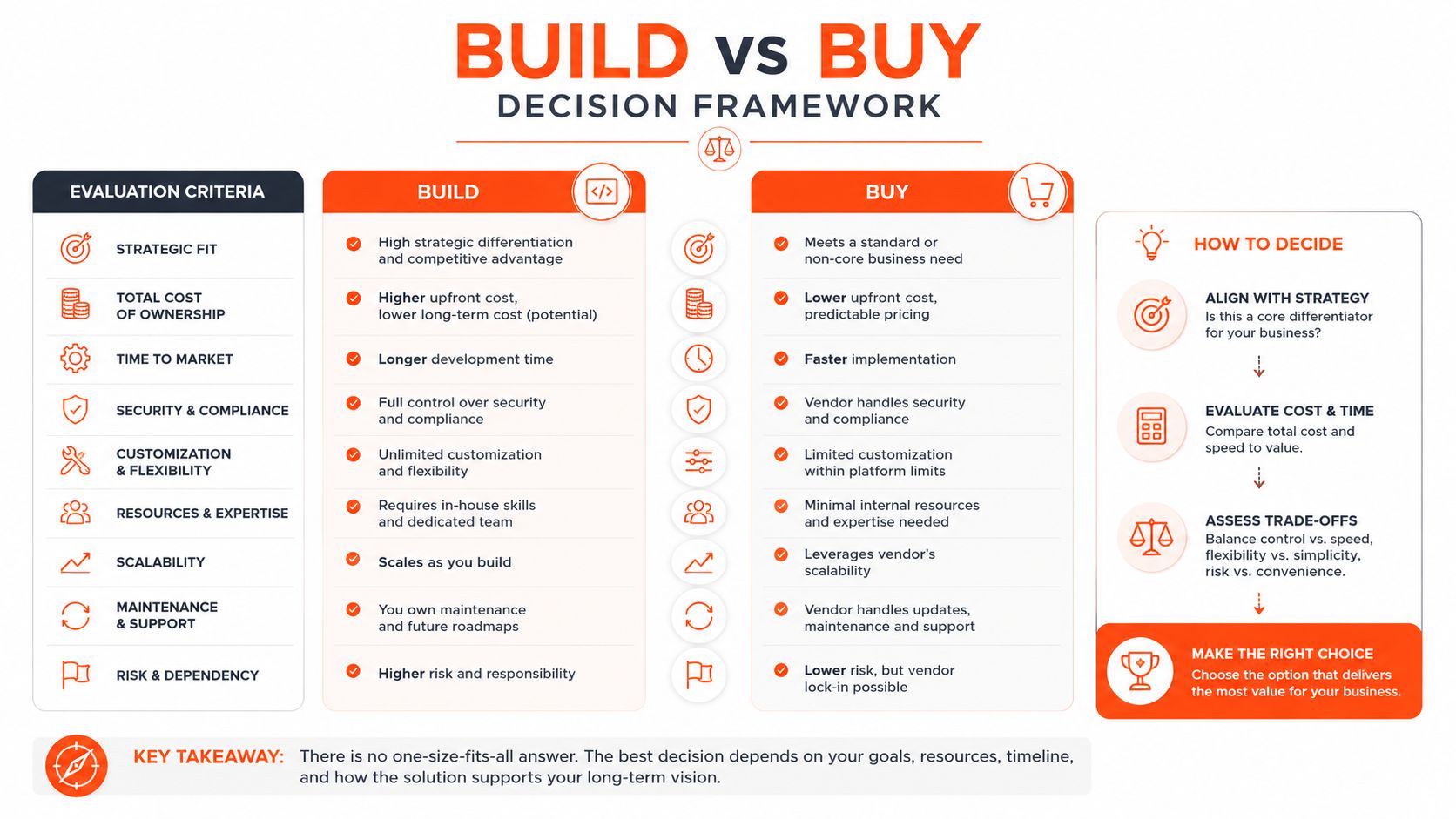
The cleanest decision framework starts with alternatives, not code. Most merchants compare custom app development against "doing nothing," which is the wrong benchmark. The key comparison is against the cheapest workable option that still solves the problem reliably.
Compare the four paths
A public app is the default when the need is common and the market already has a mature solution. It's usually the fastest route to value, and it keeps maintenance off your plate. The downside is that your workflow has to fit the app, not the other way around.
A theme extension is a better fit when the change lives in the storefront and doesn't need deep backend coordination. It's lighter than a full app, easier to keep aligned with the theme layer, and often enough for merchandising changes, content inserts, or UI adjustments. If the logic is primarily presentational, a theme-level solution avoids a lot of unnecessary complexity.
A Shopify Function is the right move when the business rule belongs inside checkout, discounts, or validation logic. It keeps execution close to the platform and avoids standing up more infrastructure than the job requires. If the rule is narrow and deterministic, a Function often beats a custom app on simplicity.
A full custom app becomes the last stop when the logic spans multiple systems, needs a durable admin interface, or has to orchestrate workflows that a Function or extension can't reasonably own. That's where the operational overhead is justified.
If the problem is frequent, differentiated, and stable, build. If it's common, transient, or easily approximated, buy.
Use this filter before you commit
Start by validating the pain point. If merchants can't describe the problem in repeatable terms, the solution is probably still fuzzy. Then check whether they're willing to invest in solving it properly, because even a good idea can become dead weight if the business case is weak.
Only after that should you compare existing apps and lighter solutions. Independent Shopify-focused guidance on choosing custom builds only after validating the pain point lines up with what I see on projects; teams don't regret building custom software because it was hard, they regret building it because the need wasn't specific enough.
A useful test is maintenance stability. If the business rule changes every few weeks, a custom app can become a moving target. If the workflow is repetitive and the logic is unlikely to churn, custom ownership is easier to justify.
Technical Architecture and Shopify APIs
Once you've decided to build, architecture decides whether the app is a durable asset or a maintenance trap. The most important choice is usually not the framework, it's how tightly the app respects Shopify's API limits, data patterns, and embedded admin experience.
Build around the GraphQL Admin API
For most custom Shopify app development work, the GraphQL Admin API is the right default because it returns only the fields you request, which keeps payloads smaller and avoids overfetching. That sounds minor until an app starts reading products, orders, inventory, and metafields all day long, then inefficient queries begin to shape the app's latency and reliability.
The catch is that GraphQL isn't free-form. You have to design around GraphQL cost points and keep queries narrow so you don't create expensive requests that trigger throttling. In practice, that means cursor-based pagination, scoped queries, and retry/backoff logic for transient failures, especially when the app touches catalogs or order workflows at scale. The ShopifyNinjas guide on GraphQL Admin API patterns for custom apps is a solid reminder that the API design is part of the product design.
Use the right tool for the job
Not every rule belongs in an app server. Shopify Functions are a better fit for discount logic, validation, bundles, and order rules when the behavior needs to stay close to checkout and stay lean operationally. A Functions-first design often eliminates the need for extra middleware that only exists to compute a rule Shopify can already enforce.
Embedded admin experiences still need a clean UI layer. That's where App Bridge matters, because merchants should feel like they're staying inside Shopify Admin instead of bouncing between disconnected interfaces. Webhooks fill the event-driven gaps, especially when order changes, inventory updates, or fulfillment events need to push work into other systems without polling.
I've found that teams overbuild internal orchestration long before they need to. The better pattern is to keep the app thin, let Shopify do what it's good at, and reserve the custom layer for the workflow logic the platform can't express cleanly.
Here's a practical reference on replacing older rule systems with platform-native logic, moving from scripts to Functions. It's a good example of why architecture choices should reduce surface area, not add to it.
Development Lifecycle from Scoping to Deployment
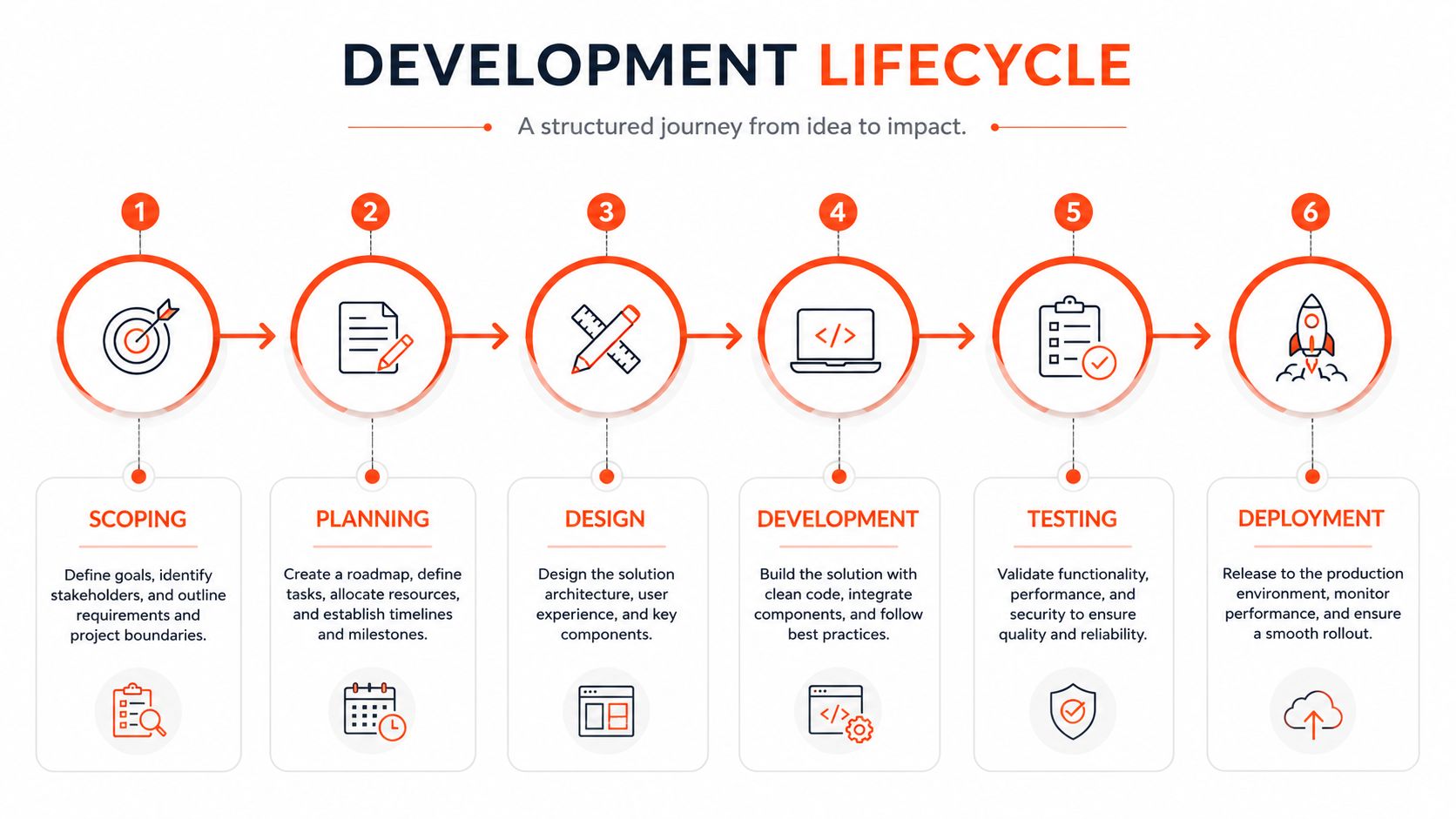
The hardest part of a custom app project is rarely writing the first endpoint. It's getting the merchant workflow into a shape that can survive development, testing, and install-time review without turning into a pile of exceptions. Projects usually stall when teams discover that the “simple” request hides a dozen edge cases.
Discovery has to map to actual operations
Good scoping starts with how the merchant already works, not how the app could theoretically work. The workflow should be mapped to store data, admin permissions, integration points, and failure states before anyone starts building. If the team can't describe what happens when an order is partially fulfilled, canceled, edited, or synced late, the scope isn't ready.
Development then happens against a Shopify development store with iterative builds. That environment lets you test realistic products, customers, and orders without forcing the merchant's live store to absorb unfinished logic. The useful habit is to ship in small slices, then validate the slice before widening the surface area.
Testing is where the assumptions break
Unit tests catch local logic errors, but they won't save you from broken API assumptions. Integration tests against the GraphQL layer matter because many failures only appear when real payload shapes meet real workflows. Merchant user acceptance testing matters just as much, because the app can still fail if the UI forces staff to think differently than they do today.
The part teams underestimate most is webhook reliability. If the event pipeline is weak, the app looks fine in demos and then degrades under real store activity.
Deployment is its own checkpoint. Shopify's own guidance emphasizes technical, security, UX, and performance review before launch, and recommends monitoring tools such as Bugsnag, Datadog, or Sentry plus analytics like Google Analytics, Amplitude, and Partner Dashboard exports to track activation, retention, revenue, and support volume. Shopify also frames most custom app projects as taking roughly 4–12 weeks end-to-end, including 3–8 weeks for development alone, which is a good reminder that validation and iteration are part of the build, not an afterthought. Shopify's app-building guidance is still one of the clearest references for that process discipline.
Cost Estimates and Timeline Realities
Budget conversations go off the rails when teams ask for a single price without defining complexity. Custom Shopify app development spans a wide cost range because the work itself varies so much by workflow depth, integrations, and support burden. A real estimate starts with scope, then narrows by operational complexity.
Use complexity, not optimism, to budget
Simple apps sit around $3,000–$8,000 according to the cost ranges in the verified data, and they're usually the easiest to define because the logic is narrow. Mid-level apps with integrations sit around $8,000–$20,000, which is where external systems, webhook handling, and more nuanced admin experiences start to show up. Advanced apps with complex workflows can reach $20,000–$50,000+, especially when the app has to coordinate multiple systems and protect reliability under growth. Those figures come from the cost guidance in the CartCoders reference on custom Shopify app development costs and process.
The annual support line matters just as much as the build. Maintenance is often budgeted at 10%–20% of the original build cost per year, or about $200–$2,000 monthly depending on monitoring and updates, which is why treating support as optional is a planning error. When merchants skip maintenance planning, they don't save money, they just move the cost into outages, broken integrations, and rushed fixes.
The timeline follows the scope
The end-to-end process is rarely a quick plugin replacement. Industry guidance commonly frames custom app work as taking roughly 4–12 weeks, with 3–8 weeks for development alone, and that assumes the scope is already reasonably clear. The more systems you touch, the more the timeline bends around testing, permissions, and merchant feedback.
Complexity Tier | Build Cost | Timeline | Annual Maintenance |
|---|---|---|---|
Simple App | $3,000–$8,000 | Short scoped build | 10%–20% of build cost |
Mid-Level App with Integrations | $8,000–$20,000 | Moderate multi-system build | 10%–20% of build cost |
Advanced App with Complex Workflows | $20,000–$50,000+ | Longer iterative build | 10%–20% of build cost |
The practical takeaway is simple. Scope decisions cascade directly into build cost and long-term operating expense. If the workflow can be solved with less custom surface area, that choice compounds in your favor every month after launch.
Designing for International and Cross-Border Requirements
Custom app needs become much clearer once a store operates across markets. Standard functionality often works fine in one region, then collapses under country-specific rules, localized operations, and fragmented data expectations. That's where custom Shopify app development stops being a preference and starts becoming infrastructure.
Cross-border logic lives in the backend
International requirements usually aren't about flashy storefront features. They're about backend governance, data normalization, and workflow reliability across markets. A merchant might need different fulfillment rules by country, tax logic that maps to local expectations, or product compliance checks that depend on region-specific attributes rather than a single global catalog rule.
That also means the app has to be maintainable across regions, not just functional on launch day. If each market gets its own patchwork of settings, the app becomes impossible to support. A better pattern is to centralize the shared model, then let region-specific logic branch only where the business rule differs.
Build for local variation without hard-coding it
Common cross-border use cases include localized currencies, region-specific payment or fulfillment workflows, and regulatory checks that block or reroute certain products. A custom build is justified when public apps don't model the actual workflow without forcing the merchant into manual workarounds or separate tools.
The Numinix perspective on custom Shopify apps for niche international markets gets this right, the hard part is less about API access and more about solving market-specific operations without turning every new region into a separate app.
Design principle: keep the regional rules declarative where possible, and keep the workflow engine shared. That makes future expansion much less painful.
This is also where many teams overcomplicate the front end. Merchants don't usually need a beautiful international control panel first. They need the app to normalize data, respect regional rules, and keep the operation consistent across markets.
Maintenance Monitoring and Long-Term Support
A custom app launch isn't the finish line. It's the moment the app becomes part of the merchant's operating system, which means visibility, alerting, and support habits matter as much as code quality. If no one is watching the app, Shopify changes and edge-case traffic will eventually expose it.
Monitor what breaks first
Error tracking should be in place from day one. Tools like Bugsnag, Datadog, and Sentry help surface failures before merchants start filing tickets, especially in webhook handlers and API-facing jobs. That matters because the issues that hurt merchants most are often intermittent, which means they're easy to miss in local testing.
Analytics should track more than visits. Use Google Analytics, Amplitude, or Partner Dashboard exports to watch activation, retention, revenue, and support volume. Those signals tell you whether the app is being adopted, whether people are staying with it, and whether the support burden is growing faster than the value.
Treat API versioning like a recurring task
Shopify API changes are not a surprise event. They're a standard part of owning an app. If version updates and deprecation checks aren't scheduled, the app will age into fragile behavior, especially if integrations depend on assumptions that only held for an older API version.
That's why support documentation matters as much as monitoring. Merchants need setup notes, workflow explanations, and troubleshooting steps that match the app's real behavior. If your team wants a structured approach to handoff and support materials, Presidio's support documentation resource is a practical reference point for organizing that work.
A good maintenance plan answers three questions. What failed, how quickly did we know, and what will change before it fails again? If those answers are clear, the app stays useful instead of drifting into another forgotten line item in the tech stack.
If you're deciding whether a custom build is really justified, Presidio can review the workflow, compare it against lighter Shopify options, and help you map the maintenance cost before you commit. Start with the business problem, not the code, and get a plan that won't turn into app sprawl six months later.



