Presidio
Your store can look healthy in audits and still feel sticky on a real phone. The PageSpeed badge is green, the homepage loads, and the team keeps adding apps because each one solves a specific problem. Then a shopper on a mid-range Android starts hesitating on variant taps, the cart drawer lags, and the checkout path feels slower than it should. That's the point where shopify performance optimization stops being a cosmetic project and becomes a revenue and discoverability problem.
The old playbook focused on images and a few lazy-load tweaks. That's not enough anymore. Shopify's own performance guidance points merchants toward slow scripts, unnecessary apps, image optimization, and even theme changes, because app code can remain in a theme after uninstall and keep slowing the storefront down Shopify web performance guidance. If you want a broader view of how performance fits into the wider commerce stack, the guide to eCommerce optimization in 2026 is a useful companion piece.
There are now two audiences to optimize for at the same time. Shoppers need quick, predictable interactions. AI search and answer engines need clean HTML, structured data, and consistent rendering they can trust. The same engineering habits, lean JavaScript, fast server response, and explicit markup, serve both.
Table of Contents
Why Shopify Performance Now Shapes Revenue and Discovery
A DTC team looks at mobile traffic, sees shoppers dropping off early, and assumes the homepage needs a visual refresh. The problem is usually farther down the stack. Shoppers feel the gap between a tap and a response, and that delay usually comes from scripts, theme code, or an app stack that grew one decision at a time.
The storefront has to feel fast, not just score fast
Shopify's performance guidance treats Core Web Vitals as the starting point, and that framing matters. The platform's advice is to identify slow scripts, remove unnecessary apps, optimize images, and consider a performance-optimized theme because code burden can survive app uninstalls and keep dragging on rendering Shopify web performance guidance. That problem is bigger than trimming hero images or chasing a green score in a lab test.
Speed also affects how your content gets read by machines. AI shopping experiences, search assistants, and recommendation layers depend on pages that render predictably and expose product facts in a structured way. Clean HTML, good schema, and server-side clarity make the storefront easier for humans and easier for systems that need to parse and compare products.
Practical rule: if a merchant says the site “looks fast” but the cart feels sticky, treat that as a script and interaction problem first.
For a more complete performance checklist that connects optimization work to broader ecommerce operations, the guide to eCommerce optimization in 2026 is a useful reference point. The mindset shift is simple. Performance now affects conversion, merchandising, and machine readability, so the work has to cover both the person tapping the screen and the system interpreting the page.
Why this matters on mobile first
Mobile shoppers expose weak spots faster than desktop users do. A store can pass a quick visual review and still feel clumsy on a phone because one heavy widget blocks the main thread or a discount script delays cart actions. The question is no longer whether the page loads. It is whether shoppers can act immediately once it does.
Lean themes help here, but only to a point. A stripped-down theme can improve the baseline, yet a feature-rich app stack can erase that gain the moment extra scripts start competing for attention. The best storefront decisions reduce friction for the shopper and keep the page readable for AI systems. Those goals do not compete. They reinforce each other.
Core Web Vitals as Your Optimization Compass
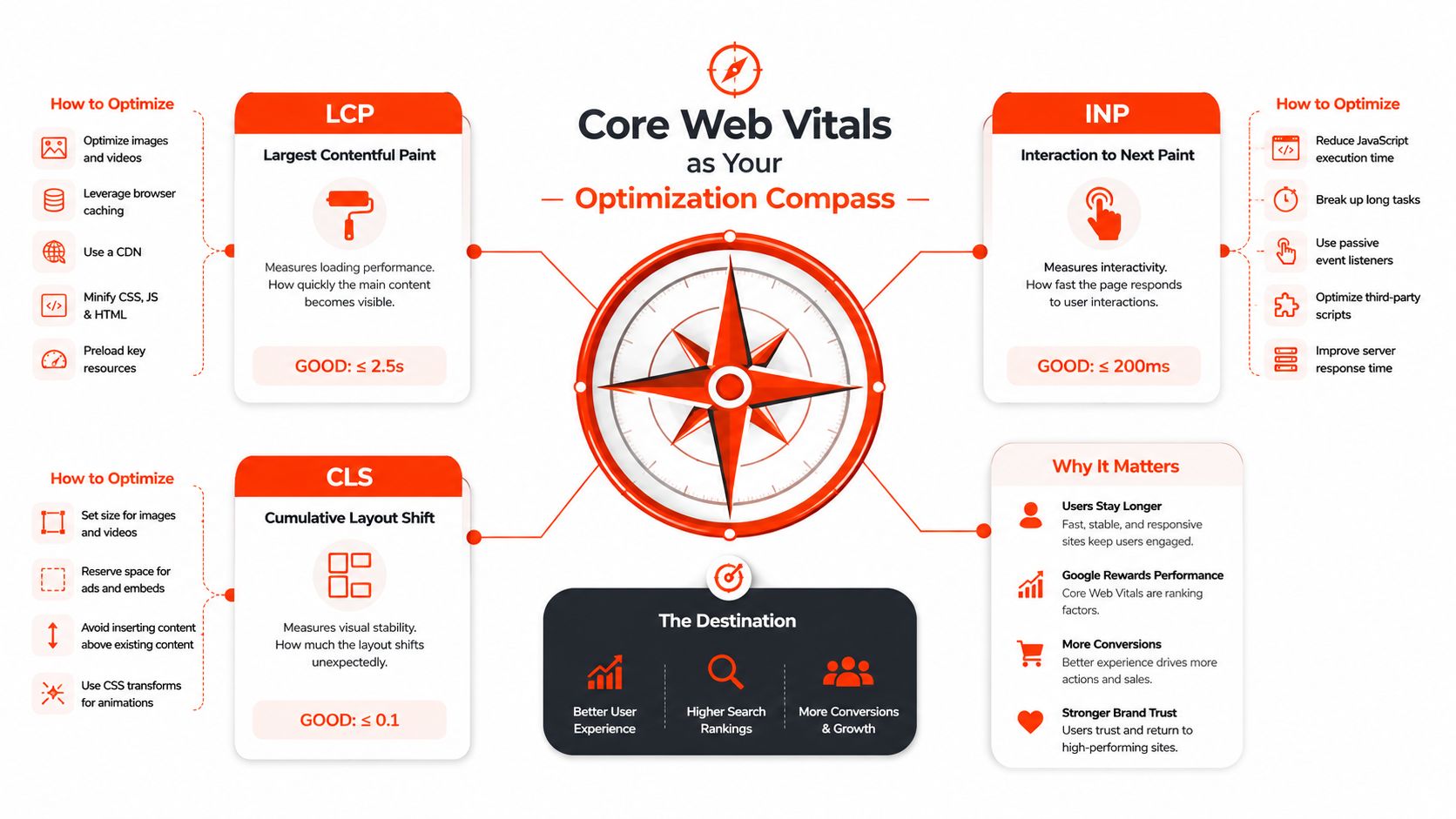
LCP, INP, and CLS measure three different kinds of storefront friction. Largest Contentful Paint shows how quickly the main above-the-fold content becomes visible. Interaction to Next Paint shows how quickly the storefront responds when a shopper taps a variant, opens a menu, or adds an item to cart. Cumulative Layout Shift shows whether the page keeps moving while someone is trying to use it. In practical Shopify performance work, the mobile field targets that matter are LCP under 2.5 seconds, INP under 200 milliseconds, and CLS under 0.1 eCommerce optimization checklist.
What each metric tells you
LCP usually points to above-the-fold weight, slow image delivery, late CSS, or server latency. Shopify's own enterprise guidance uses TTFB as part of that diagnosis, because it helps separate backend delay from render delay Shopify Enterprise web performance guide. If the hero section is heavy but the page becomes usable once it appears, LCP is where the work starts. If the page is still waiting on the server before anything paints, the fix sits lower in the stack.
INP is where many stores find the key bottleneck. The move from FID to INP made responsiveness harder to fake, because it measures how the page reacts to actual taps and clicks, not just the first input event WGenTech on Shopify speed and INP. A storefront can look fast and still feel broken if app scripts block variant selection, cart updates, or menu interaction. That is usually a script coordination problem, not an image problem. For SEO teams trying to connect page experience work to discoverability, the Core Web Vitals guide for SEOs is a useful companion.
CLS matters because shifting content creates mis-taps and forces shoppers to reorient. The usual causes are missing dimensions on images, late-loading banners, injected widgets, and other elements that enter the page after the initial layout is already set. Shopify's performance guidance treats it as one signal in a broader diagnostic set, alongside LCP, INP, and supporting metrics Shopify Enterprise web performance guide. In practice, CLS often reveals whether the theme is reserving space correctly or letting apps rewrite the page after render.
Field data versus lab data
Lab tools help reproduce a problem. Field data shows what real shoppers experienced on real devices, on real networks, with real scripts running. Shopify recommends using Web Performance reports, real-user monitoring, browser DevTools, and supporting metrics like TTFB to isolate where delays originate Shopify Enterprise web performance guide. That distinction matters because a theme can score well in a controlled test and still feel slow on mobile when multiple apps compete for the same main thread.
If the store feels slow to become usable, start with LCP. If shoppers complain that taps, filters, and cart actions lag, start with INP. If items jump around and cause mis-taps, fix CLS next. I usually treat INP as the sharper signal on DTC stores with a heavy app stack, because that is where merchant-facing friction shows up first, while theme refreshes often help only if you also remove the scripts the theme is carrying.
A theme update can help clean up that baseline. A lot of older builds accumulate stale snippets, duplicate section logic, and app code that still runs after uninstall, which is why a theme update and maintenance plan often pays off more than another visual tweak. The trade-off is straightforward, a leaner theme reduces friction, but a feature-heavy app stack can erase that gain quickly if the scripts keep piling up.
The Four Layers That Decide Shopify Speed
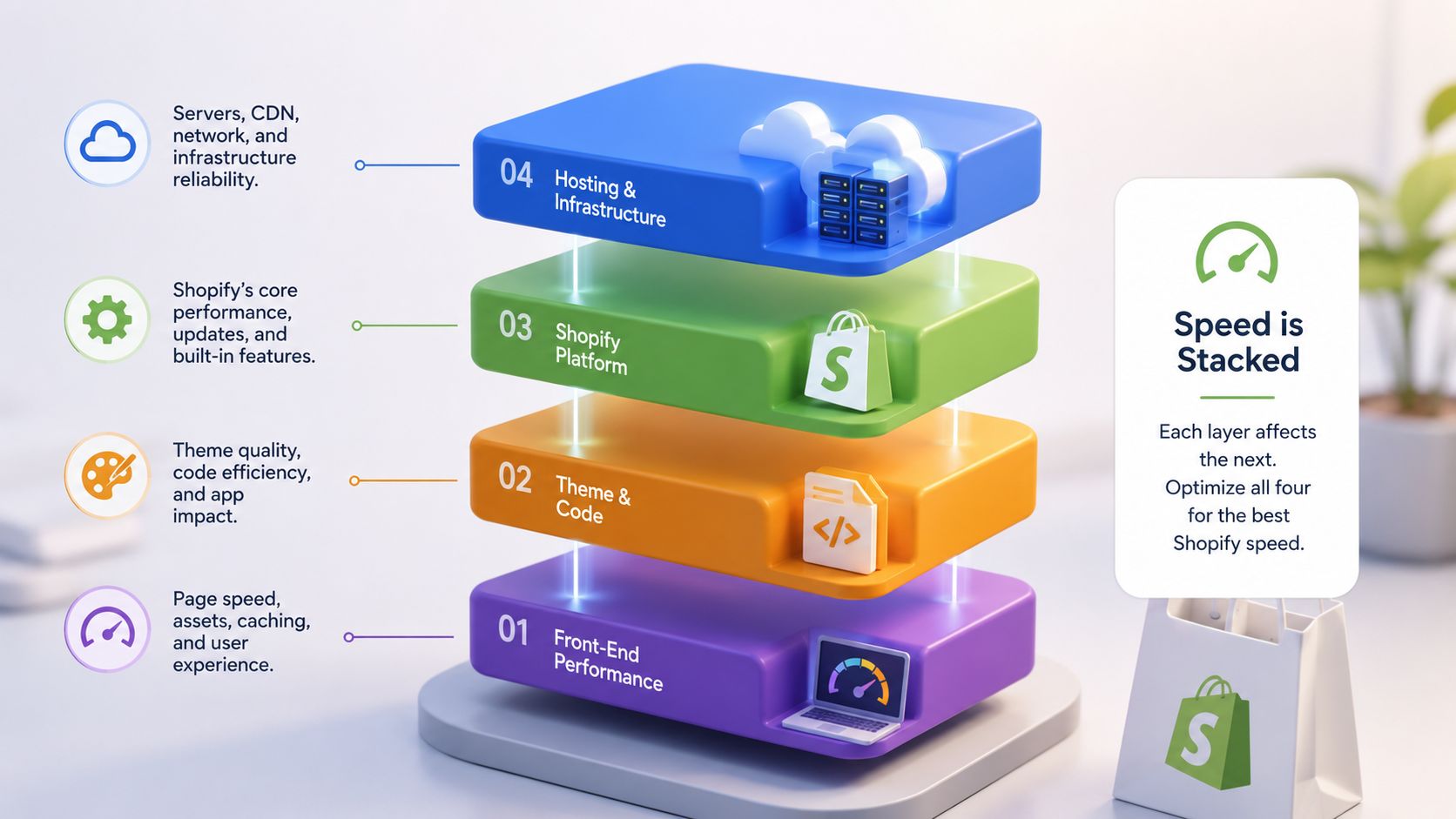
A Shopify storefront slows down in layers. Theme code, third-party apps, images and media, and external scripts or pixels all share the same path to the browser, so one weak layer can hold up the rest. Image compression helps, but it will not fix a theme that ships too much JavaScript or a stack of apps that all wake up on page load.
Theme code and apps are intertwined
A lean theme can still feel slow if it carries stale snippets, repeated section logic, or app injections that were never cleaned up. Shopify's web performance guidance warns that app code can remain in the theme after uninstall, so theme audits need to happen alongside app audits Shopify web performance guidance. Theme structure also affects how quickly the browser builds the page and how cleanly apps integrate, which is why updating your Shopify theme can fix more than visual drift.
Images and media usually get the first round of attention because they are visible and easy to audit. The harder problem is that media often sits beside scripts instead of replacing them. A page can look compressed and still feel sluggish on mobile if the JavaScript layer is too heavy for the main thread.
Third-party scripts are the quietest layer, and often the most expensive. Analytics, chat, reviews, attribution tags, and personalization tools can all add work without changing the page much on the surface. The practical move is to map what runs where, then decide which code belongs on every page and which code should only load on a subset of templates.
Rule of thumb: if a script does not need to block the first interaction, it probably does not belong in the critical path.
A simple mental checklist
Use this order when you inspect a page:
Theme first, because structure and rendering decide what the browser must do before the shopper can act.
Apps next, because they often add the most JavaScript per business function.
Media third, because image and video delivery affect what loads before the page feels ready.
External scripts last, because tags and pixels often multiply across templates.
A theme update can improve maintainability and remove old code paths, but only if the app layer stays under control. If you want a practical reference for that trade-off, the article on updating your Shopify theme is worth a read. The main point is that all four layers compound, and speed work only holds when each one is reviewed against the same standard.
Diagnosing the Actual Cost of Third-Party Apps
A brand adds a reviews app because social proof helps conversion. Then a loyalty widget lands in the header, chat gets installed for support, and a discount helper joins the stack before a big campaign. Each app looks justified on its own. Together, they can turn every page into a script negotiation, especially on mobile where the next tap depends on how quickly the main thread clears.
Measure the footprint, not the feature list
The first mistake is trusting the app dashboard. The second is assuming uninstalling an app removes its cost. Shopify's guidance already warns that app code can stay behind in the theme after the app is gone, which leaves orphaned scripts in the storefront even when the app icon disappears. That is why a clean app list does not always mean a clean storefront.
Use Chrome DevTools Coverage to see how much of a loaded script is used. Open the Network waterfall to see which requests block rendering or delay interactivity. If your team uses the Shopify Theme Inspector, pair that with the browser waterfall so you can separate theme work from app work. The point is not only to spot heavy apps, it is to see which ones load everywhere when they only need to appear on specific templates.
Rank apps by business value and script cost
A practical ranking exercise usually changes priorities fast. The loudest app in Slack is not always the heaviest app in the browser. A low-risk recommendation widget that only renders on product pages may be easier to keep than a chat tool that loads on every page and delays the first interaction. On mobile, the biggest responsiveness problems often come from the stack around the theme, not the theme alone.
The store does not care whether a script is “important” to the marketing team. It only cares whether that script blocks the next tap.
A good app ranking uses two questions. What business function does the app provide, and what does it cost in page weight and responsiveness? If an app adds little business value and loads sitewide, it is a removal candidate. If it delivers clear value but costs too much, it is a replacement candidate.
Common Third-Party Apps and Their Typical Performance Cost | Typical Mobile JS Cost | INP Risk | Recommended Action |
|---|---|---|---|
Reviews widgets | High when loaded globally | Medium to high | Load on scroll or switch to lighter rendering |
Chat tools | Medium to high | High on mobile | Defer until after key interaction |
Loyalty and rewards tools | Medium | Medium | Restrict to key templates |
Analytics and pixels | Variable | Medium | Consolidate and delay non-critical tags |
For a broader look at how app sprawl shows up in real storefronts, the stores using apps page gives useful context on the kinds of stacks teams inherit. Once you know which apps are expensive, you can stop debating opinions and start removing real cost.
Practical Tactics for Leaner App and Script Stacks
The fastest gains usually come from deciding what does not need to run right away. Chat, reviews, and analytics are useful, but they rarely need to block the first tap. If a script does not affect the shopper's next move, it belongs outside the critical path.
Reorder the load path
Push non-critical third-party scripts until after the main content is available. Review widgets can wait until scroll or visible intent instead of loading on first paint. Analytics should be consolidated wherever possible so duplicate loaders and nested trackers do not tax the same page. Shopify's guidance on web application performance points in the same direction, reduce unnecessary requests, use caching where it fits, and keep lazy loading focused on assets that can wait.
A practical way to keep the stack honest is to set a mobile JavaScript budget and treat it as a release gate, not a soft target. If a pull request pushes the site beyond that budget, it needs a clear reason. That keeps new features from erasing months of cleanup.
Replace, consolidate, or remove
Some apps deserve removal, not a workaround. Heavy review suites can often be replaced with lighter server-rendered options. Tag sprawl can be reduced by consolidating analytics pixels through a tag manager or a stricter launch process. Apps with strong business value but poor responsiveness still need scrutiny, especially on mobile, where INP usually reveals the hidden cost.
Merchants who want less app dependency at the theme layer should also look at the theme itself. Shopify's page speed guidance points merchants toward performance-focused theme choices when structure is part of the bottleneck. For teams that need more control than a theme can offer, headless or composable builds can make sense, but they add operational overhead and are not a default answer. If your store is also reworking cart logic, discounts, or custom checkout behavior, Shopify Scripts to Functions guide is a useful reference for reducing theme-side complexity without guessing at the migration path.
A weekly audit checklist
Review new installs: Check whether any app added this week loads sitewide.
Search for orphaned snippets: Inspect theme files after uninstalling anything.
Check first interaction: Open the cart drawer and variant selector on mobile.
Compare templates: Test homepage, top product pages, and top collection pages.
Question duplicate tags: Look for multiple analytics or remarketing loaders.
Teams that want a wider view of how script-heavy stacks affect storefront behavior can also compare AI web scraping tools to see how cleaner HTML and less client-side noise change what automated systems can read. The point is straightforward. Keep only the code that earns its place on the critical path.
Preparing Your Storefront for AI Search and Answer Engines
AI search systems don't need your storefront to be flashy. They need it to be legible. That means semantic HTML, clean product metadata, predictable rendering, and server responses that expose the right facts without depending on heavy client-side reconstruction. The same work that helps shoppers on mobile also helps answer engines decide whether your product is worth surfacing.
Treat schema as the machine-readable product layer
Structured data should cover the basics cleanly. Product, Offer, BreadcrumbList, and Organization schema give crawlers a reliable map of what the page is, how it's categorized, and what can be bought. In practice, schema is less a checkbox and more the API layer that AI systems query when they decide whether to recommend a product. If the markup is incomplete or out of sync with the visible page, trust drops fast.
Variant data deserves special attention. If size, color, or availability only appears after hydration, AI systems and crawlers may not see the same page the shopper does. Server-rendering those details keeps the storefront consistent and reduces the gap between what the browser shows and what an automated system can interpret.
Keep crawl policy and content signals aligned
If your team is publishing crawl guidance for AI systems, keep it explicit and readable. That includes llms.txt policies, robots instructions, and clear treatment of what should or shouldn't be crawled. The point isn't to chase every new crawler by name, it's to make the store's intent clear enough that automated systems can interact with it responsibly.
For merchants researching how different systems extract and interpret content, compare AI web scraping tools can be a useful way to understand what these tools expect from a page. The engineering takeaway is the same either way. Clean HTML beats clever tricks, and stable rendering beats late-stage patches.
AI discoverability improves when product facts live in the markup, not just inside a script after page load.
Keep the source of truth consistent
If you run Shopify alongside a headless front end or external merchandising layer, product metadata has to stay synchronized. Titles, prices, availability, and canonical URLs need to match across the systems that render and the systems that index. A mismatch here doesn't just hurt SEO. It creates inconsistent data for the AI systems that are now acting like discovery layers.
AI optimization isn't a separate project. It's what happens when storefront engineering leaves less ambiguity behind.
Monitoring, Budgets, and CI for Long-Term Performance
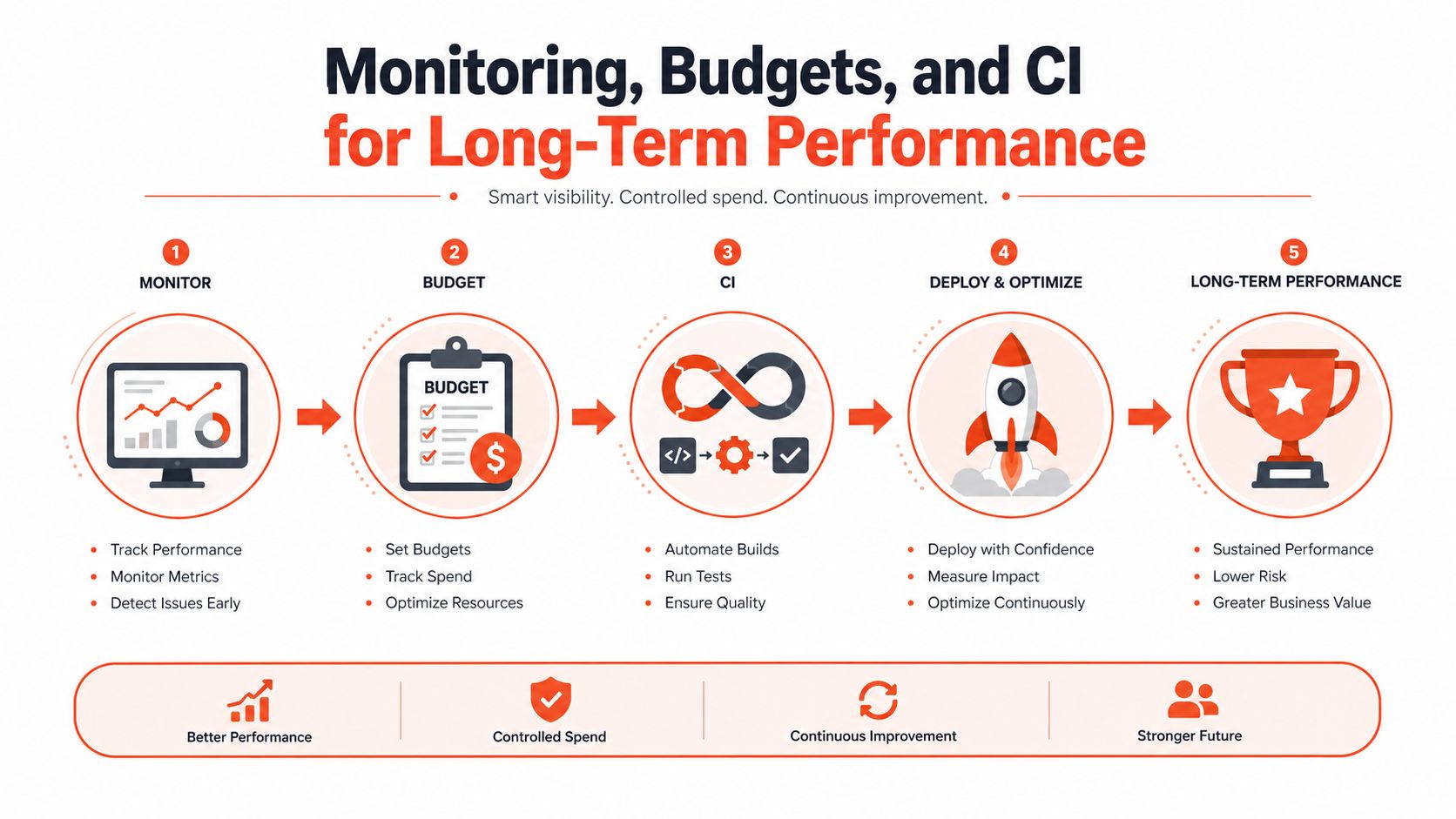
Performance gains disappear fast when nobody keeps watch. A store can feel quick after a cleanup sprint, then slow down again as new apps, pixels, and theme edits pile up. The fix is to treat speed like any other engineering constraint, with budgets, tests, and routine checks.
Put the budget in the pipeline
Set committed thresholds for LCP under 2.5 seconds, INP under 200 milliseconds, CLS under 0.1, a mobile JavaScript bundle under 250 KB, and a PageSpeed mobile score of at least 70. Those limits only help if they are enforced in pull requests or CI, not checked once a quarter after the regression is already live.
Synthetic tests should cover the homepage plus your top product and collection templates, because those are the pages where regressions usually show up first. Shopify's own guidance also recommends real-user monitoring and Web Performance reports so you can compare lab results with what shoppers experience Shopify Enterprise web performance guide.
Use a weekly operating rhythm
Monday is for field data, so the team can see whether real shoppers hit a regression. Wednesday is for app review, because that is when most untracked additions show up. Friday is for theme edits and script changes, which are often the source of load or interaction problems.
That cadence works because it is simple enough to sustain. It also keeps AI-readiness in view, since crawlers and answer engines still consume the same storefront resources that shoppers use. If the page is too heavy or too inconsistent for real users, it is usually too messy for machine consumers as well.
Performance is not finished when the dashboard turns green. It is finished when the budget stays intact after launch.
If your team needs help turning these practices into a maintainable Shopify roadmap, Presidio is a solid place to start for technical audits, theme cleanup, and ongoing storefront optimization.



