Outrank AI

Account-aware B2B ecommerce personalization means showing each buyer the pricing, products, availability, and navigation that match their company and contract, not merely recommending similar products. The approach is already operational across core buying flows, with 58% of B2B companies using personalized site search and 41% offering customer-specific pricing or price books. Adobe B2B commerce survey data
A procurement manager signs in to a wholesale storefront and sees the same catalog as a new distributor. The search results include products their company can't order, the prices don't match their agreement, and the reorder path is buried under consumer-focused merchandising. They email sales, wait for confirmation, and leave the storefront without placing the order.
That situation looks like a UX problem, but the root cause sits deeper. The storefront doesn't know which account is shopping, which ERP rules apply, or how the buyer's role should change the experience. B2B ecommerce personalization is an account-aware commerce system, and Shopify is only one part of that system.
Table of Contents
Why B2B Buyers Expect Different Experiences
A DTC storefront can often personalize around an individual shopper. It remembers recently viewed products, ranks recommendations from browsing behavior, and presents a shared catalog with broadly consistent pricing. A B2B storefront has to answer a harder question: what is this person allowed and expected to buy on behalf of this company?
Consider three visitors to the same Shopify store. A repeat wholesale customer may need a reorder page, contract pricing, and the exact assortment approved for its account. A distributor may need a broader catalog, volume-based purchasing tools, and region-specific availability. A procurement manager at a new company may need technical documentation, approval workflows, and a path to request terms before seeing negotiated prices.
A generic storefront forces all three through the same journey. Buyers search through irrelevant products, compare prices they can't use, and contact sales for information the business already holds in its ERP or CRM. The resulting friction isn't solved by adding a recommendation carousel to the home page.

Personalization reaches the buying system
Personalization can change the search index, category ordering, product visibility, content blocks, payment options, and account controls. A buyer searching for a part number should see the version available to their company, not an attractive but unavailable substitute. A customer with negotiated shipping rules shouldn't encounter checkout options that contradict the account agreement.
Adobe's 2023 B2B commerce survey illustrates how far the practice extends. It found that 58% of B2B companies used personalized site search, 56% personalized payment or shipping options, 48% personalized product recommendations, 48% targeted content and promotions to specific customer segments, 44% personalized product category pages, and 42% used dynamic UI that adjusted navigation for each user or company. The survey breakdown shows personalization operating inside the commerce experience, not only in campaign copy.
The same research reported that 41% offered customer-specific pricing or price books, while 38% provided personalized reporting or insights to customers. That combination points to account-aware infrastructure. Shopify agencies and commerce studios need maintainable logic, clear ownership of customer data, and controlled integrations. Otherwise, every new exception becomes another app, theme condition, or custom script.
Practical rule: If a personalization rule changes what a customer can buy, what they pay, or how an order is fulfilled, treat it as commerce logic first and merchandising second.
A sustainable implementation starts by mapping account identity to the systems that own truth. Shopify can render the experience, but the ERP may own price books and inventory, while the CRM stores account relationships and sales ownership. The B2B ecommerce best practices guide is a useful starting point for aligning the storefront with those operational requirements.
The Four Data Layers Behind Account-Aware Commerce
A distributor account can be matched to its CRM record and price book before the first page view. The storefront then avoids rendering a price that the ERP would reject. That outcome depends less on a personalization app than on a data model that connects identity, catalog rules, and commercial ownership.
A workable B2B model combines firmographic data, technographic data, intent signals, and first-party behavioral data. ZoomInfo's B2B personalization framework describes these layers as complementary inputs for tailoring experiences for anonymous and known visitors.
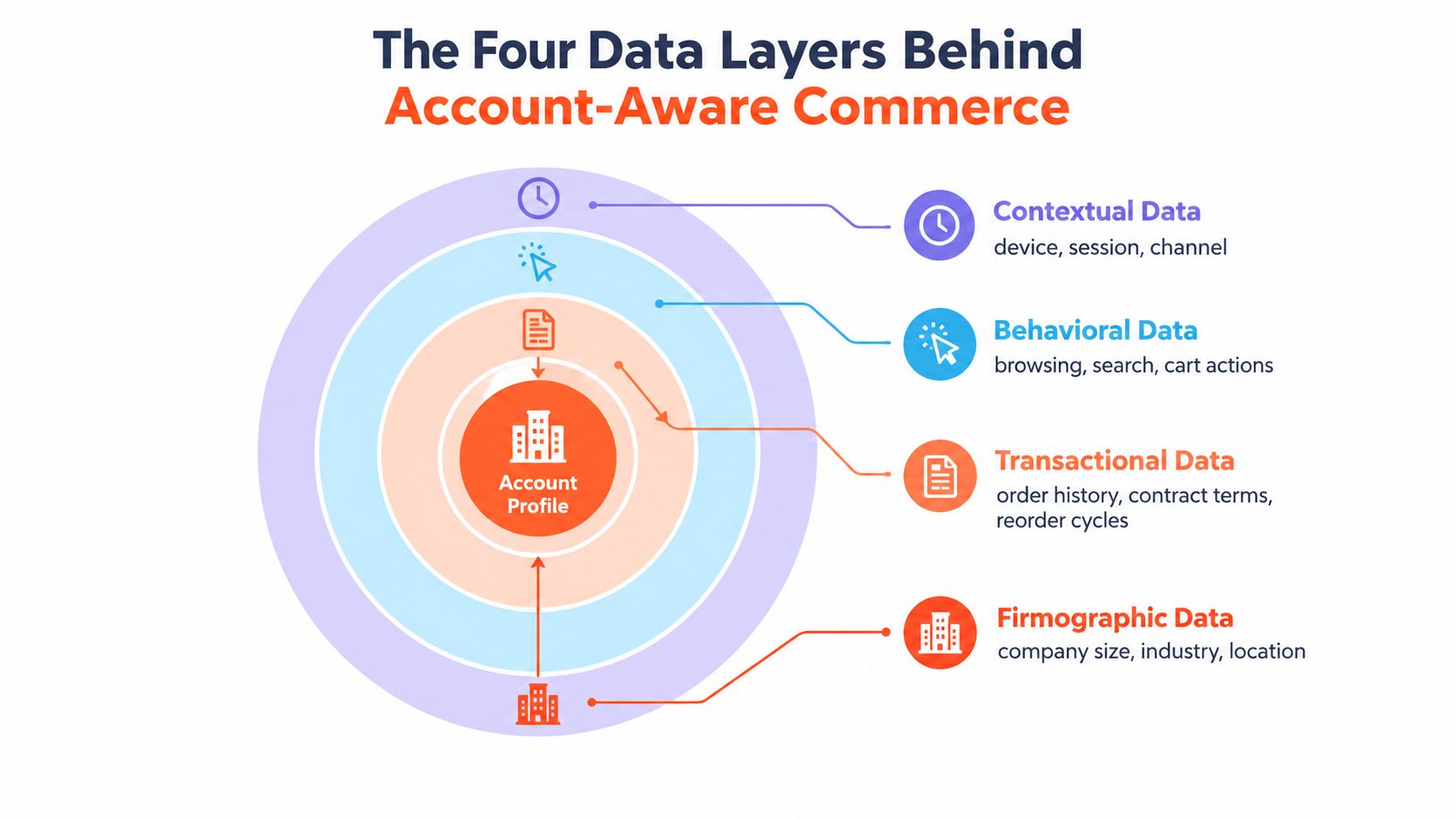
Firmographic data sets the first boundary
Firmographic data includes industry, company size, revenue tier, and geography. It gives an anonymous visitor a useful starting context when no individual purchase history exists. An industrial distributor may need different product families and buying guidance from a healthcare supplier before anyone logs in.
Key the enrichment record to a stable company identifier, not only to an email domain. CRM account IDs, billing entities, and regional business units can then map to the right catalog, sales owner, and operating rules. If the match is uncertain, show relevant content without hiding products the buyer may need.
Firmographics establish a starting point. Account authentication, region, and buyer role should refine it. Keep the fallback conservative, because an incorrect exclusion can block a legitimate order and create avoidable work for sales support.
Technographics improve integration relevance
Technographic data describes the platforms and tools used by the buying company. It can shape integration messaging, implementation documentation, and compatibility filters. A buyer using a known procurement or commerce stack may need a different technical explanation from someone evaluating a standalone catalog.
This layer belongs primarily in content and discovery. It should not calculate prices or grant account permissions. A technology signal can determine which setup guide appears, while an ERP or CRM rule controls the commercial decision.
Intent signals reveal timing
Intent signals help infer buying stage from content engagement, product views, searches, and commercial resources. Repeated comparisons within one product family may justify a clearer route to technical specifications or a sales-assisted quote request.
Intent remains probabilistic. Store it with an expiration window, combine it with account context, and avoid allowing one page view to permanently alter the storefront. Test whether the change helps buyers complete a task rather than only increasing promotional exposure.
First-party behavior sequences the journey
First-party behavioral data includes browsing, search, cart activity, purchases, reorder patterns, and account interactions. Its value increases after login, when actions can be connected to a company, location, and customer role.
A recommendation based only on clicks can still be commercially wrong. The item may sit outside the account catalog, conflict with a contract, or lack regional availability. Run behavioral suggestions through catalog, inventory, pricing, and permission checks before displaying them.
Anonymous behavior can suggest relevance. Account data decides commercial eligibility.
The catalog needs consistent structures for product families, variants, units of measure, regional availability, and customer eligibility. The AdManage.ai product catalog management guide provides a reference for organizing catalog operations before adding dynamic experiences.
Document which system owns each field and how updates move between systems. Shopify can render the experience, while the ERP may own inventory and price books and the CRM may own company relationships. Teams can use guidance on ERP and ecommerce integration to define synchronization rules before custom logic and apps multiply.
Three Core Personalization Strategies for B2B
The most useful personalization programs usually start with three commercial surfaces: account experience, product discovery, and pricing. They overlap for the buyer, but they require different data, permissions, and failure handling in Shopify.
Account-based personalization
Start with the account, not the widget. Once a buyer authenticates, Shopify should receive or resolve the company, location, buyer role, catalog assignment, and relevant fulfillment constraints. The theme can then adjust navigation and content, while server-side or platform-level rules control access to products and prices.
A practical account-aware storefront might show:
Company navigation: Reorder, invoices, quotes, saved lists, and approval tools can replace generic consumer account links.
Catalog visibility: The buyer sees the products assigned to their company or channel, with a deliberate fallback for items that require sales assistance.
Content relevance: Technical documents, merchandising guidance, or onboarding content can reflect the buyer's industry or role.
Fulfillment context: Shipping methods and pickup options can reflect account and location rules rather than a universal checkout configuration.
Use Shopify customer accounts and B2B company relationships where the native model fits. Add custom Liquid logic only for presentation and lightweight conditions. If a rule affects authorization, don't rely on hidden theme elements, because hiding a product isn't the same as preventing access.
Product-level personalization
Product personalization should reduce search effort and improve the next purchase decision. Recommendations can use reorder history, frequently purchased combinations, compatible accessories, and the current account catalog. A buyer who regularly orders a base component may need its replacement parts or a preconfigured bundle, not the products that happen to be popular across the entire store.
Personalized search deserves the same care. Shopify's guidance recommends monitoring search exit rate, zero-results rate, and search add-to-cart rate for personalized search, while recommendations should be evaluated through CTR and attributed revenue lift. Shopify measurement guidance summarized in the benchmark source provides a useful measurement vocabulary.
Don't allow a recommendation engine to bypass business rules. Filter candidate products by account catalog, inventory, market, and compatibility before ranking them. If the recommendation service fails, return the standard catalog experience rather than an empty product module.
For teams assessing tooling, ecommerce personalization software guidance can help frame the choice between recommendation engines, search services, custom functions, and broader customer-data platforms.
Pricing-level personalization
Pricing is the most operationally sensitive layer. A B2B buyer may have a contract price, customer-specific price book, volume break, currency rule, tax treatment, or payment term that the storefront must honor consistently.
Shopify Plus native B2B capabilities can cover many structured price-list scenarios. More complex requirements often need Shopify Functions, an app, or an integration that retrieves authoritative prices from the ERP or commerce service. The key design decision is to define one source of truth. If Shopify, an app, and the ERP can each calculate a different price, support teams will spend their time resolving discrepancies.
Treat price failure as a controlled business state. The storefront should display a clear quote or contact path when it can't verify a price, rather than showing a catalog amount that the buyer can't use.
Shopify Plus Built-Ins Versus Custom Development
Shopify Plus native B2B features make sense when the commercial model is structured and the operating team wants fewer moving parts. Company profiles, buyer accounts, catalogs, and price lists can support a credible account-aware experience without turning the theme into a rules engine.
Custom development becomes more appropriate when pricing depends on external calculations, product availability comes from several systems, merchandising rules vary by role, or the CRM and ERP contain critical account relationships. A custom app can centralize those decisions and expose a stable interface to the storefront. It also creates ownership obligations for monitoring, testing, version updates, and incident response.
The right question isn't whether custom code is good or bad. It's whether the rule belongs in Shopify, an integration layer, or the system that owns the business decision.
Feature | Shopify Plus Built-In | Custom Development |
|---|---|---|
Company accounts | Suitable for structured company and buyer relationships | Useful when identity spans CRM, SSO, dealer portals, or external hierarchies |
Catalog assignment | Effective for defined catalogs and customer groups | Better for dynamic eligibility based on inventory, region, channel, or role |
Price lists | Strong fit for managed, predictable account pricing | Needed when prices require ERP calculation, contract logic, or complex volume rules |
Navigation and content | Works for straightforward theme conditions | Better for cross-system segmentation and dynamic experience orchestration |
Search and recommendations | Can connect to approved tools or platform features | Allows strict filtering through catalog, permissions, compatibility, and inventory |
Operational maintenance | Lower custom maintenance when requirements stay within the model | Higher ownership burden, but clearer control over complex rules |
Upgrade resilience | Benefits from Shopify-supported capabilities | Requires regression testing against platform and integration changes |
Use the native path when the model is stable
Native capabilities are a sensible first choice when account structures are clear, price lists change through managed processes, and the ERP only needs scheduled synchronization. They also make training and support easier because fewer teams need to understand custom behavior.
Don't force native features to imitate an external pricing engine. If staff must maintain the same account rule in several screens, the solution may look simple while creating hidden operational work.
Build custom logic around clear boundaries
Custom development works best when it has a narrow contract. An integration service can resolve account context, retrieve price eligibility, and return approved data. Shopify then renders the result without duplicating the full ERP rule set.
Presidio operates as a hybrid Shopify agency and software studio, with services spanning custom themes, apps, ERP connectivity, and ongoing storefront support. That kind of delivery model is relevant when a B2B brand needs both implementation and long-term maintenance, rather than a one-time personalization installation.
Measuring Personalization Impact on Conversion
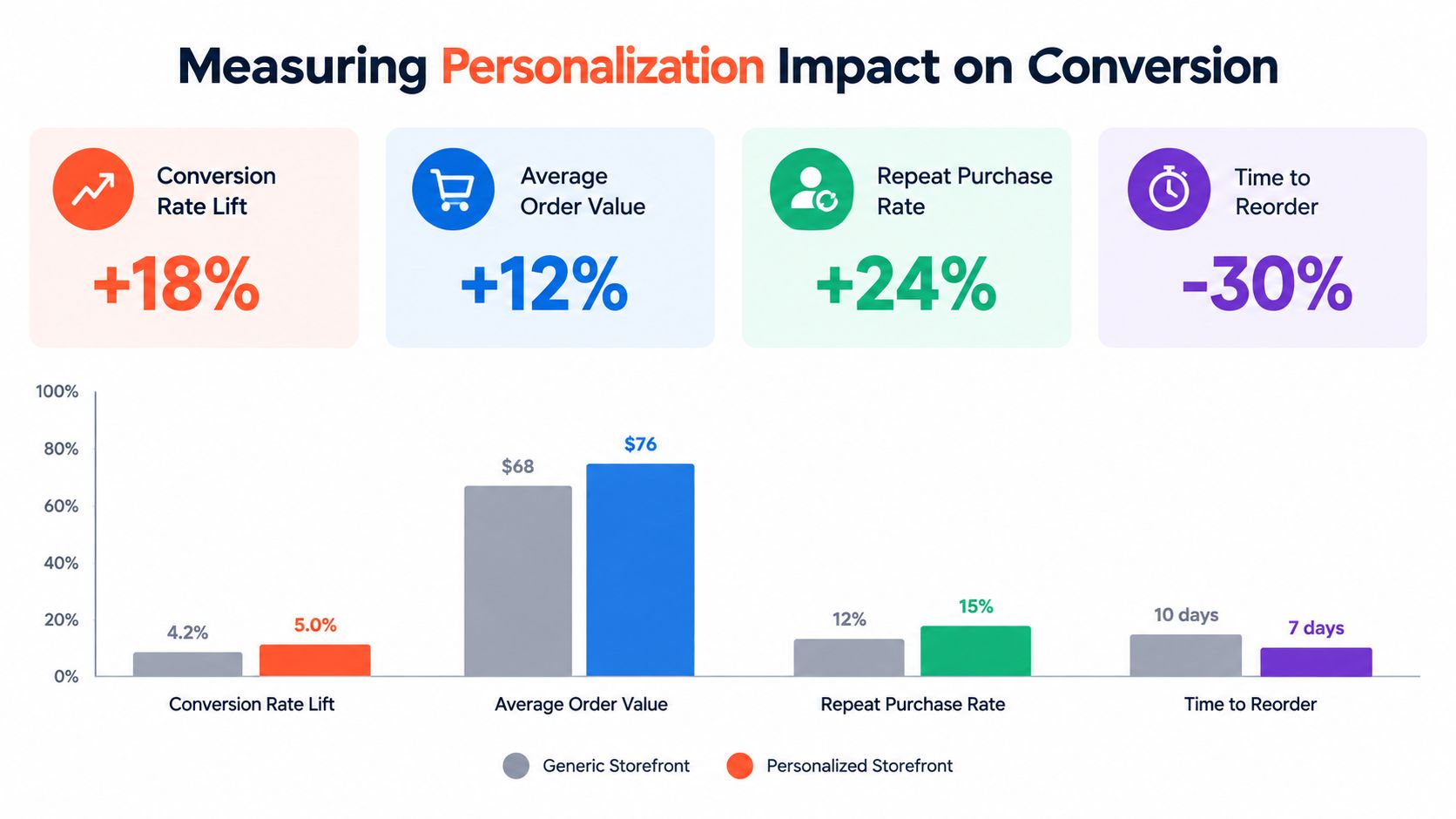
A personalized storefront should justify its infrastructure cost with measurable commercial outcomes. Establish a baseline for the generic experience, then compare the personalized version across comparable account segments, traffic sources, and purchasing contexts. In B2B, account structure matters as much as visitor behavior, so record the customer account, buyer role, price book, and eligibility state alongside each outcome.
A retail benchmark found an average conversion rate increase of 45% for retailers using personalization. The Netcore personalization benchmark report supports the broader mechanism: relevant discovery can reduce friction between browsing and adding to cart. Treat that figure as directional evidence, not a forecast for a B2B storefront with negotiated terms, approval steps, and longer procurement cycles.
Measure commercial decisions, not just interactions
For account-tier analysis, compare quote-request-to-order conversion by price book rather than relying on raw conversion rate. A negotiated price can raise order value while reducing margin. Review gross margin, discount leakage, approval time, and support contacts with the order data so the test captures the commercial effect.
Evaluate personalized search and recommendations by their contribution to a qualified order, not by engagement alone. Segment results by known account, buyer role, and product eligibility. A recommendation can appear relevant while pointing to an unavailable or unauthorized item, creating extra work for sales or support.
Pricing tests need guardrails before launch. Define the permitted discount range, margin floor, and fallback behavior for missing or stale ERP data. Compare outcomes for accounts that received the intended price context with accounts that triggered a fallback, then investigate discrepancies before expanding the rule.
Design tests around account context
Change one decision at a time where possible. For example, compare account-filtered search with the existing search while holding campaign source, catalog, buyer type, and price book steady. If account rules prevent randomization, use matched pre and post periods, document concurrent promotions, and separate new buyers from repeat purchasers.
Keep an event trail that connects storefront behavior to backend decisions:
Identity resolution: Which account and buyer role did the system assign?
Eligibility decision: Which catalog, inventory, and price rules applied?
Experience variant: Which search ranking, content block, or recommendation set appeared?
Commercial outcome: Did the buyer request a quote, complete an order, or reorder?
Failure state: Did a timeout, missing record, or stale synchronization trigger a fallback?
Review results weekly during rollout, then adopt a cadence that ecommerce and operations teams can maintain. Include failed searches, incorrect prices, margin exceptions, and support feedback. Dashboards measure outcomes, but production logs explain why an account saw the wrong experience.
Phased Rollout Roadmap to Avoid App Sprawl
Personalization projects become fragile when teams install a search app, recommendation tool, pricing app, customer-data connector, and reporting layer before deciding how account data moves between systems. Start with the smallest useful capability, prove the data path, and expand only when the previous phase behaves reliably.
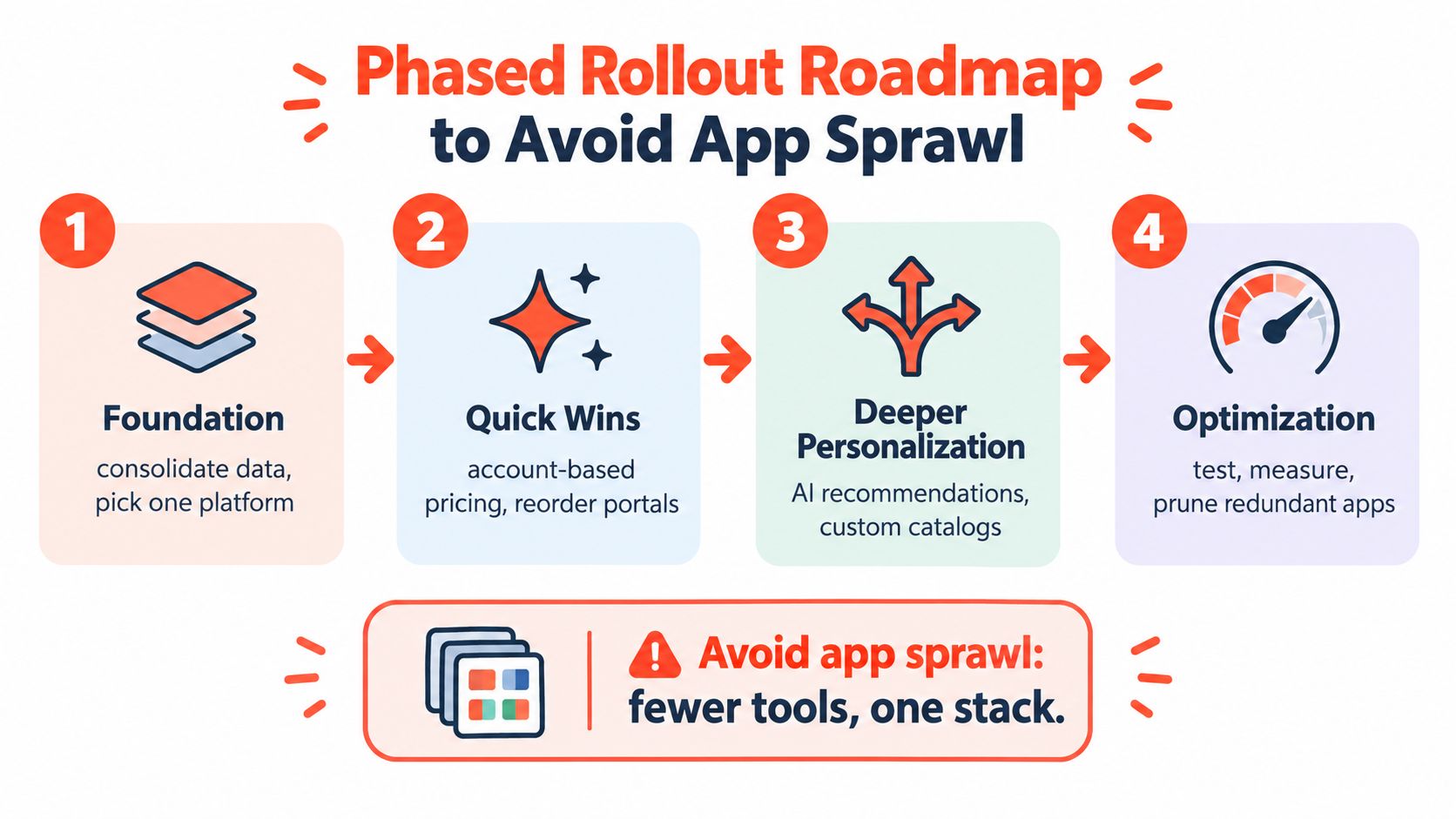
Phase one establishes identity and catalog control
Implement customer login, company association, account roles, and tier-based catalog visibility. Keep the storefront's fallback behavior explicit, especially for anonymous visitors and accounts with incomplete data.
The validation checkpoint is simple: a test buyer should see the correct account, products, and basic navigation across desktop and mobile sessions. Roll back any rule that hides purchasable products, exposes restricted products, or creates a mismatch between the storefront and sales team's records.
Phase two adds commercial relevance
Introduce account-specific prices, customer content, and segment-aware search after identity and catalog behavior are stable. Connect pricing to the system that owns it, and log the returned price context so support can explain what the buyer saw.
Measure search outcomes, price accuracy, quote requests, and completed orders by segment. Don't add a second tool to solve a problem caused by an unclean product or customer record. Fix the data contract first.
Phase three expands discovery carefully
Add compatibility recommendations, dynamic category ordering, deeper ERP synchronization, and intent-informed content. Advanced logic should remain modular, with each rule independently testable and capable of falling back to a neutral experience.
At this stage, document data freshness, error states, ownership, and removal criteria for every integration. A personalization feature without an owner becomes permanent technical debt.
Phase four optimizes and prunes
Run experiments, review low-performing rules, and remove redundant apps. Keep the theme foundation lean, move complex decisions into controlled services or Shopify Functions, and monitor performance on key templates.
Architecture check: Every new app should replace a defined capability, complement an existing system, or provide a measurable outcome. If it does none of those, don't install it.
Before launch, create a rollback plan for each phase. It should identify the previous theme behavior, data sync switch, feature flag, and person responsible for restoring the safe path. That preparation lets the team move quickly without making the buyer responsible for discovering technical failures.
Presidio can help B2B teams connect Shopify or Shopify Plus with ERP systems, build maintainable themes and apps, and improve account-aware search, pricing, and product discovery without unnecessary app sprawl. Review your current storefront and integration boundaries, then visit Presidio to discuss a phased personalization roadmap grounded in your catalog, account model, and operational needs.

Jamie, Presidio’s Designer, leads the practice alongside Johnnie. With over 10 years of e-commerce experience, Jay is a Shopify expert, known for crafting innovative solutions that prevent tech debt.
Jaime
Senior Product Designer, 2020



