Presidio

Your sales rep just fixed a pricing error that should never have reached the buyer. The customer found the product through search, added the correct configuration, and then saw the wrong contract price and an unreliable stock message. They abandoned the order, emailed procurement, and went back to the familiar channel, not because the storefront looked dated, but because the storefront contradicted the business relationship.
That scenario exposes the core problem with most B2B ecommerce best practices. Teams spend months refining navigation and polishing checkout while ERP inventory, customer-specific pricing, product specifications, and approval rules remain fragmented. The strongest Shopify Plus implementations don't eliminate sales assistance. They decide which work buyers can complete themselves, which work sales reps should handle, and how both sides use the same operational data.
Table of Contents
What B2B Ecommerce Best Practices Really Mean in 2026
B2B ecommerce best practices aren't a checklist for adding more digital features. They're a discipline of orchestration. A buyer may discover a product online, ask a rep for a negotiated quote, return through a customer account, submit a purchase order, and then contact support about a split shipment. The experience should feel continuous even when the channel changes.
That requires a deliberate boundary between self-service and assisted selling. Let buyers handle repeatable tasks, including searching, reordering, checking availability, downloading documents, and tracking routine orders. Give sales reps the controls they need for negotiation, complex configurations, exceptions, credit decisions, and high-value opportunities. Forcing every buyer into a portal creates friction. Forcing every buyer to call a rep creates cost and delay.
DHL's 2025 B2B ecommerce research found that 78% of global B2B retailers sell on at least three ecommerce platforms, while 76% offer digital-wallet payments and 35% offer buy-now-pay-later options. The same research reported that 64% offer product subscriptions and 38% use AI across ecommerce platforms. These figures don't mean every business needs every feature. They show that multichannel commerce, flexible payment options, subscriptions, and automation are becoming operating expectations.
Measure the operating system, not the storefront
A B2B program is working when it changes the business behind the site. Track three signals:
Quote-to-cash compression: Measure the time between an initial commercial request and collected payment. A better workflow removes avoidable rekeying, approval delays, and pricing disputes.
Rep hours reclaimed: Identify routine order-status questions, invoice requests, and repeat orders that the portal can handle without sales intervention.
Logged-in reorder frequency: Watch whether existing buyers return to saved lists, order history, and account-specific catalogs instead of reverting to email or phone.
The scale of the channel makes maintainability a commercial issue. U.S. B2B sales exceeded $15 trillion in 2025, according to U.S. B2B sales data reported by Digital Commerce 360. At that scale, the best storefront isn't the one with the most logic. It's the one that handles complex catalogs, pricing, payments, and fulfillment while giving buyers fewer surprises.
How B2B Ecommerce Differs From DTC on Shopify Plus
A DTC storefront is usually optimized for an individual shopper making a relatively simple purchase. A B2B storefront represents a commercial relationship. The buyer may belong to a company account, use a negotiated price list, need approval before submitting an order, and expect an invoice or purchase order rather than an immediate card charge.
Shopify Plus supports B2B capabilities such as company accounts, draft orders, and B2B payment terms. The difficult work isn't bolting consumer apps onto the platform. It's configuring the account, catalog, pricing, checkout, and integration logic so the storefront reflects how each customer is authorized to buy.
Dimension | DTC Storefront | B2B on Shopify Plus |
|---|---|---|
Buyer identity | Individual shopper or guest | Company account with buyers, approvers, and administrators |
Pricing | Public price, promotions, and customer segmentation | Customer-specific price lists, volume rules, and negotiated contracts |
Payment | Card, wallet, or standard online payment | Card, purchase order, invoicing, credit terms, and approval rules |
Catalog | Broad product visibility | Account-specific catalog eligibility and permissions |
Order flow | Immediate checkout | Cart, quote, draft order, approval, or assisted order |
Fulfillment | One shipment is common | Partial shipments, multiple locations, and account-specific delivery rules |
Sales role | Support and acquisition | Negotiation, configuration, exception handling, and account growth |
Measurement | Acquisition and cart funnel | Reorder, quote-to-order, approval completion, and quote-to-cash |
Stop importing consumer assumptions
Net terms aren't a cosmetic payment option. They affect credit checks, account permissions, invoice creation, and reconciliation. Negotiated pricing isn't a discount-code problem. It belongs in a governed pricing model tied to the company and, where necessary, the ship-to location or buyer role.
Punchout catalogs, EDI exchanges, sales-assisted draft orders, and Shopify checkout may all belong in the same commerce architecture. The buyer shouldn't have to understand which system processed the order. They should see an accurate price, a credible availability message, and a clear next step.
A simple diagnostic helps. If your leadership dashboard is dominated by CAC, ROAS, and add-to-cart rate, you're probably running a DTC playbook on a wholesale audience. Keep those measures where they apply, but add metrics for account activation, reorder completion, quote conversion, approval latency, and rep-assisted revenue.
Building Catalogs That Convert Complex B2B Buyers
A long catalog doesn't convert because it contains every SKU. It converts when a buyer can identify the right item, verify compatibility, understand the unit of measure, and trust the availability shown. On complex B2B sites, product data is a conversion feature.
The strongest starting point is a catalog model that matches how customers buy. Structure variants around pack size, case quantity, color, grade, dimensions, and unit of measure instead of creating unnecessary SKU sprawl. Store specifications, compatibility rules, compliance documents, installation files, and fitment attributes in structured fields. Don't bury essential decision data in PDFs or unsearchable marketing copy.
The Polar Analytics ecommerce benchmarks describe a study that evaluated onsite search across 23 B2B ecommerce sites and 22 criteria. The practical lesson is straightforward. Search deserves instrumentation, ownership, and testing, especially when buyers arrive with part numbers, technical phrases, or narrow compatibility requirements.
Design the catalog around permission and repetition
Account-specific visibility matters as much as relevance. Hide products a buyer isn't authorized to purchase, show the correct pack and price context, and prevent unavailable configurations from appearing as viable choices. Then give repeat buyers speed lanes:
Saved lists: Tie lists to company accounts and buyer roles so procurement can reuse approved assortments.
Quick order: Accept part numbers, quantities, and units of measure without forcing a buyer through visual browsing.
Order history: Let customers reorder from previous purchases while preserving current availability and pricing.
Technical filtering: Filter by the attributes that determine compatibility, not by decorative merchandising categories.
Use Shopify sections for flexible storefront composition only after the underlying content model is sound. A flexible section can present specifications clearly, but it can't repair missing attributes or resolve conflicting product records.
Prove that catalog work is paying off
Track search exit rate by buyer segment, time-to-add-to-cart for priority accounts, and the percentage of orders that ship without manual rep intervention. Review failed searches and compare them with the terms customers use in support tickets. If a buyer repeatedly searches for a part number that your catalog doesn't index, the problem isn't a button color.
Catalog cleanup also compounds. The same structured data supports search, filtering, customer-specific merchandising, integrations, documentation, and sales enablement. For most complex B2B programs, it deserves priority before another round of cosmetic CRO.
Pricing, Discounts, and Account Management That Scale
Pricing should be treated as governed business data, not as a spreadsheet that one person updates before a sales call. B2B brands usually lose control through inconsistent list prices, ad-hoc checkout adjustments, and customer-specific agreements that exist only in a rep's memory.
Start with a pricing hierarchy. Define the base catalog price, customer-specific price lists, volume tiers, contract prices, promotional rules, and approval thresholds. Connect those rules to company accounts and customer tags, then make the source and precedence clear. A buyer should never receive a promotional price that overrides a contract unintentionally.
Separate commercial rules from emergency exceptions
Trade discounts, promotional codes, and rep-issued approvals need different permissions and audit trails. A sales rep may be able to request an exception, while a finance approver authorizes it. A buyer may be able to create a cart, while an account administrator submits the order. Model those distinctions rather than giving every user access to a generic discount field.
Shopify Plus mechanisms can support the structure, but the implementation needs careful design across company accounts, B2B payment terms, Markets, Shopify Functions, and Flow. Use Functions or equivalent platform logic to enforce order minimums, prevent discount stacking, validate bundle conditions, and route unusually large orders to an assisted workflow.
Component | Purpose | Shopify Plus mechanism |
|---|---|---|
Company account | Groups buyers, locations, and permissions | Shopify B2B company profiles and locations |
Price list | Applies negotiated or segment pricing | B2B catalogs and customer-specific pricing |
Volume rule | Rewards defined quantities without manual edits | Catalog configuration and Shopify Functions |
Payment terms | Reflects approved commercial arrangements | B2B payment terms and account settings |
Approval flow | Controls orders that need authorization | Company permissions, draft orders, Flow, and custom logic |
Discount governance | Prevents stacking and records exceptions | Shopify Functions, discount rules, and Flow |
Tax and credit data | Keeps checkout aligned with account status | ERP or tax integration with account-level logic |
Payment terms, credit limits, tax exemptions, and approval workflows belong in the same account model. When they're scattered across apps, spreadsheets, and rep notes, checkout becomes a negotiation about what the system should already know.
ERP, CPQ, and PIM Integrations as Core Infrastructure
Treat ERP, CPQ, and PIM as the operational backbone of B2B commerce. The storefront is the interface, but these systems determine whether the interface tells the truth.
The ERP should remain the system of record for inventory, orders, invoicing, and shipping. A real-time or tightly managed inventory sync matters because B2B buyers often verify stock before investing time in configuration, approval, or checkout. The PIM should own product attributes, specifications, documents, and taxonomy. CPQ should govern complex configurations, approved prices, quote creation, and commercial thresholds.

Sequence the integration work by commercial risk
If budget forces sequencing, start with the ERP. Stale inventory and incorrect order status destroy trust quickly. Move to PIM next, because incomplete specifications make search and product comparison unreliable. Add CPQ when configurations, negotiated pricing, or approval thresholds exceed what the storefront can safely manage.
That sequence isn't a license to postpone architecture. Define ownership for every important field before building the sync. Who owns available-to-sell inventory? Which system wins when a product description changes? How does a canceled order update the storefront? What happens when the ERP rejects an order?
A maintainable integration needs more than a successful launch:
Field ownership: Assign one authoritative source for each price, stock, specification, document, and status.
Error handling: Log failed updates and give an operator a clear retry or resolution path.
Latency monitoring: Measure the time from an ERP change to the storefront reflecting it.
Reconciliation: Compare records regularly so silent drift doesn't become a customer-facing issue.
Change control: Review schema and business-rule changes across Shopify, ERP, PIM, and CPQ together.
Use Shopify ERP integration planning as an architectural concern, not a launch checklist. Integration maintenance is part of conversion optimization for complex B2B catalogs because fresh data removes the uncertainty that blocks orders.
UX, Checkout, and CRO Patterns for B2B Buyers
B2B UX should optimize for execution, not inspiration. A buyer usually arrives with a product family, part number, reorder list, or business requirement already in mind. Make the shortest reliable path obvious.
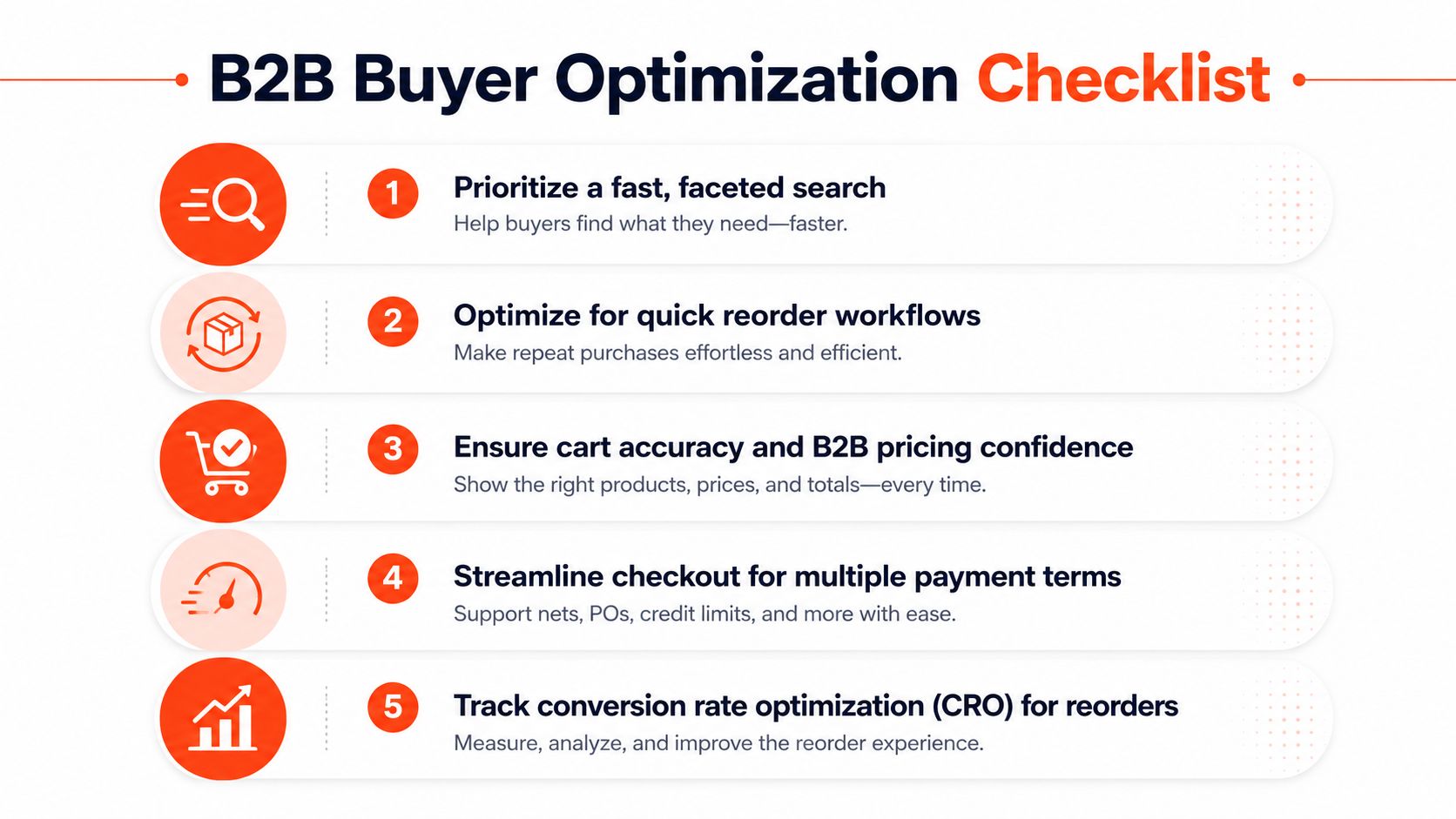
Put fast search, part-number lookup, faceted filtering, saved orders, quick-order forms, CSV upload, and one-click reorder inside the account experience. Show price, availability, lead time, unit of measure, and order constraints as early as the commercial model allows. If a customer can't tell whether the cart contains the right quantity or pack size, a polished interface won't save the order.
Make the login decision deliberately
Don't force every new prospect to create an account before they can express intent. A guest path with quote capture can support discovery and sales follow-up. Existing customers, however, should log in before account-specific price lists, terms, approval rules, and order history apply.
The checkout should support purchase order fields, net terms, quote-to-order conversion, tax handling, delivery instructions, and a visible route to a rep. A buyer who needs assistance shouldn't have to abandon the cart and start a separate email conversation. Pass the cart, account, and quote context into the assisted workflow.
For implementation guidance on extensible checkout logic, see Shopify checkout extensibility. Use extensions for relevant validation and presentation, but keep commercial rules governed by the account and integration model rather than scattered across front-end components.
A practical CRO scorecard should include:
Logged-in reorder rate, segmented by account and buyer role.
Time to second order, which shows whether the first purchase created a repeatable path.
Quote-to-cash conversion, which connects commercial intent with collected revenue.
Search-to-cart success, especially for technical queries and priority accounts.
Checkout exception rate, including price disputes, rejected terms, and manual corrections.
A 2026 review of B2B ecommerce conversion benchmarks describes blended session conversion above 2.5% to 3.5% as strong, 3.5% to 5.0% as top-performer territory, and 5% or more as best-in-class. Treat those ranges as directional only. Segment by device, traffic source, buyer status, and purchase versus lead conversion before changing the experience, especially because the same guidance identifies forced account creation, unexpected costs, checkout friction, and weak product data as common causes of underperformance.
Subscriptions, Security, and Long-Term Optimization
A B2B subscription isn't a DTC recurring order with a company logo. The schedule may need to align with a purchase order, contract term, consumption pattern, approval policy, or invoicing process. Usage-based replenishment and scheduled reorder can work well, but the design must account for quantity changes, substitutions, prorated charges, and ERP synchronization.
Use Shopify Plus subscription capabilities where the commercial model is repeatable. Keep exceptions in an assisted workflow. If a customer needs to change the delivery schedule, adjust quantities across locations, or reconcile a contract invoice, give the rep and account administrator a shared view instead of forcing the buyer through a consumer-style cancellation and restart process.
Protect commercial information
Security includes more than payment data. Customer-specific prices, invoices, credit status, ship-to locations, and purchase history are commercially sensitive. Build access around the buyer's role and least privilege.
Use SSO through SAML where the customer's identity environment requires it, role-based permissions for procurement teams, and audit logs for sensitive changes. Reduce payment-card scope through Shopify Payments where it fits the operating model, and keep current security and compliance documentation ready for procurement reviews. Buyers often ask for evidence before they approve a supplier, not after a breach.
Accessibility belongs in the same governance process. Build and test against WCAG 2.2 expectations, including keyboard operation, focus visibility, meaningful labels, readable contrast, and usable error messages. Accessibility improves the buying experience for users with disabilities and can affect whether a procurement team accepts the storefront.
Maintain the system on a cadence
Run a quarterly review that covers:
Catalog quality: Remove duplicate products, repair failed searches, and verify technical documents.
Price-file differences: Compare active storefront pricing with approved ERP and contract data.
Sync latency: Check inventory, order, fulfillment, and invoice update timing.
Permission audits: Review users, roles, dormant accounts, and approval authority.
CRO backlog: Rank tests by revenue risk and buyer friction, not novelty.
Maintenance isn't a support afterthought. It keeps the self-service promise credible while preserving the human path for work that requires judgment.
The One Best Practice Most B2B Brands Still Skip
Many teams respond to a storefront problem by adding another app. That instinct is understandable, but it often creates a less reliable system. Each new app can introduce another script, webhook, data transformation, permission model, and failure point between Shopify, ERP, PIM, and the buyer.
The better practice is consolidation after launch. Stop treating the installed app list as permanent architecture. Audit it like an operating system.
Run a practical systems audit
Start with a script-tag and webhook inventory. Record what each app loads, what data it reads, what data it writes, and which business process depends on it. Then measure end-to-end order latency from storefront submission to ERP confirmation. Map every transformation that touches price, inventory, customer identity, fulfillment, or tax.
Use a simple decision test for every app:
Keep it if it owns a capability that the core platform and existing systems can't safely replace.
Consolidate it if it duplicates another app or overlaps with Shopify Functions, Flow, or existing integration logic.
Retire it if nobody can explain its business owner, measurable outcome, or failure recovery process.
Rebuild it only when the rule is stable, important, and easier to govern inside your core architecture.
The supplied consolidation visual contrasts expansion, which introduces 8 to 12 app icons, with a more efficient integrated foundation. Treat that range as a warning about complexity, not a universal benchmark for every store.

Use a six-month consolidation plan
In the first month, inventory scripts, webhooks, integrations, data owners, and failure alerts. Next, remove redundant tools and move straightforward discounts, bundles, notifications, and order rules into Shopify Functions or Flow where appropriate. Standardize product ownership in one PIM and document the ERP synchronization contract.
Then tighten the operating rhythm. Set a clear target for inventory freshness, monitor order acknowledgments, and investigate every discrepancy between storefront and back office. Don't adopt an arbitrary latency promise without measuring system capacity and business risk. The point is reliable freshness, not a number chosen for a slide deck.
Create a 30-day audit template with five fields for every integration: owner, purpose, data touched, failure consequence, and retirement decision. Require every new app request to answer what existing capability it replaces, how it affects performance, who maintains it, and how the team will remove it later.
Presidio offers Shopify theme and app development, ERP connectivity, technical audits, performance tuning, and UX and CRO roadmaps for teams that need to reduce operational complexity rather than add surface-level features. Visit Presidio to assess your Shopify Plus architecture, prioritize data and integration fixes, and build a maintainable B2B commerce program that gives buyers the right balance of self-service and human support.

Jamie, Presidio’s Designer, leads the practice alongside Johnnie. With over 10 years of e-commerce experience, Jay is a Shopify expert, known for crafting innovative solutions that prevent tech debt.
Jaime
Senior Product Designer, 2020



