Presidio

A launch-day dashboard can look healthy while the warehouse is already working from a different reality. An operations director sees Shopify marking a SKU as available, even though the ERP has allocated that stock to a wholesale purchase order. Customer orders continue to arrive, the warehouse pauses fulfillment, and everyone starts asking the wrong question: which API failed?
The harder question is which system was allowed to make the decision. ERP and ecommerce integration isn't a wiring exercise between two applications. It's a data ownership model, a set of sync boundaries, and a recovery plan for the moments when systems disagree.
Table of Contents
Why ERP and Ecommerce Integration Is Harder Than It Looks
Most integration diagrams show arrows between Shopify and an ERP. Production incidents rarely happen because an arrow is missing. They happen because both systems write to the same field, a retry arrives after a timeout, or a late event changes a record that the other platform has already processed.
Inventory is the clearest example. Shopify needs sellable availability for checkout, while the ERP may hold physical stock, allocated stock, safety stock, damaged units, and stock assigned to different fulfillment locations. Sending the raw warehouse number to the storefront can expose inventory that isn't available to customers. Silk Commerce explains that inventory accuracy depends on synchronization and allocation rules, not simply on the count stored in either system.
The sync boundary carries the risk
A dual-write design looks resilient because both applications receive updates. In practice, it creates conflict resolution work. If Shopify changes a product title while the ERP updates the SKU, which version wins? If an order webhook times out after the ERP creates the order, should the next delivery create another order or confirm the first one?
You need explicit answers for:
Ownership: Which system is authoritative for each object and field?
Timing: What does “current” mean for inventory, pricing, and fulfillment?
Replay: How can a late or failed event be safely processed again?
Conflict handling: Does the integration reject, overwrite, merge, or quarantine conflicting data?
Vendor maintenance windows, time zones, ERP batch cycles, and rate limits also complicate any promise of real-time behavior. A storefront may receive an update quickly while a downstream financial posting waits for an ERP job. Calling the entire workflow real time hides the operational detail merchandisers and warehouse teams need.
Practical rule: Define what eventual consistency means for each data type before anyone writes integration code.
The market's direction reinforces the operational importance of this work. One widely cited estimate places the global ecommerce ERP integration market at USD 6.2 billion in 2024, with a projection of USD 14.2 billion by 2030 at a 14.8% CAGR. The same outlook identifies cloud deployment and API-based integration as central delivery models, a sign that integration has moved from a back-office convenience to a core commerce capability. Adobe's ecommerce ERP integration overview provides that market context.
What ERP and Ecommerce Integration Actually Means
ERP and ecommerce integration is the ongoing exchange of operational data between an ERP and an online commerce platform. The usual objects include products, inventory, prices, customers, orders, payments, fulfillment updates, returns, and tax-related information.
The purpose isn't to make both systems identical. It's to let each system perform the job it was designed to perform while passing the right decisions across the boundary.
Give each platform a lane
An ERP typically holds financial records, purchasing information, inventory control, warehouse logic, fulfillment status, and supply chain data. Shopify handles merchandising, collections, cart behavior, checkout, storefront presentation, and much of the customer-facing experience.
That division creates a contract:
Shopify captures buying intent through the cart and checkout.
The integration sends order data into the ERP for operational processing.
The ERP calculates or confirms inventory and fulfillment state.
Shopify receives the customer-facing availability and status it needs.
Each system keeps fields that belong to its own business process.
The exchange is bidirectional but asymmetric. Orders commonly originate in Shopify and travel to the ERP. Inventory and operational product attributes commonly originate in the ERP and flow back to Shopify. Customer ownership depends on the model. A direct-to-consumer brand may create the customer in Shopify, while a B2B organization may already manage account, credit, and payment terms in the ERP.
Think in business events, not database copies
A useful integration doesn't copy every field just because an endpoint exposes it. It translates events and enforces rules. An order-created event might include line items, discounts, shipping details, customer identity, payment status, and channel metadata. The ERP then maps that payload into its order structure, validates it, and returns a fulfillment or exception state.
Product synchronization works differently. The ERP may be the source for SKU, cost, stock, and purchasing attributes, while Shopify owns the presentation layer, merchandising copy, media, and collection placement. The integration should move only the fields that have a clear owner.
Cloud adoption has made this architecture more practical for smaller and mid-market merchants. ERP systems existed long before modern ecommerce, but cloud deployment reduced some of the infrastructure and access barriers that previously made integration difficult. Top10ERP describes the historical shift and reports that cloud-based solutions represented 54.23% of market share in 2025, while API integration represented 46.49% of revenue in that year.
Integration Patterns and Middleware Options
The right architecture depends less on the number of platforms than on the number of rules, failure modes, and teams responsible for maintaining them. A simple Shopify store with a straightforward ERP may tolerate direct API calls. A brand with multiple locations, B2B pricing, marketplaces, returns, and headless frontends usually needs an orchestration layer.
Four practical choices
Direct API integration puts the logic in application code. It can start lean, and it avoids paying for a separate integration platform, but authentication, field mapping, retries, rate-limit handling, and monitoring all become your responsibility. A Shopify API change or ERP schema update can affect several parts of the codebase.
Middleware or iPaaS uses a platform such as Celigo, Workato, or MuleSoft, or a queue-and-transform service built for the merchant. These tools usually provide connectors, authentication management, mapping, retry controls, logs, and operational dashboards. You trade some low-level flexibility for faster implementation and better visibility.
Custom ETL extracts records, transforms them, and loads them into the destination on a controlled schedule or through event triggers. It suits migrations, large catalog operations, and data warehouses, but ETL alone can be awkward for urgent order ingestion.
A custom event bus built with tools such as Kafka, Pub/Sub, or serverless workers offers strong control over event distribution, replay, and scaling. It also demands platform engineering, alerting, schema governance, and long-term ownership. For teams evaluating Microsoft Dynamics 365 Business Central alongside workforce processes, a resource such as this modular HR platform on Business Central can help clarify where the ERP boundary sits before integration work begins.
Pattern | Build Cost | Runtime Cost | Flexibility | Best Fit |
|---|---|---|---|---|
Direct API | Lower initially | Engineering time and maintenance | Moderate | Small scope, limited entities |
Middleware or iPaaS | Moderate | Platform subscription and operations | High within platform model | Most Shopify ERP projects |
Custom ETL | Moderate to high | Infrastructure and scheduled jobs | High for transformation | Migration and analytical workloads |
Custom event bus | High | Infrastructure and platform ownership | Very high | Complex rules and high event volume |
Shopify webhooks fit naturally with middleware and event-driven designs because they can hand off order, product, and inventory events to a queue before the ERP is called. The practical rule is straightforward: start with middleware unless you have a clear reason not to. Move to a custom event bus when volume, latency requirements, or transformation complexity justify the additional platform investment.
Mapping the Core Data Flows Between Systems
Every implementation needs a directional model for the major entities. “Sync both ways” isn't a model. It's an invitation to create loops, overwrites, and records with no clear owner.
Orders
For direct-to-consumer commerce, Shopify should usually originate the order event. The ERP receives the order, validates it, creates the operational record, and returns fulfillment or exception updates. Order edits, cancellations, partial shipments, and returns need separate event handling because they change the original business state.
A webhook retry can create a duplicate order if the integration posts blindly after a timeout. The destination should use a stable idempotency key derived from the Shopify order or event identity and record the processing result.
Inventory
The ERP generally owns inventory truth because it sees purchasing, allocation, warehouse movement, and fulfillment. Shopify should publish sellable stock, not necessarily the raw physical count. Safety stock, reservations, and location rules belong in the availability calculation. Shopify ERP architecture guidance recommends event-driven synchronization, delta processing, idempotency keys, dead-letter queues, and controlled inventory updates.
Products
Product ownership varies. The ERP often originates SKU, cost, units, and operational status, while Shopify owns presentation fields and merchandising structure. A mapping error can be subtle, such as a price arriving in the wrong currency unit or a variant being connected to the wrong inventory item.
Customers
Customer creation often begins in Shopify for DTC, while B2B account records may originate in the ERP or CRM. Don't merge records on email alone if business accounts, multiple contacts, tax identifiers, or guest checkouts matter. A canonical identity key and explicit merge rules prevent duplicate customer records from spreading across systems.

For merchants replacing spreadsheet exchanges or manual document handling, replace manual EDI workflows is a useful way to frame the broader automation opportunity. The implementation detail still matters: map every field, define its owner, and test failure behavior rather than validating only successful payloads. Teams building specialized Shopify functionality can also use custom Shopify app development when the native storefront or app layer needs a controlled extension.
Defining Source of Truth and Sync Boundaries
Bidirectional sync doesn't automatically create resilience. Without field-level ownership, it creates two systems that keep correcting each other.
A better model assigns one canonical system to each business decision. The other system receives a projection that it can display or use within its own workflow. The ERP might own SKU, cost, inventory, purchasing, and fulfillment status. Shopify might own cart state, checkout data, storefront presentation, and marketing-attributed customer context.
Assign ownership at field level
A product record can have multiple owners. The ERP can own the SKU and cost, while Shopify owns the product description and merchandising status. The integration should not treat the entire product object as a single indivisible record.
Entity | System of Record | Sync Direction | Conflict Rule |
|---|---|---|---|
Inventory availability | ERP | ERP to Shopify | ERP wins, publish sellable quantity |
Order creation | Shopify | Shopify to ERP | First accepted event wins |
Fulfillment status | ERP or warehouse | ERP to Shopify | Operational status wins |
Storefront content | Shopify | Shopify to storefront | Shopify wins |
B2B account terms | ERP or CRM | ERP to Shopify | Financial system wins |
Use write-through behavior when the destination must confirm a transaction immediately. Use event-driven delivery when systems can process asynchronously and you need buffering, retries, or replay. In both cases, attach an idempotency key and preserve the original event so operators can trace what happened.
The same discipline applies when syncing Seller Central data with other commerce systems. Data being present in two databases doesn't mean both databases should edit it.
Selective synchronization becomes more valuable as the merchant adds SKUs, fulfillment nodes, channels, and custom fields. Full bidirectional synchronization sounds complete, but it expands the conflict surface. A strict boundary keeps the storefront responsive while preserving financial and operational control in the ERP.
Shopify and Shopify Plus Architecture Considerations
Shopify imposes constraints that should shape the integration before development starts. Webhooks can notify your service about changes, but delivery isn't a guarantee that events arrive in the business order you expect. Your receiver should acknowledge quickly, persist the event, and process it asynchronously with an idempotency key.
Shopify API usage also requires deliberate scheduling. Admin API and Storefront API calls operate within platform limits, while GraphQL requests consume a cost budget. Large catalog operations should use bulk operations or controlled batching rather than a loop that requests every record individually. A flash sale and a catalog reindex can compete for the same integration capacity if they share an unbounded worker pool.
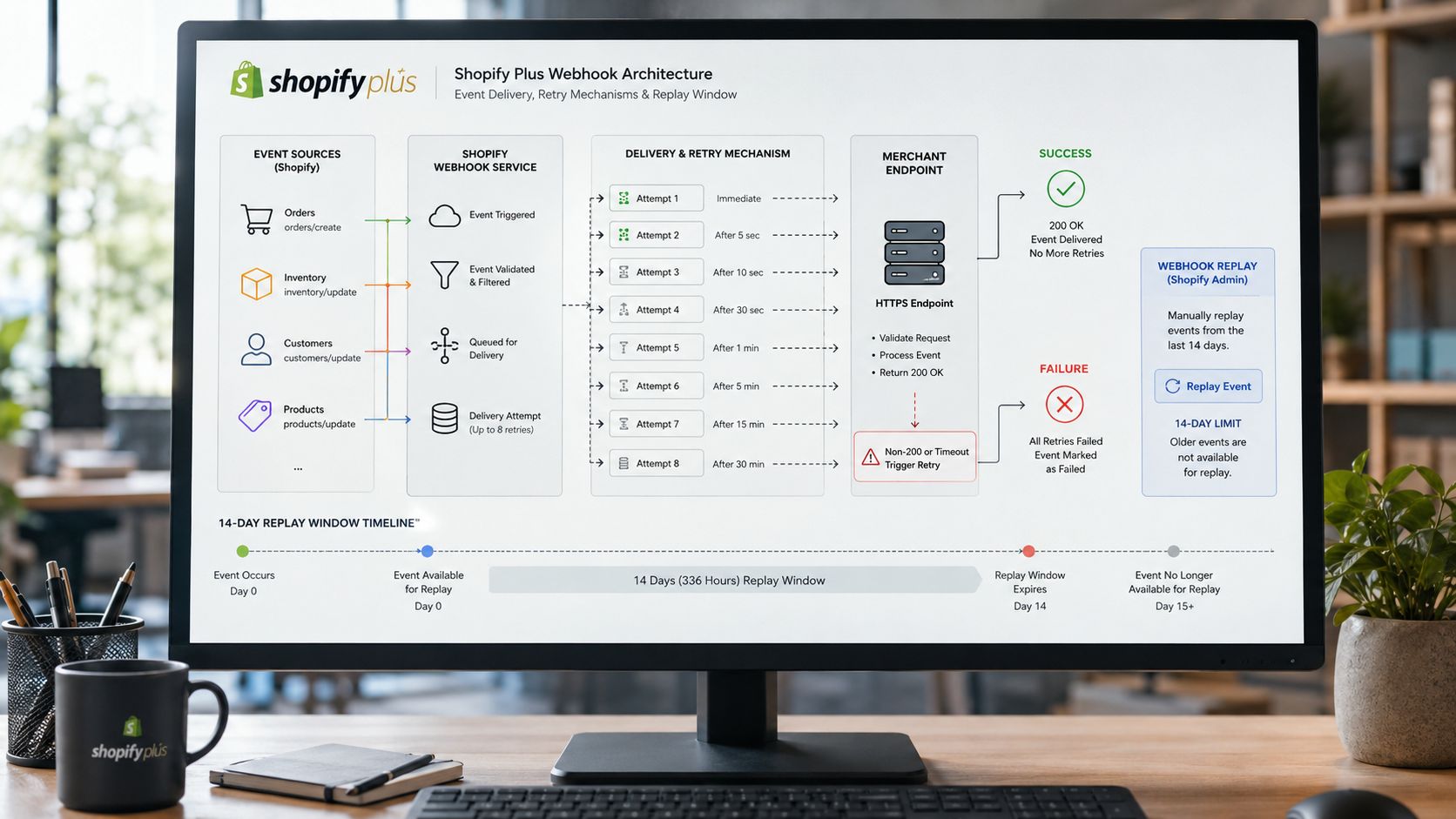
Design for Shopify's event model
Your event pipeline should include:
Fast acknowledgement: Accept the webhook before doing slow ERP work.
Durable queues: Keep events available when the ERP is unavailable.
Idempotent writes: Treat retries as normal, not exceptional.
Dead-letter handling: Isolate payloads that need human review.
Delta processing: Send changed records instead of rebuilding full datasets.
Shopify's webhook behavior includes retries and a bounded replay window, so retention and replay tooling belong in the design. A failed event shouldn't require an engineer to reconstruct the order from an admin screen.
Shopify Functions and checkout extensibility provide a controlled place for custom pricing, discounts, bundles, and order rules. Don't expose ERP credentials or internal financial logic to the browser. Instead, pass the minimum customer-facing result through an app or function boundary, with the ERP remaining responsible for authoritative financial and fulfillment decisions.
Headless storefronts add another cache problem. Multiple frontends can read the same catalog, so an ERP price or inventory update must invalidate every relevant cache rather than only the traditional Shopify theme response. Teams planning this model should account for Shopify headless commerce as an architectural choice, not just a frontend replacement.
The integration can also sit behind a custom event pipeline that separates ingestion, transformation, and delivery. That separation prevents an ERP slowdown from blocking Shopify event intake and gives operators a clear place to inspect queue depth, last-successful sync time, and failed transformations.
Common Failures and How to Prevent Them
Production failures usually expose an ownership decision that was never made. The initial connection may pass its tests, yet the integration fails when inventory is reserved, an order is retried, a location changes, or an ERP catalog update collides with a storefront promotion.
The recurring failure patterns
Overselling starts with stale availability. The storefront publishes stock before reservations and allocations are applied, or an inventory update is delayed while checkout continues. Make the ERP the inventory authority, publish sellable quantity, validate availability at checkout where appropriate, and alert when synchronization stops.
Duplicate orders usually follow webhook retries, timeouts, or workers that don't record completed writes. Store a durable idempotency key at the destination and make order creation safe to repeat.
Mapping drift appears after a SKU, location ID, variant, tax code, or fulfillment identifier changes in one system. Maintain a cross-reference table, validate mappings before deployment, and quarantine unknown identifiers instead of guessing.
Rate-limit collisions occur when bulk catalog writes consume capacity needed for live order or inventory events. Use separate queues and priorities, back off on throttling, and schedule non-urgent work around operational demand.
Pricing and tax divergence follows unclear ownership or different rounding and rule models. Define which system calculates each value, preserve the source currency and precision needed for reconciliation, and test discounts, tax, refunds, and partial fulfillment separately.
Failure | Root Cause | Mitigation |
|---|---|---|
Overselling | Stale or unallocated inventory published online | Publish sellable stock and validate critical availability |
Duplicate orders | Missing idempotency and unsafe retries | Use stable event keys and replay-safe writes |
Mapping drift | IDs change without a controlled cross-reference | Version mappings and quarantine unknown values |
Rate-limit collision | Bulk jobs compete with live events | Prioritize queues and apply backoff |
Price or tax mismatch | Different owners or calculation rules | Assign calculation authority and reconcile outputs |
Observability should show queue depth, event age, last successful sync, rejected payloads, mapping conflicts, and destination response states. A green job status isn't enough if the queue is accumulating old events.
Incident habit: Keep a runbook that says who can replay an event, which records must be checked first, and when an operator should stop the queue instead of retrying.
Replay tooling matters because the first failure is rarely the last. Operators need to retry one event, a bounded time range, or a specific entity without replaying the entire integration.
A Phased Plan for Shopify Plus Migrations
A Shopify Plus migration puts every sync boundary under pressure at the same time. The merchant changes storefront behavior, product identifiers, customer records, URLs, apps, and sometimes fulfillment assumptions while orders continue to arrive. A phased plan limits the number of unknowns that reach production together.
Discovery
Start by documenting ownership for every core entity and important field. Inventory locations deserve special attention because Shopify locations, ERP warehouses, 3PL nodes, and allocation rules may not share the same identifiers. Record current sync schedules, manual overrides, failure queues, and reports that finance or operations uses to confirm correctness.
The first practical move is an audit of existing boundaries. Don't choose middleware until you know which system currently creates, edits, approves, and reconciles each record.
Pilot
Connect one channel, region, or controlled product group first. Use shadow writes where possible, compare projected records with the production system, and produce reconciliation reports for orders, inventory, prices, and fulfillment. The pilot should prove failure handling, not just successful creation.
Cutover
Define a freeze window for catalog and configuration changes. Decide whether a short dual-write period is safe, and document which system wins if both sides change during that period. Preserve order replay capability so events accepted during migration aren't lost when the new connection becomes active.
Steady state
After launch, assign ownership for the integration contract. Monitor event age, failed mappings, inventory freshness, order status mismatches, and API throttling. Run rollback drills while the team still remembers the cutover, and update runbooks when an incident exposes a new edge case.

A staged approach also supports broader compliance and operational requirements. Market coverage connects integration demand with e-invoicing requirements in the EU and India, as well as headless commerce and marketplace service-level pressure. One analysis projects the market from USD 14.21 billion in 2025 to USD 15.21 billion in 2026, reinforcing that integration decisions can be driven by tax and invoicing obligations as much as by efficiency goals. Mordor Intelligence outlines those market drivers and projections.
For merchants planning the platform move itself, Shopify migration services can fit into the discovery, cutover, and post-launch optimization work without treating the ERP connection as an afterthought.
Presidio helps Shopify and Shopify Plus brands map data ownership, build ERP and 3PL connections, and create maintainable storefront and app architectures around those boundaries. Visit Presidio to discuss an integration audit, migration plan, or custom Shopify implementation that can be monitored and supported after launch.



