Presidio

The popular advice about ecommerce site search is incomplete. Merchants are told to improve autocomplete, add AI relevance, and teach the search engine more synonyms. Those changes can help, but they won't rescue a results page that leaves shoppers with a long product grid, weak filters, and no clear way to choose.
Search is a product-discovery journey, not just a retrieval system. A shopper who types “gift for mom” or “running shoes for flat feet” may have strong intent without knowing the exact product name. Your Shopify store has to interpret that intent, guide the next decision, and make comparison easy. The search box is only the opening move.
Search approach | What it does well | Where it breaks down | Best next investment |
|---|---|---|---|
Keyword matching | Finds products containing the query terms | Misses synonyms, typos, and problem-based intent | Better product data and query rules |
AI relevance tuning | Improves ranking and conversational understanding | Can still return an overwhelming grid | Guided navigation and merchandising |
Faceted search | Helps shoppers narrow a category | Requires useful, clean product attributes | Context-aware filters |
Product finder | Converts vague needs into structured choices | Needs thoughtful questions and maintenance | Intent mapping and recommendations |
Comparison tools | Supports feature-heavy decisions | Takes effort to model comparable attributes | Consistent product data |
Table of Contents
Why Most Ecommerce Site Search Implementations Fail
Better autocomplete is one of the most repeated recommendations in ecommerce. It's also one of the easiest features to overvalue. Autocomplete can help a shopper reach a known product faster, but it does little for someone who knows the problem they want to solve and not the SKU they want to buy.
A query such as “gift for mom” isn't a conventional product lookup. It expresses an occasion, recipient, and emotional context, but no category, budget, material, or style. “Running shoes for flat feet” is more specific, yet it still asks the store to connect a customer need with product attributes that may not appear in the product title. An AI engine can interpret those words, but the customer still needs help deciding what matters next.
Independent 2025 research on ecommerce results pages found that 85% lacked guided elements such as a product finder, 58% had no dynamic filters, and more than 76% lacked product comparison tools (State of Search 2025 research). Those findings point to a practical failure: merchants invest in the query layer while neglecting the decision layer.
Search technology isn't the same as discovery
A technically relevant result can still be commercially useless. If a broad query produces dozens of products with identical visual weight, the shopper has to perform the merchandising work themselves. They must decide which attributes matter, identify meaningful differences, and work out whether a product fits their situation.
The results page should respond to query intent. A specific product search needs a direct product card with availability, variants, and a clear path to purchase. A problem-based query needs education, attributes, and guided narrowing. A category query needs facets that reflect how customers shop, not merely the fields your product database happens to contain.
Practical rule: If the shopper can't explain why one result is better than another, relevance tuning hasn't solved the full search problem.
Product design fundamentals matter here. Teams reviewing search layouts can use these product design guidelines to assess hierarchy, interaction clarity, and decision friction, then apply those principles specifically to search states.
The zero-result page is only one failure mode
A zero-result query is visible and easy to report. A more dangerous failure returns products that technically match but don't help the shopper. Broad intent, missing attributes, poor synonym coverage, and rigid filters can all create a dead end without displaying an empty state.
Start by grouping queries into known-item, category, attribute, problem, and non-product intent. Each group deserves a different response. A search engine should retrieve products, but the storefront should help the shopper move from language to confidence.
The Business Case for Investing in Search Quality
Search traffic carries intent, but intent alone does not create revenue. A shopper who types a product, material, or use case into your storefront has given the business more context than a homepage visit. Growth, merchandising, UX, and engineering should treat that behavior as a shared commercial signal.
Benchmarks report that up to 30% of visitors use site search when it's offered, and searchers are often 2 to 3 times more likely to convert than non-searchers (Algolia ecommerce search and KPI statistics). Other research places in-session search usage around 30% to 50% and zero-result rates at 10% to 15% (2020 ecommerce site search research). Treat these figures as directional benchmarks, not a forecast for your store.
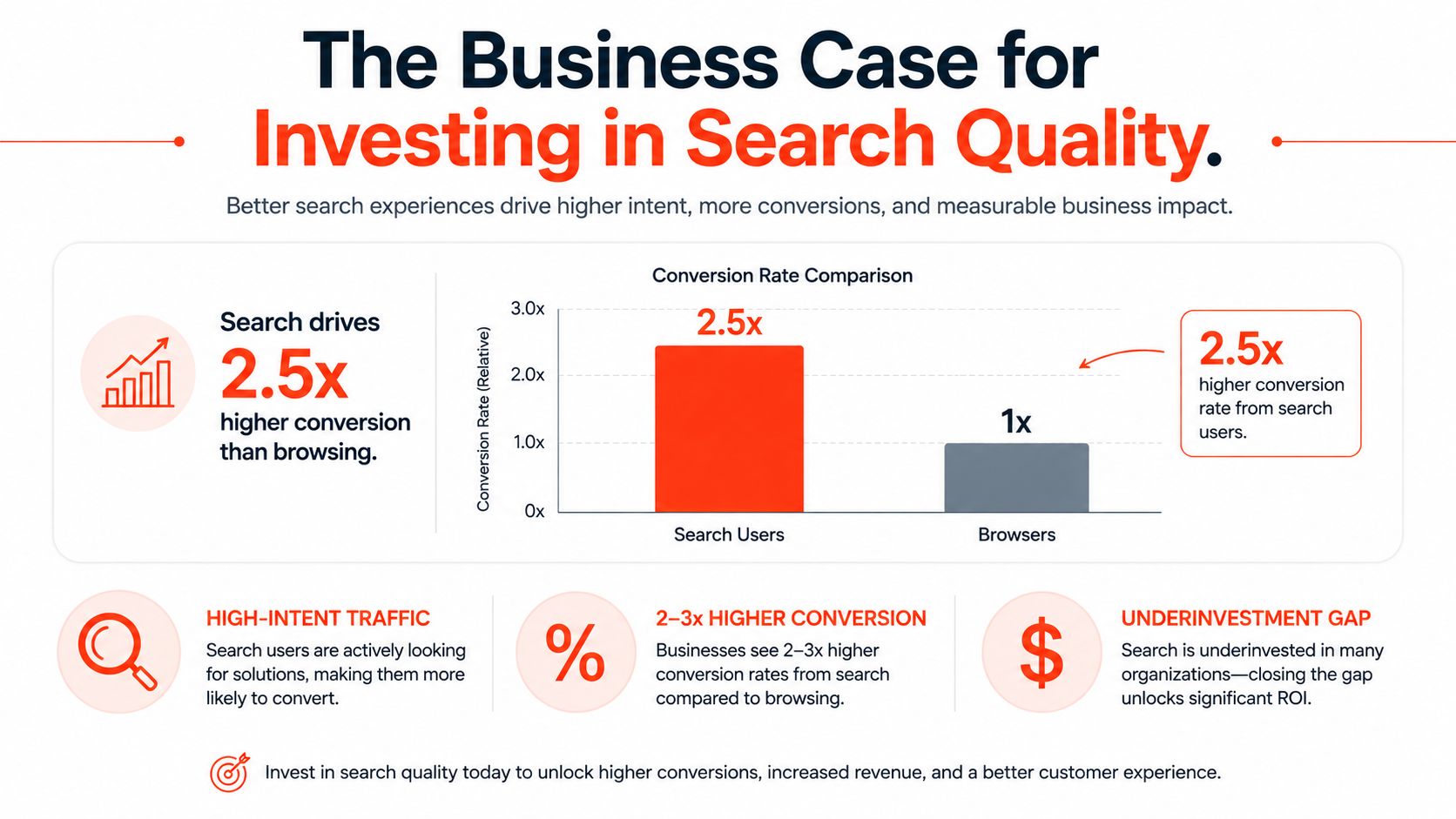
The commercial case is direct. Searchers may be more valuable, so a failed search affects an audience that already showed stronger purchase intent. Irrelevant ranking, an empty results page, or filters that provide no useful direction can stop product discovery before the customer reaches a decision.
Build the financial case with your own funnel
Start with your store's baseline instead of promising an abstract uplift. Separate sessions that include search from browse sessions, then track:
Search usage: How often visitors start or refine a search.
Search conversion: Purchases from sessions that include search.
Result engagement: Click-through rate, filter use, product views, and add-to-cart actions.
Zero-result rate: Searches returning no products or no useful recovery path.
Revenue per search session: A business measure connecting search behavior with orders.
The widely cited 2020 ecommerce research reported an average desktop conversion rate of 5.9% for retailers with advanced site search, compared with 2.8% for merchants using basic search capabilities, an association of more than 2 times higher conversion (2020 ecommerce site search research). That finding supports investment in search quality. It does not prove that installing an advanced tool will produce the same outcome.
Connect search to merchandising decisions
Search logs reveal demand that navigation may hide. Repeated searches for a material, use case, or product type can expose weak product copy, missing collection structure, or a catalog gap. Searches followed by complementary purchases may also inform cross-sell placement, but validate that pattern in your own data.
Search technology cannot compensate for poor product data or weak discovery paths. For Shopify acquisition and technical foundations, the Shopify SEO best practices guide offers relevant context. Keep search work aligned with crawlable collection architecture, complete product information, and a storefront that loads and operates reliably.
Results Page UX Patterns That Actually Convert
A results page should change shape according to intent. Treating every query as a standard collection grid creates unnecessary work for customers and hides the information that supports a decision.
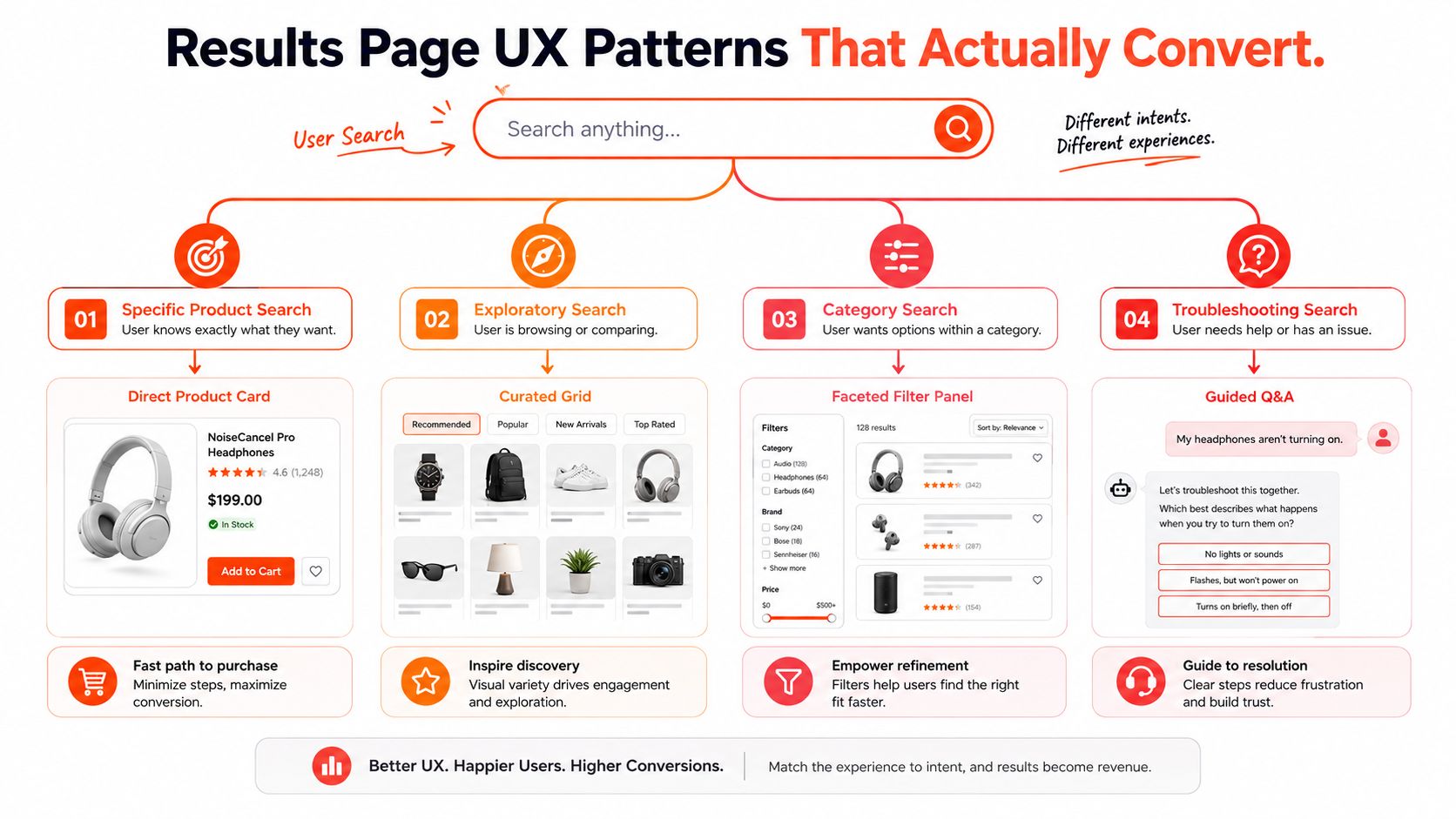
Match the interface to the query
Known-item searches should be fast and precise. Show the strongest product match first, preserve variant context, and make availability visible. Don't force a shopper who searched for an exact model through a discovery quiz.
Category searches need faceting. A query such as “linen shirts” should expose relevant attributes such as fit, color, sleeve style, and size, provided those fields are consistently populated. A filter for an attribute that only a small portion of products contain creates confusion rather than control.
Exploratory searches benefit from curated grids and merchandising logic. A query like “summer essentials” may deserve collection suggestions, editorial content, and a product grid organized around a useful buying sequence. Ranking can prioritize in-stock products, but it shouldn't conceal commercially important alternatives without a reason.
Troubleshooting or problem-based searches need guided questions. “Sensitive skin” or “flat feet” may map to several product categories and require qualification. A product finder can ask about the shopper's priorities, then recommend a smaller set with explanations.
Design the narrowing path
Dynamic faceting is more useful than a permanent wall of filters. The interface should surface filters that make sense for the current result set and query, while keeping selected filters visible and reversible. On mobile, filter controls need to preserve context, show applied choices, and return shoppers to the same scroll position after they close the panel.
Comparison matters in categories where products differ by technical specifications, ingredients, compatibility, or capacity. A comparison tool doesn't need to expose every field. It should highlight the attributes that separate products and allow the shopper to move from comparison to purchase without losing their place.
A good results page reduces the number of decisions a shopper has to invent for themselves.
Merchandising rules need restraint. Pin a relevant product, boost seasonal inventory when it fits the query, and handle out-of-stock products deliberately. Showing unavailable items can be useful when alternatives sit beside them, but sending customers to a dead product page without substitution is poor recovery.
Personalization can support these patterns when it has a clear role. Teams exploring how to boost conversions with AI should evaluate whether AI improves the complete decision path, not just the ranking model. Presidio's conversion rate optimization tips with AI also offers relevant context for connecting intelligent features with measurable storefront behavior.
Native Shopify Search Versus Third-Party Solutions
Shopify's native search is often the right starting point. It keeps the storefront architecture simple, avoids another indexing service, and works well when product titles, descriptions, tags, metafields, and collections are organized consistently. Many stores don't need an external engine. They need better data and a results template that exposes useful decisions.
The limitations appear as catalog language becomes less predictable. Synonyms, typo tolerance, weighted attributes, query rules, advanced merchandising, and analytics can require more control than a native setup provides. A third-party engine may solve those problems, but it also introduces a data pipeline that someone must own.
Solution type | Best for | Monthly cost | Implementation complexity | Key limitations |
|---|---|---|---|---|
Shopify native search | Stores with organized catalogs and straightforward intent | Platform-dependent | Low | Less control over advanced relevance and merchandising |
Shopify Search & Discovery | Merchants needing native filters, recommendations, and search controls | App and platform terms apply | Low to moderate | Requires disciplined product data and configuration |
Algolia | Teams needing flexible, developer-controlled search infrastructure | Vendor-dependent | High | Indexing, usage management, and custom UX require engineering |
Searchspring | Merchants prioritizing merchandising controls and managed search workflows | Vendor-dependent | Moderate to high | Adds platform cost and integration maintenance |
Klevu | Catalogs needing AI-assisted discovery and merchandising | Vendor-dependent | Moderate to high | Requires data synchronization and ongoing tuning |
Custom search service | Brands with unusual catalog logic or composable architecture | Project and infrastructure-dependent | High | Long-term ownership stays with the merchant |
Use a decision matrix, not a feature checklist
Choose native search when your catalog vocabulary is controlled, your filters are understandable, and your team can improve product data without a separate search engineering function. Shopify's Search & Discovery app can extend native capabilities for merchants who want a more structured configuration without introducing an external provider.
Consider a third-party platform when search is central to the buying journey, query patterns are varied, or merchandising teams need direct control over ranking and rules. The decision should account for catalog complexity, technical capacity, data quality, and operational tolerance, not just the presence of AI in a vendor demo.
Account for the hidden work
External search tools must receive accurate product data, inventory state, pricing context, collections, variants, and relevant metafields. Synchronization failures can produce stale availability or incomplete results, while theme changes can break autocomplete, filters, or analytics events.
There's also an ongoing maintenance cost. Someone must review failed queries, update synonyms, audit ranking rules, test seasonal campaigns, and check that a new product type is represented correctly. A cheaper tool that nobody maintains won't outperform a simpler system with disciplined ownership.
Search in the Age of Multi-Channel Discovery
The onsite search box is no longer the only beginning of product research. Shoppers may discover a product through Google, Amazon, social platforms, YouTube, or an AI assistant, then arrive at your Shopify store with a shortlist and a set of assumptions.
Recent industry coverage reports that 43% of shoppers use AI chatbots for product recommendations, while 24% start directly on retailer websites (2025 ecommerce SEO and discovery coverage). Those figures describe a changing discovery environment, but they don't eliminate the importance of onsite search. They change its job.
A pre-informed visitor often uses search to validate. They may search for a model name, compare two materials, check compatibility, or narrow a product family by size and feature. A results page designed only to introduce the catalog can frustrate someone who already knows the category and wants confidence.
Make external intent legible onsite
Conversational discovery creates more natural-language queries. Instead of typing a short product noun, shoppers may paste a need, a recommendation, or a string of attributes. Your search layer should map those terms to structured product data, but the interface must also communicate why the results fit.
That requires more than an AI answer above a grid. Show the matched attributes, surface comparison controls, preserve the original query, and offer recovery when the system interprets intent incorrectly. A shopper should be able to adjust the result without starting over.
Connect search with the rest of the storefront
Search should share useful signals with recommendations, quizzes, collection merchandising, and customer support. A visitor who searches for a product type and then opens a comparison guide shouldn't receive disconnected suggestions based only on the last page viewed.
The strongest architecture treats search as one layer in a product-discovery system. External channels create awareness, onsite search organizes intent, guided navigation resolves uncertainty, and product detail pages provide proof. Personalization can assist across those stages, but manual merchandising remains important for inventory, launches, compliance, and brand priorities.
Implementation Roadmap for Shopify Stores
A successful Shopify search project starts with evidence, not a vendor shortlist. Review query logs, result engagement, zero-result patterns, product data quality, and the points where shoppers abandon the journey. Then choose the smallest technical change that addresses the largest friction.
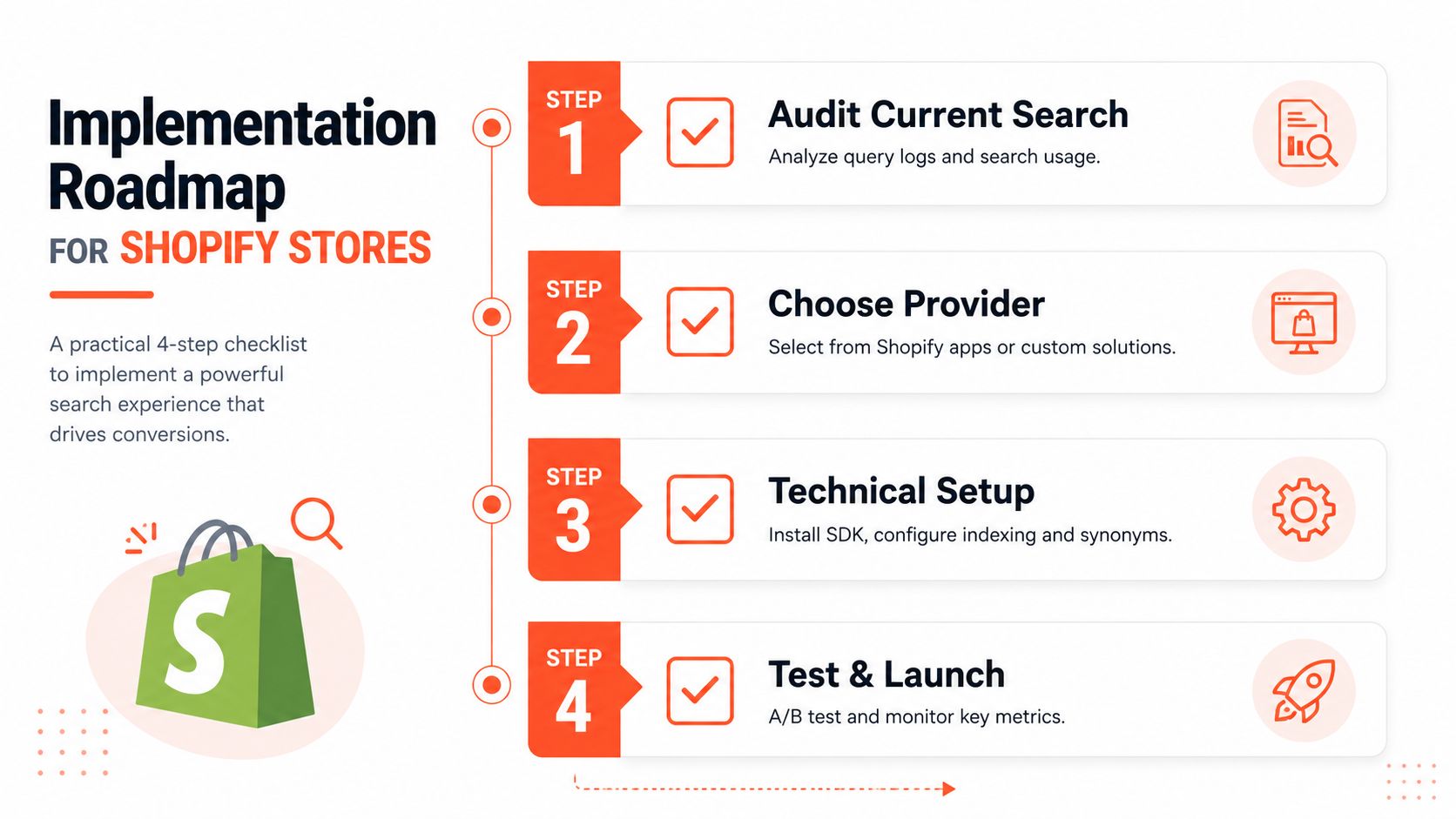
Audit before selecting a provider
Export representative queries and classify their intent. Look for vocabulary mismatches, misspellings, broad problem terms, product-type ambiguity, and searches for content that isn't a product. Check whether titles, descriptions, product types, tags, variants, and metafields contain the attributes your customers use.
Your audit should also inspect the storefront implementation. Test autocomplete on mobile, keyboard navigation on desktop, filter persistence, URL behavior, loading states, accessibility, analytics events, and out-of-stock handling. A powerful backend cannot compensate for a results page that loses selected filters or fails to announce updates to assistive technology.
Configure the smallest useful release
Start with high-impact foundations:
Clean the catalog: Standardize attribute values and fill the fields used for filtering and comparison.
Map language: Add synonyms, common abbreviations, spelling variants, and internal product terminology.
Build recovery states: Create useful responses for zero results, broad queries, and non-product searches.
Instrument the funnel: Record query, result count, clicks, filter actions, product views, add-to-cart events, and purchases.
Test intent paths: Validate known-item, category, exploratory, and problem-based searches with real examples.
For stores that need bespoke indexing, custom UI, or connections to ERP and merchandising systems, custom Shopify app development can provide a more controlled implementation path. Keep the data contract explicit so theme changes and catalog operations don't break search.
Here's the implementation video for teams evaluating the technical workflow:
Bring in a specialist when the search experience touches several systems, when the theme is heavily customized, or when internal teams can't maintain the index and merchandising rules. Handle it in-house when the catalog is coherent, the native tools cover the required behavior, and one team can own ongoing review.
Measuring and Optimizing Search Performance Over Time
Search isn't finished when the provider is installed. Product catalogs change, customer language shifts, inventory moves, and campaigns introduce new queries. A search experience that worked during one season can deteriorate when merchandising teams add products without the attributes the results page depends on.
Track the complete journey instead of one headline metric. Zero-result rate shows where retrieval fails, but it won't reveal irrelevant results that technically contain a matching term. Pair it with query-level click-through, filter interaction, product views, add-to-cart actions, search abandonment, and conversion from sessions that used search.
Turn failed queries into a work queue
Review failed and low-engagement searches on a regular cadence. For each pattern, ask whether the fix belongs in product data, synonym mapping, ranking, merchandising, UX, or the catalog itself.
Vocabulary issue: Add a synonym or revise product metadata.
Attribute issue: Populate the field required by a filter or comparison view.
Intent issue: Create a product finder, editorial result, or guided recovery path.
Inventory issue: Surface alternatives, restock information, or a relevant collection.
Ranking issue: Adjust weighting or merchandising rules, then test against nearby queries.
A useful search team doesn't blindly maximize automation. AI can interpret language and identify patterns, while merchandisers should retain control over launches, exclusions, inventory priorities, and sensitive claims. Search quality improves when both systems have clear responsibilities.
Test the interface, not only the algorithm
Run controlled tests on autocomplete presentation, filter placement, result-card information, comparison entry points, and recovery messages. Keep the query set stable enough to isolate the interface change, and segment results by intent so a gain for known-item searches doesn't hide a decline for exploratory searches.
For technical background on making internal search more discoverable and useful, fix internal site search for SEO offers a complementary perspective. SEO and conversion work overlap around crawlable content, clear information architecture, and useful recovery paths, but onsite search still needs behavioral measurement.
Red flags deserve immediate attention: a rising zero-result rate, a sudden drop in result clicks, filters that produce empty pages, searches that repeatedly lead to product exits, and new products that never appear for obvious queries. Assign an owner, review the highest-impact patterns, and document every rule so search doesn't become an opaque collection of patches.
Presidio helps Shopify and Shopify Plus brands improve product discovery through storefront optimization, custom themes, apps, merchandising enhancements, and CRO work. Visit Presidio to discuss an ecommerce site search audit or a maintainable implementation that connects search with the broader buying journey.



