Outrank AI

The average Shopify store converts at about 1.4%, which means roughly 1 purchase per 71 sessions. That's the starting point for Shopify conversion rate optimization, and it explains why the discipline matters so much: stores in the top 20% convert at 3.2% or higher, while the top 10% reach 4.7%+ (benchmark analysis). The gap isn't a rounding error. It's the difference between a store that leaks traffic at every stage and one that consistently turns the same demand into materially more orders.
Shopify's own CRO guidance also keeps the metric grounded in the standard formula, conversion rate = total conversions divided by total visitors, times 100. In Shopify's reporting context, that means sessions that complete checkout divided by total sessions, and it's the right lens for measuring whether changes moved the business (Shopify CRO guidance). That matters because the average ecommerce conversion rate can sit around 1.95% in IRP Commerce market data, and Shopify's own educational materials note it can usually hover between 2.5% and 3% depending on conditions, which makes benchmark context essential rather than optional (Shopify CRO guidance).
For a merchant, that means the job isn't “improve the homepage” or “make the buttons prettier.” It's to find the exact stage where buyers are dropping, then decide whether the business goal is raw conversion rate, higher AOV, or stronger retention. If you want a broader growth context alongside CRO, grow your online business with expert tips is a useful companion read.
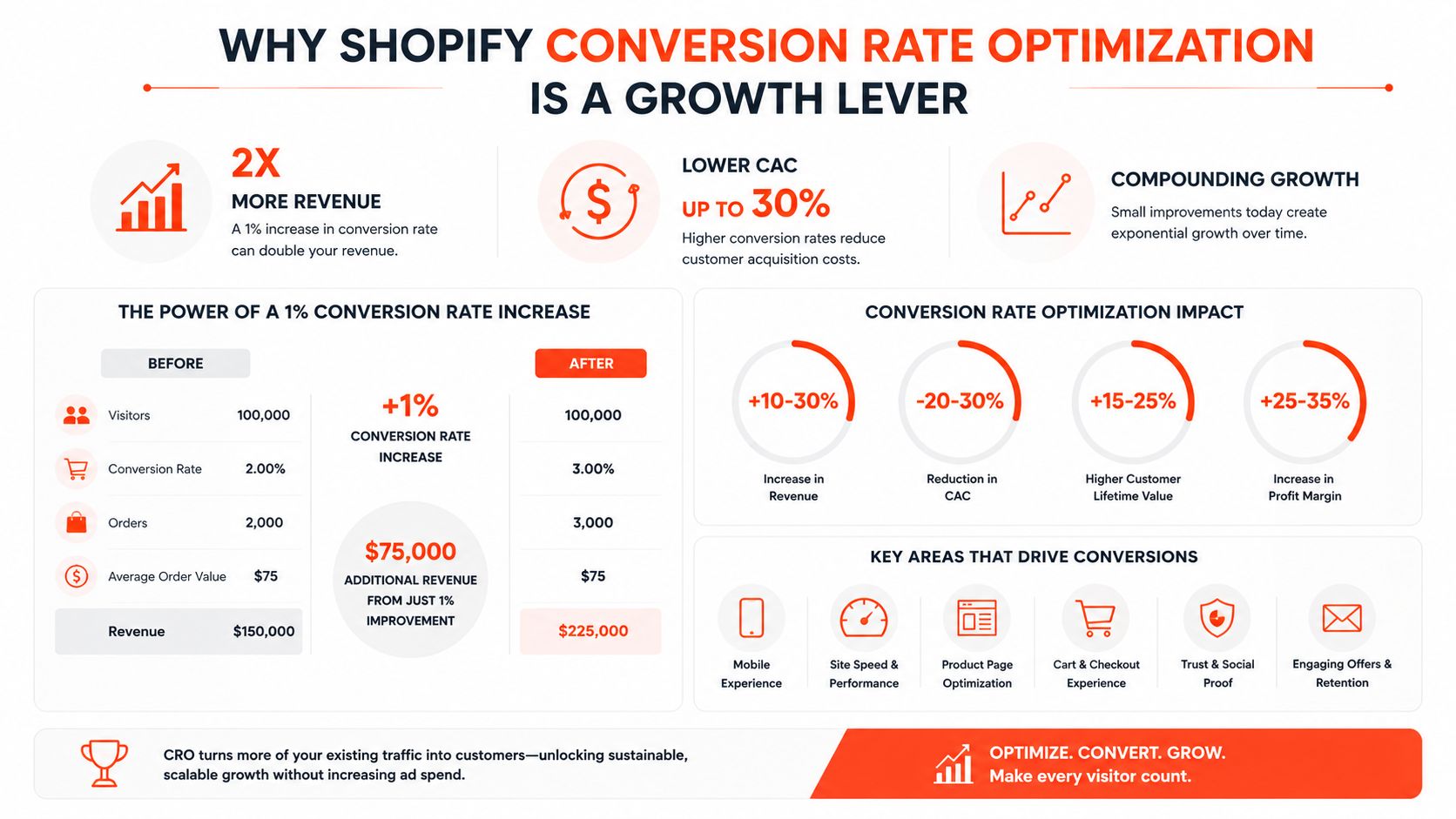
Table of Contents
Why Shopify Conversion Rate Optimization Is a Growth Lever
Shopify stores rarely lose because traffic is impossible to get. They lose because too much of that traffic never turns into revenue, or turns into low-quality revenue that does not support the business. A store converting at the platform average leaves a lot on the table, while stronger stores extract far more from the same sessions. That gap is why Shopify conversion rate optimization is a growth lever, not a cosmetic exercise.
Shopify gives you a relatively clear path from session to checkout, but it also makes friction visible. If product discovery is weak, the storefront leaks before intent forms. If cart progression stalls, the problem is usually offer clarity, trust, or merchandise fit. If checkout completion drops, payment choice, shipping surprises, or device friction is usually the culprit. Shopify's own Shopify CRO guidance treats conversion rate as a core signal of whether the experience is helping the sale, but the essential job is to judge that signal in context, not by vanity averages.
The better response is a diagnostic one. Start with the stage that is leaking, then decide whether the store needs better intent capture, less checkout friction, or a higher-quality order mix. That choice matters because a brand with weak acquisition quality should not chase raw conversion rate at the expense of AOV, while a mature store with decent traffic quality may get more from retention or order value gains than from squeezing another small lift out of the homepage.
Practical rule: If a change does not move one measurable funnel stage, it is probably just cosmetic.
Site speed still matters, but only as part of that diagnostic picture. Slow pages usually hurt mobile first, and they can mask bigger merchandising or checkout problems, so use the site speed optimization overview as a supporting check rather than the whole strategy.
If you want a practical reference point, you can also use this framework to grow your online business with expert tips instead of chasing isolated tweaks that look good in a blog post but do not survive Shopify data.
Diagnosing Your Shopify Funnel Stage by Stage
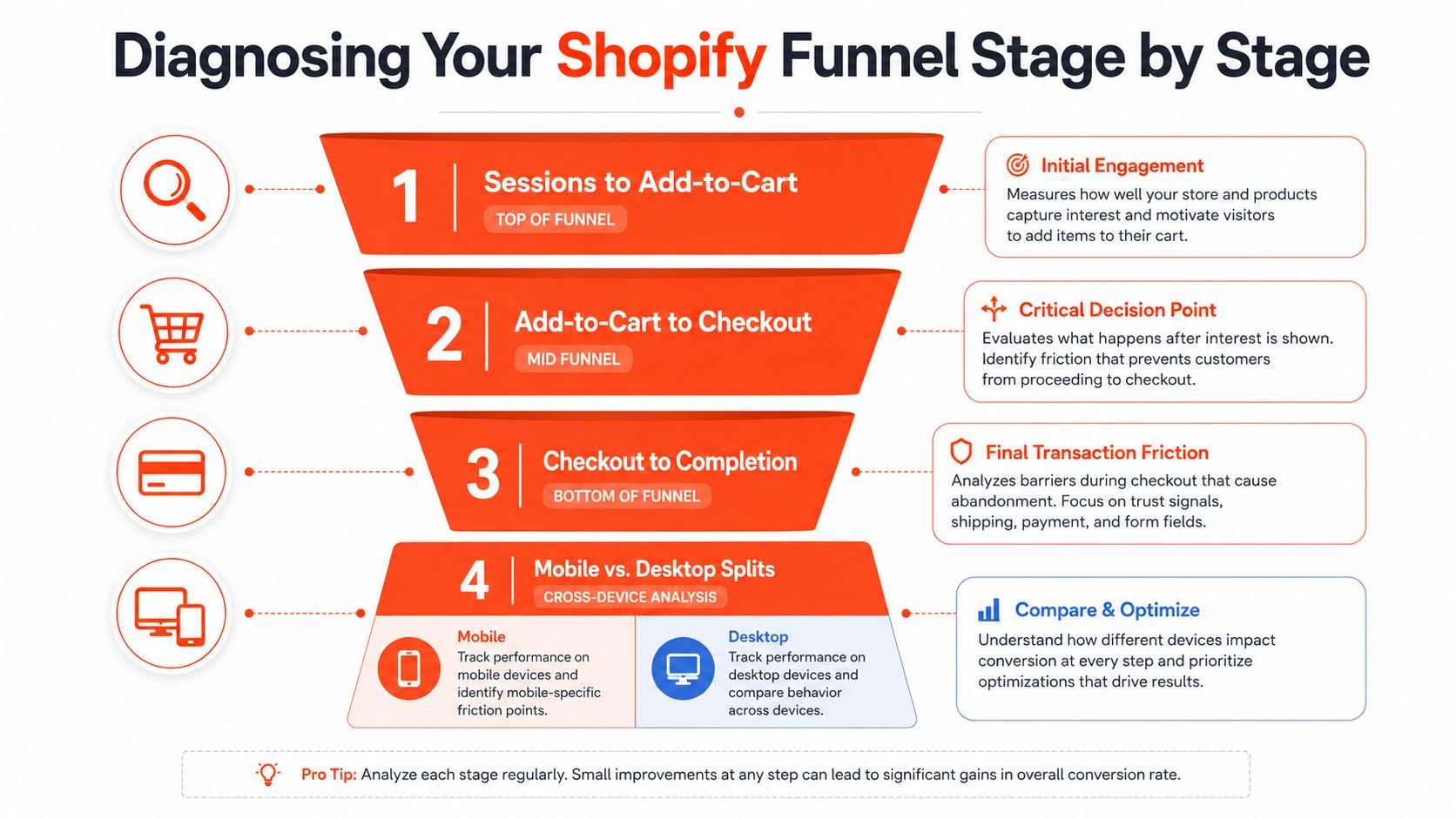
Treating Shopify CRO as one sitewide number is how teams miss the core problem. A store can have an acceptable overall conversion rate while losing volume at product discovery, cart progression, or checkout completion. The cleaner model is a four-stage funnel, sessions to added-to-cart, added-to-cart to checkout, checkout to completion, and mobile versus desktop splits.
Start with the handoff, not the headline
The first diagnostic question is simple. Are shoppers seeing products and engaging, or are they bouncing before intent forms? A 2026 Shopify-focused checklist uses 4-8% as a target range for sessions to add-to-cart, 40-55% for add-to-cart to checkout, and 50-65% for checkout to completion, with device-level analysis called out as essential because mobile and desktop often behave differently (Shopify CRO checklist). Those ranges are not universal laws, but they're useful because they force you to inspect the handoff, not just the final number.
Use Shopify Analytics to isolate where the gap starts, then validate it with a session replay tool. If sessions are healthy but add-to-cart is weak, the problem usually sits on the product page, collection page, or merchandising layer. If add-to-cart is fine but checkout completion drops, the issue is usually surprise friction, payment choice, or confidence at the final step.
Measure by device, then by intent
Device splits matter because mobile shoppers interact differently from desktop shoppers. The same product page can be persuasive on a large screen and awkward on a phone. That's why mobile-specific behavior should be reviewed independently, not folded into an overall rate that hides the problem.
The fastest way to waste time is to optimize the wrong stage.
A practical workflow is to look at funnel drop-off first, then open replay clips that match the drop-off pattern. If the behavior repeats, you've got a real bottleneck. If it doesn't, the metric is probably noisy or the traffic mix changed.
The same checklist also links stage-level diagnostics to technical performance, which is why a deeper look at the speed optimization resource is useful before you change anything structural.
Product, Merchandising, and UX Friction Points
Most Shopify audits don't fail because a store is missing one “growth hack.” They fail because a few boring friction points keep showing up in the wrong places. Weak product-page structure, vague value propositions, poor imagery, buried social proof, messy navigation, and weak search all damage conversion in different ways, and they usually show up first as leaks between sessions and add-to-cart.
Where the page breaks trust
Product pages do most of the persuasive work. If the page doesn't answer the basic question, why this product, why now, and why from this store, shoppers hesitate. Missing or low-quality imagery forces people to guess. Buried reviews make the product feel unproven. Weak copy leaves the visitor to infer benefits instead of seeing them clearly.
Collection pages and navigation matter just as much when the shopper is still exploring. If merchandising is chaotic, buyers can't get to the right product quickly enough to form intent. Search and discovery problems show up when shoppers know what they want but can't find it cleanly, which often looks like strong traffic with weak downstream movement.
Map friction to the funnel stage
Friction Point | Funnel Stage Affected | First Fix to Test |
|---|---|---|
Weak benefit-led product copy | Sessions to add-to-cart | Rewrite the first product-page block around the primary use case |
Poor or thin imagery | Sessions to add-to-cart | Add more angles, context shots, and clearer zoom behavior |
Missing social proof | Sessions to add-to-cart | Move reviews closer to title, price, and CTA |
Confusing navigation | Sessions to add-to-cart | Simplify collection paths and menu labels |
Weak site search | Sessions to add-to-cart | Improve search relevance and autocomplete behavior |
Bad product clustering on collections | Sessions to add-to-cart | Re-merchandise collections by intent, not just catalog logic |
The reason to prioritize these first is that they change whether shoppers enter the funnel at all. If the page never earns the add-to-cart click, nothing in checkout can save it. In my audit work, that's the most common mistake, teams start tuning checkout while the product pages are still doing half the selling badly.
Diagnostic rule: If add-to-cart is weak, don't touch checkout yet.
For teams wanting a cleaner implementation layer once the merchandising work is clear, Presidio's Quiz Kit is one option for AI-powered product recommendations and lead capture, especially when the catalog is large and intent signals are messy.
Optimizing the Shopify Checkout
Checkout is where Shopify gives merchants the most control with the least ambiguity. If a shopper has already committed, the final job is to remove friction without introducing new uncertainty. Shopify's modern checkout stack makes that possible, but only if you know which levers are worth testing.
Prioritize the friction you can see
Start with payment choice, shipping clarity, and form friction. If the shopper has to slow down to enter repetitive data, the checkout is doing too much work. If shipping costs appear late, the experience feels less like a purchase and more like a surprise bill. If the available payment methods don't match how your audience likes to pay, you've created hesitation at the worst possible moment.
Shopify's current ecosystem also matters here because checkout customizations now sit inside a more structured environment than legacy script-heavy setups. For stores still untangling old logic, the Scripts to Functions transition guide is a practical reference for understanding what can be modernized and why that matters for maintainability.
Test the features that reduce hesitation
Shop Pay is worth serious attention because it compresses the payment step for returning customers. Wallets and BNPL options can also reduce friction when they're aligned with the audience and margin structure. Address autofill helps on mobile, where typing is more punishing and mistakes are more common.
Shipping thresholds deserve a careful test, not blind loyalty. They can improve completion when they make costs feel predictable, but they can also distort basket behavior if they're structured poorly. That's why checkout-stage testing should always connect to the funnel stage you're trying to fix, not to the idea of “better UX” in the abstract.
A useful way to think about the decision is this. The checkout should not be as persuasive as the product page. It should be quieter, faster, and more certain. If a brand is in a high-risk or heavily regulated category, extra caution is warranted, and a playbook for high-risk stores is a useful companion when assessing payment and compliance constraints.
Quality of Conversion Beats Raw Conversion Count
A lot of Shopify brands optimize the wrong variable. They chase a higher raw conversion rate, then hurt margin, AOV, or downstream retention by leaning too hard on discounting or over-simplifying the purchase path. That can make the dashboard look better while the business gets less healthy.
The post-purchase surface is part of CRO
Shopify's own enterprise guidance notes that post-purchase experience, customer support, and multiple payment options all influence conversion outcomes, and it calls out abandoned-cart recovery, omnichannel remarketing, and post-purchase optimization as meaningful practices rather than afterthoughts (Shopify enterprise CRO guidance). That framing matters because the store experience doesn't end when the order is placed.
For mature brands, the better question is whether a change improves the quality of conversion. A lower-friction checkout might increase order count, but if it drives more refund pressure, lower-margin orders, or weaker repeat behavior, the apparent win is shallow. Subscription paths, upsell flows, and post-purchase pages all belong in that evaluation because they affect the kind of customer you just acquired.
Know what you're optimizing for
Not every brand should optimize for the same goal at the same time. A launch-stage store often needs raw conversion more than anything else. A brand with steady traffic and margin pressure may care more about AOV and profitable conversion. A mature brand with a strong repeat base may get more from retention and LTV than from squeezing one more percentage point out of the checkout.
Candid rule: More orders are not always better orders.
Support signals also matter. If customers keep asking the same pre-purchase questions or complaining after purchase, those are CRO signals too. They show where expectation-setting is failing and where a conversion may be low-quality from the start.
The practical move is to tie on-site behavior to post-purchase outcomes, then judge whether the improvement made the business healthier, not just noisier. That's the difference between a storefront that “converts” and one that compounds.
Measuring Shopify CRO Without Lying to Yourself
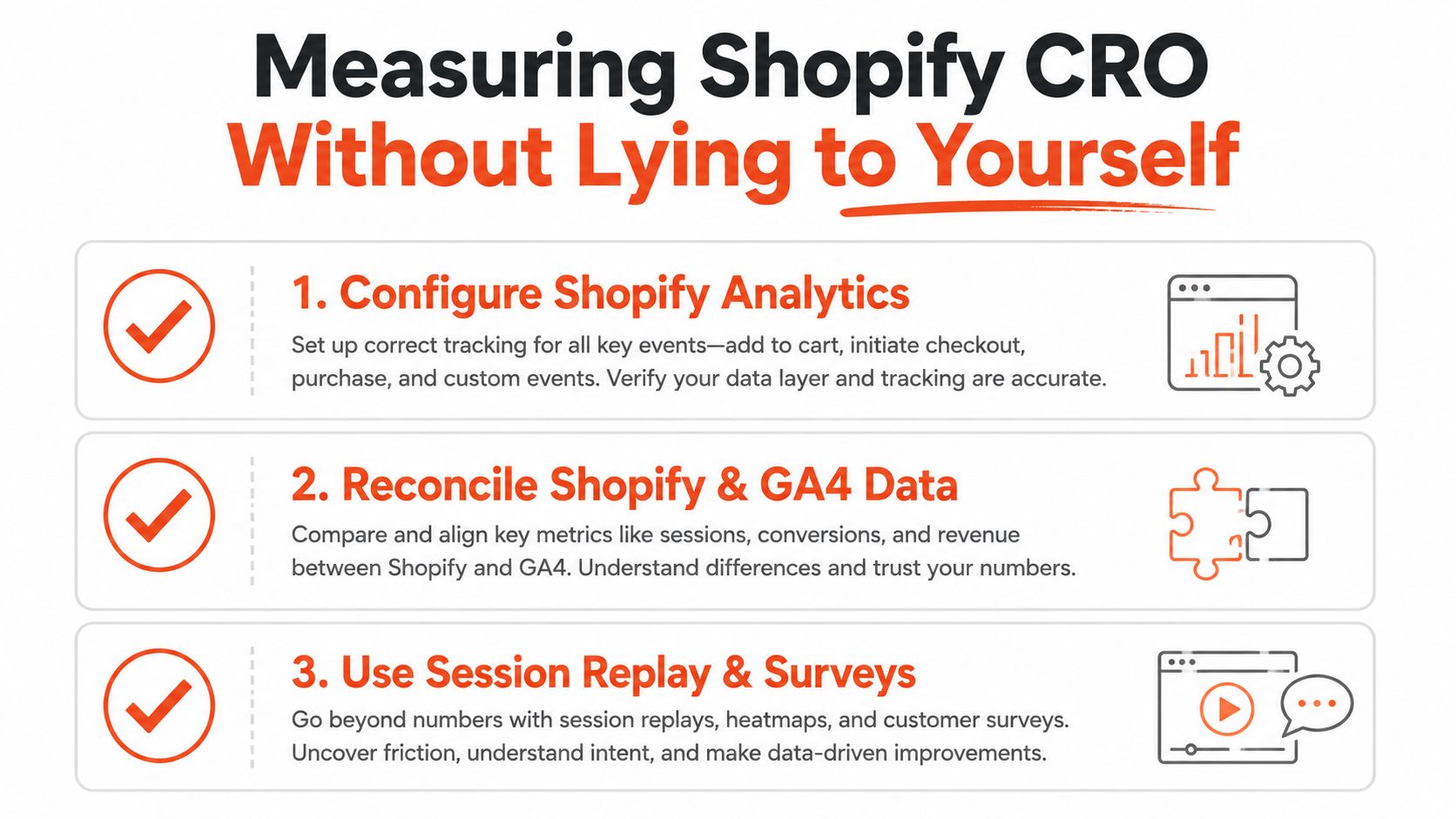
Bad measurement makes strong tactics look weak and weak tactics look strong. A trustworthy Shopify CRO setup starts with clean Shopify Analytics instrumentation, then checks that data against GA4 and qualitative tools so you can separate real behavior from dashboard noise. If the numbers disagree and nobody investigates why, the team ends up optimizing a story instead of a store.
Build the measurement stack around the decision
Shopify Analytics should be the source for store-native conversion behavior, especially sessions and checkout completion. GA4 helps with broader journey context and traffic-source behavior, but it often needs reconciliation so session counts and conversion events aren't double-counted or misread. Session replay and heatmaps then tell you whether the users behind the numbers experienced the friction you think they did.
A/B testing only works when the hypothesis is specific. Don't test “better product page.” Test a clear change tied to a clear stage, then let the result run long enough that you aren't reacting to noise. The fastest way to fool yourself is to peek early and declare a winner because the graph moved for a day.
Avoid the common measurement mistakes
The biggest errors are simple. Teams optimize the wrong funnel stage, count assisted behavior as if it were final conversion, or trust a test result before it's stable. Another common mistake is changing too many things at once and then acting surprised when they can't tell what worked.
The discipline is less glamorous than the tactics, but it's what keeps the program honest. If the replay tool and the dashboard disagree, go back and inspect the journey. If the A/B test doesn't cleanly answer the question, rewrite the hypothesis before you run it again.
A 90-Day Shopify CRO Roadmap
A good CRO program starts with diagnosis, not tactics. If you start changing product pages before you know where the funnel is leaking, you end up with activity instead of progress. A useful 90-day plan starts by measuring the right stage, then fixes the highest-confidence blockers, then moves into broader changes once the store data is clearer.
Weeks 1 to 2, instrument and isolate
Lock down Shopify Analytics, reconcile GA4, and confirm that the store is reporting the same journey you think shoppers are taking. Add session replay if it isn't already in place. Then inspect the funnel stage by stage, sessions to add-to-cart, add-to-cart to checkout, checkout to completion, and mobile versus desktop.
This is also the time to decide whether the business should optimize for raw conversion rate, AOV, or retention. A newer store may need more buyers first. A margin-tight brand may care more about order quality than a small lift in conversion. If you are trying to use AI to sort through the first pass of ideas, the conversion rate optimization tips with AI guide is a useful reference for separating useful signals from noise.
Weeks 3 to 6, fix the obvious leaks
Address the on-site friction that is clearly suppressing intent. Clean up product pages, tighten collection merchandising, improve navigation clarity, and test one or two checkout changes that speak directly to the weakest stage. If mobile is lagging, isolate the mobile experience and work there first, because blended averages can hide a problem that only shows up on phones.
These early wins usually reveal more than a long list of half-tested changes. A store that removes hesitation at the product page and checkout stages will usually see cleaner results than one that keeps adding new tactics before the basics are stable.
Weeks 7 to 12, expand the bets
Once the main leakage is under control, move into more structural improvements. That includes personalization, bundling, post-purchase flows, and retention touches that improve the quality of conversion. The point is not to stack on more ideas. It is to tie the next round of changes to what the funnel data already showed.
For teams that want to use automation more carefully, AI can help with prioritization, variant generation, and pattern spotting, but it does not replace a clear hypothesis or a clean measurement setup. Used well, it speeds up analysis. Used badly, it adds more clutter to a store that has not finished fixing the basics.
End the quarter with a backlog, not a victory lap
The final review should separate three things, what moved the funnel, what improved order quality, and what should wait. If a change raised conversions but hurt retention or margin, it belongs on a different roadmap. If a test did not win but exposed a real friction point, that still counts as useful information.
The best CRO teams leave the quarter with a shorter, sharper backlog. They know which stage deserves the next round of work, they know which metrics matter for the business model, and they know which ideas looked attractive but did not earn more budget.

Jamie, Presidio’s Designer, leads the practice alongside Johnnie. With over 10 years of e-commerce experience, Jay is a Shopify expert, known for crafting innovative solutions that prevent tech debt.
Jaime
Senior Product Designer, 2020



