Presidio

You've been asked to connect a Shopify store to an ERP, warehouse system, CRM, or custom storefront. The first product sync looks simple, then the edge cases arrive: a webhook is delivered twice, a nested GraphQL query costs more than expected, or a Shopify API version reaches the end of its support window while production is still running on it. A dependable Shopify API integration isn't a script you deploy once. It's a versioned service with explicit ownership, controlled data flows, and recovery paths.
Table of Contents
What a Shopify API Integration Actually Does
A Shopify API integration connects the store's operational data with systems that need to read, write, or react to it. Products and inventory may move between Shopify and an ERP. Orders may feed fulfillment and finance workflows. Customer events can trigger actions in a CRM, while a headless storefront uses buyer-facing APIs to display catalog data and create checkouts.
The important distinction is between requesting current state and receiving changes. Admin APIs let your backend read and modify Shopify resources. Webhooks notify your application that something happened, so your system doesn't need to poll constantly. Your design should combine both: use webhooks to detect change, then fetch or reconcile the authoritative resource before applying downstream effects.

Start with the data flow
Before writing a request, document four decisions:
Trigger: Does a webhook, scheduled job, user action, or external system initiate the flow?
System of record: Which system owns price, inventory, customer identity, order status, or fulfillment state?
State: Where do you store Shopify IDs, cursors, version markers, event IDs, and sync timestamps?
Recovery: What happens when Shopify throttles a request, a downstream service fails, or a webhook arrives again?
Shopify launched its API platform and App Store on June 2, 2009, when it said more than 5,000 merchants could begin using custom applications from developers. That launch established an official ecosystem for third-party applications and merchant-specific workflows, rather than a temporary beta surface. You can see how that ecosystem developed into a broader integration discipline in Shopify integration services, especially when external commerce systems need shared data contracts and maintained connections.
Shopify now releases a new API version every three months, with each version supported for one year before developers need to move to a newer version. That means your integration needs an upgrade owner, a pinned version, and a staging process. If your work also involves collecting external marketplace data for catalog or competitive research, an Etsy scraping API can sit outside the Shopify transaction flow, but it should still feed a clearly defined normalization and validation layer.
Practical rule: Treat every Shopify integration as a small product. It needs monitoring, release notes, data contracts, and a rollback plan, not just working credentials.
Setting Up Authentication the Right Way
Authentication depends on who will install the integration and where the token will be used. A custom app for one merchant has a different trust model from a public app installed across multiple stores. A headless storefront also shouldn't use the same credentials as a private backend.
For a single merchant-owned backend, an Admin API access token is usually the most direct option. The merchant creates the custom app in Shopify admin, grants only the required access scopes, and provides the token to a secure server-side application. This avoids building a public installation flow, but it also makes your team responsible for secret storage, access review, and replacement if credentials are revoked.
A public app or a multi-store integration needs OAuth. The app sends the merchant through an authorization flow, validates the callback's HMAC, exchanges the authorization result for an access token, and stores the installation against the shop domain. Keep offline access tokens in encrypted storage and design the installation record so you can reauthorize or uninstall cleanly.
The Storefront API serves a different audience. It supports buyer-facing and headless experiences, where the frontend needs selected product and checkout capabilities without exposing Admin API credentials. Storefront access tokens and permissions should be treated as separate from staff-facing Admin API authentication.
Compare the trust models
Method | Best For | Token Lifespan | Scope Control |
|---|---|---|---|
Admin API access token | A custom app owned by one merchant | Managed by the merchant and app lifecycle | Admin API access scopes |
OAuth | Public apps and integrations serving multiple stores | Persistent offline access can be stored for the installation | Merchant-approved scopes during authorization |
Storefront API token | Headless and buyer-facing storefront experiences | Managed separately from Admin API credentials | Storefront-specific access and capabilities |
Don't choose a programming language or SDK before settling the authentication model. Your implementation team can compare practical options in this guide to the best language for creating apps, but the language won't fix an incorrect token strategy.
Store credentials outside source control, limit scopes to the resources the integration needs, and log shop identifiers rather than secrets. For OAuth, validate the callback before persisting anything. For Admin tokens, provide a documented rotation and revocation procedure. For Storefront access, assume the token may be used in a public-facing application and avoid granting it administrative authority.
Choosing Between REST and GraphQL
REST and GraphQL aren't competing religions. They're tools for different request shapes, and a single integration can use both. REST is often easier for a linear operation against one resource. GraphQL is more efficient when the client needs a carefully selected graph of related objects.
Criterion | REST Admin API | GraphQL Admin API |
|---|---|---|
Payload control | Returns a resource-shaped response | Client selects the fields it needs |
Throttling model | Request-based leaky bucket | Query cost points per second |
Strong fit | Simple reads, writes, and familiar CRUD flows | Nested data, selective fields, and consolidated operations |
Main risk | Extra requests and overfetching across related resources | Complex queries consuming more cost than expected |
Default use | Start here for straightforward endpoints | Prefer it for high-volume or relationship-heavy workflows |
REST Admin API limits differ by Shopify plan. The documented limits are 2 requests per second on Standard, 4 on Advanced Shopify, 20 on Shopify Plus, and 40 for Shopify for enterprise. Shopify documents GraphQL limits of 100, 200, 1,000, and 2,000 cost points per second for those same plan tiers. See the official REST API usage and rate limits when budgeting a workflow.
The practical implication is easy to miss. REST counts requests, while GraphQL measures query cost. A large nested GraphQL query can throttle even when the request count looks modest. Conversely, a REST workflow that fetches a product, its variants, inventory, metafields, and related records one request at a time can create unnecessary latency and pressure.
Make the decision per endpoint
Use REST when the operation is simple, the response already matches the data contract, and there's no meaningful benefit from combining related resources. Use GraphQL when you need several fields from connected objects, want to avoid overfetching, or need selective reads and writes in a high-volume workflow.
GraphQL doesn't remove the need for design discipline. Request only the fields you need, measure cost per operation, cache stable objects, and break broad queries into purposeful pieces. For larger catalog or order jobs, use Bulk Operations instead of looping synchronously through individual requests.
For buyer-facing builds, keep the Admin and Storefront concerns separate. The Shopify Storefront API is designed around storefront and checkout experiences, not staff-side catalog administration. That distinction should shape both your token handling and your performance tests.
Working with Products, Orders, and Customers
Resource integrations become maintainable when they use small, predictable request shapes. A product sync rarely needs every field Shopify exposes. Start with the product identifier, title, status, and the variant nodes required by the downstream system. Add inventory, media, pricing, or publication data only when the business flow needs them.
Metafields are useful when Shopify needs to carry integration-specific values without forcing a separate schema migration. Use them for controlled attributes such as an external ERP identifier, mapping status, or a source-system revision. Define the namespace, key, type, and ownership before multiple systems begin writing to the same field.
Orders need a different read model from a transaction workflow. A fulfillment pipeline commonly needs financial status, line items, fulfillment state, shipping details, and the Shopify order identifier. A reconciliation job may need timestamps and downstream references instead. Don't treat an order payload as a universal object that every consumer should receive in full.
Keep resource responsibilities explicit
Resource | Key Fields | Common Integration Use | Watch-out |
|---|---|---|---|
Product |
| Catalog synchronization and merchandising | Variant and inventory relationships can expand payloads |
Order |
| ERP, finance, and fulfillment workflows | Order editing requires explicit support in the integration design |
Customer |
| CRM matching, segmentation, and service workflows | Matching records requires a clear identity strategy |
For customer flows, search by a controlled identifier such as email or phone, then verify the returned record before changing tags or addresses. Tag updates should be additive or explicitly replacing, depending on the downstream contract. Address data deserves particular care because customer records can contain multiple addresses and checkout-related workflows may use a distinct address-book operation.
A reusable pattern works across all three resources: fetch the parent, request only the fields needed for the current operation, then expand child nodes lazily. Store the Shopify ID and the downstream ID together, and record the last successful synchronization state. If a later request fails, the next run can resume from known state instead of guessing what happened.
A narrow payload is easier to validate, cheaper to process, and less likely to break when the platform adds fields or changes surrounding relationships.
Building Reliable Webhook Handlers
A webhook handler has one job at the edge: prove that the message came from Shopify, record it safely, and acknowledge it quickly. Business processing belongs behind that edge, usually in a queue or asynchronous worker.
Create subscriptions through the Admin API or Shopify's Partners tooling, and store the topic, shop domain, callback route, and secret together. When a request arrives, calculate the HMAC from the raw request body using the shared secret, then compare it with the X-Shopify-Hmac-Sha256 header. Parsing and re-serializing JSON before verification can change the bytes and produce a different digest.
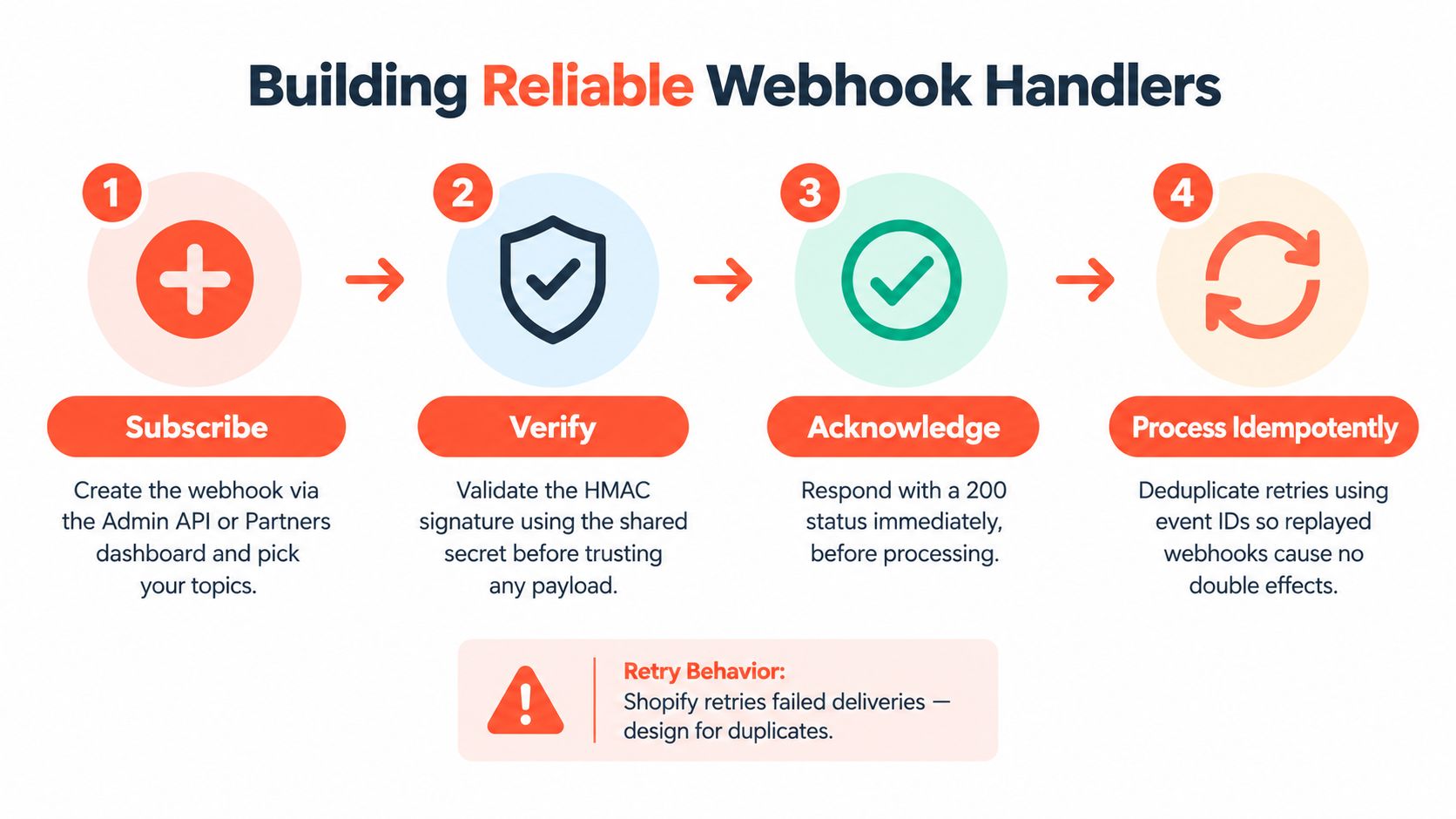
Use four operational guarantees
Subscribe deliberately. Register only the topics the integration owns, and include required compliance topics where the app's distribution model demands them.
Verify before trusting. Check the HMAC against the untouched request bytes, and reject invalid messages before they reach application logic.
Acknowledge quickly. Persist the delivery or enqueue it, then return a successful response before heavy work begins.
Process idempotently. Use the
X-Shopify-Webhook-Idheader, object identifiers, or version checks to ensure a replay cannot create a duplicate downstream effect.
Persist the full verified payload before calling an ERP, sending a fulfillment command, or mutating another system. If the worker fails after persistence, it can retry from a durable record. If Shopify redelivers a failed webhook, the deduplication record lets the worker recognize the event without accidentally discarding a legitimate later change.
Timeouts are a common production failure. A handler that waits for a slow downstream API may cause Shopify to retry, creating concurrent copies of the same event. A queue separates receipt from processing and lets you control retries, dead-letter handling, and ordering assumptions.
Webhook discipline: A duplicate delivery is normal operating input, not an exceptional condition. Design the side effect so running it twice produces the same final state.
Webhook subscriptions also need operational ownership. Log delivery IDs, topic, shop, receipt time, verification result, queue status, and processing outcome. Test replay behavior in a development store before launch, including partial failures and a downstream system that remains unavailable.
The following walkthrough complements the implementation pattern with a visual demonstration:
Handling Rate Limits and Throttling
Throttling becomes manageable once you separate request limits from query-cost limits. REST Admin API traffic follows plan-specific request constraints, while GraphQL Admin API traffic is governed by the cost of the selected fields and relationships.
Dimension | REST Admin API | GraphQL Admin API |
|---|---|---|
Limiting unit | Requests per second | Cost points per second |
Standard plan limit | 2 requests per second | 100 cost points per second |
Advanced Shopify limit | 4 requests per second | 200 cost points per second |
Shopify Plus limit | 20 requests per second | 1,000 cost points per second |
Shopify for enterprise limit | 40 requests per second | 2,000 cost points per second |
Main design response | Queue and pace requests | Reduce selection cost and pace by returned usage metadata |
The limits above come from Shopify's Admin API rate-limit documentation. Don't build a retry loop that ignores the response metadata. Shopify recommends adapting request pacing from usage information, stopping until sufficient capacity is available, and using a one-second backoff when throttled.
For REST, avoid treating a 429 response as an invitation to send the same request immediately. Honor the response guidance, apply bounded backoff with jitter, and place repeated failures behind a circuit breaker. For GraphQL, record the requested and actual cost of each operation. A query with several nested connections may be more expensive than a set of smaller, purposeful reads.
Reduce pressure before adding retries
Cache stable reads such as shop policies, configuration objects, or product metafields when freshness requirements allow it. Use cursors for pagination, avoid repeatedly fetching unchanged parent records, and move large catalog, product, inventory, customer, or order jobs to Bulk Operations rather than synchronous loops.
Headless teams should also avoid importing Admin assumptions into storefront traffic. Shopify documents that real buyer traffic through the Storefront API isn't subject to a fixed requests-per-minute limit, while tokenless access has a query complexity cap of 1,000, apps can have at most 100 active storefront access tokens per shop, and checkout creation is throttled separately. Those constraints make query shape, token management, and checkout testing more important than just counting frontend requests. See the Storefront API documentation for the current rules.
Monitor throttled responses, operation cost, queue age, and retry counts by shop and endpoint. A production integration should show which workflow is consuming capacity, not merely report that “Shopify is slow.”
Deployment and Ongoing Maintenance
A release can pass today's tests and still fail after Shopify changes its default API behavior. Pin the API version in every request header, record it in application logs, and schedule deliberate upgrades. Shopify's quarterly release cadence and one-year support window make version review part of routine operations. Treat the integration as a versioned system with an owner, staging coverage, and a rollback path.
Use a development or staging store with a custom app that matches production scopes and webhook topics. Test contract failures, including partial fulfillment, inventory changes, missing customer matches, duplicate deliveries, pagination boundaries, and downstream outages. Production-like data shapes reveal more than a happy-path request returning 200.
A practical release checklist
Pin the version: Set
X-Shopify-API-Versionexplicitly instead of relying on an unstable default.Review changes quarterly: Read Shopify release notes, inspect deprecated fields and mutations, and assign an owner for each upgrade.
Test before switching: Run the replacement version in staging, compare payloads, and validate downstream mappings.
Roll out gradually: Use feature flags or shop-level controls to limit traffic while the new behavior proves stable.
Keep rollback available: Disable the affected flow without deleting source data or applying destructive compensating changes.
Centralized structured logs should capture the shop domain, API version, request or correlation ID, endpoint or operation name, cursor position, GraphQL cost, and webhook delivery ID. Keep tokens and sensitive customer data out of logs. These fields let an engineer trace a failed order sync to a specific store and operation instead of searching unstructured output.
Presidio provides Shopify development and integration services for brands building custom apps, ERP connections, webhook flows, and maintained storefront systems. If the quarterly version review keeps getting deferred, its team can take ownership of upgrade work, staging validation, and rollback planning. That support turns a one-time implementation into an operated system with clear data ownership and release practices.
Map systems of record, pin the Shopify API version, and test duplicate webhook deliveries before adding features. For architecture, implementation, or ongoing maintenance support, visit Presidio to discuss your store or Shopify Plus project.



