Presidio

You're probably in the middle of the same decision most Shopify teams hit once a theme starts feeling cramped. Marketing wants faster landing pages and more control. Engineering wants a framework that fits the rest of the stack. Someone suggests Next.js, someone else says just use Hydrogen, and eventually the question surfaces: is the Shopify Storefront API the right foundation for a storefront you'll still want to maintain a few years from now?
That's the right question to ask.
The Shopify Storefront API isn't hard to get working. It's hard to keep clean once product detail pages, carts, customer sessions, cache layers, preview environments, and quarterly API changes start interacting. A lot of teams evaluate it like a feature list. In production, it behaves more like an operational contract. The contract covers how you query, what you cache, where you isolate private data, and how you survive version changes without turning every upgrade into a fire drill.
Table of Contents
Why the Storefront API Matters for Headless Builds
A typical headless migration starts with a store that has outgrown the theme layer, but not in one obvious way. Product pages need richer merchandising. Content needs to live outside Shopify's templates. Performance matters more than theme convenience. The team wants React, not Liquid. That usually puts Next.js or Hydrogen on the table, and both roads depend on the same commerce surface underneath: the Shopify Storefront API.
That matters because your frontend stops living inside Shopify's runtime. Once you decouple, your page rendering, cache behavior, cart state, and checkout handoff become your responsibility. The API isn't just where product data comes from. It becomes the backbone for buyer-facing commerce actions.
For teams exploring headless commerce on Shopify, the mistake I see most often is treating the first working product query as proof the architecture is sound. It isn't. The actual test comes later, when you need to answer operational questions:
Auth boundaries: Which calls are safe in the browser, and which must stay server-side?
Query discipline: How much data is each route pulling?
Cache separation: Which responses can sit at the edge, and which must never touch shared cache?
Version ownership: Who upgrades the schema when Shopify retires the one you pinned to?
Practical rule: If a storefront build can't explain its version plan and cache boundaries before launch, it's not ready for production.
A themed store hides a lot of this. A headless storefront exposes all of it. That's why the Storefront API matters. It's not because it enables custom React components. It matters because it defines the operational shape of your storefront for the long haul.
What the Shopify Storefront API Actually Is
The Shopify Storefront API is Shopify's buyer-facing commerce API. It's the surface your storefront uses to fetch products and collections, create carts, update cart lines, and power customer-facing shopping flows. Shopify describes it as the foundation for headless storefronts, with access to actions like displaying products and collections, adding items to cart, and calculating contextual pricing, and it's available only in GraphQL with no REST storefront equivalent according to Shopify's headless Storefront API documentation.
That last part matters more than many teams expect. This is a GraphQL-only interface. You don't pick from a set of buyer-facing REST endpoints. You shape the response yourself.
The public counter, not the warehouse door
The easiest way to explain the boundary is this: the Storefront API is the public counter where customers interact with the shop. The Admin API is the warehouse door where staff manage the business.
A storefront query can ask for product titles, selected variant data, collection listings, cart state, or customer-facing content that belongs in the buying journey. It is not the place to create products, edit inventory, fulfill orders, or manage back-office operations.
That split helps teams avoid a common architectural mistake, which is trying to force buyer-facing experiences through admin-oriented patterns.
Why GraphQL-only is the right shape for storefronts
Storefront payloads are volatile. A product card needs one shape. A product detail page needs another. A country-specific merchandising component needs another. GraphQL fits because it lets you ask for exactly the fields each surface needs instead of overfetching a generic resource.
That becomes useful fast:
Product grids can stay lean.
CMS-driven merchandising blocks can request only the product fields they render.
International storefronts can shape pricing and product context per route.
Storefront API vs Admin API at a glance
Surface | Protocol | Primary user | Read/Write | Auth model |
|---|---|---|---|---|
Storefront API | GraphQL | Buyer-facing storefronts | Read-heavy with storefront mutations like cart actions | Access token tied to a specific Shopify store |
Admin API | REST and GraphQL for back-office work | Merchants, apps, operations | Administrative read and write actions | Server-side app or admin authentication |
One more practical signal: Shopify's documented support list spans at least 16 named Storefront API versions from 2022-04 through 2026-07, plus an unstable track in the same headless documentation linked above. That's not an experimental edge feature. It's the production data plane for custom storefronts.
Authentication and API Versioning Explained
A headless storefront usually runs fine until the first quiet failure: preview works, production starts returning partial nulls, and nobody can tell whether the problem came from a token change, a schema change, or a cache layer serving the wrong shape. Authentication and versioning sit in the middle of that operational mess. Treat them as one contract from day one.
The Storefront API uses a single versioned GraphQL endpoint, and Shopify documents that contract in its Storefront API reference. In practice, that means the token, store domain, and API version should be configured together, tested together, and deployed together. Splitting them across app config, edge middleware, and one-off environment variables creates upgrade risk you do not need.
Put auth and version in one config path
Use one shared storefront client. Give it ownership of:
Store domain
API version
Storefront access token
Default headers
Cache policy defaults
That setup sounds boring. Good. Boring infrastructure is easier to keep alive for three years than clever per-route client code.
If you're already building custom Shopify apps and integrations, apply the same standard here. Centralized config makes incidents easier to trace, and it keeps auth drift from creeping in between local, preview, and production environments.
What the token says about intended use
A Storefront API token is tied to a specific Shopify store. That matters less as a documentation detail and more as an architectural constraint. The token is meant to back a buyer-facing storefront for that shop, with query patterns and caching rules that match commerce traffic.
That has two practical consequences.
First, token handling should be predictable. Teams inherit trouble when one runtime uses a private env var, another injects the token at build time, and a third reads from a secrets manager on request. Pick one path and make it auditable.
Second, token scope affects how safely you can cache. Public catalog queries can usually be cached aggressively. Customer or cart-aware requests need tighter controls because the same token can serve both anonymous and buyer-specific operations.
Pin the API version in code, and expose it in logs and health checks.
Version locking is a maintenance decision
Shopify ships on a regular version cadence with overlapping support windows. That is a workable contract for long-lived storefronts, but only if the storefront pins a dated version and upgrades on a schedule.
Use a fixed release such as 2025-10 or 2026-04. Do not let the client float implicitly to whatever the platform considers current. Floating feels convenient early on, then turns simple maintenance into incident response.
A pinned version changes how the whole storefront is operated:
Code generation stays deterministic
Query reviews have a stable schema target
Cache keys can reflect version-specific response shapes
Rollbacks stay realistic during release week
Upgrade work becomes planned engineering, not surprise cleanup
I have seen version drift cause more pain than outright breaking changes. The hard part is rarely updating a query. The hard part is finding every place that assumed an older field shape, then invalidating caches and frontend assumptions without taking the storefront sideways.
For a maintainable build, store the API version next to the token config, include it in observability, and rehearse upgrades before support windows force the issue. That keeps versioning where it belongs: an operational routine, not a production mystery.
Common Queries and Mutations in Real Storefronts
Most real storefronts use a narrow slice of the schema over and over. Product retrieval, collection pagination, cart creation, line updates, and buyer identity changes do the bulk of the work. The performance story usually has less to do with Shopify and more to do with whether your query shapes stay disciplined.
Product queries should match the component, not the whole page
A common mistake is building one massive product fragment and reusing it everywhere. That feels tidy in the repo and performs badly in production.
For a product detail route, ask for what the page renders immediately: title, handle, selected variant, images you show above the fold, price fields in use, and any specific merchandising metafields you need. Don't pull adjacent data just because it might be useful later.
This shape is easy to reason about. It also makes later refactors obvious. If the component stops rendering image galleries or large variant lists, the query should shrink with it.
Collection pages live or die by pagination discipline
Cursor pagination is the right default for collections. Keep list queries shallow and defer nonessential enrichments. Product grids don't need the full detail payload from your product route.
That pattern keeps product cards fast and lets the product page do the heavier lifting.
Cart mutations are the heart of headless checkout
Most headless builds only need a small set of mutations:
Create a cart when the shopper starts buying
Add lines when they select products
Update buyer identity when market, email, or customer context changes
Query shape is the real performance lever
Teams often overfocus on framework choice. In practice, the biggest wins usually come from query restraint.
Avoid giant shared fragments
Keep list queries different from detail queries
Don't request transformed media fields everywhere by default
Let the client own lightweight variant selection state when it can
Smaller GraphQL documents are easier to cache, easier to debug, and less likely to turn into accidental bottlenecks.
Rate Limits and Query Complexity in Practice
The Storefront API doesn't behave like a traditional fixed requests-per-minute API. Shopify states that buyer traffic is not subject to a fixed requests-per-minute cap. Real buyer traffic scales dynamically, while bots, crawlers, and checkout creation are constrained. For unauthenticated access, Shopify also enforces a hard query-complexity ceiling of 1,000 in the Storefront API 2026-10 documentation.
That creates two separate operational concerns.
Traffic scaling and complexity are different problems
A lot of teams collapse these into one idea called “rate limiting.” That's too vague to be useful.
One constraint is about who is making requests. Real buyer traffic is treated differently from bot or crawler behavior.
The other is about how expensive a single query is. Even if traffic is legitimate, an oversized unauthenticated query can still fail because it crosses the complexity ceiling.
Storefront API Throttling and Complexity Limits
Limit Type | Scope | Default Value | Typical Real Cost |
|---|---|---|---|
Real buyer traffic scaling | Buyer-facing traffic | Scales dynamically | Depends on traffic pattern and request shape |
Bot and crawler throttling | Non-buyer automated traffic | Constrained by Shopify | Usually shows up when scraping or crawling behavior is aggressive |
Query complexity ceiling | Unauthenticated query shape | 1,000 | Depends on selected fields, nesting, and fragment size |
Checkout creation constraints | Checkout-related path | Separately constrained | Treat cart and checkout mutations as a more sensitive path |
What works in production
The fix usually isn't “send fewer requests.” It's “send less waste.”
Good storefronts stay inside the limit by being intentional:
Catalog reads stay lean: product cards and search suggestions should not carry PDP-level field depth.
Fragments are split by use case: grid, PDP, cart line, and recommendation modules should not share one oversized fragment.
Cart paths are isolated: don't assume a cart mutation can be stressed the same way a collection read can.
If a query feels like it's trying to power half the page tree in one request, it probably is.
The practical mindset is simple. Treat complexity like a budget. If a public route depends on a large unauthenticated query, keep tightening it until it's obviously smaller than the maximum ceiling. That leaves room for normal product growth and future component creep.
Caching Strategies and Customer-Scoped Data
Caching is where many headless storefronts either become fast and stable, or become dangerous.
Shopify's Hydrogen guidance says Storefront API responses are cached by default and can be tuned per query using strategies such as CacheShort (10 seconds), CacheLong (1 day), CacheNone, or custom headers in the Hydrogen caching documentation. That gives teams useful control, but it also creates a sharp boundary: public catalog data benefits from caching, while customer-specific data must be explicitly excluded.
Public data and private data need different paths
The cleanest mental model is to stop thinking in pages and start thinking in subrequests.
A product page might contain:
public catalog data
market-aware pricing
cart badge state
logged-in customer context
Those pieces should not all share one cache policy.
For broader Shopify performance optimization work, this is one of the most effective habits to build early. Public merchandising and private shopper state should flow through different cache paths from day one.
A practical cache pattern
For most storefronts, this pattern holds up well:
Product and collection data: use long-lived or short-lived shared cache depending on how frequently merchandising changes.
Frequently changing public data: use shorter cache windows when freshness matters more.
Cart and customer state: bypass shared cache entirely.
Shopify's Hydrogen docs are explicit that customer-specific queries must disable caching at both the subrequest and page levels to avoid leaking personalized data in the documentation above. That's not theoretical. If private data touches a shared cache boundary, you're one header mistake away from exposing the wrong shopper state.
Boundary to enforce: anything touching cart or customer context should default to no shared cache unless you can prove otherwise.
Why isolation matters more than TTL tweaking
Teams sometimes spend too much time debating exact cache durations and not enough time separating public and private flows. The first decision is architecture. TTL comes second.
What usually works best is isolating subrequests so catalog queries can benefit from edge caching while customer-scoped requests opt out automatically. That's especially important once personalization enters the stack. Personalization can coexist with aggressive caching, but only when private paths are strictly separated from shared ones.
Operational Trade-offs Most Teams Underestimate
Headless doesn't remove complexity. It relocates it.
That's the part teams often learn late. In a theme build, Shopify absorbs a lot of storefront behavior by default. In a headless build, your repo owns more of the contract. Cart behavior, fallback rendering, cache rules, integration edges, and change management all move closer to your team.
The latest API changes are a good example. Shopify's 2025-01 Storefront API changelog added category and taxonomy filtering, changed percentage adjustment pricing to Float, deprecated buyer and tax/duty cart fields, and added gift-card removal by ID according to the Storefront GraphQL changelog for 2025-01. None of that is abstract if you run a production storefront. It affects data modeling, cart assumptions, and upgrade work.

The hidden work isn't in the first sprint
The launch build usually gets budgeted. The maintenance tail usually doesn't.
A few things teams underestimate:
Schema change handling: deprecated fields don't hurt until your frontend, codegen, or middleware depends on them.
Cart evolution: buyer identity, tax assumptions, duties, and discount behavior all change over time.
Merchandising drift: new taxonomy or filtering capabilities may force query changes across collection and search experiences.
Operational ownership: changelog review, regression testing, and rollout planning need an owner.
What control really costs
Headless is still the right decision for some brands. The control is real. So is the burden.
If you want a decoupled frontend, you're also choosing to own more moving parts:
Frontend framework upgrades
Storefront API version bumps
Cache invalidation behavior
Checkout handoff testing
Third-party app replacement logic
Custom middleware and observability
That doesn't make headless a bad idea. It just makes it an engineering product, not a design upgrade.
Build Checklist Before You Ship a Storefront Integration
Most storefront problems aren't caused by Shopify. They're caused by shipping a workable integration without the safeguards that keep it workable later.
The checklist below is the version I'd want attached to every pull request before a Storefront API build goes live.
Lock the contract before you scale it
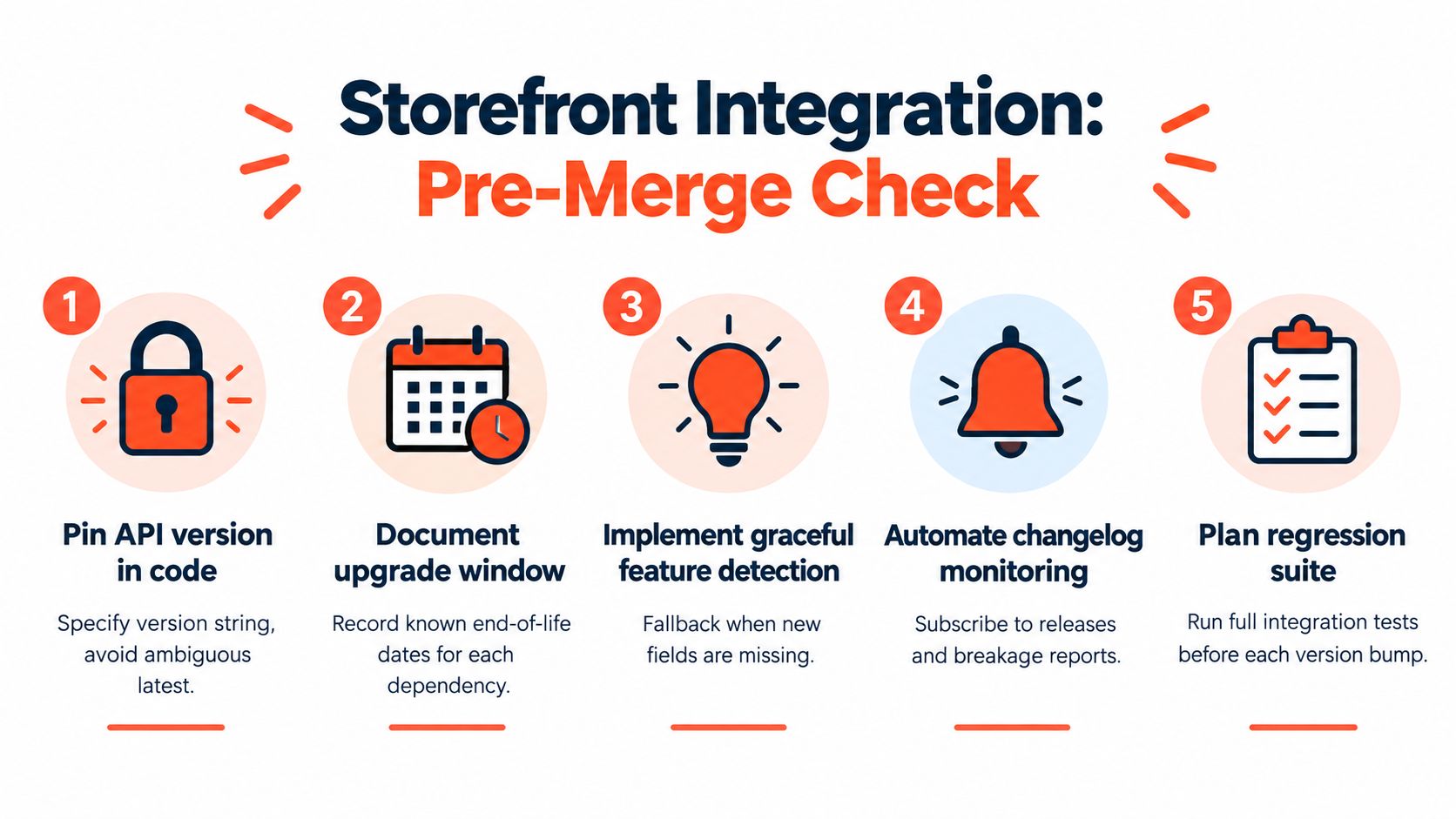
Pin the API version in code: Don't rely on memory or dashboard screenshots. Make the version visible in the storefront client and in deployment config.
Document the upgrade window: If the API version changes quarterly, your team needs a visible calendar entry and a clear owner.
Use the smallest query that serves the UI: Start with less. Expand only when the component needs more fields.
Separate public and private cache paths: Product and collection requests can be cached aggressively. Cart and customer flows shouldn't share that boundary.
Monitor critical commerce paths: Product fetches, cart creation, line adds, and checkout handoff deserve synthetic checks and logs.
Build for predictable failure
A solid storefront doesn't pretend nothing will change. It expects change and contains it.
That means adding a few habits early:
Feature-detect fields where schema drift is plausible
Keep a rollback path for API version bumps
Review the changelog on a schedule
Run regression tests against cart and merchandising flows
Use one storefront client abstraction across the app
If you need a practical implementation partner, Presidio builds and supports Shopify storefronts, apps, themes, and headless integrations, including custom work that sits on top of the Storefront API and long-term optimization after launch.
Ship boring commerce code. The storefront can be ambitious. The integration layer shouldn't be.
If your team is deciding whether the Shopify Storefront API belongs at the center of a headless build, Presidio can help with the hard part after the prototype works: versioning strategy, cache design, cart architecture, and long-term maintainability. We build Shopify storefronts, apps, and supporting systems for brands that need custom commerce without turning every API change into a rebuild. Visit Presidio if you want a team that treats headless as an operating model, not just a launch project.

Jamie, Presidio’s Designer, leads the practice alongside Johnnie. With over 10 years of e-commerce experience, Jay is a Shopify expert, known for crafting innovative solutions that prevent tech debt.
Jaime
Senior Product Designer, 2020



