Presidio

Your team has six Shopify apps handling subscriptions, loyalty, ERP synchronization, and order logic. Each one owns a slice of the workflow, adds another webhook dependency, and charges in a way that becomes painful as order volume grows. The result is familiar: nobody can explain the full customer journey, an innocent configuration change breaks an operational handoff, and engineering is paying to maintain vendors' assumptions.
That's when a Shopify custom app enters the conversation. It may be the right answer, but it may also be an expensive way to recreate capabilities Shopify already provides through Functions, Flow, native administration, or a mature public app. In 2026, the decision is no longer only about what to build. Legacy custom apps created before the platform's change can still be managed in Shopify admin, while new custom apps must be built and managed in the Dev Dashboard from January 1, 2026, creating a split operating model (Shopify Help Center).
Before approving a six-figure statement of work, decide which problem you're solving, who will own the result, and whether your organization can govern it for years.
Table of Contents
When a Shopify Custom App Becomes the Only Answer
A custom app earns its place when the workflow is proprietary, operationally important, and difficult to replace. A multi-warehouse merchant with different allocation rules, a B2B sales process tied to an ERP, or a headless storefront with a nonstandard customer account experience may have requirements that public apps can't handle without awkward workarounds.
Native tools still deserve the first review. Shopify Flow can coordinate many event-based automations. Segments can support audience logic. Shopify Functions can handle certain commerce rules directly inside Shopify. If those tools cover the requirement cleanly, building an app creates unnecessary hosting, testing, permission, and support obligations.
Decision rule: Don't build because the workflow is annoying. Build because the workflow creates durable business value that simpler tools can't deliver.
The build-versus-buy question should return whenever the operating model changes. A public app may be sensible while the brand is small, then become restrictive when the merchant adds warehouses, wholesale pricing, international markets, or an ERP with unusual inventory states. Conversely, a custom app can become technical debt when the business standardizes a process that Shopify later supports natively.
The 2026 change makes this evaluation more urgent. A team now has to manage legacy admin-created custom apps and newly governed Dev Dashboard apps as parts of the same estate. That means the business case must include lifecycle ownership, access policies, release controls, and support procedures, not just feature delivery.
The right trigger for a build
Approve discovery when all of these conditions are present:
The workflow differentiates the business: Competitors can't just install the same solution and reach the same operating outcome.
The data path matters: The app must coordinate Shopify with an ERP, warehouse system, subscription platform, or proprietary service.
The requirement will persist: The team expects the capability to remain important through multiple planning cycles.
Failure has a clear owner: Someone inside the organization can approve changes, monitor incidents, and fund maintenance.
Native alternatives have been tested: The team has documented why Flow, Functions, existing apps, or theme logic fall short.
If those conditions aren't true, don't commission a custom app yet. Start with a technical spike and a native capability audit. A build should remove structural friction, not merely give a team a more familiar programming environment.
What a Shopify Custom App Actually Is
A Shopify custom app is software built for a specific merchant and installed on a specific store. It isn't listed in the Shopify App Store, and its permissions are designed around that merchant's workflows rather than a general market. That makes it useful for private ERP synchronization, internal operations, proprietary pricing, or a controlled admin experience.
A public app is different. It's designed for distribution across merchants, must support a broader range of configurations, and operates within Shopify's public app ecosystem. A custom app has a narrower audience, which can reduce unnecessary product complexity, but the merchant takes on more responsibility for architecture, security, support, and continuity. Teams comparing implementation partners can also review practical guidance on how to build Shopify apps with Cleffex Digital before selecting a delivery approach.

Four categories that teams confuse
The word “app” now covers several distinct implementation models:
Public apps are distributed through the App Store and solve broadly defined merchant problems.
Custom apps serve a specific store and are managed for one merchant's requirements.
Shopify Functions run commerce logic on Shopify's infrastructure. They're suited to defined extension points such as discounts, bundles, delivery, payment, and order rules.
No-code tools such as Shopify Flow coordinate supported triggers and actions without a bespoke application codebase.
Functions are not just a cheaper custom app. They are an execution surface with Shopify-defined inputs, outputs, and limits. Shopify's public rollout began in June 2022, and by February 2023, four Functions APIs were publicly available, with another four in developer preview or beta (Gadget's overview of Shopify Functions). That history matters because Functions have expanded the set of requirements that should not automatically become standalone applications.
A custom app commonly includes an external backend, data storage, authentication, monitoring, and deployment controls. A Function may avoid much of that infrastructure, but it can't replace an application that needs long-running orchestration, complex external integrations, or a rich administrative workflow.
Ask one question before using the word “app”: where must this logic run, and who needs to interact with it? If the answer is inside a supported Shopify commerce surface, start with Functions. If the answer involves external systems and merchant-specific operations, evaluate a custom app.
Build, Buy, Functions, or No-Code
The practical decision is less complicated than most architecture workshops make it. Match the path to the shape of the problem, then reject options that create more operational burden than business value.
Path | Best For | Typical Cost | Time to Value | Risk |
|---|---|---|---|---|
Build | Proprietary workflows, deep integrations, sensitive data, and long-lived operational value | Depends on scope and operating model | Slower | Ownership and maintenance burden |
Buy | Common requirements already solved by a stable vendor | Recurring vendor cost | Faster | Vendor dependency and app interaction |
Functions | Deterministic discounts, bundles, delivery, payment, or order logic | Development and maintenance effort | Moderate | Extension limits and platform dependency |
No-Code | Straightforward event-based automations and low-complexity operations | Tool configuration and ongoing administration | Fast | Limited logic and weak handling of edge cases |
Build a custom app
Choose this when the workflow is proprietary, handles sensitive information, or must coordinate several systems. Complex B2B pricing, ERP-backed inventory decisions, account-specific order rules, and headless experiences can justify the investment.
The warning sign is a requirements document full of ordinary automations, simple tags, notifications, and standard discounts. That usually means the team hasn't finished evaluating native tools.
Best fit: A Shopify Plus merchant with a distinctive operating model and an internal owner who can fund maintenance.
Buy a public app
Buy when the problem is common, the vendor has a credible support model, and replacing the tool later won't trap the business. Subscription management, reviews, email capture, and standard merchandising often belong here.
Don't buy merely because installation is quick. Validate theme compatibility, webhook behavior, data export, permission scopes, incident support, and what happens when the vendor changes its implementation.
Best fit: A merchant whose requirement is important but not strategically unique.
Use Functions
Functions are the strongest option for logic that must execute within Shopify's commerce flow. Discount combinations, bundle rules, delivery routing, payment customization, and order logic are natural candidates when they fit the available extension surface.
The warning sign is a Function being asked to behave like an integration platform. If it needs extensive external state, scheduled processing, or a complex administrative interface, pair it with an app or choose a different architecture.
Best fit: A team that needs predictable commerce behavior without building a full external application.
Choose no-code
Use Flow or another native configuration path for narrow automations with clear triggers and actions. It's an appropriate starting point for operational notifications, tagging, routing, and straightforward internal handoffs.
No-code becomes the wrong choice when people start adding exceptions faster than they can document them. A workflow that only one administrator understands is not low maintenance.
Best fit: A merchant with simple, well-defined automation and limited appetite for engineering ownership.
How a Shopify Custom App Is Built Under the Hood
A custom app usually lives partly outside Shopify. Its frontend may run in Node, Rails, a serverless environment, or a container. Its backend connects to Shopify, stores only the data it needs, and coordinates external systems while Shopify remains the source of record for products, orders, customers, and inventory.
The GraphQL Admin API is the primary data interface for many new builds. Shopify's calculated query-cost model assigns cost to selected fields, and the effective limit applies per app-store combination. Standard stores receive 100 cost points per second, Advanced Shopify receives 200, Shopify Plus receives 1000, and Commerce Components receives 2000 (Shopify GraphQL Admin API rate limits). The practical implication is simple: broad queries, careless polling, and unbounded nested fields create throttling risk.
The main components
Component | What It Does | Merchant Concern |
|---|---|---|
Admin API | Reads and updates administrative data | Scope control, query cost, and version management |
Storefront API | Supports custom shopping experiences | Customer privacy, caching, and product availability |
Webhooks | Pushes events such as order or uninstall changes | Delivery failures, retries, and duplicate events |
Backend | Runs business logic and integrations | Ownership, hosting, and incident response |
Database | Stores app state and processing history | Retention, PII, backups, and deletion |
Extensions | Adds functionality to admin, checkout, or other surfaces | Surface-specific limits and authentication |
Webhooks should drive event-based processing instead of constant polling wherever possible. The application must verify webhook authenticity, handle duplicates safely, record processing status, and respond appropriately when an endpoint is unavailable. GDPR-related topics and app/uninstalled events also need deliberate handling so the team can remove or restrict data when required.
Authentication deserves equal attention. Shopify sends an access token with GraphQL Admin API requests through the X-Shopify-Access-Token header, while checkout and customer account UI extensions use session tokens that the server must verify. Shopify's documentation also distinguishes admin extensions that can access the Admin API through authorized fetch behavior (Shopify Admin GraphQL API documentation). Your app should request the smallest practical set of scopes and keep secrets outside source control.
Infrastructure choices affect the operating model
Hosting on Vercel, Fly, AWS, or another platform is only the beginning. Separate development, staging, and production environments. Use managed secret storage, structured logs, error tracking, deployment alerts, and backups. Data residency and personally identifiable information may determine where the app and its database can operate.
Checkout extensions, admin extensions, and Functions aren't interchangeable. Each has its own runtime assumptions and authentication behavior. Teams choosing a language and hosting model can use this comparison of languages for creating apps, but the right choice is the one the support team can operate after the original developers leave.
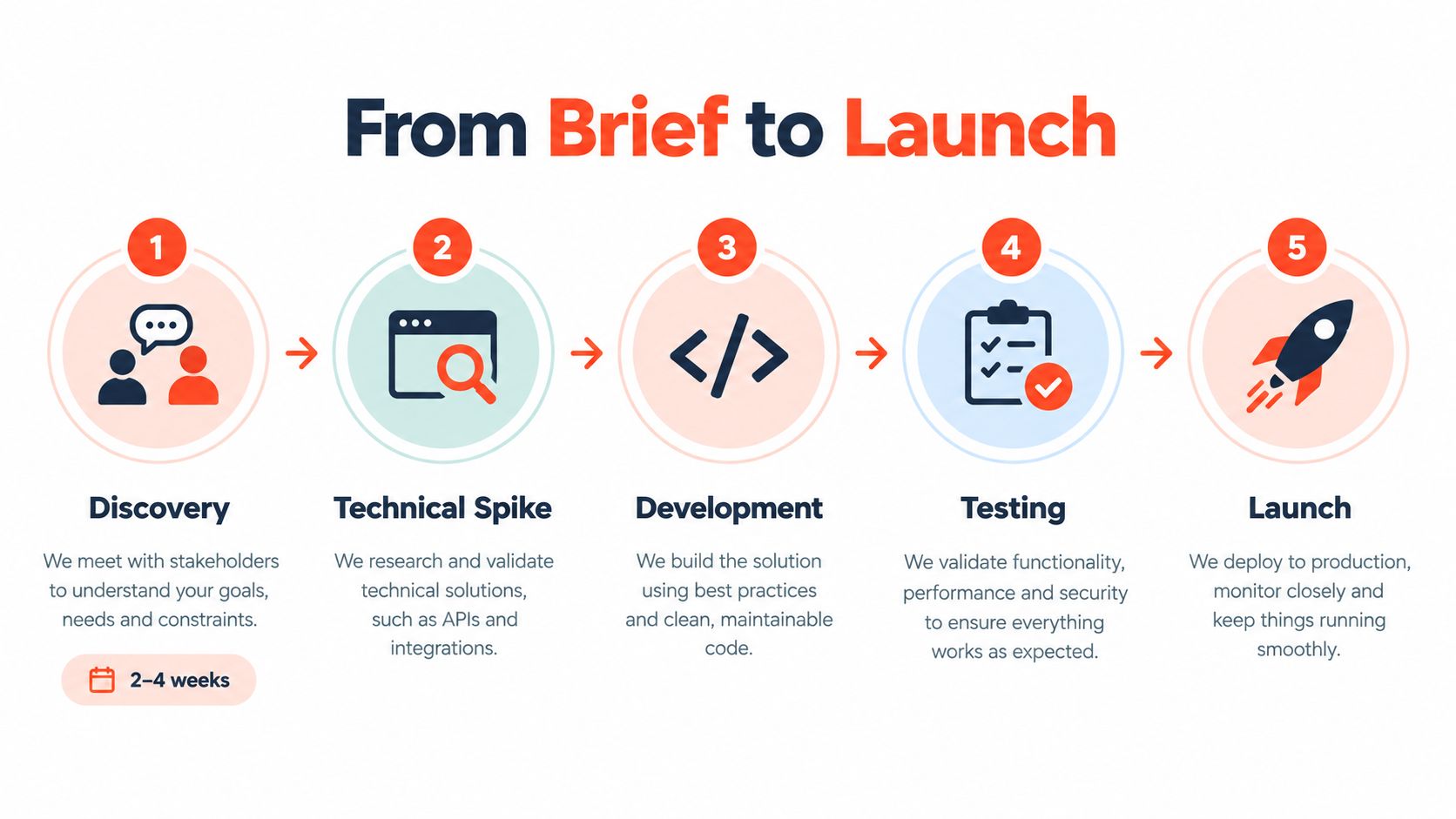
The Real Development Process From Brief to Launch
The agency timeline often starts with “development” because that's the easiest activity to sell. A reliable build starts earlier, with someone making the workflow precise enough to test.
Discovery and architecture
Discovery commonly takes two to four weeks. The product owner interviews operations, customer service, finance, merchandising, and engineering. The team audits the existing workflow, maps data ownership, identifies failure states, and runs a technical spike against Shopify's APIs and webhook behavior.
Architecture and design follow for another two to four weeks. The tech lead produces the system diagram and data model. The team freezes scopes, defines the permission matrix, and confirms the extension surfaces. The merchant should sign off on this milestone before feature development begins, not after the build has accumulated assumptions.
Build in controlled increments
Build sprints typically run for six to fourteen weeks, depending on integration depth and scope. Developers should deliver into a staging development store, demonstrate working increments weekly, and maintain a frozen scope list. A new requirement should trigger a documented decision or change order, not disappear into the backlog as an invisible promise.
Staffing needs named accountability:
Product owner: Resolves business conflicts and accepts functionality.
Tech lead: Owns architecture, technical risk, and release quality.
Frontend and backend engineers: Deliver the application and its Shopify surfaces.
QA lead: Defines test coverage and manages regression testing.
Project manager: Tracks dependencies, decisions, dates, and budget.
A team can use external specialists, including LATAM developers, but the merchant still needs an internal product owner. Outsourcing implementation doesn't outsource business accountability.
Test the failures, not just the happy path
Staging QA and migration usually take two to four weeks. Test realistic order states, inventory conflicts, permission boundaries, duplicate webhook delivery, partial ERP outages, uninstall behavior, and API throttling. Prepare rollback steps before merging the release, and rehearse who makes the cutover decision.
Launch should include a scoped installation, a controlled data migration, monitoring, and a defined hypercare window. If the project has no written rollback plan or no person authorized to stop the launch, it isn't ready for production.
Timelines, Costs, and Where Budgets Actually Go
Custom app budgets become unreliable when vendors quote a feature list without pricing the operating conditions around it. A thin integration and a multi-service commerce platform may both be called “an app,” but they create entirely different delivery commitments.
Complexity Tier | Timeline | Budget Range | Typical Examples |
|---|---|---|---|
Thin integration | 8 to 12 weeks | $25,000 to $60,000 | Admin API synchronization with limited transformation |
Mid-complexity app | 4 to 7 months | $80,000 to $200,000 | Admin interface, multiple webhooks, and operational workflows |
Multi-service app | 6 to 12 months | $200,000 to $500,000+ | Checkout extensions, Functions, external services, and deeper orchestration |
These are planning bands, not guarantees. The proposal should explain what changes the number: systems involved, data migration, permission design, availability requirements, testing depth, and post-launch support. A useful companion when assessing broader ecommerce budgets is this guide to the cost of an ecommerce website.
The line items that disappear in optimistic quotes
Discovery is often presented as free and then absorbed into delivery. That creates pressure to skip interviews, data mapping, and technical spikes. Design can also become expensive when stakeholders revise workflows after engineering has started.
QA should have a fixed scope, named environments, and explicit acceptance criteria. Support should identify response times, coverage, escalation, and what counts as a new feature. Hosting, observability, error tracking, database operations, and dependency licenses may not appear in the headline build price, but the merchant still pays for them.
Budget test: If the quote is lower than 20 percent of the projected annual benefit, ask which assumptions or deliverables were removed.
That rule isn't a promise of return. It's a challenge to the business case. The projected benefit must be tied to a real operational outcome, such as reduced vendor dependency, fewer manual reconciliations, faster fulfillment decisions, or a capability that directly supports a differentiated customer experience.
Don't approve a build from the total alone. Request a costed discovery phase, a milestone plan, an explicit out-of-scope list, a support proposal, and an exit plan. A cheap launch can become an expensive dependency when nobody priced ownership.
Maintenance, Security, and the 2026 Governance Shift
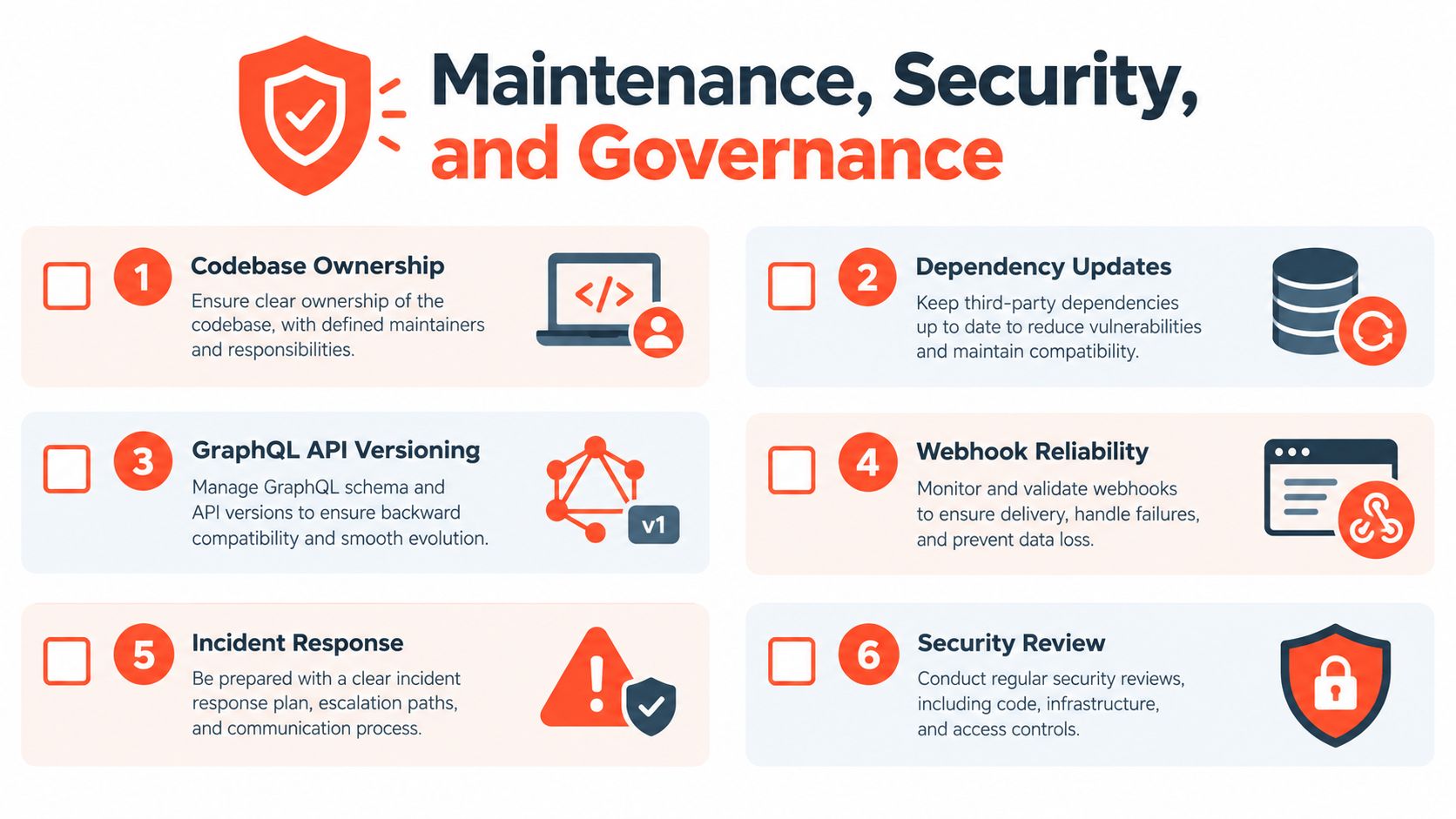
The launch is the beginning of the liability, not the end of the project. Someone must own the repository, dependency updates, Shopify API version changes, webhook reliability, monitoring, incident response, and security reviews. If the agency keeps the keys, the merchant needs contractual access and a practical transition path.
Shopify's 2026 model makes governance a board-level operating concern for larger merchants. Legacy custom apps created before 2026 can still be managed in Shopify admin, while new custom apps require the Dev Dashboard. Alongside those two categories, teams may operate Functions-backed extensions and no-code automations with different ownership and release practices (Shopify's app guidance).
Put governance in the contract
Before signing, get written answers to these questions:
Who owns the codebase: Does the merchant control the repository, build process, documentation, and deployment credentials?
Who hosts the app: Who pays for infrastructure, rotates secrets, manages backups, and responds to outages?
Who handles API changes: Does the support agreement include GraphQL version updates and compatibility testing?
What does support mean: Are response targets, escalation paths, monitoring responsibilities, and incident communications defined?
How is sensitive data protected: Are scopes minimized, PII retention documented, and access reviewed?
What happens after termination: Can the merchant export data, receive source code, and transition to another team?
How are legacy apps governed: Which old applications remain active, who can access them, and when will the team retire or refactor them?
Shopify's Functions transition also deserves its own review. Teams moving logic from Scripts or legacy patterns should assess the available extension surface, test behavior under real discount and order combinations, and document who owns the new implementation. Presidio's guide to moving from Shopify Scripts to Functions can serve as one reference during that assessment.
The strongest recommendation is also the least glamorous: maintain an application register. Record each app's purpose, store, scopes, owner, hosting location, data handled, dependencies, deployment process, and retirement status. Without that inventory, the Dev Dashboard migration moves technical confusion into a newer interface.
Presidio builds and supports Shopify storefronts, custom apps, themes, integrations, and Shopify Functions for merchants that need maintainable workflows rather than another isolated tool. If you're evaluating a custom app, Presidio can help audit the native options, define the architecture, and support the implementation after launch.



