Outrank AI

A six-person apparel brand can run smoothly on Shopify for years, then hit a wall during a major campaign. The Liquid theme starts feeling restrictive, mobile product pages become difficult to optimize, and the merchandising team wants campaign pages that don't fit neatly into sections and blocks. Meanwhile, the engineering team is proposing a headless storefront, promising more control and a faster experience.
That proposal may be technically sound and financially wrong.
Shopify headless commerce isn't an automatic upgrade from Liquid. It's a decision to replace the storefront layer with a custom application while keeping Shopify's commerce engine underneath. The business case depends on whether that extra control solves a costly problem, and whether the team can support the resulting software after launch.
Table of Contents
What Headless Commerce Actually Means on Shopify
In the apparel scenario, Shopify hasn't necessarily failed. The catalog, inventory, orders, payments, and checkout may all work exactly as intended. The constraint sits in the presentation layer, where Liquid themes, templates, sections, and app integrations determine how much freedom the team has.
A headless implementation separates that storefront from Shopify. The customer-facing application runs independently and communicates with Shopify through APIs. Shopify continues to manage the commerce system of record, while the custom frontend controls routing, rendering, interactions, and the visual experience. This is the same architectural pattern described in Presidio's guide to composable commerce, where independently managed systems connect through defined interfaces.
What changes for the storefront
A standard Shopify theme uses Liquid templates that Shopify renders as part of the Online Store experience. Merchants manage much of the storefront through Shopify admin, and the theme architecture provides a controlled framework for content, navigation, product pages, and collection pages.
Headless Shopify moves those responsibilities into a separate frontend application. A React-based storefront requests structured product, collection, cart, and customer data from Shopify, then renders the experience in its own way. That allows a team to create custom product configurators, unusual navigation patterns, editorial landing pages, and application-like interactions without forcing every experience into a theme section.
The trade-off is direct. A theme is a managed storefront environment. A headless application is software that your team owns.
Practical rule: Choose headless because the native storefront prevents a valuable experience or operating model, not because the word sounds more modern.
What headless does not replace
Going headless doesn't mean abandoning Shopify. In most implementations, Shopify remains responsible for the operational work that merchants already depend on:
Catalog and inventory: Products, variants, availability, and merchandising data remain in Shopify.
Orders and fulfillment: Shopify continues to provide the central order workflow.
Checkout: The storefront can hand the shopper into Shopify's checkout rather than forcing the team to build a custom transaction system.
Customer data: Customer account and purchase information remains connected to Shopify's commerce platform.
The frontend changes. The commerce engine doesn't have to.
That distinction matters because many failed headless projects treat the custom storefront as a blank canvas with no platform constraints. It isn't. The Storefront API, cart behavior, customer account flows, checkout capabilities, app compatibility, and API lifecycle still shape what the team can safely deliver.
For the apparel brand, headless may be justified if the campaign experience, performance requirements, or product logic directly affects commercial outcomes. If the team mainly wants better typography, more flexible sections, or a cleaner product page, a well-engineered Liquid theme may solve the problem with much less operational risk.
The Hydrogen, Oxygen, and Storefront API Stack Explained
Shopify's recommended headless stack has three connected parts. Hydrogen is the application framework, the Storefront API is the commerce data contract, and Oxygen is the deployment and hosting layer.
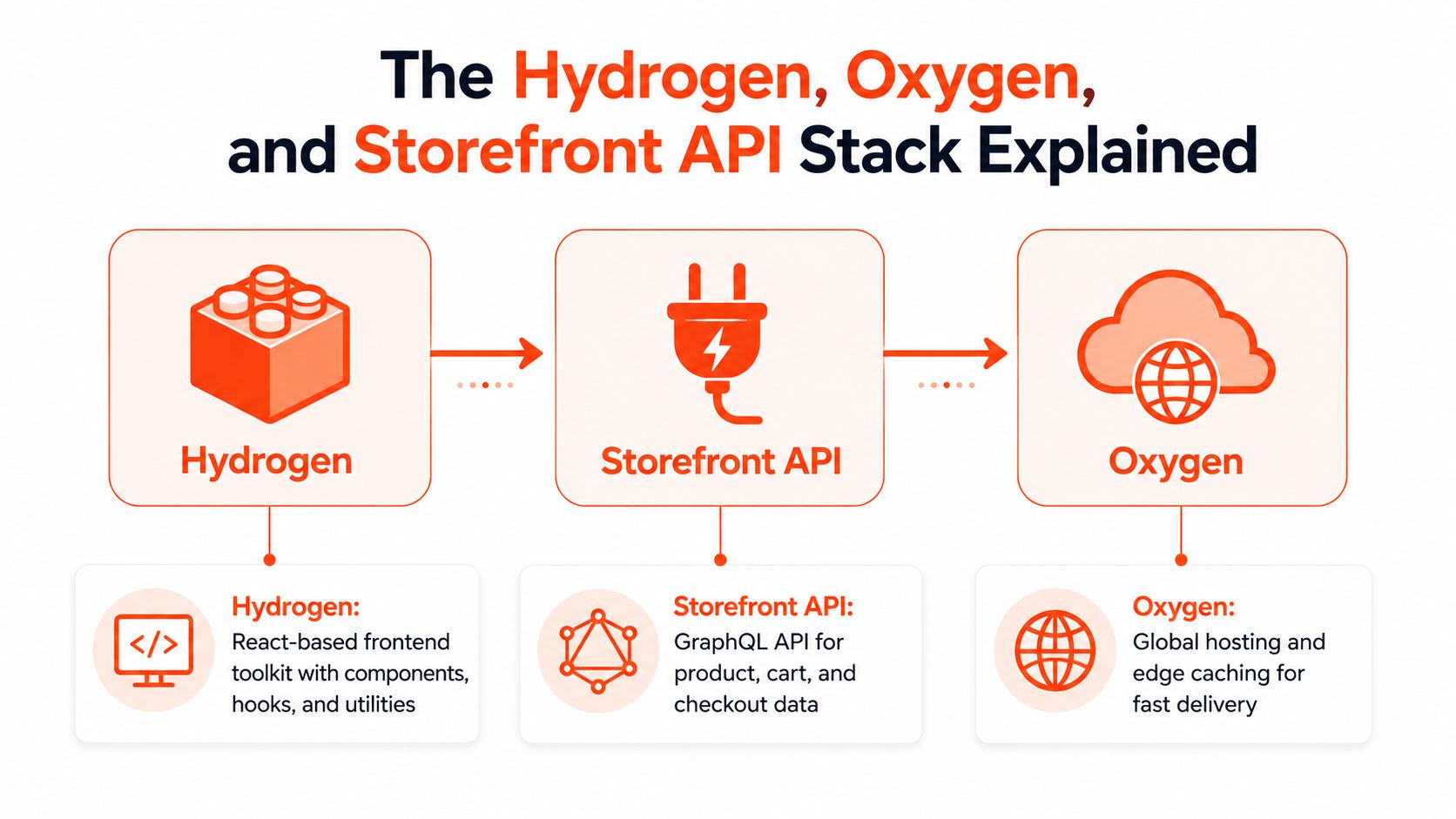
Think of the stack as a restaurant. Hydrogen is the kitchen and service workflow, the Storefront API is the order ticket between the customer interface and the kitchen, and Oxygen is the network of locations that helps serve customers close to where they are.
Hydrogen is the storefront foundation
Shopify describes Hydrogen as its React-based headless commerce stack, now built on the open-source React Router framework. It provides an opinionated starting point rather than asking every team to assemble a commerce application from raw React primitives.
Hydrogen includes preconfigured components, CLI tooling, API client handling, and established Shopify data patterns. That matters because a storefront needs much more than visual components. It needs product queries, cart mutations, caching behavior, route handling, error states, customer flows, and server rendering that works with commerce data.
The opinionated parts are useful when they match the project. They reduce the amount of platform plumbing an engineering team has to design and maintain. They can also feel restrictive when a brand has unusual infrastructure, deep editorial requirements, or a broader composable system that Hydrogen wasn't designed to orchestrate.
The Storefront API is the contract
The Storefront API connects the custom application to Shopify's commerce data. The frontend uses it to retrieve products and collections, understand availability, create and update carts, and support customer-facing commerce flows.
Treat the API as a contract, not as a database shortcut. The frontend shouldn't assume that every Admin API field, theme behavior, or installed app feature automatically exists in the Storefront API. Before development begins, map the brand's required journeys against the API's actual capabilities.
That exercise should cover:
Product discovery: Search, collections, filters, recommendations, and merchandising rules.
Cart behavior: Add, remove, update, discount, and persistence requirements.
Customer journeys: Login, account access, order history, and personalized experiences.
Checkout handoff: The point where Shopify takes over the transaction and which customizations remain available.
Oxygen handles delivery
Oxygen is Shopify's global serverless hosting platform for Hydrogen storefronts. It supports deployment at the edge, caching, and CDN integration, allowing teams to deliver rendered storefront content closer to shoppers while keeping the commerce connection intact.
Shopify's own headless fundamentals documentation describes Hydrogen and Oxygen as a connected architecture, with Hydrogen providing the storefront framework and Oxygen providing the environment for deployment. That integration can reduce infrastructure work because teams don't have to assemble hosting, routing, cache configuration, and deployment workflows from unrelated services.
You can deploy a custom storefront to another platform, such as Vercel or Netlify. That may be the correct choice when the organization already has mature platform engineering standards. It also introduces another operational boundary to observe, secure, and maintain.
The practical question isn't whether one hosting provider is universally superior. It's whether your team benefits more from Shopify's integrated path or from the control of an existing infrastructure platform.
Headless Versus Liquid on Shopify
A brand can have a fast, profitable storefront and still choose the wrong architecture for its team. Liquid and headless solve different problems. Liquid keeps the storefront inside Shopify's managed model. Headless separates the experience layer into an application, giving the team more control while transferring more engineering and operating work to them.
Dimension | Shopify Liquid | Shopify Headless |
|---|---|---|
Flexibility | Customization through Online Store 2.0 themes, sections, blocks, templates, metafields, and app extensions | Frontend control through React, custom routing, application logic, and external content systems |
Performance | Shopify-hosted themes benefit from platform caching and an integrated delivery model | Can perform well with Hydrogen, server rendering, controlled JavaScript, and edge delivery |
Content operations | Merchandising teams can often make changes directly in Shopify admin | Workflows depend on the custom application and may include a separate CMS |
Development model | Theme changes can be accessible to developers and trained merchants | Meaningful changes usually require frontend engineering |
App compatibility | Shopify's theme and app ecosystem generally needs fewer adaptations | Apps may require custom API integrations or replacement implementations |
Operational burden | Shopify manages much of the storefront environment | The team owns repositories, releases, monitoring, dependencies, and frontend maintenance |
Flexibility has a maintenance price
Liquid gives the brand a bounded system. That boundary can limit unusual layouts or interactions, but it also prevents architectural sprawl. A merchandiser can often create a campaign page by arranging sections instead of waiting for a developer to build a route, connect a content model, and deploy an application change.
Headless removes much of that ceiling. A React team can build custom routing, interactive product experiences, advanced personalization, and editorial layouts that do not fit a theme cleanly. Each capability then becomes part of the application's design, testing, deployment, and maintenance surface.
That trade-off affects operating cost after launch. A new merchandising request may be a theme configuration change in Liquid, while the same request in headless can require frontend work, API changes, review, and a release.
Performance depends on implementation
Headless does not guarantee a faster storefront. A custom React application can ship excessive JavaScript, make inefficient API requests, delay rendering, or create cache misses that a well-built Liquid theme avoids.
Shopify's real-user performance analysis found that Liquid and Hydrogen were the only compared architectures that performed well for INP in CrUX data, and Shopify concludes that Hydrogen is the strongest path to good web performance when a brand chooses headless. The analysis also qualifies that conclusion: performance depends on the framework, rendering strategy, and delivery infrastructure, not separation alone. Review Shopify's real-user comparison of Liquid and headless performance before treating architecture as a speed shortcut.
Choose the constraint before the architecture
Liquid is usually the better fit for a straightforward catalog, a fast theme, frequent merchant-led updates, and limited engineering capacity. Headless becomes more compelling when the brand needs an experience the theme model can't express, or when several customer touchpoints need a shared application layer.
Start with the constraint causing measurable business friction. If the issue is an oversized theme, remove unused scripts and improve the existing storefront before replacing it. If the issue is a product builder, complex route model, or content workflow that Liquid cannot support cleanly, headless deserves a serious evaluation.
The final decision should include the build cost, the expected payback window, and who will maintain the application after launch. More frontend control has value only when that value exceeds the continuing cost of owning it.
The Economics of Going Headless
Headless is a capital allocation decision, not only a frontend choice. The initial build gap may be about 20% rather than three to five times the cost of Liquid, according to independent analysis of Shopify headless economics. The business case still depends on payback and the team's capacity to operate the result. For brands under $5M GMV, payback can outlast the platform's useful life, leaving a technically successful build that fails as an investment.
The launch budget captures only part of the cost. A Liquid theme lets Shopify absorb more storefront maintenance, while a Hydrogen application shifts more responsibility to the brand, its internal engineers, or its agency partner. That difference affects every release, integration update, and production incident after launch.
Dimension | Liquid, Shopify themes | Hydrogen headless | Custom headless on another framework |
|---|---|---|---|
Initial investment | Lower relative build cost, especially when extending an existing theme | Higher investment for application architecture, frontend development, testing, and deployment | Highest variability because the team must assemble more platform and integration decisions |
Change management | Merchants and theme developers can handle many updates inside Shopify | Frontend engineers handle application changes and releases | Platform and frontend engineers manage framework, hosting, and commerce integration changes |
Hosting model | Shopify-managed storefront hosting | Oxygen provides Shopify's integrated hosting path | The team manages a separate hosting and deployment platform |
Integration work | Many theme-compatible apps work with limited adaptation | Frontend-facing apps often require API or component work | Integration patterns vary by framework and infrastructure |
Payback risk | Lower because the operating model is simpler | Higher when revenue lift is uncertain or the brand is small | Higher still when custom infrastructure adds long-term ownership |
Best economic case | Straightforward storefronts and merchant-led iteration | Differentiated experiences with a clear commercial bottleneck | Complex organizations with established platform engineering |
Model the return before choosing the architecture
Treat revenue gains from faster rendering, personalization, or a better product journey as hypotheses. Build the model from the brand's own conversion, traffic, average order value, margin, and retention data. Test whether a plausible improvement repays both the build and the continuing engineering commitment before another major storefront change becomes necessary.
For a brand below the $5M GMV threshold, headless is difficult to justify unless it supports a requirement tied directly to the business model. A custom configurator, unusual subscription journey, or experience spanning several interfaces may qualify. A preference for a more fashionable frontend usually does not.
Performance work applies to both architectures. Before funding a rebuild, follow a structured Shopify performance optimization process to identify whether the bottleneck comes from scripts, media, templates, third-party apps, or the rendering model itself.
Budget for the post-launch workload
After launch, teams still handle API versioning, checkout changes, dependency updates, cache debugging, preview environments, analytics validation, and third-party integration maintenance. Shopify's 2026 headless and checkout guidance also indicates that headless can require more technical resources as checkout requirements change. Checkout Extensibility became mandatory for Plus merchants in January 2026 and for non-Plus merchants by August 2026, according to Shopify's guidance on headless B2B and checkout evolution.
Checkout therefore needs ongoing ownership rather than a one-time implementation. A decoupled frontend requires a named owner, release discipline, API observability, and a dependency policy. Without those controls, even improvements in Shopify's commerce platform can leave the application expensive to update.
Migration Considerations and Architecture Decisions
A headless migration starts with an architecture audit, not a frontend build. The first question is whether the current Liquid storefront contains business logic that the team understands well enough to reproduce. The second is whether installed apps expose compatible APIs, webhooks, extensions, or components for the new experience.

Audit the current storefront before choosing the stack
Start by inventorying the parts that affect customer and operational continuity:
Liquid customizations: Record template logic, section settings, snippets, metafields, metaobjects, and theme-level workarounds. Some can become Hydrogen components. Others may reveal an app or backend dependency that the new frontend must call directly.
Third-party apps: Separate backend services from presentation-layer apps. Fulfillment and inventory integrations may continue without frontend changes. Reviews, loyalty widgets, popups, subscriptions, and merchandising tools often need a new implementation.
URL structures: Export product, collection, blog, and campaign URLs. A new route model should preserve valuable paths where possible and create tested redirects where it can't.
SEO continuity depends on more than a redirect file. Preserve canonical behavior, metadata, structured data, pagination, internal links, robots directives, and sitemap coverage in the new renderer. Headless removes several theme defaults, so the engineering team must deliberately recreate them.
Protect data and shopper continuity
Metafields need explicit mapping into the new data model. Customer accounts and permissions need an end-to-end test, not just a successful login in development. Cart recovery also needs attention during a phased rollout, because shoppers may move between the old Liquid storefront and the new application while campaigns, email links, or saved sessions still point to different experiences.
Decide where checkout remains before building the cart flow. Shopify checkout is usually the lower-risk transaction surface, but the team must verify which checkout customizations, discount rules, subscription behaviors, and customer account requirements remain compatible with the target setup.
Pick a rollout that matches team maturity
A feature-flagged parallel run gives the team a controlled way to compare behavior and performance before broad exposure. Route-by-route migration works when the URL model and ownership boundaries are clear. A big-bang cutover can reduce dual-system complexity, but it demands stronger testing, rollback planning, and launch monitoring.
Hydrogen is the natural first option for a commerce-first Shopify build because Shopify provides the framework and Oxygen hosting path. Next.js may fit better when the storefront has demanding editorial content, complex routing, or deep integration with non-Shopify platforms. The correct choice follows the integration map, not developer preference.
A monorepo can simplify shared types, components, and deployment coordination. Separate repositories can isolate ownership between commerce, content, and platform teams. Either can work, but establish API contracts, environment ownership, release approvals, and observability before the first production route ships.
When Shopify Headless Is the Wrong Choice
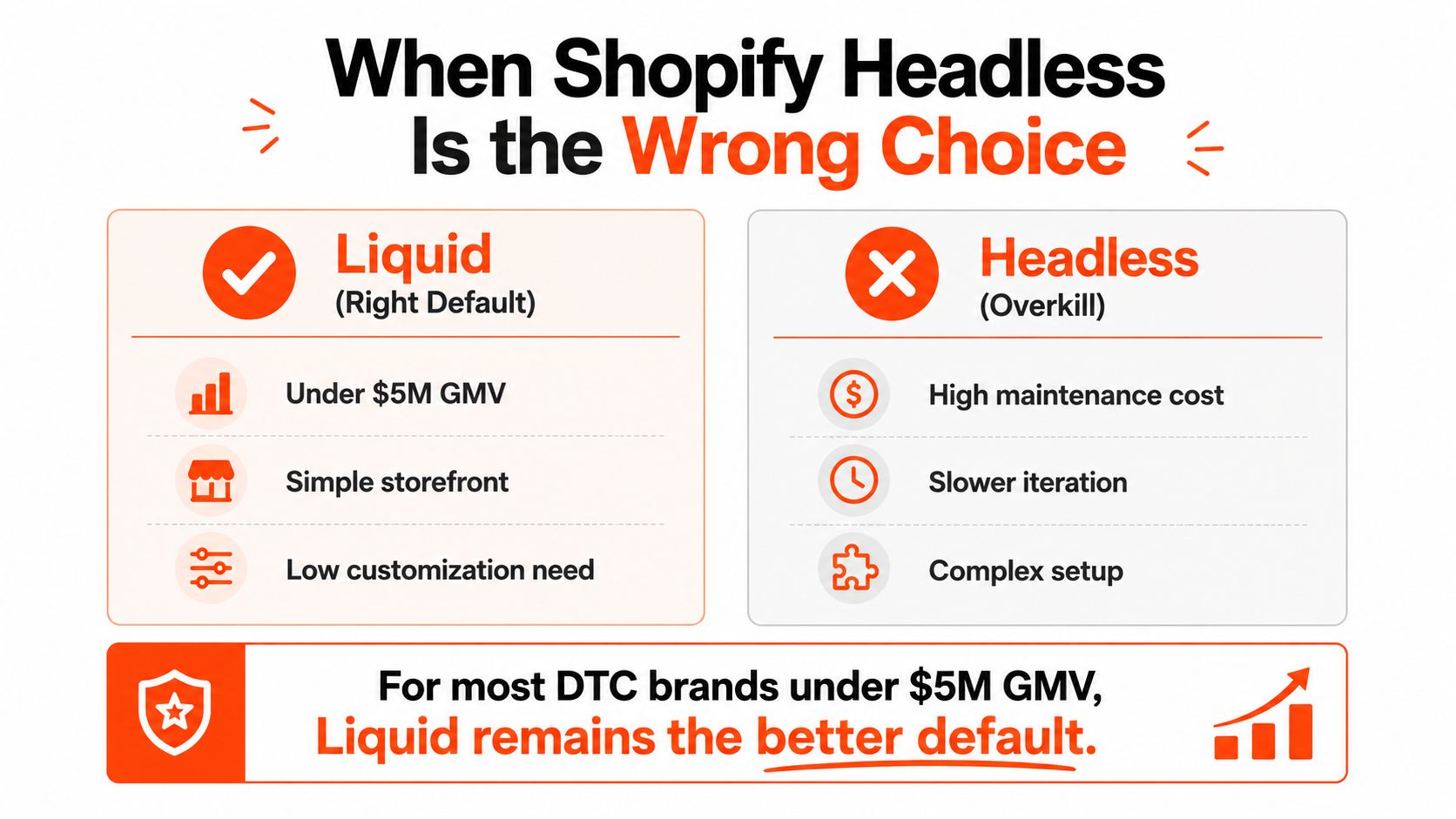
Headless is often the wrong default for a DTC brand under $5M GMV, especially when the catalog is straightforward and the team depends on Shopify admin for daily merchandising. The extra frontend control won't compensate for slower campaign iteration, a missing app integration, or a maintenance budget the business can't sustain.
Keep Liquid when the operating model depends on it
Liquid is usually the smarter choice when:
Merchandising is highly autonomous: Marketing teams need to launch, reorder, and revise campaign content without engineering releases.
The catalog is uncomplicated: Products don't require configurators, complex bundling, or unusual purchase journeys.
The app ecosystem is central: Reviews, subscriptions, loyalty, personalization, and analytics depend on theme-level integrations.
International operations need platform-native workflows: Shopify Markets features such as regional pricing and currencies should work without recreating the surrounding experience.
Engineering ownership is unclear: No internal frontend team and no reliable agency retainer means the custom application will age without a responsible maintainer.
The strongest warning sign is a brand that wants headless for flexibility but has no process for deploying and maintaining software. A custom storefront turns ordinary requests into engineering work. A homepage change, analytics update, checkout adjustment, or app replacement may need code review, testing, and release management.
Headless doesn't remove constraints. It moves them from theme architecture into engineering capacity.
Headless earns its place in narrower situations
Headless makes more sense when the brand already has a capable engineering team, a defined performance budget, and a customer experience that Liquid can't model cleanly. That may include a complex product customization flow, programmatic content requirements, specialized personalization, or several digital interfaces sharing one commerce backend.
It can also fit organizations with complex ERP, CRM, OMS, or content operations, provided the team has mapped the integration surface and assigned long-term ownership. The architecture should solve a named constraint, with an agreed measurement plan.
For a practical discussion of the trade-offs between a custom storefront and Shopify's managed model, this Shopify headless commerce video offers another perspective.
Deciding Whether Headless Fits Your Brand
The decision becomes clearer when the leadership team separates current problems from future aspirations. “We want a more immersive site” is a design ambition. “Our product configuration requires interaction patterns the theme cannot support” is an architectural constraint.
Use these questions in an architecture workshop:
Revenue stage: Brands under $5M GMV rarely have an obvious headless payback case. Treat that threshold as a reason to model carefully, not as an absolute ban.
Custom functionality: Which customer journey does Liquid fail to express? Name the route, data, interaction, and commercial outcome.
Team capacity: Who owns React development, API changes, performance monitoring, releases, and incident response after launch?
Content velocity: Can the marketing team work effectively with the proposed CMS and deployment process, or will headless create a developer queue?
International scope: Do regional catalogs, pricing, languages, domains, and market rules justify a custom storefront layer?
Integration surface: Have the team mapped the ERP, CRM, OMS, PIM, subscription, search, reviews, loyalty, and analytics dependencies?
Operating horizon: Is leadership willing to fund headless as a continuing software product rather than a one-time redesign?
Use stage as a starting point, not a verdict
Pre-$2M GMV brands will typically get more value from a strong Liquid foundation, performance tuning, conversion work, and disciplined app selection. Between $2M and $8M GMV, the team should build a detailed ROI model and test whether the commercial constraint is large enough to support a separate application. Above $8M GMV, headless may be easier to justify when the brand also has omnichannel, marketplace, multi-region, or complex integration needs.
Those ranges are decision prompts, not guarantees. A smaller brand with a technically demanding product can have a stronger case than a larger brand with a simple catalog.
For teams managing multiple experiences, Shopify multiple storefronts can be part of the evaluation, but multiple storefronts alone don't prove that a fully headless frontend is necessary. Compare the cost of separate native experiences, selective custom components, and a shared application against the actual operating model.
Before approving a build, ask the leadership team to complete one sentence: “Headless will pay for itself by solving ___, measured by ___, and owned after launch by ___.” If the team can't fill in those blanks with a specific problem, metric, and owner, keep the Liquid storefront and invest in the constraint you can prove.
Presidio helps Shopify and Shopify Plus brands evaluate headless architecture, build maintainable custom storefronts, and improve existing themes when a rebuild isn't justified. Visit Presidio to discuss the right implementation path, from performance and UX audits through headless builds and ongoing engineering support.

Jamie, Presidio’s Designer, leads the practice alongside Johnnie. With over 10 years of e-commerce experience, Jay is a Shopify expert, known for crafting innovative solutions that prevent tech debt.
Jaime
Senior Product Designer, 2020



