Presidio

A storefront release can look routine right up until a shopper adds a discounted item to a cart and the new frontend sends a payload the old integration doesn't understand. The page stays online, the theme published successfully, and your uptime monitor reports green. Yet checkout errors, missing discount values, or broken subscription handoffs start appearing while old and new code serve real customers together.
That's the part most zero downtime deployment guides underplay. Keeping a storefront reachable during a release is only the first requirement. For Shopify and headless commerce, the release also has to preserve compatibility across carts, checkout flows, discount logic, app APIs, sessions, and live data. A clean traffic switch can't rescue a release that makes two active versions disagree about what a customer's order means.
Table of Contents
Why Zero Downtime Deployment Matters for Commerce
A product launch puts several clocks under pressure. Merchandising needs a collection published, marketing has campaigns scheduled, and engineering must release a theme change or headless build while shoppers are active. A small component update may also alter cart rendering, selling-plan selection, discount messaging, analytics events, or an app proxy connecting the storefront to another system.
The hidden risk appears when old and new code run side by side. The new version might display a discount correctly on the product page but send a cart request in a format the older integration cannot parse. Browsing, search, and the homepage continue working. The failure surfaces later, when the cart recalculates or checkout requests a value that the older API, schema, or session logic does not recognize.
A store can remain reachable and still fail its commercial job.
Zero downtime deployment means more than keeping a page available during a switch. It requires active customer journeys to keep working while release versions overlap. Cart mutations, checkout handoffs, discount calculations, API payloads, and session state must remain compatible. Otherwise, the release avoids an infrastructure outage while creating a customer-facing one.
Reliability has a direct commercial boundary
Cloud release practices made blue-green, canary, and rolling updates common engineering patterns. A technical benchmark describes 99.99% uptime as about 4.4 minutes of downtime per month and 99.999% uptime as roughly 5 minutes per year, useful reference points when teams define interruption limits for release operations (uptime benchmarks for zero downtime deployments).
The commercial exposure is equally clear. Gartner's widely cited estimate places average enterprise downtime at about $5,600 per minute. The same operational guidance says that a deployment causing 5 minutes of downtime twice per week would exceed 8.6 hours of deployment-related downtime annually, enough to threaten a 99.9% SLA by itself. Commerce teams experience that exposure through abandoned carts, support tickets, wasted campaign traffic, and lower confidence in checkout.
Commerce rule: Measure release success by completed customer journeys, not only by whether the web process stayed alive.
Availability isn't the same as user impact
Comparative evidence favors controlled release methods over in-place upgrades. One financial-grade CI/CD analysis reported a 9.3% average failure rate for conventional deployment techniques, with typical downtime windows of 3 to 15 minutes. Its zero-downtime methods reduced downtime to less than 2.1% and produced zero user impact in 87% of releases (comparative CI/CD deployment analysis).
Those results do not remove the need for compatibility planning. They show why release mechanics matter, while Shopify teams must also protect the contract between storefront code, APIs, schemas, carts, checkouts, discounts, and sessions. A rapid rollback limits exposure, but preventing incompatible requests from reaching live customers is safer.
The practical question is whether every active session can complete its journey while two versions share production traffic.
Choosing the Right Release Pattern for Shopify
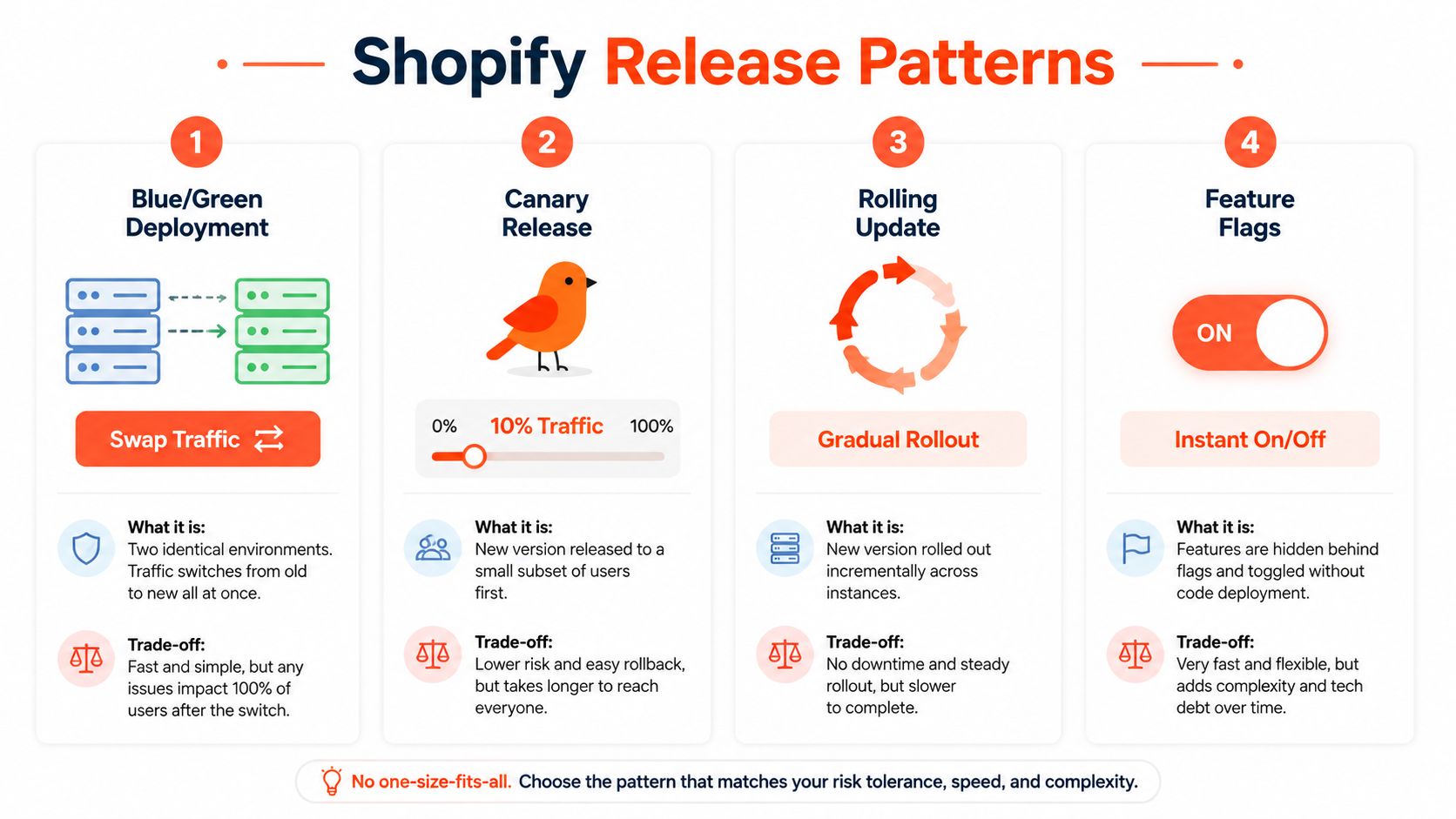
No single release pattern fits every storefront change. A theme-only styling adjustment, a new cart transformation, and a checkout-adjacent subscription integration have different blast radiuses. The safest choice depends on where traffic can be controlled, whether the old version can remain live, and how quickly the team can reverse exposure without rebuilding.
Pattern | Best For | Risk Level | Rollback Speed |
|---|---|---|---|
Blue/Green | Headless storefront builds and high-risk releases | Lower when environments are equivalent and validated | Fast traffic reversal |
Canary | Changes that benefit from measured production exposure | Bounded, but dependent on meaningful signals | Fast if automated |
Rolling | Multi-instance applications with strong compatibility discipline | Higher during mixed-version operation | Gradual |
Feature flags | Separating code deployment from customer exposure | Limited by cohort and flag design | Immediate flag change |
Blue-green gives the cleanest storefront cutover
Blue-green keeps two environments live. The current environment serves shoppers while the replacement environment receives the build, configuration, and validation checks. Once the idle environment behaves correctly, routing switches to it and the previous environment remains available for rollback.
That model works well for a headless Shopify storefront where a load balancer, hosting platform, or edge router can control traffic. It creates a clear separation between versions and makes rollback operationally simple. The trade-off is duplicated capacity and the need to validate shared resources, including APIs, caches, session handling, and any data store that both environments use.
For Shopify theme publishing, Shopify's own versioning and preview workflow can reduce deployment exposure for presentation changes. It doesn't automatically solve compatibility in app-backed logic or external services. If the release changes how the theme calls an app, formats cart data, or reads a configuration value, the shared contract still needs a compatibility plan.
Canary is powerful only with evidence
A canary sends a small traffic slice to the new version, observes it, and promotes only when predefined gates remain healthy. That approach exposes the release to real browser behavior, device combinations, carts, and integrations that staging rarely reproduces.
The weakness is statistical and operational. A small cohort may not contain a discount edge case or a subscription flow, so an early quiet period can create false confidence. Guidance on canary analysis recommends starting with a very small slice, defining the minimum detectable effect and rollback thresholds before launch, and treating an underpowered sample as insufficient evidence rather than proof of safety (statistical pitfalls in canary releases).
Rolling updates require the strictest compatibility
Rolling deployment replaces instances gradually, which means old and new application versions serve traffic at the same time. It can conserve infrastructure, but it makes backward-compatible APIs, schemas, cache keys, and messages essential.
Feature flags complement these patterns rather than replacing them. A flag can keep a new cart component or discount presentation disabled while the code is deployed, but it can't repair a destructive schema migration or an incompatible API request already sent by the new version. For broader architecture decisions around enterprise hosting and deployment, Kogifi's deployment guide for enterprises provides useful context. Teams evaluating a composable build can also review headless commerce architecture for Shopify before choosing where routing and release control should live.
A Practical Zero Downtime Deployment Workflow
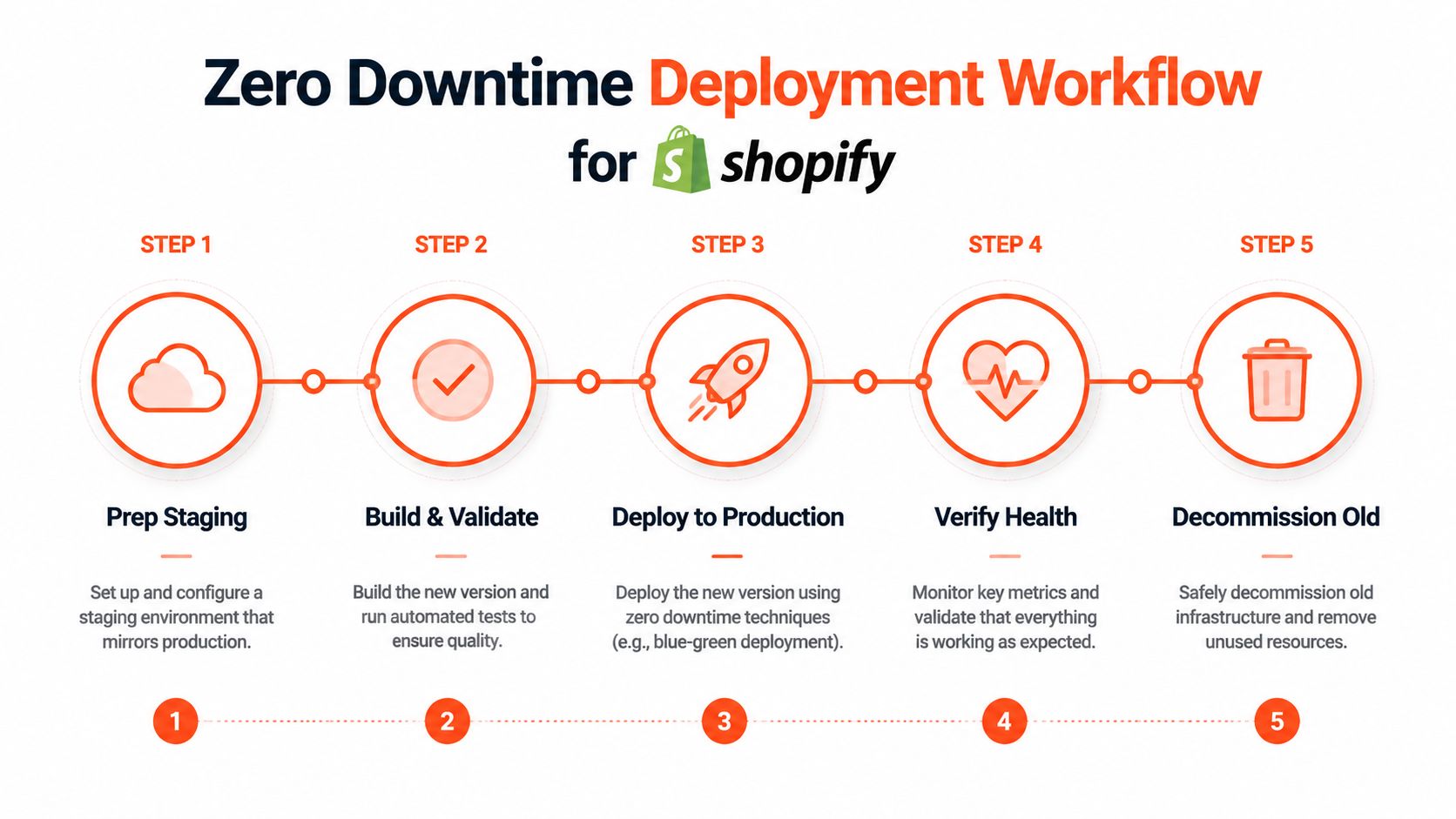
A reliable release starts before the deployment command. The team should know which customer journeys the change touches, which versions will coexist, and what action reverses exposure if a signal deteriorates. That preparation is especially important for Shopify storefronts because the frontend may depend on Shopify APIs, app services, analytics endpoints, and browser-held session state.
Start with a release contract
Write down the release boundary in plain language. “Update product-card styling” is a narrow change. “Replace discount messaging and cart line-item handling” is a commerce contract change that needs broader validation.
Use a branch or commit that can be built reproducibly, lock dependencies, and keep environment-specific configuration outside the artifact. For a Shopify theme, validate the theme package and its settings in a preview environment. For a headless build, generate the production artifact before traffic moves, then test it against representative Shopify data and the same app endpoints used in production.
A custom theme may be the right foundation when the release needs precise control over templates, sections, and storefront behavior. The engineering considerations differ from a heavily customized off-the-shelf theme, so teams should treat custom Shopify theme development as an architectural decision, not only a visual one.
Validate the idle environment
Deploy the new build without exposing it broadly. Check page rendering, asset loading, API responses, cart creation, quantity changes, discount application, selling-plan selection, login state, and checkout handoff. Include browser tests that preserve cookies and session state across navigation, because a clean anonymous page load proves very little about an existing cart.
Run contract checks against every integration that reads or writes storefront data. Confirm that the old version can still operate if it shares the same backend resources, and confirm that the new version tolerates fields or responses produced for the previous release. Many teams discover that “frontend-only” changes alter request shape or response assumptions.
Shift traffic and watch the journey
Use a hard cutover for a validated blue-green release, or staged routing for a canary. Avoid treating the switch as the finish line. Keep the previous environment intact until the health window passes and customer-flow monitoring shows stable behavior.
A useful release dashboard combines technical and commerce signals:
Request health: Track server errors, failed API calls, and unexpected response changes.
Latency: Watch the critical storefront and cart paths, not only the homepage.
Session continuity: Confirm that carts, logged-in state, and selling-plan selections survive navigation and version boundaries.
Commerce actions: Monitor add-to-cart, discount application, checkout initiation, and payment handoff events.
Rollback readiness: Keep the prior build routable and make the reversal a controlled operational action.
The deployment is successful only when those signals remain healthy under real traffic. If the release causes an error spike or a critical flow fails, stop promotion and return traffic to the previous version before investigating deeper.
For a visual walkthrough of staged release mechanics, use this short deployment overview after reviewing the workflow above:
Retire the old version deliberately
Decommissioning too early removes your easiest rollback path. Preserve the previous release until logs, customer reports, and business-flow metrics support retirement. Then remove temporary routing, obsolete flags, and compatibility code only after the active version no longer depends on them.
The Hidden Risk of Mixed-Version Storefront Traffic
A traffic switch can finish cleanly while the release is already corrupting commerce state. The difficult part of zero downtime deployment starts when old and new storefront code share live carts, checkout flows, customer sessions, APIs, and configuration, but interpret those contracts differently.

A new version may expect a field that an older integration never sends. A migration may rename or remove a value while an in-flight request from the old version still writes to it. Cache keys can also overlap, allowing one version to receive a response generated for another representation. The storefront stays online through each failure.
Design for overlap, not an imaginary instant
Use expand and contract for schema changes. Add the new structure while retaining the legacy one. Release code that reads both forms and writes a compatible representation, then migrate or synchronize existing data. Remove the old structure only after the previous code no longer depends on it.
API changes need the same discipline. Introduce optional fields before consumers require them, accept old and new response shapes during the overlap window, and delay removal until that window has closed. If both versions write related representations, choose a synchronization method that exposes divergence and supports recovery, such as transactional dual writes where the integration can support them.
Commerce state makes small mismatches expensive
A product page may tolerate a cosmetic difference. A cart or checkout may not. Discount behavior can depend on line-item properties, customer identity, market context, or selling plans. Subscriptions and connected apps may also require stable identifiers and exact event payloads. A version mismatch can therefore change the order rather than merely render the wrong component.
Sessions extend the risk beyond a single request. A shopper can load the storefront before deployment, add products, and return afterward with cookies and cart state created by the previous version. The replacement code must interpret that state correctly. The reverse path matters too, because routing can send a session created by the new version back to the old one.
Compatibility test: Can both versions read the same cart, write the same commerce state, and tolerate each other's API responses throughout the overlap window?
Traffic volume can expose these failures. The cited deployment analysis reports average request errors rising from 0.014% with no deployment to 0.639% during a successful deployment and 1.2% during a failed deployment at medium traffic. At high traffic, the figures were 11.921%, 19.107%, and 17.893% (deployment risk under changing traffic levels). Those results do not predict every storefront release. They show why a low-volume green check cannot prove that mixed-version code will preserve carts, discounts, and API contracts under commerce load.
Testing and Observability That Prove a Release Is Safe
A release can report all green while shoppers fail at key steps. Tests and dashboards must follow the customer's path through the storefront, from product view to cart, discount, checkout, and order confirmation.
Test the contracts before the pixels
Unit and component tests cover rendering and state transitions. Commerce releases also need integration and contract tests for cart mutations, discount application, customer context, selling-plan behavior, app proxy responses, and analytics events. Preserve session cookies in browser tests, then run the same journeys against both the current and replacement versions when they share live dependencies.
Schema changes need their own gate. Verify that the old code can read the expanded schema, the new code handles legacy data, and background jobs or integrations accept both representations. A rollback fails if the database has already changed in a way the previous release cannot interpret.
Run mixed-version tests against real compatibility boundaries. Check API response fields, request validation, session cookies, cart identifiers, discount payloads, and webhook handling. A storefront can render correctly and still corrupt a cart when one version writes a shape the other version does not expect.
For teams working on page speed and storefront responsiveness, Shopify performance optimization guidance helps connect release testing with the runtime signals shoppers experience directly.
Make promotion rules explicit
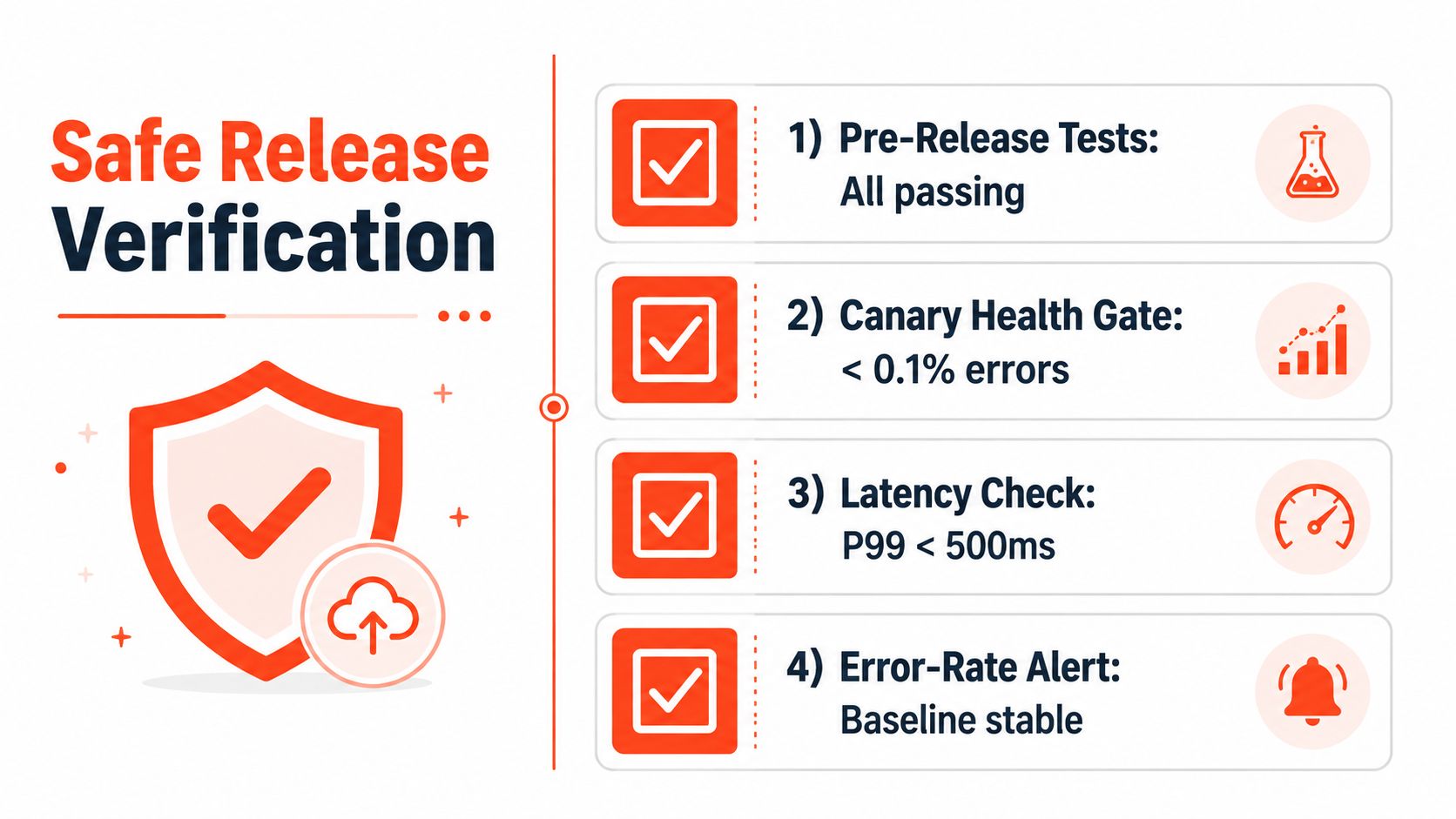
Automate canary promotion when the signal is objective. Operational rollout examples use a 99% success-rate floor and a sub-500 ms p99 latency constraint before promotion, as described in deployment health-gate guidance. Treat those figures as examples, not universal thresholds. Set rules from your baseline, traffic mix, checkout dependencies, and tolerance for commerce failures.
The same guidance describes blue-green and canary methods as capable of reducing deployment failures by up to 90% when instrumentation, rollback automation, and staged traffic shifting work together. The benefit comes from the operating system around the pattern, not the pattern name alone.
Define rollback triggers before exposure:
Error threshold: Revert when critical storefront or cart errors exceed the agreed baseline.
Latency threshold: Stop promotion when customer-facing p99 latency breaches the release budget.
Journey failure: Roll back when add-to-cart, discount, or checkout initiation fails.
Compatibility signal: Halt when old and new versions produce conflicting payloads or data states.
Business anomaly: Investigate when order-flow events diverge from the expected baseline.
Don't overtrust a quiet canary
A small canary can miss rare, expensive flows. Low traffic may conceal failures in discounts, subscriptions, checkout-adjacent logic, or external order systems. Pair automated gates with targeted synthetic transactions and human review for releases that touch those paths.
Observability must retain version identifiers in logs and events. If a shopper reports a failed discount, the team needs to identify which storefront version handled the request, which API response arrived, and whether the session crossed the release boundary. Without that context, rollback becomes guesswork. Track compatibility errors as first-class release signals, not as secondary application noise.
An Operational Playbook for Your Next Storefront Release
A useful playbook reduces the release to three decisions: which pattern limits exposure, which safeguards preserve compatibility, and which signals justify promotion. The deployment command is only one step inside that system.
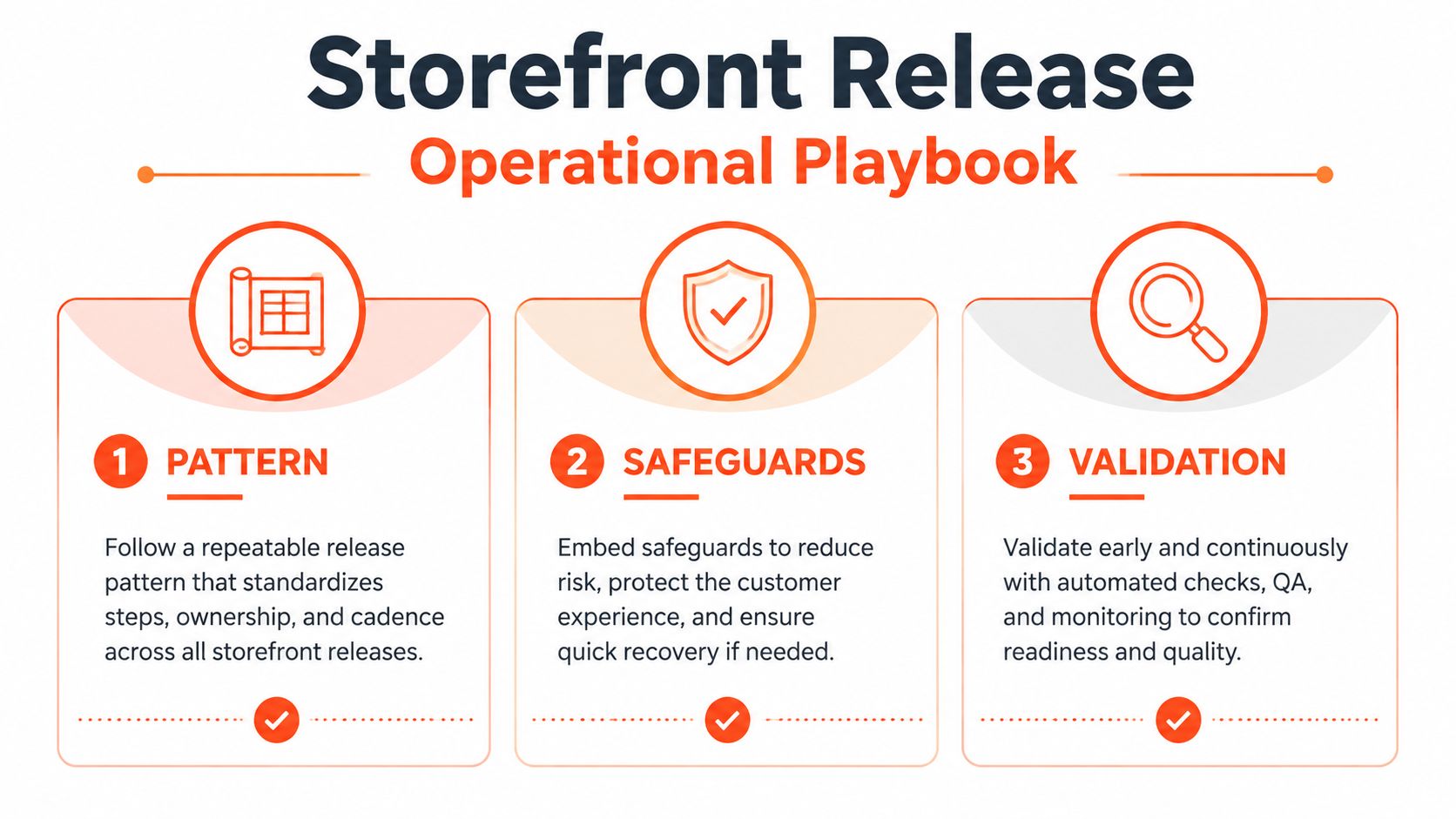
Pattern
Choose blue-green when you need a clean cutover and can keep the previous environment ready. Choose canary when you have reliable traffic controls and meaningful automated health signals. Use rolling updates only when old and new versions are deliberately backward-compatible. Add feature flags when exposure should be independent from deployment.
Safeguards
Before release, confirm that schemas expand before they contract, APIs tolerate both versions, carts and sessions survive the overlap, and integrations accept the supported payload shapes. Keep rollback available without a rebuild, and don't retire the prior version until the health window is complete.
Validation
Test the customer journeys that matter to the release. Watch technical metrics alongside add-to-cart, discount, checkout, and order-flow signals. The final question isn't whether the build finished. It's whether shoppers experienced any interruption or inconsistent commerce state.
Teams that want a storefront release process built around these safeguards can work with Presidio, a hybrid Shopify agency and software studio specializing in maintainable themes, apps, headless storefronts, integrations, and ongoing optimization. Visit Presidio to discuss a release architecture that protects live carts, checkout flows, discounts, and customer experience as your Shopify storefront evolves.

Jamie, Presidio’s Designer, leads the practice alongside Johnnie. With over 10 years of e-commerce experience, Jay is a Shopify expert, known for crafting innovative solutions that prevent tech debt.
Jaime
Senior Product Designer, 2020



