Presidio

You've probably felt this already, the Shopify storefront looks healthy, orders are coming in, and then somebody in operations says the inventory in the ERP doesn't match what customers just bought. A few hours later, finance is chasing down manual adjustments, the warehouse is holding the wrong stock, and everyone's asking why the systems that are supposed to run the business still need so much human cleanup. That's the starting point for Shopify integration ERP work, not a connector choice, but a business problem around trust, timing, and control.
The reason this keeps happening is simple. Shopify is where demand shows up, the ERP is where operations, finance, and inventory need to stay accurate, and the gap between them becomes expensive the longer it stays open. Shopify's own enterprise guidance frames ERP integration as a matter of reliable data flow and automation across business functions, not just a technical hookup, and it points teams toward reusable mappings, sync rules, and operational governance rather than a one-click fix Shopify's enterprise ERP integration overview. If you want a useful adjacent read on older environments that behave the same way, the legacy system integration guide is a good reminder that the pain usually comes from disconnected workflows, not from the label on the software.
Table of Contents
When Shopify and Your ERP Stop Talking to Each Other
The first sign is rarely dramatic. A customer places an order on Shopify, the warehouse doesn't see it right away, and the stock count in the ERP still looks healthy until someone manually reconciles it later. Then the same product gets oversold, customer service starts answering “where is my order?” messages, and finance closes the month with a pile of exceptions that should never have existed in the first place.
The business cost shows up in ordinary work
That's why ERP integration matters more than most merchants expect. A synthesis of industry research says integrated retailers cut the order-to-cash cycle by 27%, improve inventory accuracy by 32%, and achieve an average 4.6× ROI within 18 months operational excellence roadmap. Even more important for planning, many projects land in 12–16 weeks, with work commonly split into discovery, design, development, and testing or rollout phases operational excellence roadmap.
Those numbers matter because they reframe the work. This isn't just plumbing between apps, it's a commerce transformation with a short enough time horizon to matter inside a fiscal year. If your store, warehouse, and finance team are all making decisions from different versions of the truth, every delay in sync widens the gap.
Practical rule: if a field affects whether you can sell, ship, refund, or recognize revenue, it can't live in a disconnected spreadsheet for long.
The lag compounds in ways teams can feel
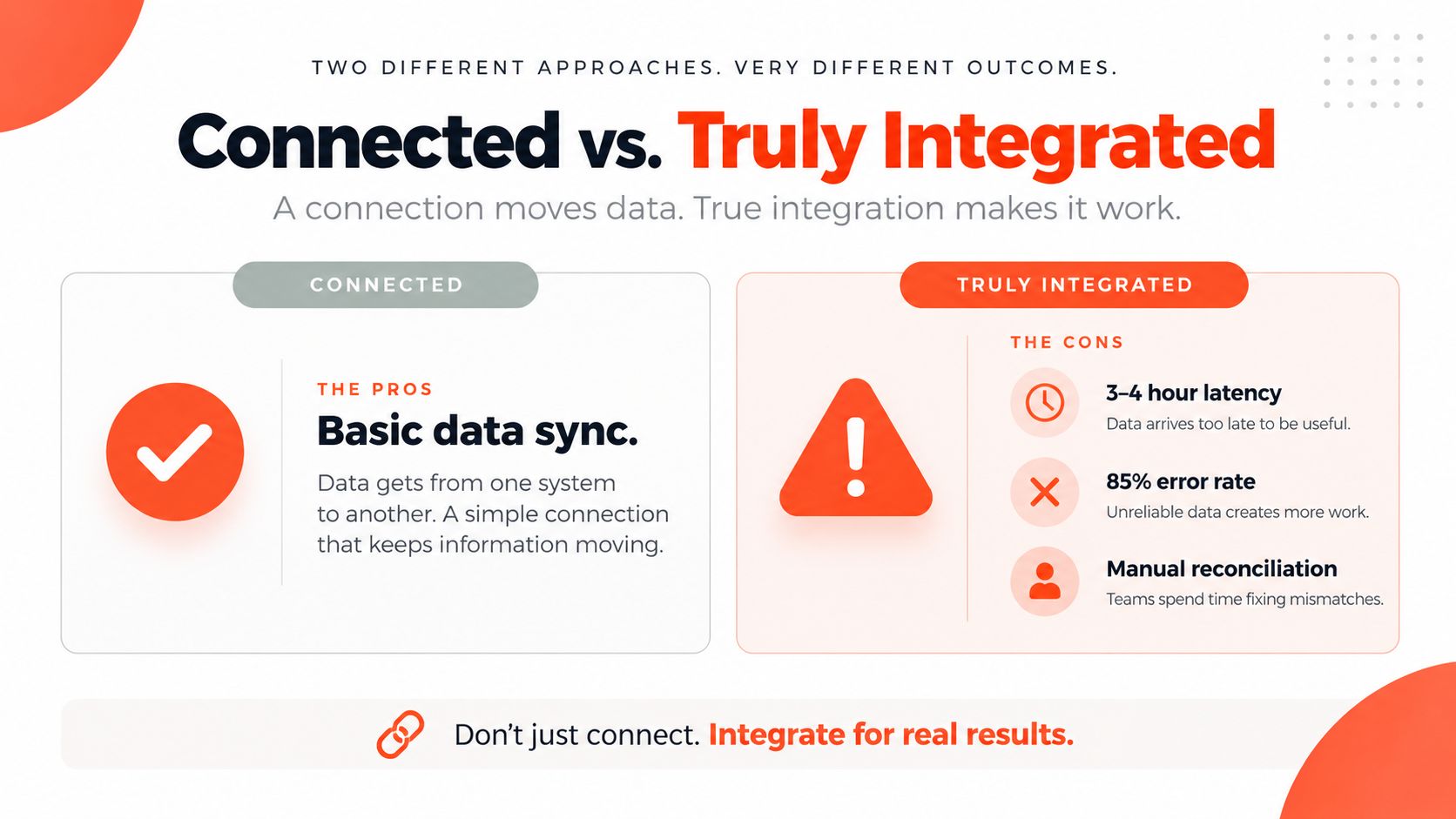
The worst part is that the damage is cumulative. Retailers without real-time ERP linkage can see data latency of 3–4 hours, and 85% of operators identify latency as a barrier to real-time decision-making integration pitfalls research. When orders, inventory, and finance all drift by hours instead of minutes, the team spends more time correcting yesterday's record than serving today's demand.
That's also why integration conversations go sideways when they start with tools. The question is whether Shopify and the ERP can share a dependable operational picture fast enough that humans don't have to fill in the gaps. Once that answer is no, the backlog, the reconciliation effort, and the customer confusion usually follow.
What a Shopify ERP Integration Does
A Shopify ERP integration connects the storefront to the back office so each system can do the work it owns. Shopify handles the customer-facing side, where shoppers browse, place orders, request returns, and sometimes see B2B pricing. The ERP handles the operational side, where inventory, fulfillment, finance, and accounting rules need a single authoritative record.

The systems each play a different role
The ERP might be NetSuite, SAP Business One, Microsoft Dynamics, Acumatica, Odoo, or another platform that centralizes business operations. Shopify's cloud ERP guidance makes the operating model clear, the integration should define which fields sync, how often they sync, and what happens when records do not match Shopify cloud ERP guidance. That matters because the storefront needs to stay responsive while the ERP keeps control of operational truth.
A useful way to follow the data is to trace one event from start to finish.
Shopify receives the event, such as an order, refund, return, or customer update.
Middleware translates the payload, applies field mappings, and routes the change to the right place.
The ERP stores or returns the authoritative state, such as fulfillment progress, inventory availability, or finance data.
The integration layer is not just a transport pipe. It also resolves differences in field names, timing, and business rules so the two systems can agree on what the record means.
The key distinction: a connector can move data, but an integration only works if each side knows what it owns.
Bidirectional sync is not the same as export
A one-way export sends data out of Shopify and stops there. A bidirectional sync moves changes in both directions, which is what most serious commerce operations need once inventory, fulfillment, and customer records have to stay aligned. If the ERP updates stock levels but Shopify never receives them, the storefront can promise items that are no longer available. If Shopify records an order but the ERP never receives it, the warehouse and finance team both start from stale information.
This is a data governance problem as much as a connectivity problem. The question is not whether the systems can talk, it is which system speaks first for each data type, how often it speaks, and what happens when two records disagree.
Shopify's own guidance points to that same setup. Fast-changing records need tighter sync cadences, slower reference data can move in batches, and teams should define field-level mappings, conflict-resolution rules, and a manual override path before launch. That is how the integration keeps working after the first clean test run, when exceptions, retries, and partial updates start showing up in production.
Mapping the Core Data Domains Between Shopify and Your ERP
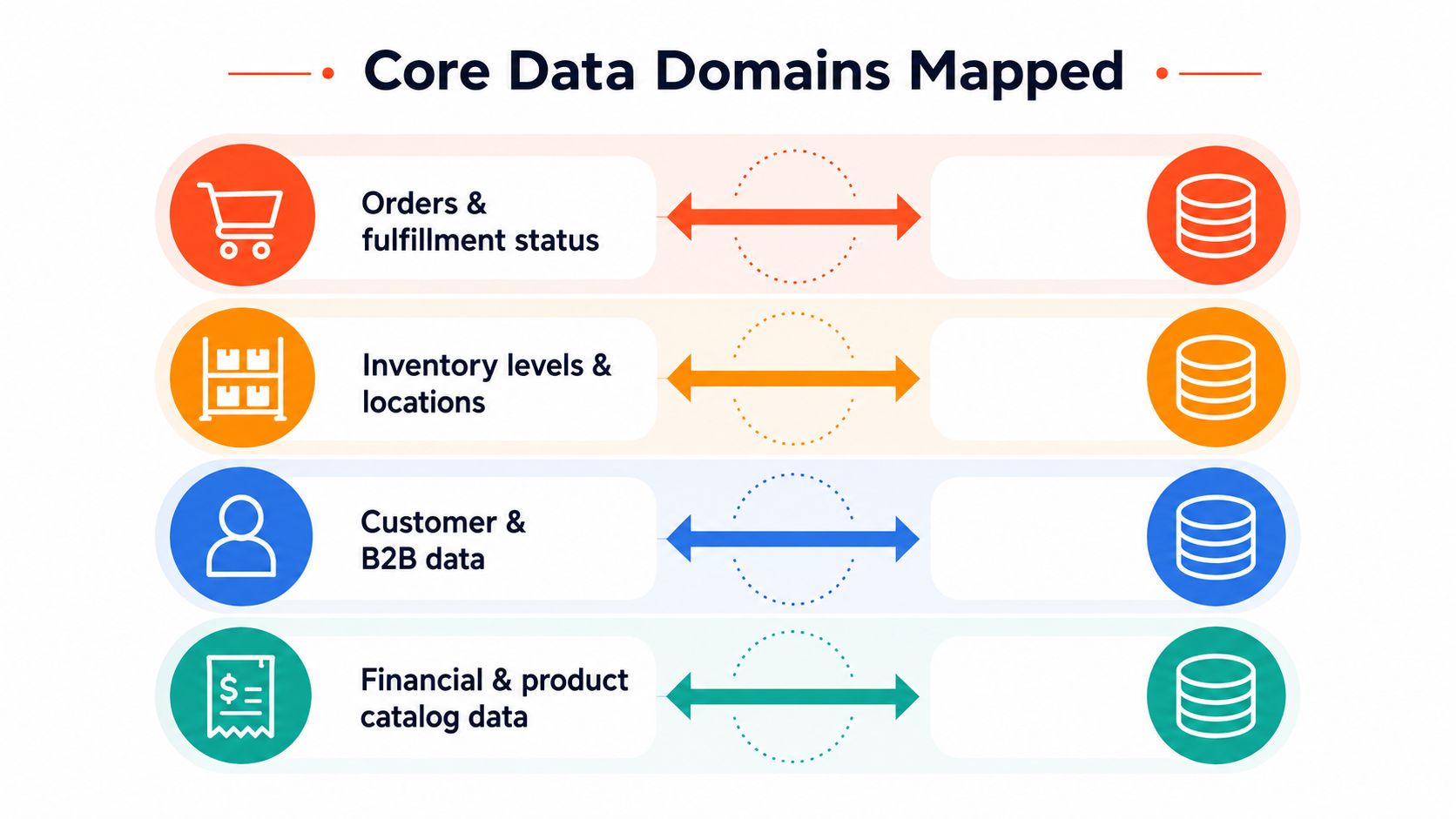
The cleanest integrations start by naming the data domains before anyone builds anything. Shopify's guidance is blunt about this, fast-changing tables like inventory and orders should use real-time synchronization, while slower reference data can move in batch, and teams should document field-level mappings, conflict-resolution rules, and a manual override path before go-live Shopify cloud ERP guidance. That's not paperwork, it's the operating model.
Orders, inventory, customers, and reference data move differently
The first domain is orders and fulfillment status. Shopify usually creates the order event first, then the ERP takes over for fulfillment, allocation, invoicing, and downstream operational steps. This path needs the tightest timing because every delay increases the chance that customer-facing status and warehouse reality drift apart.
The second is inventory levels and locations. Inventory usually needs to move both ways, because Shopify has to sell what the ERP says is available, and the ERP has to learn quickly when Shopify reserves or releases stock. In practice, real-time or near-real-time sync pays off, especially if you sell across multiple locations or channels.
The third is customers and B2B accounts. Customer identity can be slower than orders, but the mapping still matters because account hierarchies, tax logic, and credit terms often live in the ERP. When B2B workflows are involved, the sync must preserve the relationship between the storefront buyer, the account record, and any pricing rules tied to that account.
The fourth is product and finance reference data, which includes SKUs, pricing tiers, and cost-related fields. This data can often move in batch because it doesn't change as frequently as inventory or orders, but it still needs disciplined ownership. If someone changes a product field in one system without a mapping rule, the other side can drift for weeks.
The unglamorous details decide whether it survives
The hidden foundation is identifier design. Every order, customer, SKU, and location needs a stable key so the sync can recognize the same record over time. Without that, the integration creates duplicates, overwrites the wrong item, or updates a stale record because it can't tell what changed.
A few mechanics matter more than most merchants expect:
Idempotency keeps the same event from creating duplicate records when a retry happens.
Deduplication protects you when Shopify or the ERP sends overlapping updates.
Field mapping prevents the same business term from meaning two different things in two systems.
Manual overrides give ops a safe way to fix edge cases without breaking the whole flow.
Rule of thumb: if you can't explain what happens when two systems disagree on the same field, the sync isn't designed yet.
Middleware Options for Connecting Shopify to Your ERP
Teams typically end up choosing among three patterns. Native connectors are the fastest to start, iPaaS platforms sit in the middle on speed and flexibility, and custom builds give you the most control while asking your engineers to own more of the risk. If you want to explore the custom route in more depth, this custom Shopify app development guide is a useful companion because custom integration and custom app work often share the same trade-offs.
The comparison looks like this
Approach | Time to value | Control over logic | Maintenance burden | Best fit |
|---|---|---|---|---|
Native connectors | Fast | Lower | Lower to moderate | Standardized Shopify and ERP pairs |
iPaaS platforms | Moderate | Moderate to high | Moderate | Multi-system operations with changing rules |
Custom builds | Slowest | Highest | Highest | Complex workflows and unique operational logic |
Native connectors make sense when your rules are straightforward and your ERP vendor already supports the pair well. They're good when you want a mostly standard order, inventory, or customer flow without a lot of exceptions.
iPaaS platforms such as Celigo, MuleSoft, Workato, and Boomi give you a middle path. They usually provide visual builders, templates, monitoring, and reusable flows, which makes them a better fit once your Shopify setup touches fulfillment, finance, or other systems in parallel. They're attractive when the business rules change often enough that hard-coded logic becomes a drag.
Custom builds give you maximum control, especially when the integration has to follow unique business logic or unusual downstream systems. The trade-off is that your team also owns retries, observability, drift detection, and every future API change.
Choose by business complexity, not by fashion
The right choice depends on how many transactions you process, how many custom rules sit between Shopify and the ERP, and whether you have engineers who can keep the connector healthy after launch. A low-complexity store with standard ERP behavior can often start with a native connector. A merchant with multiple warehouses, B2B pricing, or custom fulfillment logic usually needs the governance and flexibility of iPaaS or custom work.
The important part is not picking the most powerful option. It's choosing the one your team can maintain when the first mapping changes.
Implementation Phases and the Checkpoints Most Teams Skip
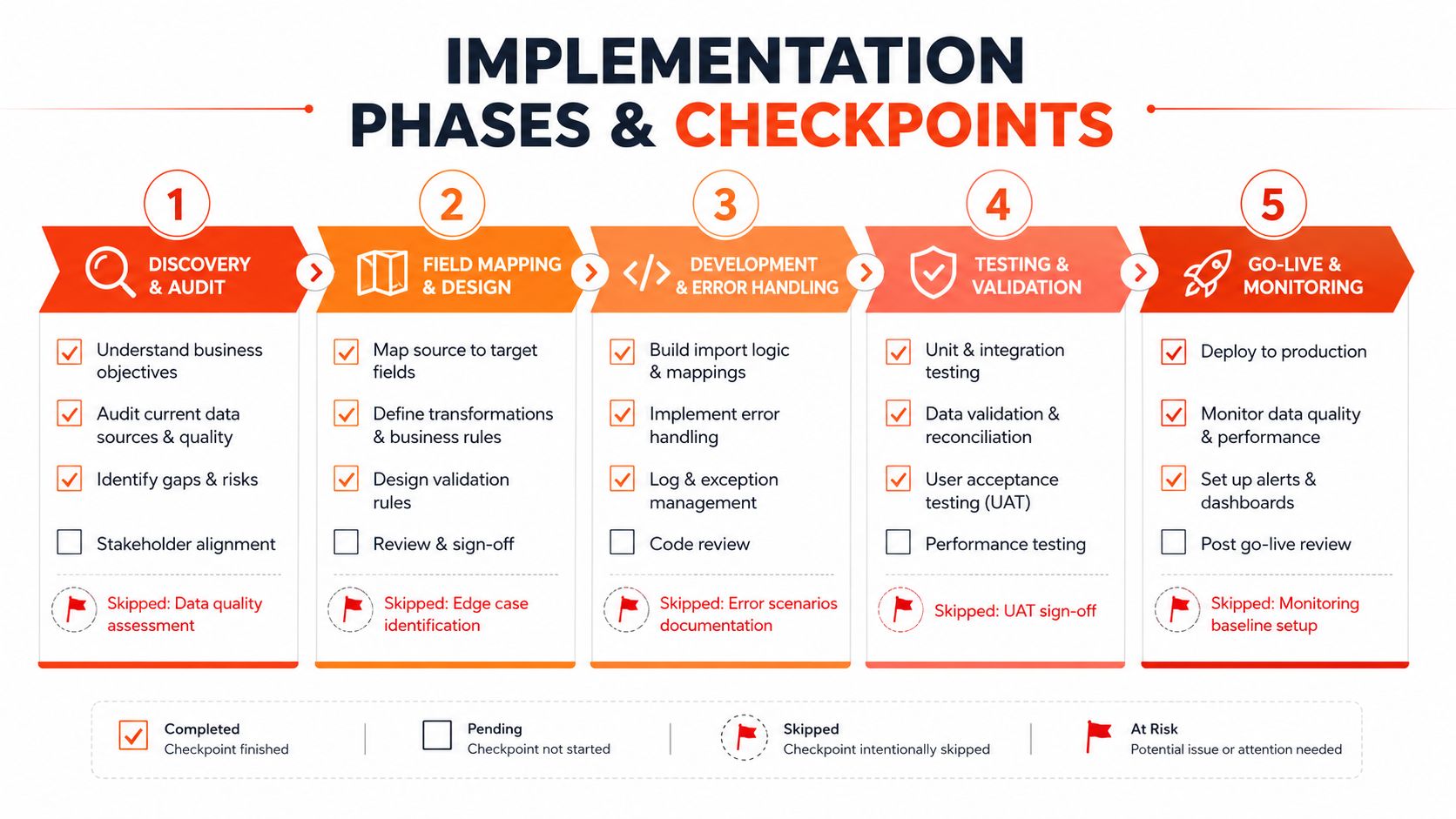
A solid Shopify ERP rollout usually moves through five phases. First comes discovery and data audit, where you identify the systems of record and clean obvious data problems. Then comes field mapping and design, followed by development of flows and error handling, end-to-end testing, and finally a phased rollout with rollback ready.
The launch prep is mostly about ugly data
Shopify's enterprise implementation guidance puts a lot of weight on cleaning product, customer, inventory, pricing, and order data before launch, then testing real scenarios like online orders, POS, B2B pricing, returns, pickup, and launch-day rollback steps ERP implementation best practices. That tells you where the hard work lives. The hardest part is rarely the first connection, it's controlling exceptions during cutover and making sure the system behaves when real orders hit it.
If you want a pre-flight checklist mindset before deployment, the pre-deployment checklist for cloud is a relevant reference point because the same discipline applies here, audit first, deploy second, and only then expand scope.
The skipped checkpoints are usually the ones that save the project
Teams often skip the unexciting controls because they don't feel like progress. That's a mistake.
Idempotency keys stop repeated events from creating duplicate orders or inventory movements.
Dead-letter handling gives failed messages a place to go instead of disappearing.
Reconciliation jobs compare Shopify and ERP records on a schedule so drift doesn't linger.
Alerts and dashboards tell humans when a flow is stalled, not three days later.
Rollback steps let you stop a bad release without corrupting live operations.
Practical rule: if the team can't tell what failed, where it failed, and how to safely replay it, the rollout is too brittle.
Here's the implementation sequence most merchants can manage:
Audit the source data before writing any flow.
Map each field with ownership, direction, and conflict rules.
Build for failure, not just for the happy path.
Test edge cases, including returns, cancellations, and partial fulfillments.
Roll out in phases, with monitoring live from day one.
A short implementation video can also help teams align on the sequence and the handoffs.
Migrating the store itself can complicate this work, so it helps when the same partner understands both the store move and the systems behind it. If you're comparing project shapes, the Shopify migration services overview is useful context because ERP integration often rides alongside a platform transition or immediately follows one.
Why Connected Is Not the Same as Integrated
A connector can be live and still leave you exposed. The core problem is not whether Shopify and the ERP can exchange data, it is whether they keep the right fields aligned, recover cleanly after errors, and preserve trust when the two systems disagree.
The common failure modes show up after launch
The first failure mode is latency and stale inventory. Shopify says a product is available, the ERP says it is not, and sales or fulfillment teams have to decide which number they trust. A queue with retries helps, but so does a reconciliation job that catches drift before customers do.
The second is mapping drift. Someone changes a field upstream, maybe in the ERP or the middleware, and the sync keeps running with an outdated assumption. Field ownership and versioned mappings matter more than a prettier dashboard here.
The third is ERP or middleware outages. When the upstream system is unavailable, the integration should hold events in a queue, retry safely, and route unrecoverable failures to dead-letter handling instead of dropping them.
The fourth is reconciliation gaps. These are the quiet ones, the system works most days, but small mismatches pile up over weeks until finance or operations finds a mess. That is why scheduled comparisons and alert thresholds matter, even when the live flows look stable.
Resilience is the real deliverable
Shopify's own guidance on post-launch work pushes teams toward data cleaning, exception testing, rollback planning, and manual override paths ERP implementation best practices. That is the right framing. The integration is not finished when the first order syncs, it is finished when the team can survive outages, field changes, partial failures, and human corrections without losing trust in the numbers.
For merchants moving toward a more modular stack, this also lines up with composable thinking. If you are deciding how much control you want at each layer, the composable commerce overview explains why replaceable parts and clear boundaries matter more than a single shortcut that hides the data rules underneath.
Choosing Your Integration Path
Start with four questions. How many transactions per minute does your storefront generate, how custom are the business rules between Shopify and the ERP, how much engineering capacity do you have to maintain the connector, and how important is sub-minute latency for inventory accuracy? Those answers usually point to the right path faster than any vendor demo.
A useful way to judge the options is to treat integration as a data governance problem first. A connector can move records, but it still has to respect field mappings, sync cadence, and the rules for what happens when a record fails or arrives out of order. That is the part merchants often underestimate. If the order, inventory, and financial data do not follow the same rules in both systems, the integration starts to drift even if the software is still online.
If your needs are standard, a native connector may be enough. It works best when the data model is simple, the number of exceptions is low, and the team can accept the limits of a packaged path. If the stack includes multiple systems and a lot of operational logic, iPaaS usually gives a better balance of control and maintainability. It gives you a place to define mappings, retries, and alerts without tying every change to custom code. If the workflows are highly specific and your team can own the long-term support burden, custom work can still make sense.
A specialist Shopify partner becomes the right call when the project sits at the intersection of storefront logic, operational data, and ongoing maintenance. That usually means the same team has to understand theme or app work and the way orders, inventory, and finance records move behind the scenes. The merchant in the opening scenario does not need another app, they need a system that keeps the warehouse, the storefront, and finance aligned when real customers start buying. That is why resilience matters more than the connector label.
Resilience is the outcome that matters
Shopify's own guidance on post-launch work pushes teams toward data cleaning, exception testing, rollback planning, and manual override paths ERP implementation best practices. That is the right framing. The integration is not finished when the first order syncs, it is finished when the team can handle outages, field changes, partial failures, and human corrections without losing trust in the numbers.
For merchants moving toward a more modular stack, this also lines up with composable thinking. If you are deciding how much control you want at each layer, the composable commerce overview explains why replaceable parts and clear boundaries matter more than a single shortcut that hides the data rules underneath.
If you want a team that can think about Shopify storefronts and ERP connectivity in the same implementation plan, Presidio can help scope the data flows, build the custom pieces, and support the ongoing changes that come after launch. Visit Presidio if you want to talk through a Shopify ERP integration that is designed around governance, resilience, and day-to-day operations.



