Presidio

Your storefront is live, but growth has made every surrounding system harder to manage. The ERP needs cleaner inventory data, international teams want localized experiences, marketing needs faster merchandising, and developers keep patching integrations that were never designed to work together. Meanwhile, a migration deadline is approaching, and the cost of a broken checkout, missing order, or lost organic landing page is much higher than the cost of the rebuild itself.
A Shopify Plus migration should therefore be treated as a data-model redesign and commercial continuity program. Products, customers, orders, subscriptions, redirects, integrations, analytics, and storefront behavior all need a deliberate destination. Shopify Plus can provide a stronger operating foundation, but only if the migration removes old complexity instead of moving it into a new platform.
Table of Contents
Why Scaling Brands Choose Shopify Plus
The decision to move usually starts with friction, not ambition. Checkout changes require workarounds, international expansion creates duplicated storefront logic, and the ERP or PIM sends data in a structure the current store can't reliably consume. Standard Shopify may still support sales, but the operating model around it becomes increasingly difficult to control.
Shopify Plus was introduced in 2014 as Shopify's offering for high-volume merchants, creating an enterprise-oriented destination for brands with more complex requirements. Shopify's wider platform now serves millions of businesses across more than 175 countries, according to this overview of Shopify Plus benefits and core features. That global footprint matters because a Plus decision often involves more than upgrading a plan. It can involve markets, currencies, customer accounts, wholesale workflows, subscriptions, analytics, and localized storefronts.
The signals that a platform ceiling has arrived
A migration deserves serious consideration when the business has outgrown the way its systems connect, not merely when the storefront looks dated.
Checkout constraints: Commercial teams need checkout behavior, discounts, or order rules that the current setup can't support cleanly.
International complexity: Markets require different pricing, currencies, tax treatment, content, and fulfillment logic.
Operational duplication: Staff maintain the same product, customer, or promotion data in several systems because no clear source of truth exists.
Integration fragility: ERP, OMS, PIM, subscription, and marketing connections fail without warning or need constant manual intervention.
Release bottlenecks: Simple merchandising changes depend on developer availability, while technical teams spend their time preserving legacy behavior.
Shopify Plus can address some of these pressures through its commerce infrastructure, automation capabilities, and enterprise support model. It won't automatically fix a poor taxonomy, ambiguous data ownership, or an integration that lacks reconciliation. Those problems follow the business unless the migration team redesigns them.
For a practical explanation of the platform's capabilities and where Plus fits, see what Shopify Plus is. The useful question isn't whether Plus has more features. It's whether those features reduce operational effort, improve control across markets, and create a maintainable foundation for the next stage of growth.
Practical rule: Upgrade because the operating model needs a better foundation, not because the current theme needs a new visual treatment.
The Pre-Migration Audit and Scope Definition
A migration begins with evidence. Before anyone designs a theme or exports a product file, the team needs an inventory of what the business runs, what customers use, and what the organization can safely retire.

Build an audit that exposes hidden dependencies
Start with a systems register. Record every app, integration, custom script, webhook, scheduled export, spreadsheet handoff, and manual process. Name the owner, business purpose, data exchanged, failure consequence, and proposed destination. An app that appears to provide reviews may also inject structured data, alter product templates, and send events to an analytics platform. Removing it without tracing those dependencies can create several unrelated defects.
Then audit the underlying data:
Products: Review SKUs, variants, product types, collections, tags, metafields, media, localization, and discontinued items.
Customers: Identify duplicates, consent fields, account states, segmentation rules, and customer-specific pricing.
Orders: Document status values, refunds, discounts, taxes, fulfillment states, subscriptions, and historical reporting needs.
Content: Crawl pages, blogs, landing pages, files, metadata, canonicals, structured data, and internal links.
Operations: Trace inventory, fulfillment, returns, fraud checks, customer service, and finance events from storefront to back office.
The Shopify store audit guide is a useful reference for structuring this discovery work. The audit isn't a report produced for approval. It becomes the migration contract, the test inventory, and the basis for deciding what belongs in Shopify, what belongs in an external system, and what should disappear.
Define scope through decisions, not feature collection
Every requirement should receive a disposition: migrate unchanged, transform, rebuild, replace, or retire. This prevents the common failure mode where stakeholders label every old behavior as essential and the new store becomes a replica of the old platform's technical debt.
Create a decision log that records the business owner, acceptance test, dependency, and fallback. Include non-functional requirements as well, such as accessibility, performance, analytics attribution, support workflows, and reporting continuity. A product director may approve a new collection model, while finance must approve order totals and operations must approve inventory behavior. Those decisions can't be left to the development team alone.
The final scope should separate launch blockers from later enhancements. A working checkout, accurate inventory, valid order flow, preserved SEO assets, and reliable customer communication belong in the first category. A redesigned loyalty experience or a new personalization experiment may belong in the second. This discipline gives the team a safer release without pretending that every future idea must be discarded.
Data Mapping and Migration Strategies
The most dangerous assumption in a migration is that a CSV export represents a complete data model. It usually represents a convenient slice of one. The source platform may store product attributes, customer logic, order history, or application data in structures that Shopify doesn't reproduce natively.
Shopify documents CSV or migration-app paths for products and customers. Historical orders may require migration apps plus the Order and Transaction APIs, while gift cards, blogs, and pages can require dedicated APIs or migration tooling, as described in Shopify's migration documentation. That means the migration team needs an entity plan, not a single import script.
Design a field-level mapping matrix
For each source field, record:
Source location: Table, API object, CSV column, app database, or manual process.
Shopify destination: Native field, variant field, metafield, metaobject, app-owned record, or external system.
Transformation rule: Formatting, normalization, lookup, merge, split, or deliberate omission.
Owner: The person who can approve the business meaning.
Validation test: The exact comparison that proves the transformation worked.
Fallback: The safe behavior if the source value is empty, invalid, duplicated, or unsupported.
A complex product may need a decision about whether an attribute belongs in a native field, a metafield, a metaobject, or the PIM. A customer record may need deduplication before import, while an order may require reconciliation across tax, discount, refund, and fulfillment values. Copying every legacy field can preserve history, but it can also reproduce obsolete logic and increase app dependence.
Data Entity | Migration Method | Key Validation Focus |
|---|---|---|
Products and variants | Shopify-compatible CSV, migration app, or API workflow | SKU identity, variant relationships, inventory, prices, media, and taxonomy |
Customers | CSV, migration app, or API workflow | Duplicate profiles, consent fields, tags, account state, and segmentation |
Historical orders | Migration app plus Order and Transaction APIs where required | Totals, taxes, discounts, refunds, payment references, and fulfillment states |
Gift cards | Dedicated API or migration tooling | Balance, status, customer association, and redemption behavior |
Blogs and pages | CSV where supported, API, or migration tooling | Content, handles, metadata, canonicals, media, and redirects |
App-owned records | App-specific export, API, or custom integration | Ownership, references, permissions, and operational events |
Reconcile, then synchronize
A dry run should use representative records, including the difficult ones. Test products with multiple variants, customers with duplicate identities, orders with refunds, subscriptions, promotional discounts, and localized pricing. Compare record counts, totals, relationships, and downstream events. A successful import isn't proof that the business meaning survived.
Keep the source system authoritative until the new flow has passed validation. During cutover, run a final incremental sync for records created or changed since the initial transfer. The team should know which system owns inventory, customer updates, orders, fulfillment, and marketing consent at every point in the transition.
Taxonomy also affects SEO and navigation. Clean category relationships, consistent internal links, and a logical information hierarchy help improve site crawlability, but the architecture must reflect how customers find products, not just how the old database happened to store them.
Theme Strategy - Rebuild vs. Adapt
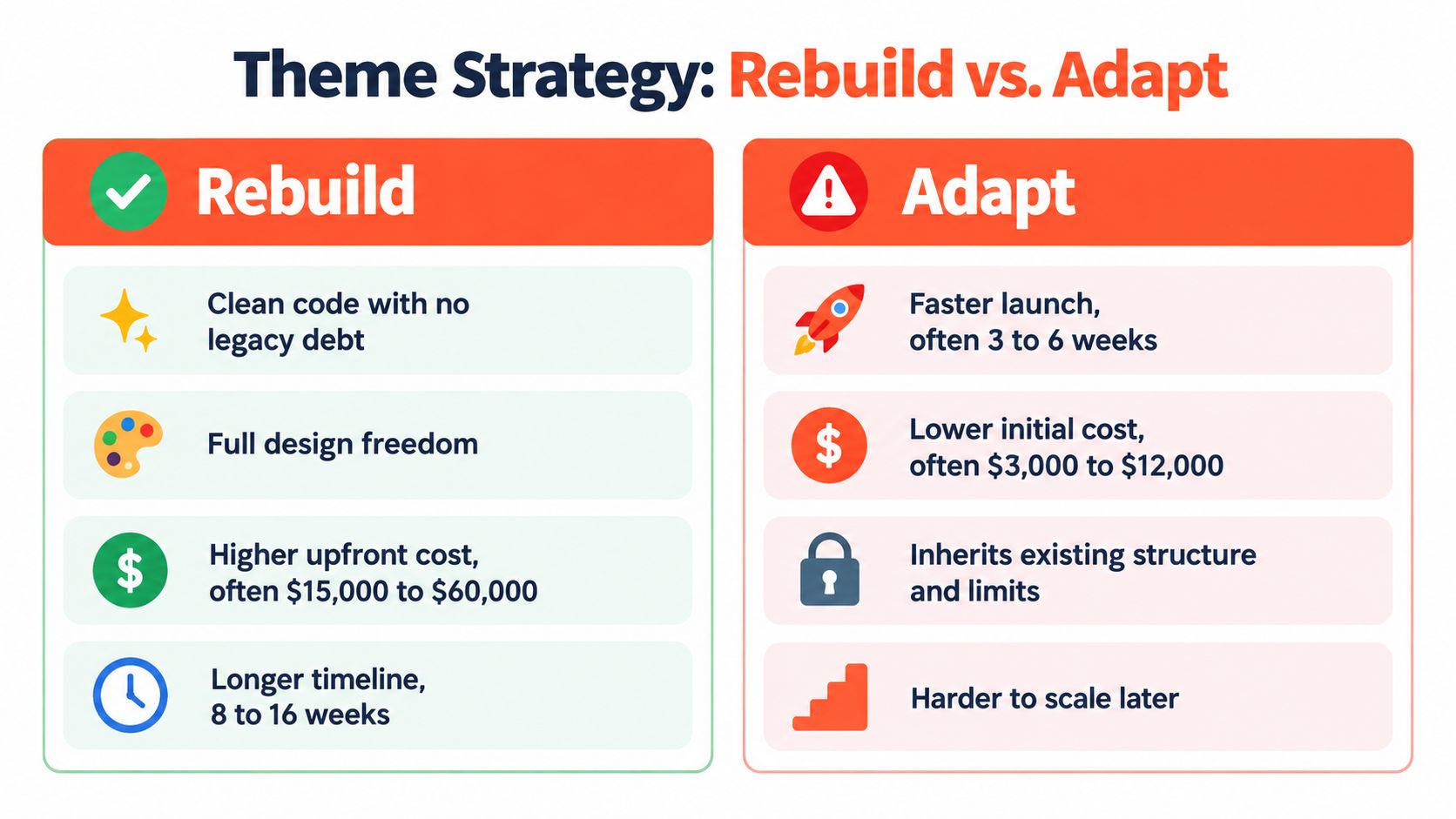
Theme decisions expose the difference between a platform migration and a platform copy. Adapting an existing theme can shorten the route to launch, but it may also carry old templates, brittle JavaScript, app assumptions, and accessibility problems into the new store. Rebuilding costs more attention upfront, yet it gives the team a chance to define a cleaner contract between design, content, commerce logic, and integrations.
Adapt when the foundation is healthy
Adaptation makes sense when the existing theme uses maintainable Liquid, has clear section boundaries, handles responsive behavior well, and doesn't depend on a long chain of app injections. It can preserve brand familiarity and reduce design rework. The team can then concentrate on templates, integrations, checkout behavior, and content migration.
The risk appears when “adaptation” means preserving everything without understanding it. Old themes often contain duplicated snippets, unused settings, hard-coded campaign logic, and scripts that load on every page. App sprawl increases that risk because each tool may add storefront code, tracking, blocks, or theme edits. A theme that launches quickly can still become expensive to maintain.
Rebuild when old behavior is the constraint
A rebuild is usually the stronger choice when the current theme has inconsistent component patterns, serious performance issues, inaccessible interactions, or features that were assembled through many unrelated apps. Rebuilding lets the team establish reusable sections, predictable data contracts, clear analytics events, and a controlled loading strategy.
The trade-off is real. A new theme requires design decisions, content migration, quality assurance, and stakeholder review. It can also create pressure to redesign every customer journey at once. Keep the rebuild focused on a stable storefront foundation, then use the post-launch roadmap for experiments and enhancements.
Evaluate both approaches against the same criteria:
Code quality: Can a new developer understand the theme without reverse-engineering it?
Feature ownership: Does each function have one clear owner?
Performance behavior: Do scripts and app assets load only where needed?
Accessibility: Can keyboard and assistive technology users complete core journeys?
Content flexibility: Can merchandisers create pages without developer intervention?
Future change: Can the team add markets, products, and promotions without repeating the old workaround?
Presidio's hybrid agency and software-studio model can support either direction, including custom themes, apps, and Shopify Functions. The important decision is not which option sounds faster. It's whether the chosen foundation lowers technical debt after launch.
Integrations, ERP Connectivity, and Cutover Planning
A storefront can look perfect while the business behind it is failing. The launch test is whether an order moves from checkout to the ERP, inventory returns to Shopify, fulfillment updates reach the customer, analytics records the transaction, and finance receives the correct values.

Test the operating chain in parallel
Create a production-like environment where the team can test the complete event path without affecting live orders. A test product should pass through the PIM or catalog source, reach Shopify, become available for purchase, create an order, enter the ERP or OMS, trigger fulfillment, and return tracking information. Repeat the exercise for cancellations, refunds, partial fulfillment, inventory changes, discount rules, and subscription events where relevant.
Integration ownership needs to be explicit. Document which system owns each field, how conflicts resolve, how retries work, and where failures appear. A connection that drops an event without any visible signal is more dangerous than one that visibly stops, because the operations team may not discover the issue until customers contact support.
Teams evaluating third party integrations should assess more than compatibility. Review authentication, event coverage, rate handling, retries, monitoring, data retention, and the vendor's support process. A replacement app is not equivalent if it can't reproduce the business rule that made the old integration necessary.
For ERP-specific architecture and operating considerations, see ERP and ecommerce integration. Keep the legacy platform available during the transition according to an agreed rollback plan, but don't treat it as a substitute for tested recovery procedures. Define who can pause the launch, what evidence triggers rollback, and how the team will reconcile orders created during the handoff.
Protect the cutover and organic acquisition
A cutover runbook should include final data synchronization, integration checks, storefront smoke tests, analytics verification, redirect validation, customer support communication, and named decision-makers. The team should rehearse the sequence, including the uncomfortable case where a critical system fails after the storefront appears healthy.
Downtime has a measurable financial risk. ITIC's 2024 Hourly Cost of Downtime Survey, summarized by Optimum7's industry analysis, found that more than 90% of mid-sized and large enterprises reported hourly downtime costs above $300,000, while 41% reported hourly losses of $1 million to $5 million or more. The survey isn't Shopify-specific, but it explains why controlled cutovers, rollback planning, and rehearsed synchronization deserve executive attention.
Shopify Plus supports up to 20 million URL redirects, compared with the 100,000-redirect limit reported for standard Shopify plans, according to Shopify's SEO migration guidance. Build the redirect map from a crawl, analytics, and Google Search Console exports. Each legacy URL should resolve through one 301 to the closest relevant destination, and that destination should return HTTP 200.
The map isn't enough on its own. Preserve titles, metadata, canonicals, structured data, internal links, and XML sitemap coverage. After launch, crawl the old URL set and record redirect status, final URL, final status, canonical target, indexability, and template performance. This crawl-diff becomes an acceptance test, not a post-launch wish list.
The cutover should feel uneventful to customers because the difficult work happened beforehand.
Post-Launch Optimization and Revenue Protection
A green deployment status doesn't prove commercial success. Real customers create combinations that scripted QA misses, including unusual devices, market settings, discount sequences, subscription changes, payment methods, and support requests. A technically complete migration can still lose revenue if merchandising, attribution, fulfillment, or checkout behavior changed in ways the team didn't measure.
Independent replatforming guidance recommends monitoring organic traffic, indexed pages, rankings, and performance through a 30-60-90 day control period, as described by Webuters' ecommerce replatforming guidance. Treat that period as an operating program with owners and thresholds, not as passive observation.
Establish the control period
Before launch, capture baselines for:
Commercial performance: Conversion rate, revenue per session, checkout completion, average order value, and product-level sales.
Acquisition: Organic landing-page traffic, indexed pages, rankings, paid attribution, feed health, and branded versus non-branded demand.
Technical health: Core Web Vitals, crawlability, redirect errors, JavaScript failures, and template-level performance.
Operations: Inventory synchronization, fulfillment latency, refund handling, subscription events, and customer-service contacts.
Segment the review by market, device, template, traffic source, and product type. Aggregate figures can hide a broken mobile checkout, a missing locale, or a single high-value product template.
The team should also define rollback criteria and alert ownership. If a metric moves unexpectedly, someone must know whether to investigate analytics, data, integrations, SEO, or user experience. Outreach and acquisition work, including research into reputable backlink building sites, should wait until the new technical baseline is stable. Otherwise, new activity can obscure the source of a regression.
Use the control period to remove unused apps, refine automation, fix content gaps, and improve the customer journey. The migration earns its value after the launch when the store becomes easier to operate, test, and evolve.
Leveraging Expert Partners for Complex Migrations
A complex Shopify Plus migration needs one accountable framework across data, engineering, SEO, design, and operations. Ad-hoc specialists can complete individual tasks, but gaps often appear between them, especially around app ownership, order reconciliation, and post-launch monitoring. A hybrid agency-studio partner can combine implementation with maintainable themes, custom apps, Shopify Functions, integrations, and ongoing optimization, reducing the temptation to solve every requirement with another app.
Presidio offers migration planning, storefront and app development, ERP connectivity, technical audits, and post-launch growth support. The right partner won't promise a painless file transfer. They'll show how the new data model, operating controls, acceptance tests, and rollback plan protect the business.
Presidio can audit your current stack, define a Shopify Plus migration scope, rebuild or adapt the storefront, and reconnect the systems that keep orders and inventory moving. Visit Presidio to discuss a migration plan built around data integrity, operational stability, and measurable revenue protection.

Jamie, Presidio’s Designer, leads the practice alongside Johnnie. With over 10 years of e-commerce experience, Jay is a Shopify expert, known for crafting innovative solutions that prevent tech debt.
Jaime
Senior Product Designer, 2020



