Presidio

Most Shopify store audit guides start with the homepage, the theme, or the app list. That feels logical, but it often sends teams toward the wrong fix. If the purchase event is duplicated, mislabeled, or missing from one market, a real conversion leak can look like a design problem, while a healthy product page gets redesigned for no reason.
A useful audit is a diagnostic exercise, not a long checklist. It should establish whether the data is trustworthy, identify which template or funnel stage is underperforming, and produce a ranked remediation plan. Shopify's ecosystem is already large, with third-party 2026 reporting estimates ranging from roughly 2.9 million to 6.9 million live or active stores, depending on the counting method, while Shopify's merchant base spans more than 175 countries, as summarized by Shopify ecosystem reporting from Webtonic. At that scale, small improvements in speed, stability, and usability can matter across a broad installed base.
The sequence matters: measurement first, performance second, experience third. That order helps DTC teams on Shopify and Shopify Plus protect revenue instead of spending a sprint polishing symptoms. A strong audit ends with owners, evidence, dependencies, and retest criteria, not a vague score.
Table of Contents
Why Most Shopify Store Audits Start in the Wrong Place
The popular advice is to open the homepage and start marking issues. Check the hero, simplify the navigation, compress images, remove apps, rewrite product copy. Those checks can be useful, but they're weak starting points because they assume the reported funnel is accurate.
Suppose Shopify shows completed orders that GA4 doesn't record. Or a purchase event fires once in the browser and again through a server-side integration. Or a multi-market setup labels checkout events inconsistently. In each case, the dashboard may point the team toward the wrong audience, product, or page. A redesign can then consume time without addressing the actual failure.
An audit should answer one question first
Where is the store losing qualified demand?
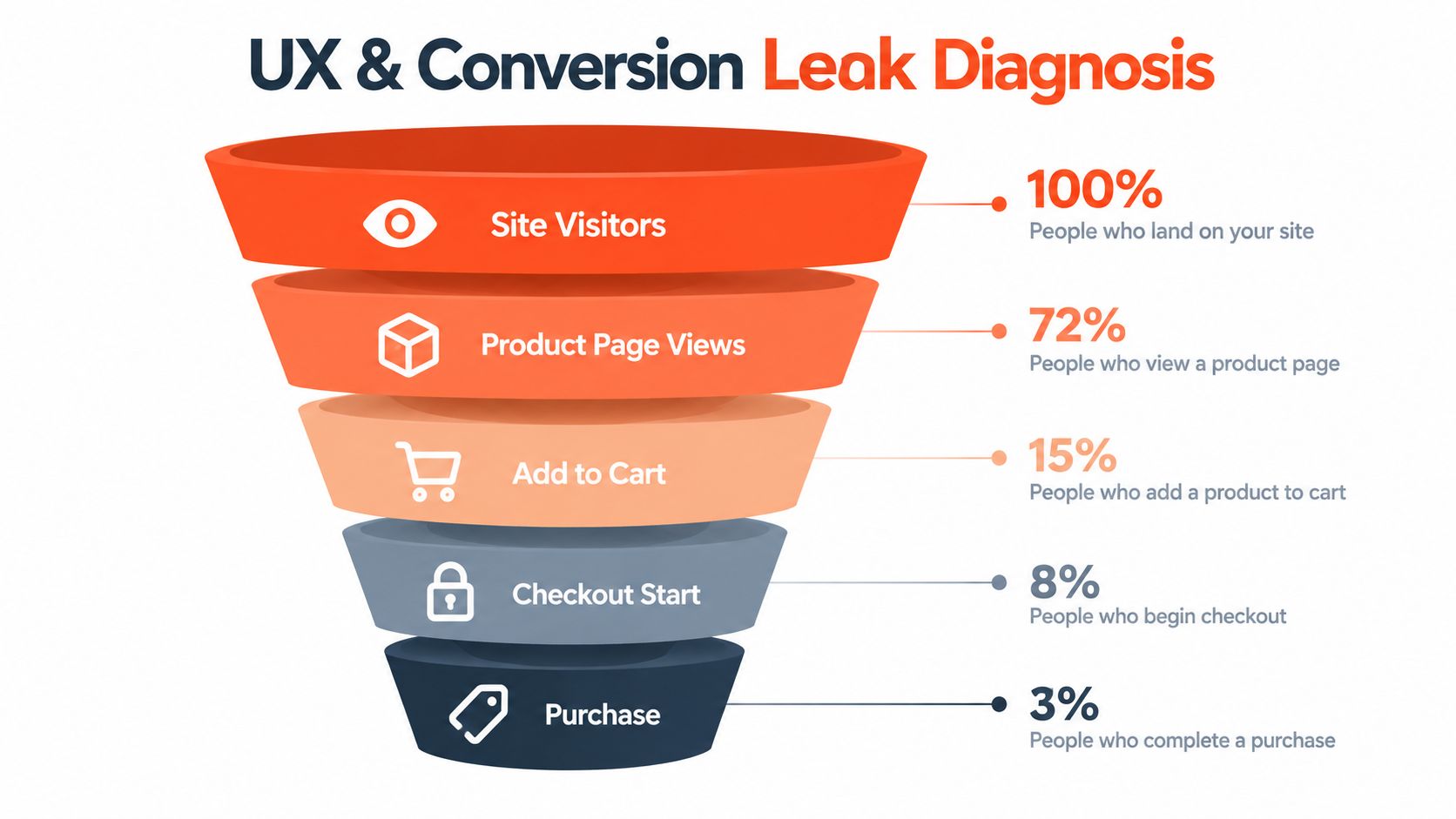
That question requires a reliable baseline across traffic, product-page engagement, add-to-cart behavior, checkout starts, and purchases. It also requires separating acquisition quality from storefront performance. A paid campaign that sends broad, low-intent traffic can make a strong product page appear weak. A fast store with broken purchase tracking can make a healthy checkout appear ineffective.
The commercial reason to take speed seriously is clear. Google's mobile landing page research found that when load time increases from 1 second to 3 seconds, bounce probability rises by 32%, and when it reaches 5 seconds, bounce probability rises by 90%, as documented in Google's mobile performance benchmarks summarized for Shopify stores. Those figures justify performance work, but they don't tell you whether speed is your biggest current leak. Measurement does.
Practical rule: Never approve a redesign, app replacement, or CRO experiment until you know the purchase and funnel events represent real customer behavior.
Presidio's audit approach for growing Shopify brands is built around that distinction. The team examines the measurement path, then technical performance by page type, then the buyer experience and supporting layers. That keeps recommendations grounded in the store's actual failure mode rather than in a generic conversion checklist.
What a useful deliverable contains
A serious Shopify store audit should give stakeholders:
A verified baseline: Shopify orders reconciled against analytics and advertising platforms.
A template diagnosis: Homepage, collection, product, cart, and checkout findings separated instead of blended into one sitewide score.
A layer map: Issues tagged as theme, app, content, integration, or custom code.
A prioritized backlog: Each fix tied to impact, effort, risk, owner, and retest method.
A decision path: Clear guidance on whether to patch, remove, rebuild, or test.
That deliverable is more valuable than a list of warnings. It tells the team what to fix first and what not to touch yet.
Verify Analytics Integrity Before You Change Anything
Start with the order record, not the browser report. Shopify is the operational source for completed orders, so reconcile its purchase data against GA4, Meta, Google Ads, and any other platform used to judge performance. The figures won't always match perfectly because attribution models and consent behavior differ, but unexplained gaps, sudden jumps, or duplicated purchases need investigation before anyone trusts the funnel.
A practical verification workflow
First, document the current event map. List the systems that receive view_item, add_to_cart, checkout-start, and purchase signals. Note whether each event comes from Shopify's native integrations, the Web Pixels API, theme code, an app, server-side logic, or more than one path. Unknown ownership is itself a finding because nobody can safely change a tag they can't locate.
Next, place controlled test orders. Use a test product or an approved payment method, then inspect the browser network activity and each platform's debugging interface. Confirm that the purchase event fires once, carries the correct order value and currency, and includes the expected transaction identifier. Cancel or refund the order according to the store's operating procedure after the test.
Then, look for duplication and labeling errors. A legacy theme snippet can coexist with an app pixel. A checkout event may be recorded as a purchase in one market and as a checkout completion in another. Compare event names, timestamps, order IDs, currencies, and market or country dimensions. If one order creates two purchases, downstream conversion rates and return-on-ad-spend analysis become unreliable.
Finally, test consent and market paths. Repeat the journey with consent declined and accepted where applicable. Test the main storefront domain, localized domains or markets, Shop Pay if enabled, and the actual checkout path customers use. A tracking setup that works on the homepage but fails after a market switch isn't healthy.
A short afternoon review should end with a simple status for every critical event:
Verified: The event fires on the intended path with the expected parameters.
Needs review: The event appears, but attribution, consent, or deduplication remains uncertain.
Failed: The event is missing, duplicated, or materially misclassified.

This baseline also improves experimentation. Before planning a test, document the current event definitions and audience rules. The Shopify A/B testing guidance from Presidio is useful once the measurement path is stable, because an experiment can't produce a trustworthy result if the conversion event is broken.
The key diagnosis is often simple: if Shopify orders are stable but platform purchases fluctuate, investigate tracking before changing UX. If both systems show the same funnel weakness, then move confidently into performance and experience analysis.
Audit Technical Performance by Template and Device
A sitewide speed score hides the pages customers use. A homepage can perform well while collection pages carry too much filtering logic, product pages load oversized media, and cart scripts introduce interaction delay. Test the major templates separately, then split results by mobile and desktop.
Shopify's benchmarking guidance recommends measuring real-user performance against Largest Contentful Paint of 2.5 seconds or less, Interaction to Next Paint under 200 milliseconds, and Cumulative Layout Shift below 0.1. The same Shopify website benchmarking guidance also directs attention to page weight, server response time, crawlability, indexing, and a Time to First Byte target of about 0.8 seconds or less for large, JavaScript-heavy catalogs.
Use a repeatable template sequence
Homepage: Identify the largest visual element, often a hero image or promotional module. Check whether video, sliders, personalization, and review widgets load before the primary content. The question isn't whether the homepage looks impressive. It's whether the first meaningful content arrives without delaying the shopping path.
Collection page: Test filtering, sorting, pagination, predictive search, and product-card media. Collection templates often combine a high number of images with scripts that change the page after load. Check whether the URL state is crawlable and whether filter interactions remain responsive on mobile.
Product page: Measure the main image, variant selection, reviews, recommendations, subscriptions, and sticky add-to-cart behavior. Test products with different media counts and option structures. One fast product page doesn't represent a catalog if the most complex products use different sections or apps.
Cart page: Add products from several templates, change quantities, apply discounts, and move into checkout. Watch for drawer-cart scripts, shipping estimators, upsells, and cross-sells that delay interaction or shift the layout.
A good performance report names the template, device, user signal, suspected cause, and next test. “Improve speed” isn't an engineering task.
Measure real-user data first where it's available. Use lab tools to reproduce a problem and inspect its cause, but don't treat a single synthetic score as the customer experience. A relative score can look acceptable while mobile LCP remains unhealthy on a high-value landing page.
Then isolate the cause. Large image files, third-party scripts, app embeds, render-blocking theme code, slow server response, and excessive client-side work require different fixes. Removing an app may improve weight but remove a function the merchandising team needs. Replacing a script with custom code may reduce requests but increase maintenance risk. The right answer depends on the business function and the measured bottleneck.
Technical SEO belongs in this pass too. Confirm that important templates are indexable, canonical behavior is deliberate, redirects resolve correctly, internal links expose priority products and collections, and crawl paths don't depend on fragile client-side interactions. Speed and crawlability are related, but neither should be judged from a homepage score alone.
For a deeper implementation sequence, use Presidio's Shopify site speed optimization guidance. The practical outcome should be a template matrix showing the worst user signal, likely cause, owner, and validation method for each device.
Diagnose UX and Conversion Leaks Across the Funnel
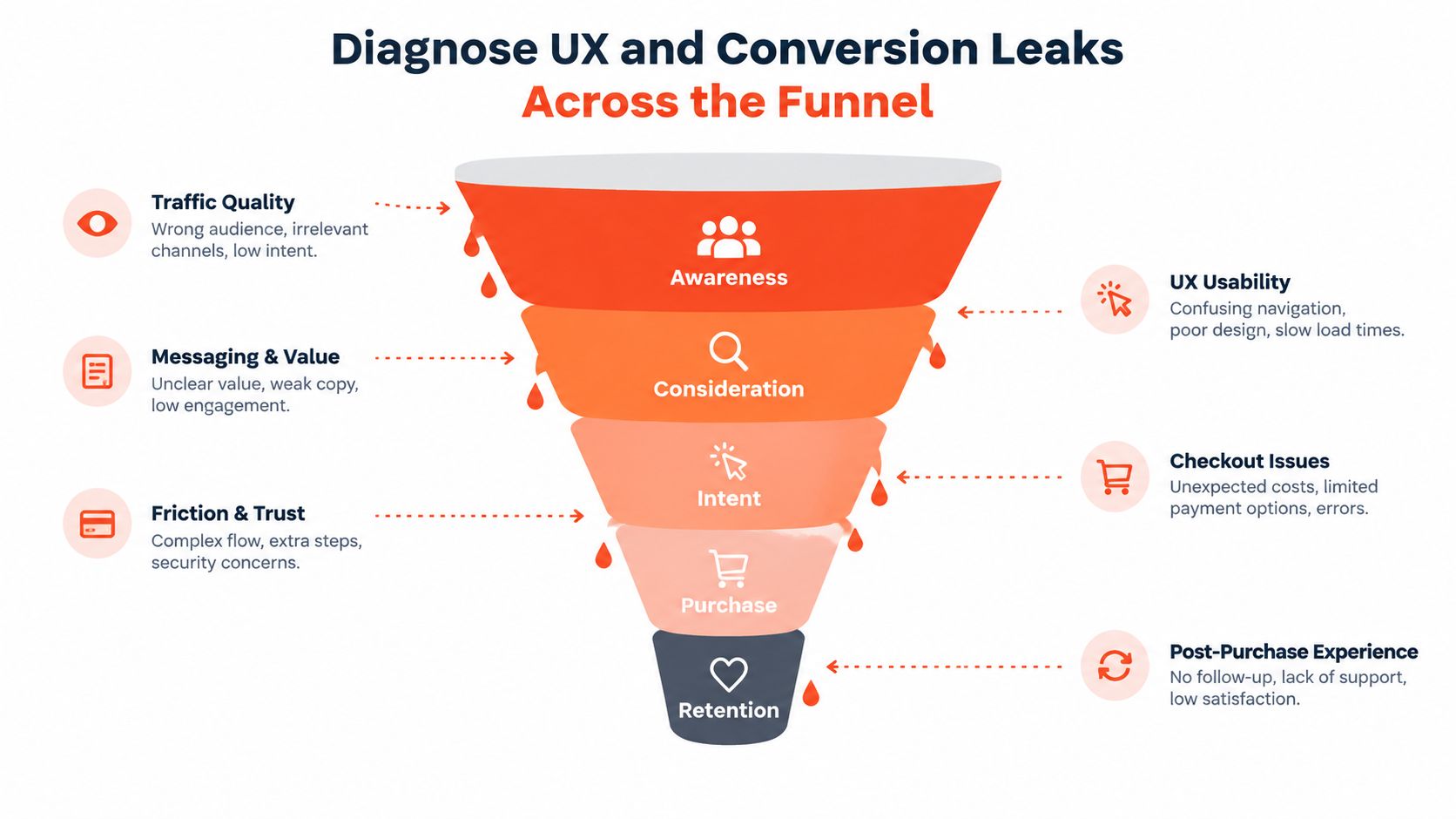
The conversion rate is an outcome, not a diagnosis. Before changing copy, buttons, navigation, or checkout, establish the baseline for overall conversion, add-to-cart, cart abandonment, product-page drop-off, traffic source, device, market, and product type.
Independent ecommerce guidance places the median Shopify store conversion rate around 1.3% to 1.8%, with roughly 1.4% cited as a common average and top-performing stores reaching about 3.2% or higher, according to Ecorn's Shopify store audit benchmarks. Those figures are directional, not a target to apply blindly. Category, price, traffic intent, repeat-customer mix, device, and geography all change the context.
Find the largest verified leak
Map the journey in order:
Landing: Which campaigns and organic pages bring visitors, and do their promises match the landing experience?
Discovery: Can shoppers find the right collection, search result, or product without excessive navigation?
Evaluation: Does the product page answer price, fit, delivery, returns, availability, and usage questions?
Commitment: Does add-to-cart work for every variant, subscription option, discount, and market?
Checkout: Do shipping, payment, tax, login, and consent steps behave as expected?
A high-intent campaign with strong product-page visits but weak add-to-cart behavior points toward product information, price framing, variant logic, or trust friction. Strong add-to-cart activity followed by checkout abandonment suggests a different investigation, possibly shipping visibility, payment behavior, discount logic, or an app change. Low engagement from an audience that never reaches a relevant product page is more likely an acquisition or merchandising issue than a checkout issue.
Use a before-and-after comparison only after defining the affected segment. A sitewide conversion rate can hide a mobile-only issue, a single market with broken localization, or a small group of products whose option selector fails. Segmenting by template and traffic quality usually reveals a narrower fix than a full redesign.
Fix the leak you can reproduce, not the page that looks least polished.
A targeted test might change product-page information hierarchy, simplify a variant selector, expose delivery details earlier, or remove an intrusive cart upsell. Record the hypothesis, affected audience, primary event, guardrail metrics, and rollback condition. Resources such as sales conversion rate strategies can broaden the testing backlog, but the audit should decide which idea belongs first.
The audit should also check sequencing. A promotion may send shoppers to a generic homepage instead of the relevant collection. A recommendation widget may appear before core product information. A discount app may interrupt the cart before shipping expectations are clear. These are not all design flaws. They're journey-order problems, and they need to be evaluated against behavior data and controlled tests.
Avoid redesigning the entire store because one funnel stage is weak. If the evidence points to a single interaction, repair that interaction, retest the complete path, and preserve stable parts of the experience.
Review Theme Code Apps SEO and Accessibility Together
Theme code, apps, SEO, and accessibility interact more than most audit checklists acknowledge. An app can inject markup that changes heading structure, add scripts that affect performance, or introduce a focus problem that wasn't present in the base theme. A custom section can create duplicate content or make a keyboard path unusable. Review the layers together so the remediation doesn't fix one issue by creating another.
Start with the theme and app inventory
Review the published theme and its development copy. Check template organization, Liquid conditionals, JavaScript dependencies, CSS duplication, section settings, app embeds, and snippets left behind by removed applications. Confirm that a theme update won't overwrite critical customizations and that the team can explain which code owns each major storefront feature.
For apps, build an inventory with four fields: business purpose, storefront locations, data dependencies, and removal risk. Then ask:
Does the feature earn its place? If nobody uses it, remove it rather than hiding it.
Where does it load? A review widget doesn't need to execute on every template.
Can the theme or Shopify Functions handle it? Consolidating functionality can reduce conflicts and maintenance.
What remains after uninstalling? App removal may leave snippets, blocks, or settings that need cleanup.
Lean builds aren't about deleting useful features. They're about making ownership explicit and avoiding multiple tools that perform overlapping work. Presidio's Function Junction is one example of a Shopify Functions product that can support custom discount, bundle, and order-rule logic, but any replacement should be judged against maintainability, performance, and operational needs.
Check SEO and accessibility at the same time
For SEO, crawl representative pages and inspect title and description uniqueness, heading hierarchy, canonical behavior, structured data, image alt text, internal links, redirects, pagination, and indexability. Validate the rendered HTML, not only the theme editor. An app can alter the output after Liquid renders it.
Accessibility review should cover keyboard navigation, focus visibility, labels, error messages, color contrast, text resizing, semantic landmarks, alt text, and dynamic updates. A theme pass isn't enough. The ADA accessibility requirements guidance from Presidio provides useful context for structuring that review, but legal obligations depend on the store's markets and circumstances.
The risk extends beyond the theme. Recent 2026 audit coverage claims that only 5% to 11% of Shopify stores reach WCAG 2.2 AA conformance under a strict checkout standard, while 30% to 40% may have an accessible theme but still fail because of apps, content, or custom code, as reported by TestParty's 2026 ecommerce accessibility analysis. The same source reports that pre-remediation product pages can contain 100 to 350 detectable WCAG violations, with Lighthouse accessibility scores in the 50 to 70 range. Treat those figures as signals about layered risk, not as a substitute for testing the actual storefront.
Create one findings sheet with a layer tag:
Theme: Base markup, styles, scripts, templates, and sections.
App: Injected widgets, embeds, scripts, and app-owned markup.
Content: Product copy, images, links, tables, and editorial components.
Custom code: Integrations, scripts, snippets, and bespoke behaviors.
That structure prevents teams from asking the theme developer to fix an app-generated violation or asking an app vendor to repair content. It also makes regression testing possible after each change.
Prioritize Fixes and Build Your Remediation Roadmap
An audit becomes valuable when the team can act on it. Rank each finding by revenue impact, effort, risk, confidence, and dependency. A missing purchase event deserves urgent attention because it can corrupt prioritization across every channel. A cosmetic spacing issue may matter to the brand but should not outrank a broken variant selector or a checkout failure.
Use a practical priority matrix
Fix Category | Impact on Revenue | Effort and Risk | When to Schedule |
|---|---|---|---|
Tracking integrity | High, because decisions rely on the data | Usually contained, but integrations require careful testing | Immediately, before optimization work |
Checkout or payment failure | High, because it blocks completed orders | Potentially high risk, test with controlled orders | Emergency or first sprint |
Mobile performance bottleneck | High when it affects key landing or product templates | Moderate, depending on app and theme ownership | First sprint after measurement is clean |
Product-page friction | Medium to high, depending on traffic and intent | Moderate, suitable for targeted testing | Early CRO sprint |
App or script consolidation | Variable, with potential stability benefits | Moderate to high if functionality overlaps | Planned technical sprint |
SEO and accessibility defects | Compounding visibility, usability, and compliance risk | Varies by layer and template coverage | Sequence by affected templates and severity |
Don't treat the table as a universal scoring system. A small defect on a high-volume landing template can matter more than a serious defect on a page few customers visit. Use the store's verified data to adjust the order.
A useful roadmap has three horizons. Immediate fixes cover tracking, broken journeys, failed payments, and obvious indexing or accessibility blockers. Sprint improvements cover template performance, product-page structure, app cleanup, and controlled UX tests. Strategic work covers theme architecture, international market support, custom features, replatform follow-ups, and deeper personalization.
After every change, rerun the affected journey and compare the same event definitions against the original baseline. Don't bundle unrelated fixes into one release if you need to know what caused the outcome. Keep a rollback path, record the deployment date, and assign one owner for validation.
For a broader audit structure that includes technical and content checks, the Next Point Digital audit checklist can help teams extend their internal review. Use it as a reference, then adapt the scope to Shopify's theme, app, checkout, and market architecture.
Schedule a lightweight review after major theme, app, checkout, consent, or market changes. A Shopify store audit shouldn't be a one-time report that expires when the next feature ships. It should become part of the operating rhythm for protecting measurement, performance, accessibility, and conversion quality.
Presidio can audit Shopify and Shopify Plus stores across analytics integrity, technical performance, UX, CRO, theme code, apps, SEO, and accessibility, then turn the findings into a tested remediation roadmap. Visit Presidio to discuss the funnel leak you need to verify first and the implementation support required to fix it.

Jamie, Presidio’s Designer, leads the practice alongside Johnnie. With over 10 years of e-commerce experience, Jay is a Shopify expert, known for crafting innovative solutions that prevent tech debt.
Jaime
Senior Product Designer, 2020



