Presidio

Most advice on Shopify theme customization starts in the wrong place. It tells merchants to open Liquid files and start editing, when the smarter move is usually to work through the theme's built-in layers first, because Shopify themes are designed to stay flexible through settings, templates, apps, and only then code.
That matters because the Shopify ecosystem is already a bounded design system, not a blank canvas. As of mid-2025, the Shopify Theme Store listed 268 themes in total, including 23 free themes built by Shopify and 245 paid themes from third-party partners, and independent usage data suggests only about 1.5% of Shopify sites run fully custom themes, with the share rising only slightly from 1.35% in 2020 to 1.53% in 2024 among the top 1 million Shopify sites (Uptek theme statistics). In practice, most brands are modifying a foundation, not rebuilding one.
Table of Contents
Why Most Theme Customizations Create Upgrade Debt
The fastest way to break a theme is to treat every request like a coding request. A color tweak, a reorderable block, or a banner swap often gets pushed into Liquid because it feels immediate, but that choice ties business content to theme logic and makes later updates harder than they need to be.
Shopify's own guidance puts theme settings and app embeds ahead of deeper edits, which matches how Online Store 2.0 themes are built, around section-based templates and portable content structures (Shopify theme customization guide). If a merchant can change a value in the Theme Editor, that's usually a better answer than hardcoding it. If a page needs a different arrangement, a JSON template is usually cleaner than patching the layout file.
Practical rule: if the request can be solved without touching core Liquid, it probably should be.
The cost of skipping the layered approach shows up later. Hardcoded content gets forgotten. Inline CSS gets copied into three other files. A small pricing exception becomes a second logic path. Then the next theme update has to work around old assumptions instead of replacing them.
That's why theme updates matter even when the storefront already “works.” Keeping a theme current preserves compatibility, reduces merge pain, and keeps the upgrade path open. A solid case for that discipline is laid out in the benefits of updating your Shopify theme, because the theme that's easy to maintain is usually the one that survives the most iterations.
The question to ask on every request is simple. Can this live in settings, a template, or an app embed first? If yes, code should be the last step, not the starting point. That habit keeps customizations reversible, portable, and much less expensive to live with.
Navigating Shopify Theme File Structure
A Shopify theme becomes manageable once you stop thinking of it as a single codebase and start reading it as a set of responsibilities. Each folder does a different job, and knowing that separation keeps changes targeted instead of chaotic.
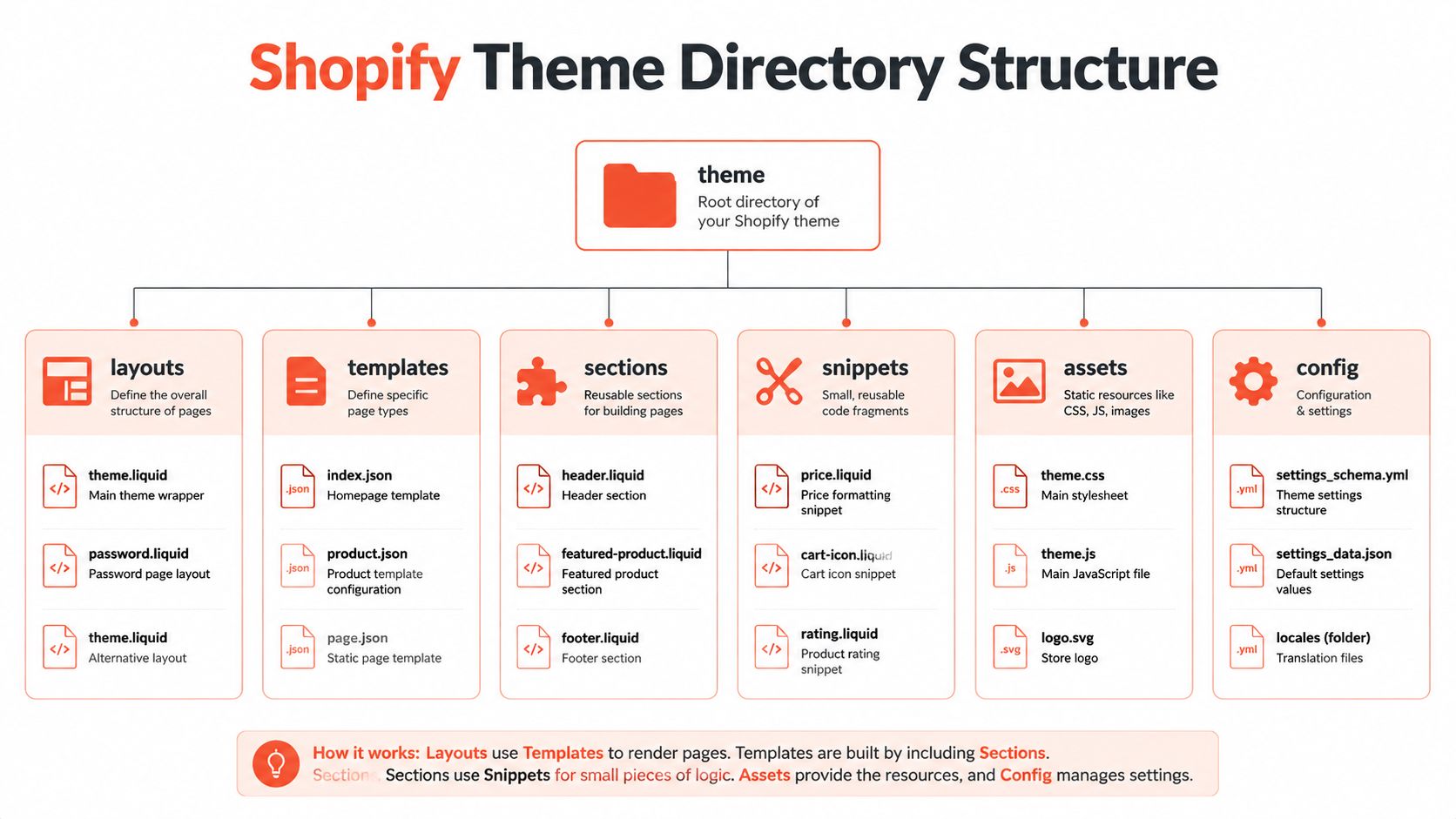
The layouts folder wraps the page shell. The main layout file is the frame every page passes through, so if you're changing global wrappers, script loading, or base markup, this is usually where that lives. Templates decide what a specific page type renders, and in Online Store 2.0 those JSON templates matter a lot because they define which sections appear and in what order.
The pieces that matter most in real projects
Sections are where most merchants feel the theme. A product hero, testimonials block, featured collection, or FAQ area is usually a section, which is why section-level thinking is the safest way to customize without dragging every page into the change.
Snippets are reusable components. If you see the same badge, icon row, or price subcomponent repeated in multiple places, a snippet can keep the implementation consistent. Assets hold compiled CSS, JavaScript, images, and fonts. Config stores theme settings and schema data. Locales handle translated strings and region-facing text.
Read the theme from the outside in. Start with the layout, then the template, then the sections it loads.
A simple product page trace makes the hierarchy clear. The page opens through the layout, then the product template decides the structure, and the sections inside that template render the actual merchandising components. If the template is JSON, the structure is mostly declarative. If a section is reusable, its schema determines which settings merchants can control later in the Theme Editor.
That's the mental model that prevents blind edits. If a page looks wrong, you don't guess. You trace where the markup lives, whether the issue belongs to a section or a snippet, and whether the fix should happen in a template assignment instead of a code rewrite.
For a broader view of theme architecture and build decisions, custom Shopify theme development is the right companion topic because file structure only becomes useful when it maps to how the theme is deployed.
A final detail matters here. The more you understand the file tree, the less likely you are to “fix” one page and accidentally alter all of them.
A video walkthrough of the theme structure
The Customization Hierarchy From Settings to Code
Good theme work starts with restraint. The hierarchy is simple, but it saves teams from overengineering small requests and underengineering important ones.
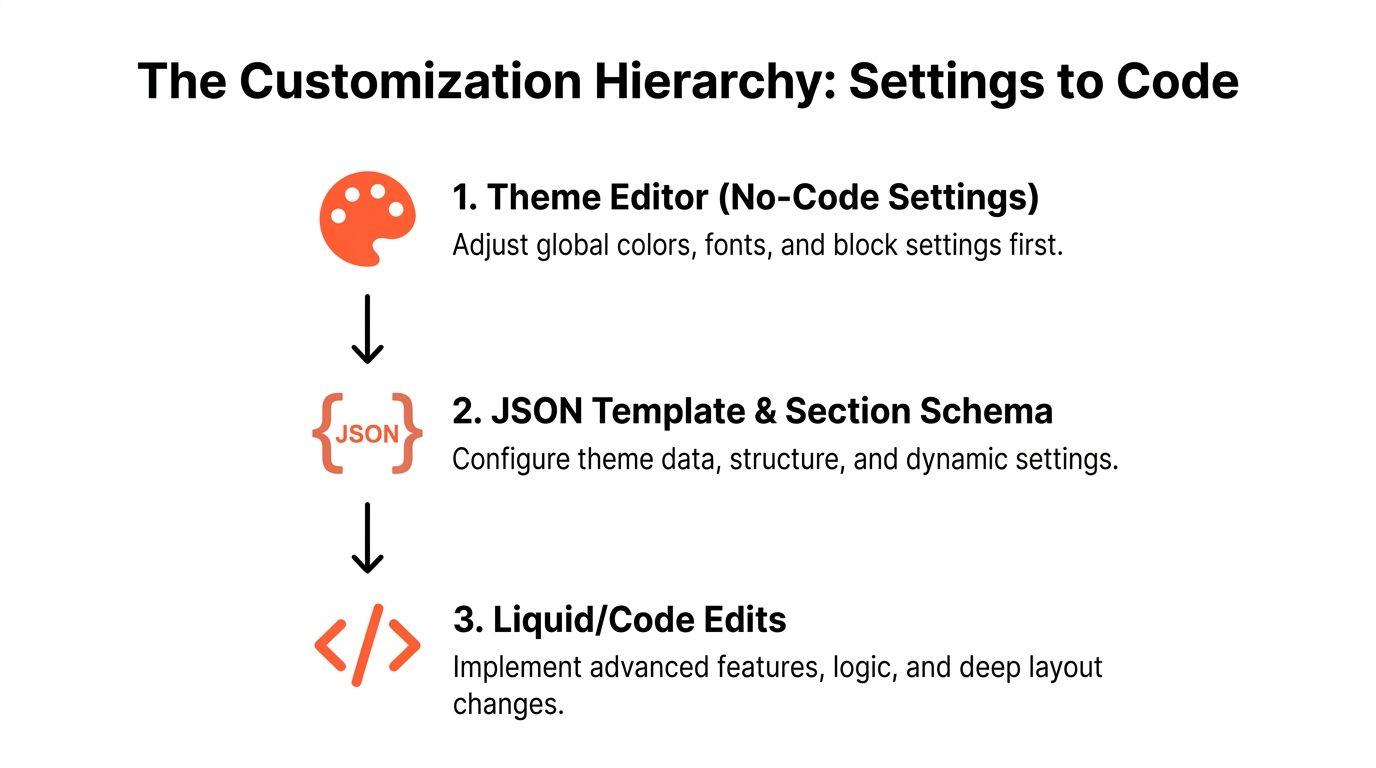
1. Theme Editor first
The Theme Editor is the first stop because it handles the most common brand changes cleanly. Fonts, colors, spacing, button styles, media, block visibility, and many merchandising choices belong here. If a merchant can make the change safely without developer intervention, that's a win for both speed and maintainability.
2. JSON templates next
If the request is about page composition, move to JSON templates. That's where section order, page-specific layouts, and template-level defaults live. A campaign landing page, for example, often needs a different section stack than the homepage, but it doesn't need a custom code branch if the layout can be assembled from existing sections.
3. App embeds and app blocks
Functional additions belong here before custom code. Subscription widgets, reviews, analytics tags, and other third-party behaviors often fit better as app blocks or embeds than as hand-rolled theme logic. That keeps the theme cleaner and reduces the odds that a future app update will conflict with your custom code.
If the feature comes from a platform app, treat that integration like a product decision, not a CSS problem.
4. Liquid and CSS only when the theme can't do it
Code is the right answer when the theme lacks a capability. That might be a product-data rule, a custom condition, or a layout behavior that can't be expressed in settings or templates. The key is to make the code solve a specific gap instead of compensating for skipped configuration.
This is also where outside resources can help teams stay disciplined. A practical Shopify checkout page customization guide is useful for understanding where checkout-level changes fit into a broader customization strategy, because checkout logic shouldn't be confused with storefront theme logic.
A useful decision test is short. If the change can live in the Theme Editor, do that. If it changes page structure, use JSON templates. If it adds an integration, use an app embed or block. If none of those work, then write code, document it, and keep it narrow.
Working With JSON Templates and Section Schemas
JSON templates are the backbone of modern Shopify customization, and they're still underused by teams that jump too quickly to theme files. They define which sections appear on a page, the order those sections load in, and the default settings merchants see when they open the editor.

Why schema matters more than most teams think
A section schema is the contract between the developer and the merchant. It controls which settings are exposed, what labels appear in the editor, and how reusable the section really is. If the schema is too rigid, merchants end up asking for code changes that should have been settings. If it's too loose, the theme becomes hard to reason about later.
Static sections and dynamic sections play different roles. Static sections are fixed into the template, while dynamic sections are meant to be rearranged or supplemented with blocks. That distinction matters on pages where merchandising teams need flexibility without creating a new template for every campaign.
A practical landing page pattern
A custom landing page often works best as a dedicated JSON template built from existing section types. One section can handle the hero, another can handle social proof, a third can handle product education, and a fourth can handle FAQs. Merchants can then adjust the composition without asking a developer to rewrite the page every time the campaign changes.
Template assignments matter too. A page assigned to a custom JSON template gets its own structure without affecting the rest of the site. That's the cleanest way to support a launch page, a seasonal collection page, or a content-led landing page with a unique content mix.
Custom templates are most valuable when they reduce future ticket volume, not when they make one page look different.
There's also a practical content lesson here. Teams that rely on metafields, section settings, or template-specific blocks can move faster because the theme holds the structure and the merchants hold the content. That division keeps the work manageable and avoids rebuilding the same page pattern every quarter.
If you're deciding whether a page deserves a new template, ask whether it needs a distinct section stack, distinct defaults, or distinct merchandising logic. If the answer is yes, JSON templates are usually the right layer.
Maintainability Practices That Prevent Rework
The difference between a theme that survives years of changes and one that gets rebuilt is usually discipline, not talent. Experienced teams protect the live storefront first, then work in small, traceable steps.
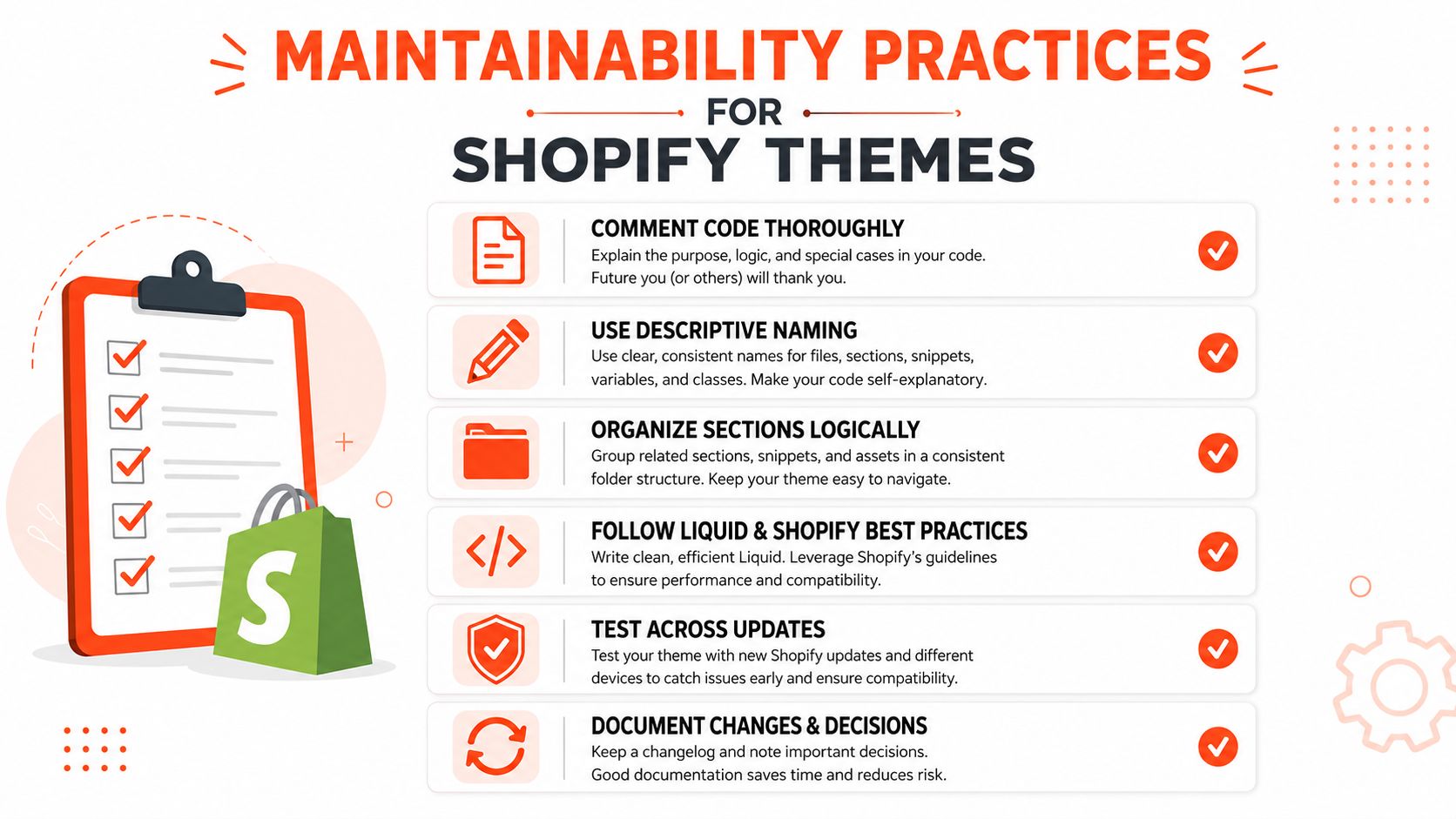
The habits that keep themes upgradeable
Duplicate the live theme before editing. A copy gives you a rollback path when a change behaves differently in production than it did in preview.
Use Shopify CLI with Git. Version control makes it possible to review diffs, isolate mistakes, and deploy changes deliberately.
Keep custom CSS in dedicated stylesheets. Inline styles scatter design decisions across the theme and make later cleanup harder.
Comment changes clearly. Future developers shouldn't have to reverse-engineer why a block exists or why a condition was added.
Test across mobile, desktop, cart, and checkout flows. Theme changes often break where teams look least, especially around responsive layouts and transition states.
Avoid hardcoding prices or content into Liquid. When business data lives in markup, editing becomes risky and repetitive.
A clean workflow also reduces performance drag. Theme customizations that pile on extra scripts, duplicated assets, or unnecessary DOM complexity create a heavier storefront over time. Shopify performance optimization is relevant here because maintainability and speed usually fail together, not separately.
You can see the same principle in landing page work. A well-structured page keeps the layout flexible and the content modular, which is why our landing page design best practices are useful outside pure marketing contexts too. In theme work, structure is what keeps a page editable without forcing a rebuild later.
The team habit that pays off most is incremental change. Small commits, clear diffs, and staged testing keep customizations readable. That's especially important when multiple developers touch the same theme, because the goal isn't just to ship a feature. It's to make sure the next feature doesn't turn into a cleanup project.
Scaling Customization Across Markets and Channels
Theme decisions get harder when a brand sells in more than one market. A page structure that works in one region can become awkward in another if language, catalog rules, shipping expectations, or local merchandising needs diverge.
Shopify's market-aware documentation now treats regional theme behavior as a first-class concern through markets.json and related market inheritance logic (Shopify markets theme customization docs). That changes the way teams should think about templates. Instead of building one universal page and forcing every region to accept it, the theme can adapt by market where it makes sense.
What changes when markets are involved
Localized content usually needs more than translated text. Different markets can need different merchandising emphasis, different collections surfaced first, or different page copy tied to shipping and tax realities. If those differences are handled with separate codebases, maintenance gets messy fast.
App sprawl creates a similar problem across channels. Every new widget, quiz, bundle tool, or analytics overlay can add friction if it isn't integrated into the theme strategy. A leaner theme foundation usually means fewer moving parts and fewer places for style and script conflicts to appear.
The best market-ready theme is the one that can vary by region without fragmenting into separate storefront logic.
Accessibility belongs in the same conversation. A customization that looks fine in one browser but breaks keyboard flow or contrast in another market is a support problem, not a cosmetic one. Theme changes should be reviewed with the same discipline whether they're for a homepage refresh or a regional expansion.
That's where a maintainable stack pays off again. A theme built with reusable sections, clean app integration, and market-aware templates can support expansion without forcing every region into a separate maintenance path. For teams planning that kind of growth, Presidio provides custom Shopify theme development, performance work, and ongoing storefront support as one option among several ways to keep a theme stable while it changes.
If your theme is starting to feel fragile, Presidio can help you tighten the structure, reduce upgrade debt, and plan changes that won't collapse at the next release. Visit Presidio to discuss Shopify theme customization, custom development, or a long-term storefront maintenance plan.

Jamie, Presidio’s Designer, leads the practice alongside Johnnie. With over 10 years of e-commerce experience, Jay is a Shopify expert, known for crafting innovative solutions that prevent tech debt.
Jaime
Senior Product Designer, 2020



