Presidio

Headless architecture is a setup where the customer-facing storefront is separated from the backend commerce engine and connected through APIs, so the two can be built and updated independently. It first emerged as a distinct commerce pattern in 2013, and adoption has accelerated fast enough that one 2026 industry summary says headless CMS adoption grew 63% year over year in 2025, while another says 18% of companies already use headless CMS, up from 8% in 2023, with 29% planning a migration (headless adoption summaries).
If you're leading ecommerce today, you've probably felt the pressure that creates interest in headless. Marketing wants faster landing pages. Merchandising wants richer product storytelling. Engineering wants fewer template constraints. Everyone wants better performance, but nobody wants to own a brittle rebuild that adds complexity without clear payoff.
That's where most explainers fall short. They tell you the pitch. They skip the operating model. A headless storefront can give your team more speed and freedom, but it also hands real platform responsibilities back to you. If you're on Shopify or Shopify Plus, that's the part that matters most.
Table of Contents
The Core Idea Behind Headless Architecture
A lot of teams arrive at this question after hitting the same wall. Every campaign, homepage update, and custom feature has to move through one shared system. The marketing team asks for a new hero module. Engineering says it has to wait for the next sprint because the same codebase also powers templates, app logic, and storefront behavior.
What is headless architecture? It's an architecture where the storefront people see is separated from the backend system that manages products, carts, checkout, and orders. The two talk through APIs.
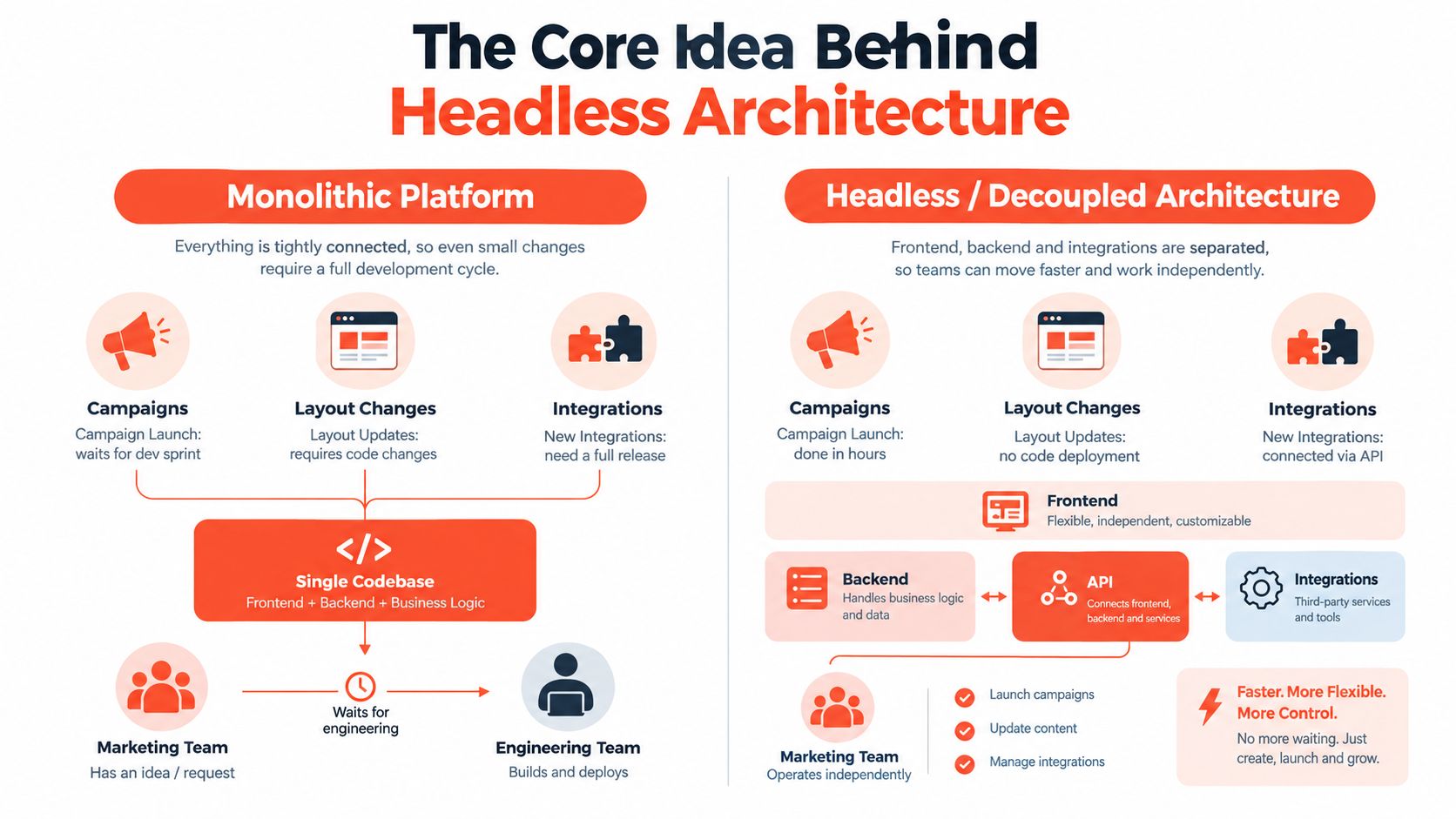
Monolithic vs headless
In a monolithic setup, the front end and back end live in one application. Your templates, content rendering, cart behavior, and business logic are closely tied together. That can be convenient because many features come pre-wired. It can also get restrictive because changing one part often means navigating platform rules in another.
In a headless setup, the storefront is its own application. The backend still owns commerce data and transactions, but the presentation layer becomes independent. According to Strapi's explanation of headless architecture, that separation lets frontend and backend scale and deploy independently, which is a major reason teams use headless to reduce frontend bottlenecks and support omnichannel delivery.
Think of it like a restaurant.
Model | How it works | What it feels like |
|---|---|---|
Monolithic | Dining room and kitchen run as one tightly managed operation | Reliable, but every menu or service change goes through the same system |
Headless | The dining room can send orders to the kitchen through a ticketing system | More flexible, but the staff has to coordinate more carefully |
What directors usually care about
This isn't really a theory question. It's a control question.
Release cadence: In headless, the front end can move on its own schedule instead of waiting on the broader platform release cycle.
Design flexibility: You can build interactions, content layouts, and merchandising patterns that don't fit neatly inside standard theme conventions.
Cost of change: Small visual changes can become easier. System ownership usually becomes harder.
Practical rule: Headless removes platform constraints from the storefront, but it doesn't remove work. It changes who owns that work.
That's the part worth remembering. Headless enables independence between the customer experience and the commerce engine. It also means your team now has to manage the seams between them.
Where Headless Came From and Why It Took Off
Headless didn't appear because the industry needed a new buzzword. It appeared because digital commerce stopped being one website.
The term headless commerce emerged as a distinct pattern in 2013. Dirk Hoerig, co-founder of commercetools, coined the term, and it was also linked to a 2013 Forrester Research report arguing that ecommerce vendors were lagging user experience expectations and should loosely couple the front end and back end (history of headless commerce).

Why the pattern showed up
The label was new. The pressure behind it wasn't.
Developers had already been pushing toward API-first patterns in content systems because they didn't want presentation locked inside rigid template layers. Commerce teams eventually hit the same problem. A platform that worked fine for one desktop storefront started to feel cramped once brands needed mobile apps, content-rich campaigns, kiosks, regional experiences, or channel-specific front ends.
Three shifts made headless much more attractive:
More touchpoints: Brands stopped serving a single storefront and started serving many surfaces.
Modern frontend frameworks: Teams wanted to use frameworks that expected data over APIs, not server-side template lock-in.
Higher UX expectations: Buyers judged sites against fast consumer apps, not just against other online stores.
Headless is less a framework trend than a response to channel sprawl.
That matters when you evaluate it. If your business still operates mostly through one storefront with straightforward merchandising, a traditional setup may still fit. If your business is trying to coordinate multiple surfaces and services, the architecture starts to make more sense.
For teams looking beyond a single application and toward modular services, this composable commerce overview is a useful next concept. Headless is often the storefront layer of a broader composable strategy, but the two aren't identical.
How the Layers Actually Work Together
The easiest way to understand headless is to stop thinking in brand names and think in layers. Most storefronts break into three.
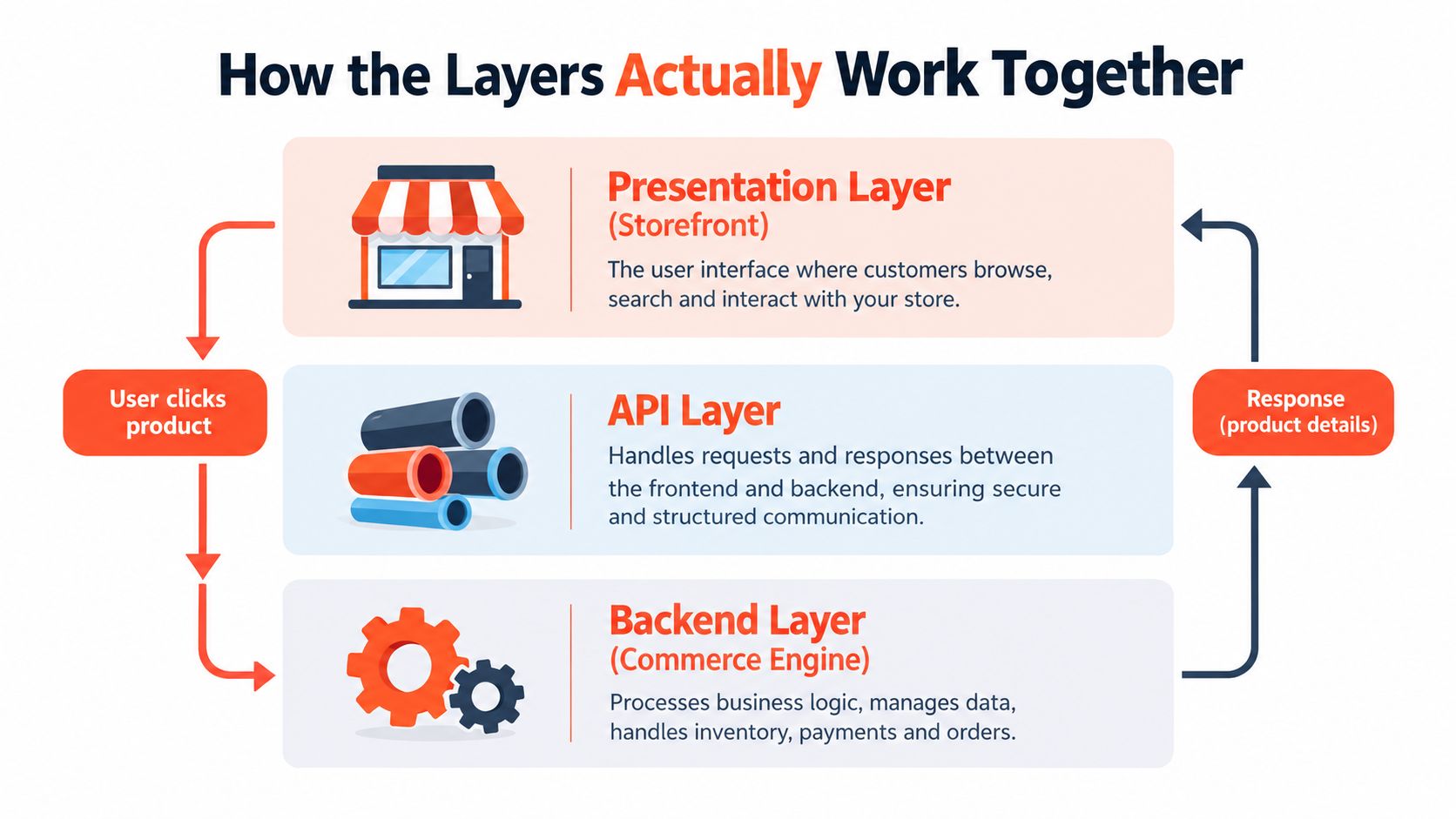
The three layers
Presentation layer
This is the storefront customers interact with. It might be built in Next.js, Nuxt, Remix, or Shopify Hydrogen. It handles rendering, layout, interactions, and often performance decisions like server-side rendering or edge delivery.API layer
This is the communication bridge. The storefront requests product, cart, customer, or content data through APIs. In Shopify headless builds, that usually means the Storefront API, often combined with webhooks and sometimes a backend-for-frontend layer to aggregate data.Commerce backend
Commerce state lives here. Product catalog, pricing, inventory, cart rules, checkout, and orders stay in the backend system.
One product page request
Let's trace a product detail page.
A shopper lands on /products/linen-shirt. The storefront app receives that request and determines what page to render. It calls the API layer for the product handle, variant data, pricing, and availability. Shopify returns structured data. The storefront renders the page and sends the HTML to the browser. When the shopper clicks Add to Cart, the front end sends another API request to create or update the cart state.
That sounds simple, but a lot of supporting pieces sit around it:
CDN delivery for fast asset and page delivery
Edge functions for request-time logic
Image optimization so large product media doesn't drag performance down
Tag managers and analytics hooks so marketing data still flows
A useful mental model is this: the storefront is no longer "inside" the commerce platform. It's a separate application negotiating with the commerce platform in real time.
Why this changes staffing
This is one reason headless work often favors teams with broader frontend and integration experience. If someone on your team wants a good primer on the full stack skills and tech stacks that make these projects succeed, that overview maps the shape of the work well.
For Shopify specifically, the API layer isn't an abstract concept. It's the daily surface your storefront depends on. A practical reference is Shopify's Storefront API overview, because most real decisions in a Shopify headless build come back to what the storefront requests, when it requests it, and how often.
Benefits and Drawbacks in Real Terms
The best reason to go headless isn't that it's modern. It's that it gives a team more control over the storefront. The best reason not to go headless is that control comes with operating burden.

Where the upside is real
Performance is the first place teams usually notice a difference. In production commerce migrations, independent headless implementations commonly report 20% to 50% page-load improvements, with median mobile LCP around 1.5 seconds versus 2.4 seconds for traditional platforms, and INP improving 40% to 55% when the storefront is rebuilt on a lighter stack and heavy app-script coupling is removed (production headless performance data).
That doesn't mean every headless build will be fast. It means the architecture gives teams more room to build a fast storefront if they execute well.
The second advantage is creative control. Custom product storytelling, interactive merchandising, and non-standard content layouts are much easier when your presentation layer isn't bound to a traditional theme system. That's especially relevant for brands where the storefront acts more like a digital flagship than a plain transaction layer.
The third is channel reuse. One backend can support multiple customer-facing experiences through APIs. That can simplify commerce operations when a brand serves web, app, in-store, or other channel-specific experiences from the same core system.
Where the downside gets expensive
The hard part isn't usually the launch. It's the ownership after launch.
A neutral market summary says the global headless commerce market is projected to grow from $1.74 billion in 2025 to $7.16 billion by 2032, but the same coverage also notes commentary that companies are spending an average of $2.6 million to implement headless architectures, while many still struggle with multi-app integration and operational complexity (headless commerce market and implementation commentary).
A headless build can improve control and performance. It can also create a larger surface area for bugs, integrations, and deployment issues.
Common pain points show up in places non-technical stakeholders don't always see at the start:
Third-party fragmentation: Apps that worked neatly inside a monolithic theme often need custom integration patterns.
Longer debugging paths: A checkout or cart issue may involve the storefront, middleware, API logic, and vendor systems.
Higher operating maturity: Faster frontends don't help much if your team can't maintain preview, releases, analytics, and QA discipline.
The practical takeaway is simple. Headless isn't faster or cheaper. It's more configurable. That can be a major advantage if your team needs that control.
Common Headless Tech Stacks Including Shopify Headless
Most headless stacks look complex from the outside because they combine several specialized tools. In practice, the architecture is easier to read if you split it into storefront, content, commerce, and infrastructure.
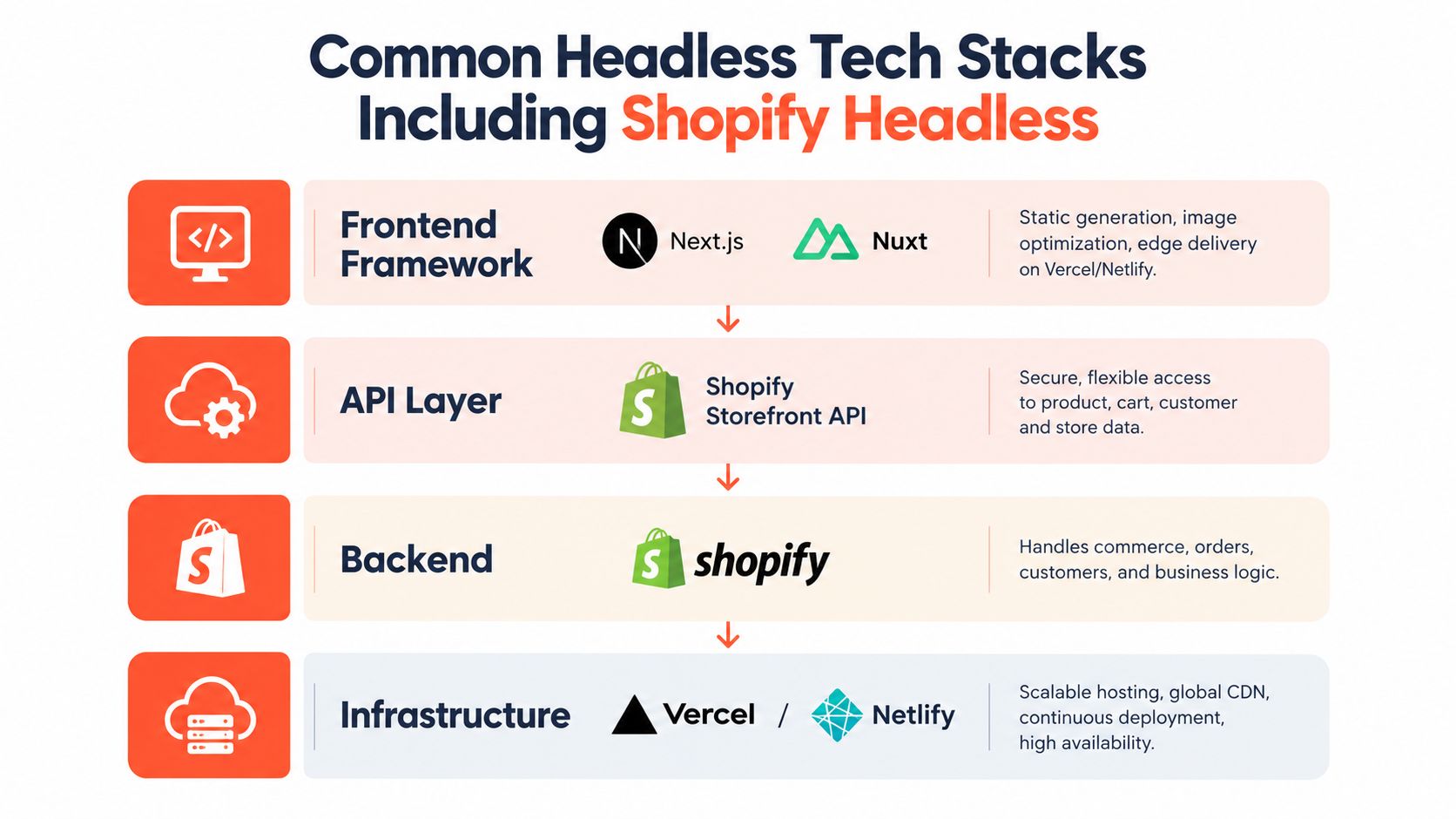
The common pieces
Here's a stripped-down view of what teams usually choose from:
Layer | Common options | What it handles |
|---|---|---|
Frontend | Next.js, Nuxt, Remix, Hydrogen | Storefront rendering and user experience |
CMS | Sanity, Contentful, Contentstack | Editorial content like landing pages and lookbooks |
Commerce | Shopify | Products, inventory, carts, checkout, orders |
Infrastructure | Vercel, Netlify, Oxygen | Hosting, deployment, edge delivery |
In a Shopify headless build, Shopify still owns the commerce engine. The storefront requests data through APIs, and editorial content may come from a separate CMS. The front end then merges those streams into a single page.
What makes Shopify headless distinct
Shopify gives teams a middle path that matters. You can decouple the storefront while still keeping checkout and payments on Shopify's rails. That reduces the amount of commerce plumbing you need to recreate yourself.
Hydrogen is Shopify's React-based framework built for this model. Oxygen is Shopify's hosting layer designed for Hydrogen storefronts. Teams that prefer a broader React ecosystem often use Next.js instead. Both paths can work. The right choice depends less on hype and more on team familiarity, deployment preferences, and how much of the app needs to be custom.
If you want a clearer breakdown of that route, Shopify headless commerce is a useful reference because it frames where Shopify ends and your custom stack begins.
A realistic stack example
A content-heavy apparel brand might run:
Hydrogen on Oxygen for the storefront
Sanity for editorial content
Shopify Storefront API for product and cart data
Algolia for search
Klaviyo for lifecycle marketing
That stack isn't unusual. What matters is not the logos. It's how many moving parts your team is prepared to own.
One option in that ecosystem is Presidio, which offers headless and composable storefront development for Shopify brands alongside migrations, custom app work, and ongoing optimization support. That's useful if your team wants Shopify-specific implementation help rather than a general web agency.
What Headless Hands Back to Your Team
This is the part many glossy headless articles skip. When you decouple the storefront, the platform stops solving some problems for you.
The hidden platform work
In a traditional theme setup, routing and URL behavior often feel native. In headless, they're your job. That includes page routing, canonical URLs, redirects, collection path changes, pagination behavior, and localization-aware URL structures.
Authentication gets more involved too. Customer sessions, account flows, gated content, B2B logic, and preview access all need deliberate handling. What felt like a built-in storefront feature becomes an engineering concern.
Preview is another surprise. Editors don't just want content storage. They want confidence. If a merchandiser updates a campaign in a headless CMS, they expect to click a preview link and see the draft storefront exactly as it will render. Wiring that flow usually takes real implementation work.
Operational complexity isn't theoretical
Recent implementation guidance calls out routing and URL management, CI/CD complexity, and authentication and authorization as major headless challenges. At the same time, adoption keeps rising. One 2025 industry survey put headless adoption or plans to adopt at 60% of retailers, with 20% already live and 25% in active migration (headless adoption and implementation challenges).
That combination is why teams get tripped up. The market momentum is real. So is the extra responsibility.
Operational reality: Headless doesn't just change your storefront. It changes your release process, your QA process, and your incident response process.
The team profile that usually succeeds
The strongest headless projects usually have:
A senior frontend owner who understands React patterns, API data flow, and performance tradeoffs
A delivery process for testing, deployments, rollback, and monitoring
A commerce-aware partner if the in-house team is strong on brand but thin on architecture
If that team doesn't exist yet, headless can still work. But the project plan needs to account for building that capability, not just launching pages.
When to Choose Headless and How to Plan a Migration
Some brands need headless. Many are just frustrated with their current theme and assume headless is the answer. Those are different situations.
Signals that point toward headless
A headless move is easier to justify when several of these are true at once:
You run more than one serious channel. A single storefront is one problem. Multiple touchpoints usually create a different architecture conversation.
You operate across regions. Localization, market-specific merchandising, and content orchestration get harder inside rigid presentation layers.
Your storefront is a product, not just a template. If your experience depends on custom storytelling, interactive UX, or unusual buying flows, theme-first approaches can become restrictive.
Your team can own software, not just content. Headless works best when someone owns engineering decisions after launch.
You can carry overlap during migration. Parallel systems, QA, and rollout planning take time and money even when the build goes smoothly.
A migration path that lowers risk
Most successful migrations don't replace everything at once. They phase risk.
Audit the current storefront
Map URLs, redirects, analytics dependencies, app behavior, and content sources before anyone starts rebuilding.Build the new storefront off to the side
Use a staging domain or protected environment while the current storefront keeps serving production traffic.Validate end-to-end flows carefully
Test routing, redirects, product availability, cart persistence, checkout handoff, and analytics events with real merchandising scenarios.Cut over in a controlled way
Monitor closely after launch, especially around performance, broken paths, cart issues, and reporting gaps.
The migration mistakes that hurt most are usually ordinary ones. Missing redirect coverage. Weak QA on cart state. No proper user acceptance testing with the merchandising team. None of those sound glamorous, but they cause real revenue disruption.
Putting It All Together
Headless architecture separates the storefront from the commerce engine through APIs. That trade gives teams more frontend control and more channel flexibility.
It also gives them more responsibility.
That's the decision in plain terms. If your current platform is actively blocking an important revenue goal, if you already have a team that can own a custom storefront, and if the gain is worth a larger build and a more demanding operating model, headless can be the right move. If those answers are shaky, a strong theme architecture is often the better business decision.
For many brands, the smartest path is monolith first, headless later. Especially if they operate one primary channel and don't yet need a custom application layer. For brands that do need it, headless is often the first practical step toward a broader composable commerce model.
If you're weighing that decision on Shopify, Presidio helps brands evaluate whether headless fits their business, then plan and build the right implementation path. That includes Shopify storefront architecture, migrations, performance work, and ongoing support after launch. You can see more about that at Presidio.

Jamie, Presidio’s Designer, leads the practice alongside Johnnie. With over 10 years of e-commerce experience, Jay is a Shopify expert, known for crafting innovative solutions that prevent tech debt.
Jaime
Senior Product Designer, 2020



