Presidio

Most Shopify advice starts in the wrong place. It tells you to install an abandoned-cart app, offer a discount, and send a sequence of reminders. That approach treats every lost order as the same problem, even though a shopper who never starts checkout needs a different fix from someone who reaches payment and then leaves.
A useful Shopify cart abandonment strategy starts with diagnosis. Cart abandonment happens before checkout starts. Checkout abandonment happens after checkout starts. Those stages have different causes, different reports, and different remedies. Recovery messages matter, but they're the last line of defense, not a substitute for a checkout that feels clear, fast, and trustworthy.
Table of Contents
Why Your Abandonment Rate Is Probably Normal
A 70% abandonment rate doesn't automatically mean your Shopify store is broken. Baymard Institute's long-running meta-analysis places the global average online shopping cart abandonment rate at 70.22% in 2026, based on 50 separate studies. Its benchmark had already been tracking around 70.19% in earlier years, and Baymard's research indicates that the global average has remained near that level for roughly 14 years. You can review the Baymard cart abandonment benchmark for the underlying methodology and historical context.
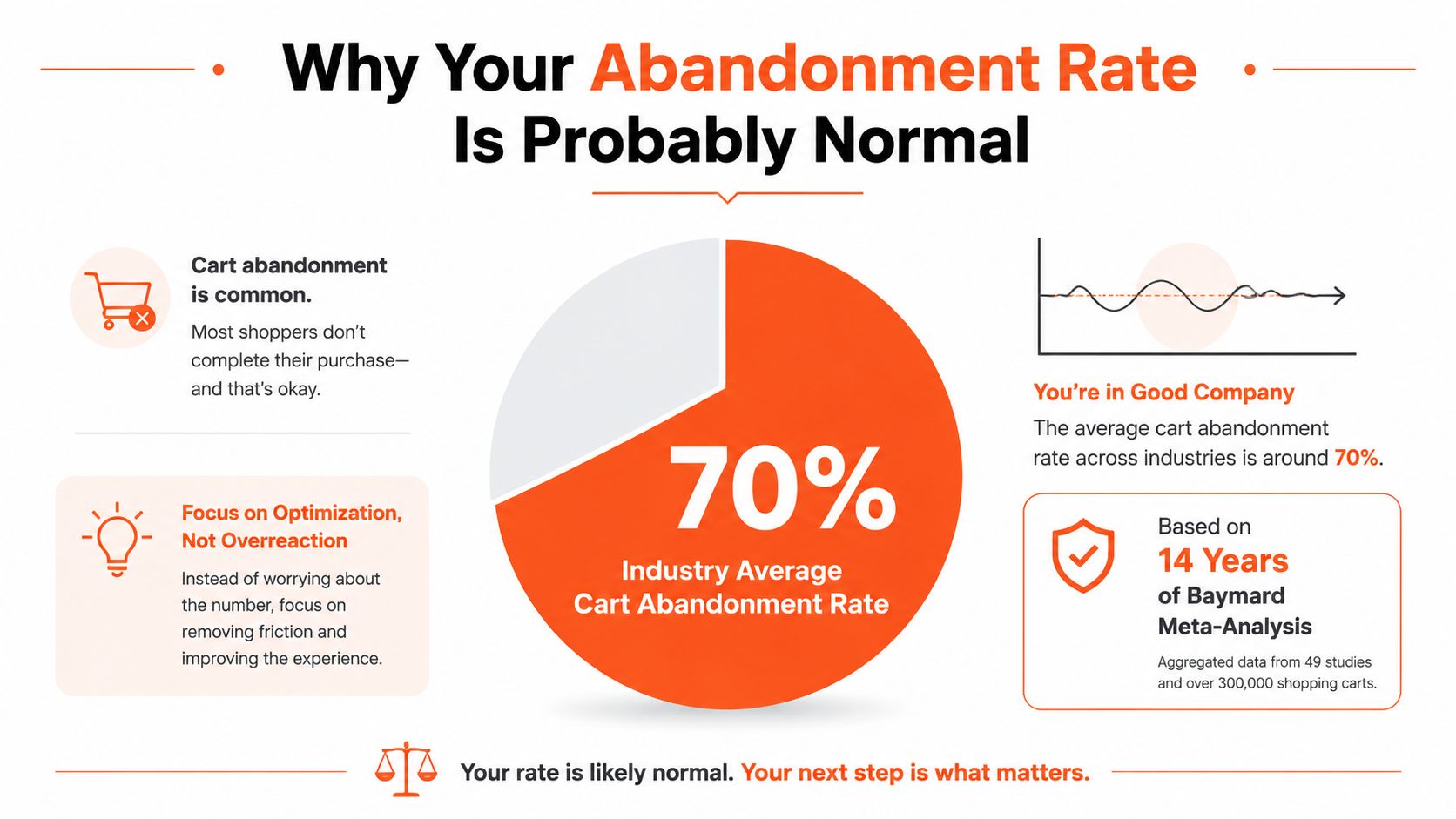
That benchmark is useful as context, not as a performance target. About 7 in 10 carts still don't convert, which means carts represent browsing intent, product comparison, price checking, and delayed purchase decisions as well as genuine buying intent. A high blended rate should prompt investigation, but it shouldn't send your team straight into blanket discounting.
Practical rule: Treat abandonment as a readout of buyer friction, not as the root cause.
Separate the two losses
Shopify merchants often describe all non-purchases as “cart abandonment.” That makes reporting convenient, but it hides the page where revenue is leaking.
Cart abandonment occurs when a shopper adds an item and leaves before starting checkout. The likely causes include unclear shipping expectations, weak product confidence, price resistance, comparison shopping, or a cart experience that doesn't give the buyer enough information to continue.
Checkout abandonment begins once the shopper starts checkout and ends without a completed order. Here, the likely issues shift toward payment availability, unexpected fees, form effort, address entry, mobile usability, and trust at the payment moment.
Those aren't interchangeable problems. A recovery email may bring back someone who intentionally delayed a purchase, but it won't repair a checkout that fails when a customer tries to use their preferred wallet. Start with the blended number only long enough to establish context. Then split the funnel before choosing a tactic.
Diagnosing Where Shoppers Actually Drop Off
A useful Shopify funnel has three distinct checkpoints:
Product page to cart add, where shoppers decide whether the offer is compelling enough to hold.
Cart to checkout start, where they evaluate total cost, shipping, quantity, and commitment.
Checkout start to purchase complete, where they provide details, choose payment, and authorize the order.
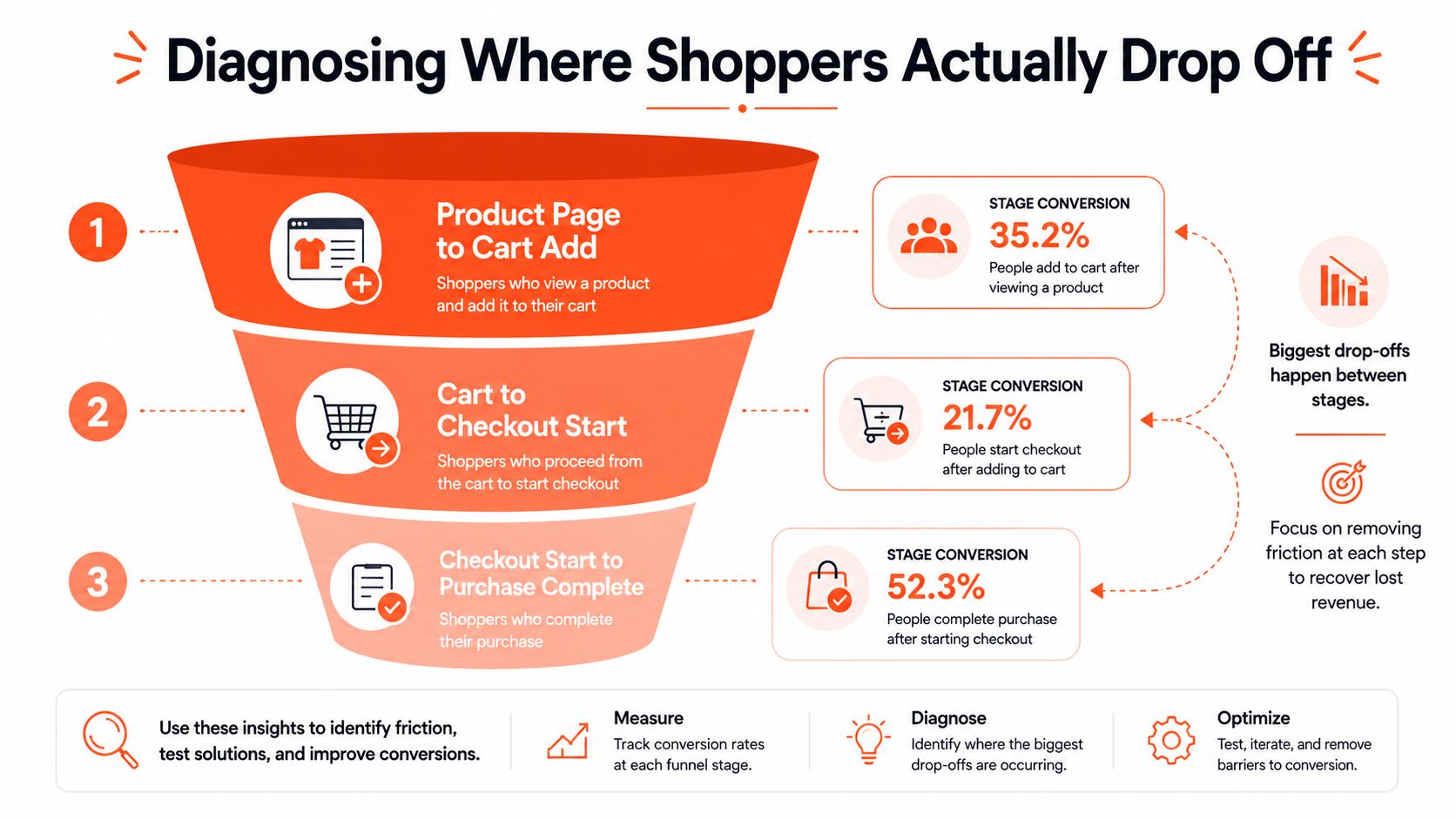
Shopify's native analytics gives you the core funnel events, while Google Analytics 4 can help you explore progression by landing page, campaign, device, and user journey. Shopify's checkout behavior reporting adds useful detail once a shopper has entered checkout. Don't rely on a single dashboard percentage. Export or compare the stages so you can see where the largest relative drop occurs.
Use stage-specific benchmarks carefully
Recent Shopify-focused benchmarks place cart-to-checkout-started abandonment around 65% to 72%, while checkout abandonment sits around 45% to 55%. Those ranges come from Shopify checkout abandonment benchmark analysis, and they're more useful than one blended number because they point toward different interventions.
If product pages generate plenty of cart additions but few checkout starts, inspect the cart first. Look for shipping estimates, delivery timing, discount application, variant clarity, inventory messaging, and whether the cart drawer distracts shoppers with unnecessary upsells.
If checkout starts look healthy but completed purchases lag, leave the cart alone for now. Inspect payment method visibility, wallet eligibility, address autofill, error states, form fields, loading behavior, and mobile completion. You may be optimizing the wrong page if you focus on cart copy while the payment step is causing significant loss.
Segment before you prioritize
Break each stage down by device type, traffic source, landing page, returning versus new shopper, and product category. A paid social audience may add products impulsively and abandon in the cart, while branded search visitors may reach checkout with stronger intent but fail at payment. Mobile shoppers can also encounter form and wallet problems that never appear on desktop.
Keep the reporting practical. Create a view that answers four questions:
Where does the drop happen?
Which device shows it most clearly?
Which acquisition source contributes the most affected sessions?
Which products or cart values appear most often at that stage?
For a broader approach to omnichannel growth conversion tactics, use the same diagnostic discipline across email, paid media, onsite experiences, and post-purchase channels. Your Shopify conversion rate optimization guide can also support the wider testing process, but don't let general conversion advice replace stage-level funnel analysis.
Checkout UX Fixes That Reduce Friction
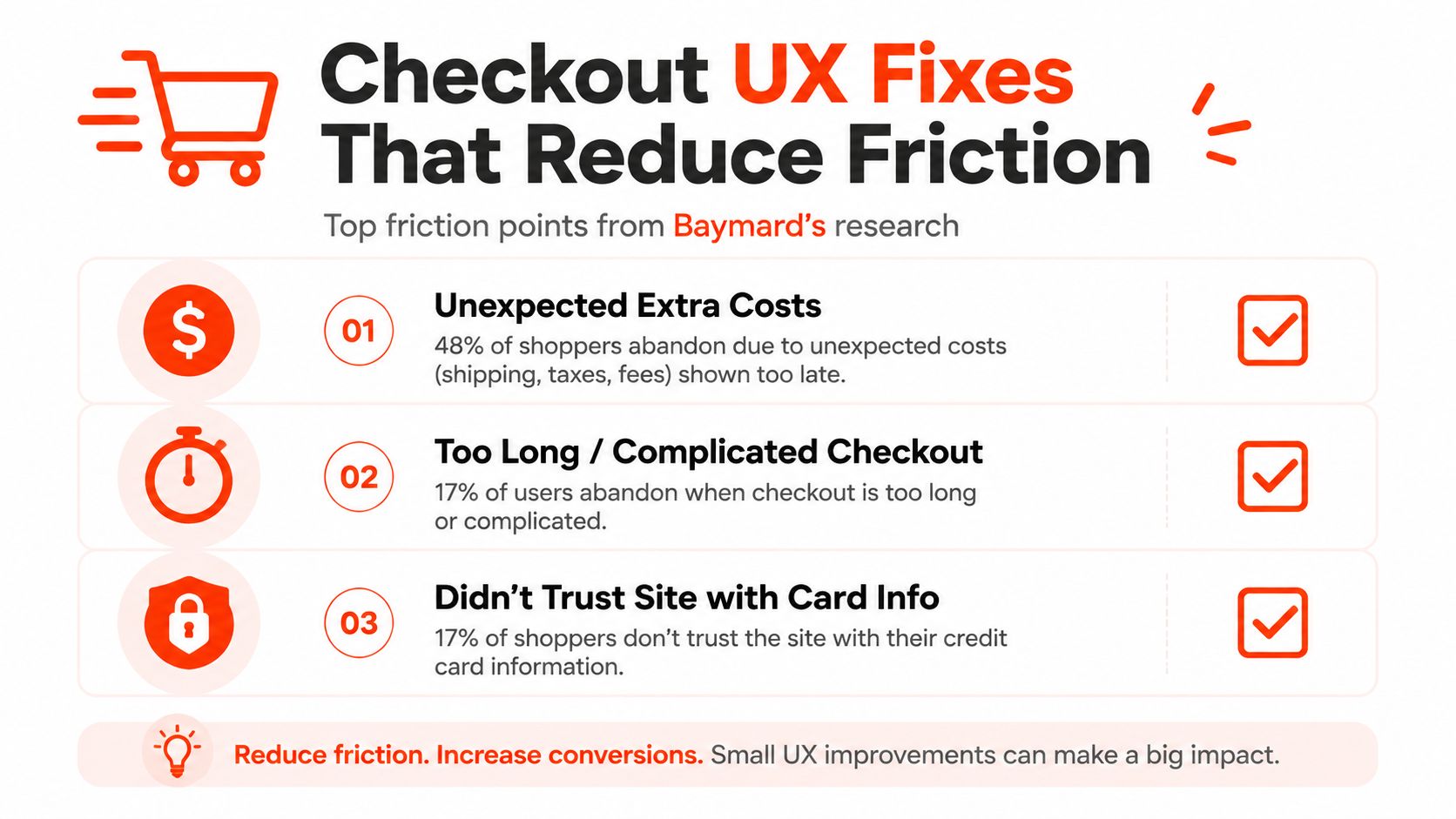
Baymard's research gives Shopify teams a clear starting point. 17% of US online shoppers said they had abandoned an order in the previous quarter because checkout was too long or complicated, according to Baymard's checkout usability research. Industry summaries of the same research also identify unexpected extra costs as a leading trigger, at roughly 48% of shoppers. Those findings point to concrete interface work, not vague “trust optimization.”
Fix cost surprise before adding incentives
Show the economics earlier. Product pages and cart drawers should communicate shipping rules, delivery expectations, taxes where applicable, and free-shipping thresholds before the shopper commits to checkout. If rates depend on destination, provide a reliable estimate in the cart rather than revealing the full cost at the final step.
Shopify merchants should also check that discount logic behaves predictably. A discount that disappears because of a minimum threshold, product exclusion, subscription rule, or bundle interaction creates a trust problem. Use Shopify Functions where custom discount logic is necessary, and display the result clearly in the cart and checkout.
Remove effort that doesn't protect the order
Enable guest checkout unless there's a genuine operational reason to require an account. Keep only the fields needed for fulfillment, tax, payment, fraud prevention, or legal requirements. Make sure address autocomplete and browser autofill work correctly, and test error recovery on actual mobile devices rather than assuming a responsive layout is enough.
Shop Pay and accelerated wallets can reduce typing and help returning shoppers move through payment more quickly. They won't solve weak product information or an unclear shipping policy, but they can remove effort after the shopper has already decided to buy.
Make the payment moment credible
Trust signals should answer active concerns instead of decorating the page. Use clear returns information, recognizable payment options, customer reviews where relevant, and restrained security language near the decision point. Guest checkout, visible wallet buttons, and a clear order summary usually do more than a crowded collection of generic badges.
For merchants planning checkout changes, Shopify checkout extensibility explains the implementation context. Test every change against real payment methods, discount combinations, shipping destinations, and mobile browsers. A checkout that works for the default card path can still fail for the customers you most need to retain.
Recovery Tactics Beyond Blanket Discounts
Discounting is easy to deploy and costly to repeat. It may recover a price-sensitive shopper, yet it can also teach customers to wait, cut margin from orders that would have converted anyway, and conceal the underlying reason someone left. Treat cart abandonment and checkout abandonment as separate problems. Cart recovery addresses uncertainty, intent, and consideration. Checkout recovery should focus on payment and completion friction.
Choose the intervention using cart value, intent stage, device, customer history, and likely objection. A shopper who left after checking delivery details may need clearer shipping information. A returning customer with a high-value cart may respond to convenience or a saved cart. A first-time mobile visitor may need a shorter path rather than a coupon.
Recent Shopify-store research reports average conversion of 6.88% for AI-powered popups versus 2.12% for exit-intent alone. Segmented campaigns reached 3.80% compared with 2.12% for generic campaigns, and 79% of recovered orders came from mobile visitors, according to the WisePops cart popup study. Those results support mobile-specific messaging, but they do not make popups a substitute for fixing checkout failures.
Match the tactic to the problem
Tactic | Avg Conversion Rate | Best For | Complexity |
|---|---|---|---|
AI-powered popup | 6.88% | Contextual onsite intervention | Medium |
Segmented popup campaign | 3.80% | Audience or intent-specific messaging | Medium |
Generic exit-intent popup | 2.12% | Basic capture before a visitor leaves | Low |
Abandoned-cart email | Varies by sequence | Known shoppers who provided contact details | Low to medium |
Retargeting audience | Not specified | Re-engaging visitors across paid channels | Medium |
Use cart-drawer messaging for immediate clarification, popups when exit behavior signals hesitation, email when the shopper has provided a reachable identity, and retargeting when the product requires more consideration. The benchmark figures above apply to popup campaigns. Email performance should be assessed separately because identification, consent, timing, and sequence quality affect results.
Test a non-discount reminder against a targeted incentive. Segment by device, customer status, cart value, and the last meaningful action, then measure recovered contribution margin, not recovered order count alone. A coupon can win the conversion while losing the economics.
Building an Abandoned Cart Email Flow
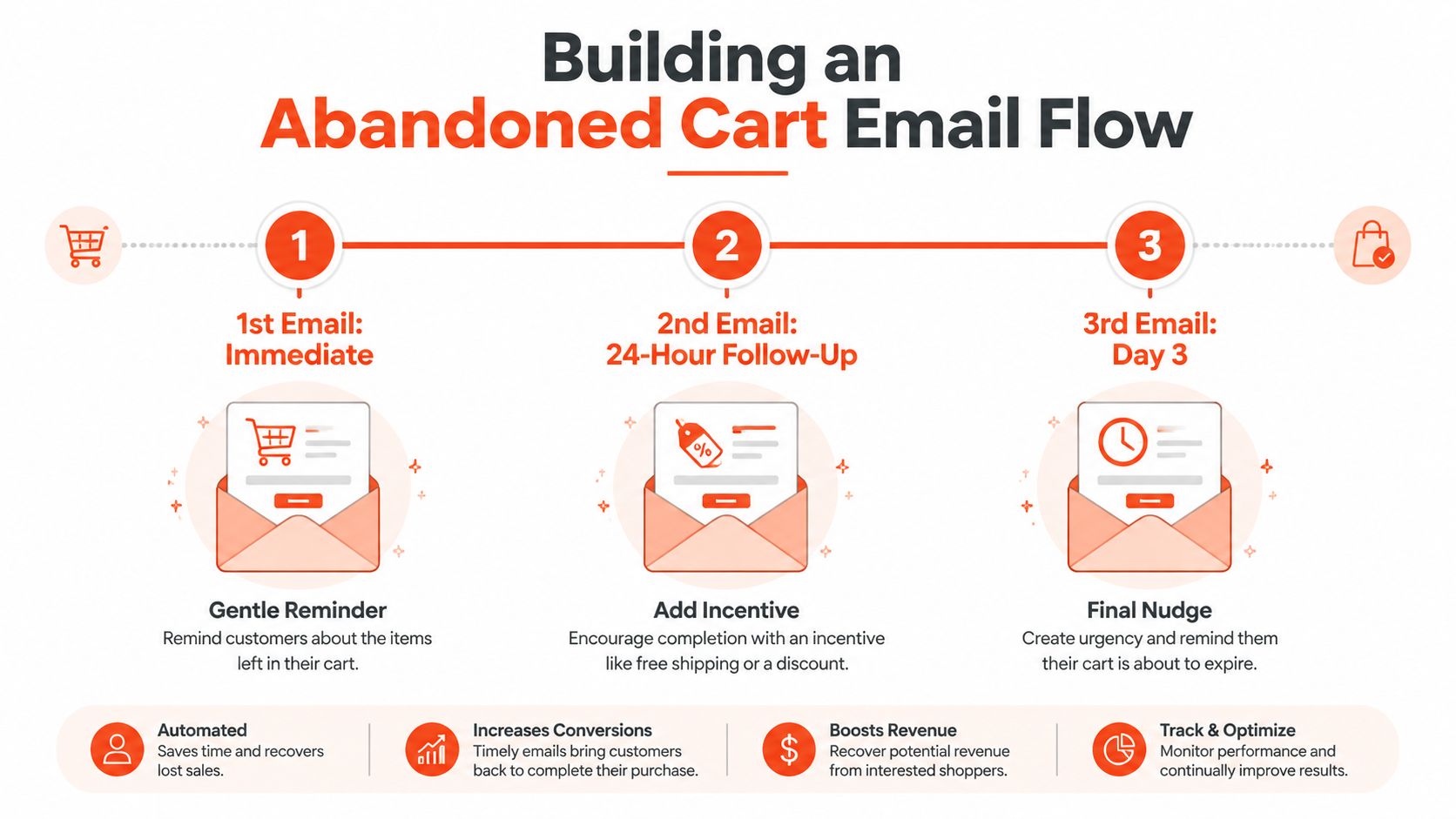
Email recovery works best as a timed, segmented system, not as a pile of reminders. One independent benchmark reports an average recovery rate of 6.1% across cart recovery sequences, with the first email recovering 2.3%, the second 2.1%, and the third 1.7%. Top performers reached 18.4% overall, including 8.1% from the first email, according to the abandoned-cart email benchmark analysis.
Build the sequence around intent
The benchmark's stronger timing pattern is an immediate first message, followed by a 24-hour follow-up and a 72-hour final touch. The first email should make returning easy. Include the product image, variant, quantity, price, and a direct link back to the cart or checkout. Don't lead with a discount if the shopper may have abandoned because of uncertainty.
The second message can answer the most likely objection. Add delivery information, returns guidance, reviews, product education, or a concise explanation of what makes the item suitable. For high-value products, reassurance often protects more margin than an automatic coupon.
The final email should create a clear stopping point. Keep it direct, show the cart contents again, and use an incentive only when the segment and margin support it.
Segment the flow before you personalize the copy
At minimum, separate new and returning customers, mobile and desktop sessions, high- and low-value carts, and product categories with different buying cycles. Exclude customers who purchased, cleared the cart, or received a relevant promotion through another channel.
Shopify's native abandoned checkout email can handle a simple flow. Move to Klaviyo or Omnisend when you need richer branching, product-category logic, customer history, SMS coordination, or suppression rules. More sends won't compensate for poor timing or generic content.
A useful testing plan covers subject line, delay, message angle, incentive threshold, and landing destination. Judge tests by completed orders and margin, not opens alone. The benchmark evidence points toward timing and segmentation as the meaningful differentiators, so optimize those before increasing send volume.
The sequence is easier to understand when you map it visually. This short walkthrough shows the basic recovery-flow mechanics before you add branching logic.
Shopify Tools and Apps for Cart Recovery
Tools should follow the diagnosis. Adding a popup app to a checkout problem creates more scripts without addressing payment friction. Adding an advanced email platform to an unidentified cart problem gives you more automation, but not necessarily a better customer journey.
Start with the native Shopify foundation. Shopify analytics and checkout reporting help identify the stage of loss. Shopify's abandoned checkout functionality supports basic reminders. Shop Pay and accelerated wallets address payment effort. Your theme, cart drawer, shipping presentation, and checkout settings influence whether shoppers reach the recovery stage at all.

Choose tools by funnel stage
Cart-stage tools should improve clarity, not interrupt every session. Shipping estimators, cart messaging, product recommendations, and targeted popups can help when shoppers hesitate before checkout.
Checkout-stage tools should reduce effort. Shop Pay, Apple Pay, Google Pay, clear payment availability, and careful checkout customization belong here. Shopify Plus merchants can use Shopify Functions for discounts, bundles, and order rules when native settings don't express the required logic cleanly.
Recovery-stage tools should manage identity and timing. Klaviyo, Omnisend, Shopify Email, SMS platforms, and retargeting integrations each make sense when their audience and consent data are reliable.
Presidio's Function Junction is one option for creating Shopify Functions for discounts, bundles, and order rules. Treat it as an implementation choice within a broader stack, not as a replacement for diagnosing the funnel.
Avoid app sprawl
Every app adds maintenance, script weight, data overlap, styling conflicts, or another place for checkout logic to fail. Audit whether each tool has a distinct job, whether its events are trustworthy, and whether its incremental revenue justifies its operational cost.
A lean stack usually has clearer ownership. One system should control email eligibility, one should own popup logic, and one should remain the source of truth for orders and revenue. Remove abandoned experiments, duplicate tracking, and apps that no longer match the store's funnel problem.
Your Cart Abandonment Testing Roadmap
A testing roadmap should begin with the largest diagnosed leak and the lowest-risk fix. Don't launch five unrelated changes and then claim success when the blended abandonment number moves. Isolate the stage, write the hypothesis, and define the primary conversion event before implementation.
Phase one targets configuration
Start with changes that don't require major development:
Cost clarity: Surface shipping rules and delivery expectations in the product and cart experience.
Checkout access: Confirm guest checkout and accelerated payment methods are available where appropriate.
Recovery hygiene: Check that purchased customers are suppressed and that abandoned checkout links work on mobile.
Measurement: Validate product-view, add-to-cart, checkout-start, payment, and purchase events across devices.
Run a clean baseline first. Your success criterion should be a statistically credible improvement in the affected stage without a deterioration in margin, refund behavior, or customer support volume.
Phase two improves experience and messaging
If cart-to-checkout progression is weak, test cart layout, shipping presentation, discount visibility, and relevant reassurance. If checkout completion is weak, test form simplification, wallet prominence, error handling, and mobile performance.
For recovery, test the immediate, 24-hour, and 72-hour sequence against your current flow. Segment by device, cart value, product group, and customer history before testing offers. Use Shopify A/B testing guidance to keep the experiment design tied to a clear hypothesis rather than a cosmetic preference.
Phase three supports deeper optimization
Longer-term work may include checkout extensibility, custom discount logic, personalization, improved product discovery, and server-side or analytics instrumentation. Prioritize these projects only after the basic funnel is stable and the source of loss is known.
Review the funnel on a regular operating cadence. Record the test, audience, implementation date, primary metric, margin effect, and decision. Cart abandonment won't disappear, but your team can steadily reduce avoidable friction by treating it as an ongoing product and engineering problem.
Presidio provides Shopify and Shopify Plus development, UX and CRO audits, performance tuning, checkout extensibility, custom apps, and ongoing optimization for brands working through funnel friction. Visit Presidio to discuss a stage-specific cart and checkout audit, then turn the findings into a prioritized testing roadmap.

Jamie, Presidio’s Designer, leads the practice alongside Johnnie. With over 10 years of e-commerce experience, Jay is a Shopify expert, known for crafting innovative solutions that prevent tech debt.
Jaime
Senior Product Designer, 2020



