Outrank AI

You hired a developer to fix checkout. You sent a Figma file with a reordered payment step, a quiz before shipping, and a custom script for upsells. The reply came back short. Shopify doesn't allow most of that anymore, and it isn't a developer skill issue.
Table of Contents
The Real Question Behind Custom Shopify Checkout
A DTC founder relaunches a store, loves the new product pages, then opens checkout. The logo is wrong, the gift message field is missing, and the bundle discount that worked in a theme mockup has nowhere to go. The team asks for a custom Shopify checkout the way they'd ask for a custom landing page. That's the wrong mental model, and it's where most checkout projects waste their first month.
Checkout isn't a theme surface you own. It's a platform controlled flow with approved slots for your branding, fields, rules, and tracking. You can't reorder core steps, inject unrestricted JavaScript, or redesign the payment form because you prefer a different layout. If your request needs any of that, it isn't a checkout build. It's either a cart redesign, a storefront change, or a request Shopify will reject no matter who builds it.
Reframe the Request Before You Scope It
Start by sorting every requirement into three buckets.
Trust and compliance needs: Legal notices, delivery warnings, required fields, and payment reassurance belong in checkout because buyers need them to finish.
Commerce rules: Discount eligibility, shipping restrictions, minimums, and payment method filtering belong in server side logic, not in visible components.
Merchandising ideas: Recommendations, quizzes, education, and most upsells belong earlier, usually on the product page or in the cart.
That sorting exercise sounds simple. It changes everything. Teams stop asking, "Can we build this component?" and start asking, "Where does this decision help the buyer?" That's the right question, because checkout is where buyers are least patient and most likely to abandon over friction you added on purpose.
If a feature helps someone choose a product, put it where they choose products. Don't move the decision to the moment they're trying to pay.
My recommendation is blunt. Treat custom Shopify checkout as a constraint problem first. List what Shopify locks, what your plan permits, and what business outcome each change must produce. Only then pick tools. If you can't name the outcome in one sentence, for example fewer invalid orders, cleaner discount rules, or accurate conversion tracking, cut the feature. A shorter checkout that converts beats a clever checkout that demonstrates technical range.
How Shopify Checkout Is Built Now
Think of checkout as a building Shopify operates. The public floors are open to buyers but locked to merchants. You don't move the stairs or rebuild the elevator. You use the service entrances Shopify provides, and those entrances determine what a custom Shopify checkout can become.
The diagram below maps those locked floors, controlled entrances, and the shared foundation underneath.
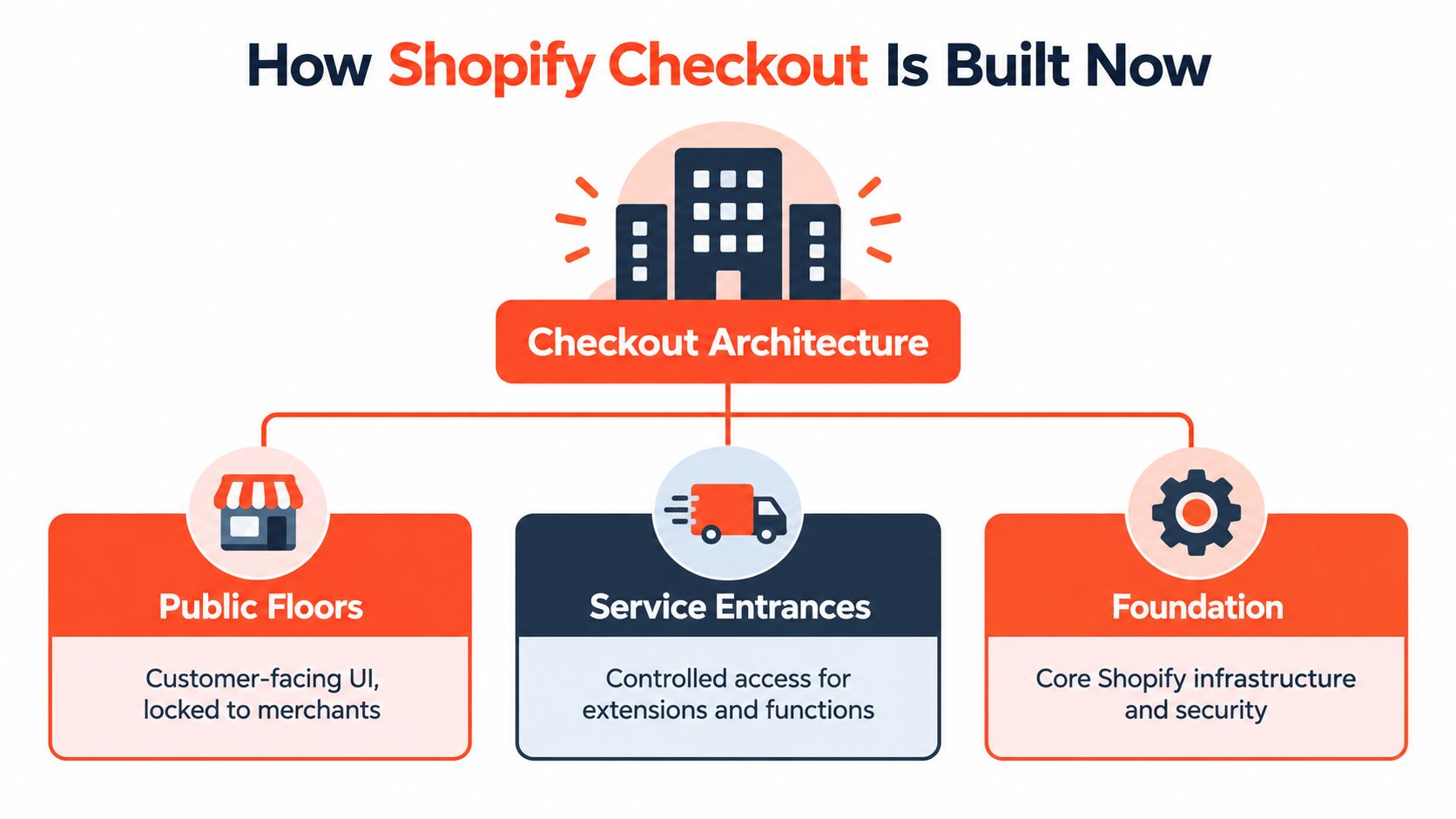
Shopify formalized this model when it introduced Checkout Extensibility for Shopify Plus merchants on January 30, 2023, replacing direct checkout code modification with an app based system designed to be upgrade safe and integrated with Shop Pay, as documented in Shopify's announcement that Checkout Extensibility became available to all Plus stores. During 2023, Shopify expanded it further, launching the new one page checkout for upgraded merchants by September 25, 2023 and adding extensibility to the Thank You and Order Status pages for Plus by November 2023.
The Four Layers You Actually Touch
Checkout UI Extensions: These add approved, component level interface elements inside checkout, such as fields, messages, and blocks placed in supported positions.
Shopify Functions: These run server side logic for discounts, cart validation, delivery customization, and payment method filtering. Buyers never see a Function. They feel its result.
Web Pixels: These handle measurement inside a sandbox. They listen for standardized events instead of reading the page like an old script tag could.
Branding and configuration: Logos, colors, fonts, layout choices, and Shop Pay alignment live here. Most brands should start here.
The separation matters. Presentation stays isolated from pricing and eligibility rules, so a design tweak doesn't break a discount. That's a better architecture than editing one template file where a headline change and a tax rule shared the same blast radius.
It also explains the limits. Checkout code runs for every merchant on shared infrastructure, handles payments, and must keep working when Shopify ships improvements. Sandboxed extension points give Shopify a way to upgrade the building without breaking your store. Don't fight that design. Build inside it, and you'll spend your budget on outcomes instead of maintenance.
Shopify Core vs Shopify Plus for Checkout
Plan choice decides where your extensions can appear. It doesn't decide whether checkout becomes fully custom, because on no plan does it. If you're evaluating an upgrade, read this comparison of Shopify Advanced and Shopify Plus and tie the decision to one named checkout capability, not a vague hope for flexibility.
On core plans, you can brand checkout, configure the layout Shopify offers, customize the cart heavily, and use supported options on post purchase surfaces. That's enough for many stores. If your real problem is weak product discovery or a cluttered cart, Plus won't fix it. You'll pay for checkout access you don't use while the actual leak stays upstream.
Plus unlocks the serious custom Shopify checkout surfaces. Checkout UI Extensions for the information, shipping, and payment steps are available only to Shopify Plus stores. That gating is the line that matters. It determines whether custom fields, banners, and other approved components can sit inside the main flow or must live before or after it.
Checkout Capability by Shopify Plan
Capability | Shopify Core | Shopify Plus |
|---|---|---|
Branding and layout configuration | Available within Shopify controls | Available, with broader Plus options |
UI Extensions on information, shipping, and payment steps | Not available | Available |
Cart customization | Extensive through the theme | Extensive through the theme |
Thank You and Order Status extensibility | Available on supported surfaces | Available on supported surfaces |
Arbitrary payment form redesign | Not available | Not available |
Reordering core checkout steps | Not available | Not available |
Unrestricted JavaScript in checkout | Not available | Not available |
Read the last three rows twice. Plus does not provide a blank canvas. It grants more approved slots and more custom logic, while Shopify still controls the payment step, the sequence, and the security boundary. Any agency that implies otherwise is selling you a future dispute.
Ask one question before upgrading. Which specific rule or field must appear on the information, shipping, or payment step, and what revenue or operational cost justifies it? If nobody can answer, stay on core, fix the cart, and revisit Plus when a real requirement appears.
Choosing Between Extensions, Functions, Apps, and Custom Code
Teams often pick tools by familiarity. A marketer finds an app, a developer proposes a custom build, and nobody asks which layer should own the behavior. Pick by job instead. The chart below compares the four routes you're choosing between.
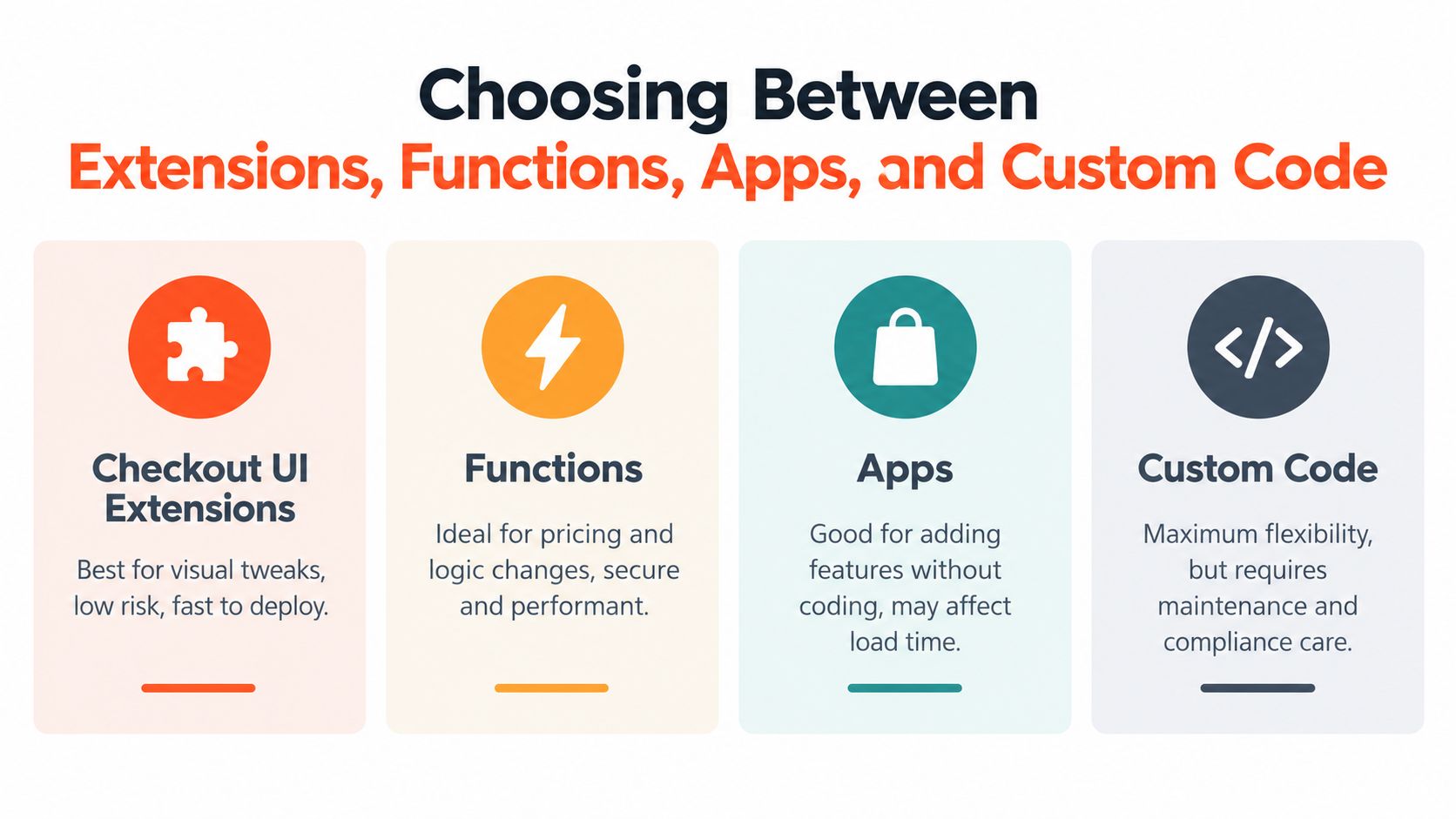
The core distinction is clean. Checkout UI Extensions provide app based, component level interface changes, while Shopify Functions execute server side commerce logic such as discount calculation, cart validation, delivery customization, and payment method filtering, keeping presentation isolated from pricing and eligibility rules, as explained in this overview of Shopify Plus checkout customization options. If a requirement changes what buyers see, think extension. If it changes what buyers are allowed to do or pay, think Function.
A Practical Order of Preference
Start with configuration and Functions. Branding settings solve more requests than teams expect, and Functions handle deterministic rules without adding visible weight. A minimum order rule, a hidden delivery option for restricted products, or a payment method filtered by cart conditions should never start life as a UI project.
Add UI Extensions only when the buyer must see or enter something inside checkout. Delivery instructions, a required acknowledgement, or a trust message tied to the order can justify a component. Decorative blocks rarely do. Every added component competes for attention on the smallest screen your customers use.
Use apps when a vendor already solved the exact problem and you'll accept that vendor's roadmap, data handling, and support pace. Apps are fast. They're also dependencies. Before installing one, check what surface it uses, what happens if it fails to load, and whether uninstalling it leaves your rules intact. Presidio's Function Junction, for example, exists for creating Shopify Functions around discounts, bundles, and order rules, which fits the logic layer rather than adding storefront decoration.
Treat custom code and headless storefronts as the last resort. A headless frontend gives you freedom on product and cart pages, but buyers still return to Shopify checkout to pay. You buy storefront flexibility and ongoing maintenance. You don't buy control over the payment form.
Decision rule: Configuration first, Functions for rules, extensions for necessary interface, apps for solved problems, custom builds only when the first four cannot express the requirement.
Write that order into your brief. It stops scope creep, reduces app sprawl, and makes vendors justify heavier options. For a custom Shopify checkout, restraint isn't a lack of ambition. It's how you keep the build upgrade safe and supportable after launch week ends.
When to Keep Personalization Out of Checkout
Here's my unpopular advice. Don't personalize checkout just because you can. Checkout is the highest friction stage of the funnel, and buyers there have already decided. Your job is to remove doubt, not introduce new choices dressed up as relevance.
The comparison below makes the trade off visual, minimal checkout against overloaded checkout.

Mobile is where weak decisions get punished. Shopify reported conversion of about 3.0% on mobile versus 4.4% on desktop from April 2023 to April 2024, according to Shopify's Checkout UI Extensions documentation. That's the margin you're playing with when you stack banners, recommendation blocks, and extra fields onto a phone screen. Desktop may forgive clutter. Mobile usually won't.
The Technical Ceiling Is Real
Compiled checkout UI extensions are limited to 64 KB, and extensions are subject to rate limits after which they can't make further changes during a buyer's session. Those limits aren't trivia for developers. They mean a heavy personalized component can stop behaving as designed mid session, right when consistency matters most. A feature that renders for one buyer and stalls for another isn't personalization. It's unreliable checkout.
Use this placement test for every proposed addition.
Keep in checkout: Information required to complete, validate, deliver, or legally sell the order.
Move to cart: Bundles, add ons, gift options, and recommendations the buyer can consider before committing.
Move to product pages: Quizzes, education, shade finders, sizing help, and anything that shapes the initial choice.
Move to post purchase: Surveys, referrals, loyalty prompts, and next order incentives that don't block payment.
Notice what survives. Trust, compliance, delivery clarity, and payment confidence. Those elements support a decision the buyer already made. Merchandising asks them to make another one, under time pressure, often while entering payment details on a phone.
Redirect the personalization budget upstream. Improve product page recommendations, build a smarter cart drawer, and use post purchase surfaces for offers that can't hurt the completed sale. The best custom Shopify checkout for many brands is smaller and faster than the one they requested. If an agency won't tell you that, ask whether they're optimizing your conversion or their project scope.
Migrating Off Legacy Checkout Customizations
If your store still carries legacy checkout logic, treat the move as a migration, not a settings change. Shopify states that checkout.liquid is unsupported for the information, shipping, and payment steps, while checkout.liquid and additional scripts for the Thank You and Order Status pages were sunset for Shopify Plus stores on August 28, 2025, per Shopify's documentation for building checkout customizations. The risk isn't that a file disappears. The risk is that behavior hidden inside that file disappears with it.
The checklist below sequences the audit, rebuild, and launch work in the order I'd run it.

Legacy setups often bundled unrelated jobs together. One template might hold a shipping warning, a discount workaround, three tracking snippets, a survey, and a market specific tax message. The modern architecture splits those jobs across UI Extensions, Functions, Web Pixels, and configuration. Nobody can validate that split from memory. You need an inventory.
Run a Migration Readiness Audit
Inventory every behavior: List each rule, script, field, banner, pixel, and post purchase experience, with the business owner who still needs it.
Map each item to a replacement: Assign it to a UI Extension, a Function, a Web Pixel, a configuration setting, an app, or retirement.
Compare analytics event by event: Confirm each required checkout event fires with the expected payload before and after the switch.
Regression test money paths: Test discounts, bundles, shipping options, tax display, payment methods, and validation errors with real order scenarios.
Name rollback ownership: Decide who can pause, revert, or hotfix, and what evidence triggers that call.
If your legacy setup also relied on Shopify Scripts, work through this guide to moving Shopify Scripts logic to Functions alongside the checkout audit, because those rules need separate replacements. Don't assume an app vendor already handled yours. Ask for proof in a test order.
International stores need extra care. Market specific consent requirements, translations, delivery rules, and tax presentation can vary inside one checkout. Test each active market, not just your home market on a desktop browser. Accessibility belongs in the same pass, since replacement components must work with keyboards, focus order, and error messaging intact.
Don't schedule this during your biggest campaign week. Migrate when your team can compare orders, analytics, and support tickets calmly. A custom Shopify checkout migration succeeds when nothing important changes without notice. Boring launch, complete parity, no mystery gaps in reporting. That's the standard.
Compliance, Performance, and the Measurement Reality
Measurement is where confident checkout plans meet the sandbox. The dashboard view below looks complete, but behind it, every event depends on what Shopify's pixel system is allowed to see.

Pixels can load across storefront, checkout, Thank You, and Order Status surfaces, but they run in a sandbox that can't render forms, banners, buttons, or modals. Tracking that scrapes checkout forms for email addresses or phone numbers may fail. If your attribution stack depends on reading fields from the page, rebuild it around standardized events and explicit data contracts. Our guide to Shopify checkout optimization covers how that measurement discipline supports broader conversion work.
Performance Is a Compliance Issue Too
Shopify warns that adding more scripts can slow store execution, while malformed or runaway scripts can keep executing indefinitely and cause slow loading or failure, which is why measurement should rely on standardized checkout events rather than DOM scraping, as noted in Shopify's overview of pixels and script behavior. Audit each pixel for payload size, execution time, duplicate firing, and failure behavior. A tag that fails loudly in testing is annoying. A tag that fails in production corrupts decisions for months.
The video below walks through checkout customization concepts that help frame where measurement ends and interface work begins.
Test the paths buyers take. Accelerated checkout, mobile devices, consent declined and accepted, retries after errors, and post purchase transitions can all behave differently. PCI boundaries and accessibility requirements aren't optional layers on top of a custom Shopify checkout. They're reasons the sandbox exists. Less third party code isn't a sacrifice. It's fewer vendors touching your most sensitive surface, and fewer surprises after every app release.
A Decision Framework and What to Do Next
Stop asking for a fully custom checkout. Ask which outcome you're buying, then choose the smallest tool that delivers it. This mapping covers the requests I see most often.
Business Goal | Recommended Approach |
|---|---|
On brand look and trust content | Branding configuration first, UI Extensions only for required messages |
Bundle discounts or tiered shipping | Shopify Functions for deterministic server side rules |
Block invalid or unwanted orders | Functions for validation, extensions for clear buyer facing errors |
Product recommendations | Product page or cart, not the payment flow |
Post purchase surveys or referrals | Thank You and Order Status surfaces after payment completes |
Accurate checkout measurement | Web Pixels built on standardized events, audited after releases |
What to Do This Week
First, confirm checkout is your problem. Compare where buyers drop against what you're proposing to build, and move merchandising requests upstream without apology. Second, if legacy scripts or template edits exist, run the readiness audit before designing anything new. New components built on an unknown baseline just give you two migrations to debug.
Third, choose the smallest combination that solves the named goal. For most Plus brands, that's clean branding, a few Functions for real commerce rules, one or two necessary extensions, and disciplined pixels. That's a custom Shopify checkout worth owning. It won't win a design award for novelty. It will keep converting when Shopify ships its next upgrade, your app vendor releases an update, and your team changes a shipping rule at short notice. Build for that Tuesday, not for the launch screenshot.
If your checkout roadmap needs a constraint first audit, a migration off legacy scripts, or hands on work with Checkout UI Extensions and Shopify Functions, talk to Presidio about scoping the smallest build that solves your actual problem. Bring your current checkout rules, tracking requirements, and the outcome you need, and we'll help you separate the essential work from the expensive distractions.

Jamie, Presidio’s Designer, leads the practice alongside Johnnie. With over 10 years of e-commerce experience, Jay is a Shopify expert, known for crafting innovative solutions that prevent tech debt.
Jaime
Senior Product Designer, 2020



