Presidio

You've got approved designs, a Shopify store, and a growing list of requests: flexible product pages, promotional banners, app integrations, and content the marketing team can change without a developer. The obvious next step is to start writing Liquid. The harder question is what happens when someone rearranges those sections, installs an app, or inherits the codebase.
Learning how to create a Shopify theme means designing for those changes, not just reproducing a mockup. A production theme needs clear component boundaries, useful merchant controls, and release checks that protect performance and accessibility long after launch.
Table of Contents
What a Shopify Theme Actually Is in 2026
Open a theme directory and start by identifying ownership. Shopify's theme architecture separates page composition, reusable presentation, assets, and configuration, rather than putting everything into a monolithic page file. The Shopify template architecture documentation establishes that separation.
A useful working map looks like this:
layout/contains page shells, includingtheme.liquid, where you organize document-level markup and shared page framing.templates/contains page-type definitions, such asproduct.jsonandcollection.json.sections/contains configurable storefront modules and section-group definitions.blocks/contains reusable theme blocks when the implementation uses that architecture.snippets/contains smaller Liquid fragments, such as product-card markup.assets/holds stylesheets, JavaScript, images, and other supporting files.config/holds theme-wide settings definitions and saved configuration.locales/keeps translation content separate from presentation markup.
Use the directory structure as an ownership map, not just a filing convention.

Follow a product page through the theme
Conceptually, the product page sits inside the global layout. Its JSON template identifies the sections to render, while the relevant Liquid sections generate the storefront HTML. A product section might render a shared snippet for a card or icon, with styling and interaction behavior supplied by assets.
That distinction matters during debugging. If the document shell is wrong, inspect the layout. If the wrong modules appear, inspect the template configuration. If product information renders incorrectly, inspect the section and its supporting snippets.
Give each concern a clear home
Keep global decisions global and component decisions local. A site-wide typography setting belongs in theme configuration; a promotional banner's text belongs with that banner. Don't hide unrelated business rules inside a shared product-card snippet just because the snippet already receives product data.
Editorial pages deserve the same discipline. Rankira's Shopify blog optimization ideas can serve as a planning resource when deciding what a blog template needs, while implementation ownership should remain explicit in the theme.
Practical rule: A developer should be able to identify a component's markup, settings, styles, and behavior without searching unrelated templates.
Start with that standard. It makes subsequent design changes easier to scope and review.
How JSON Templates and Sections Replaced Static Pages
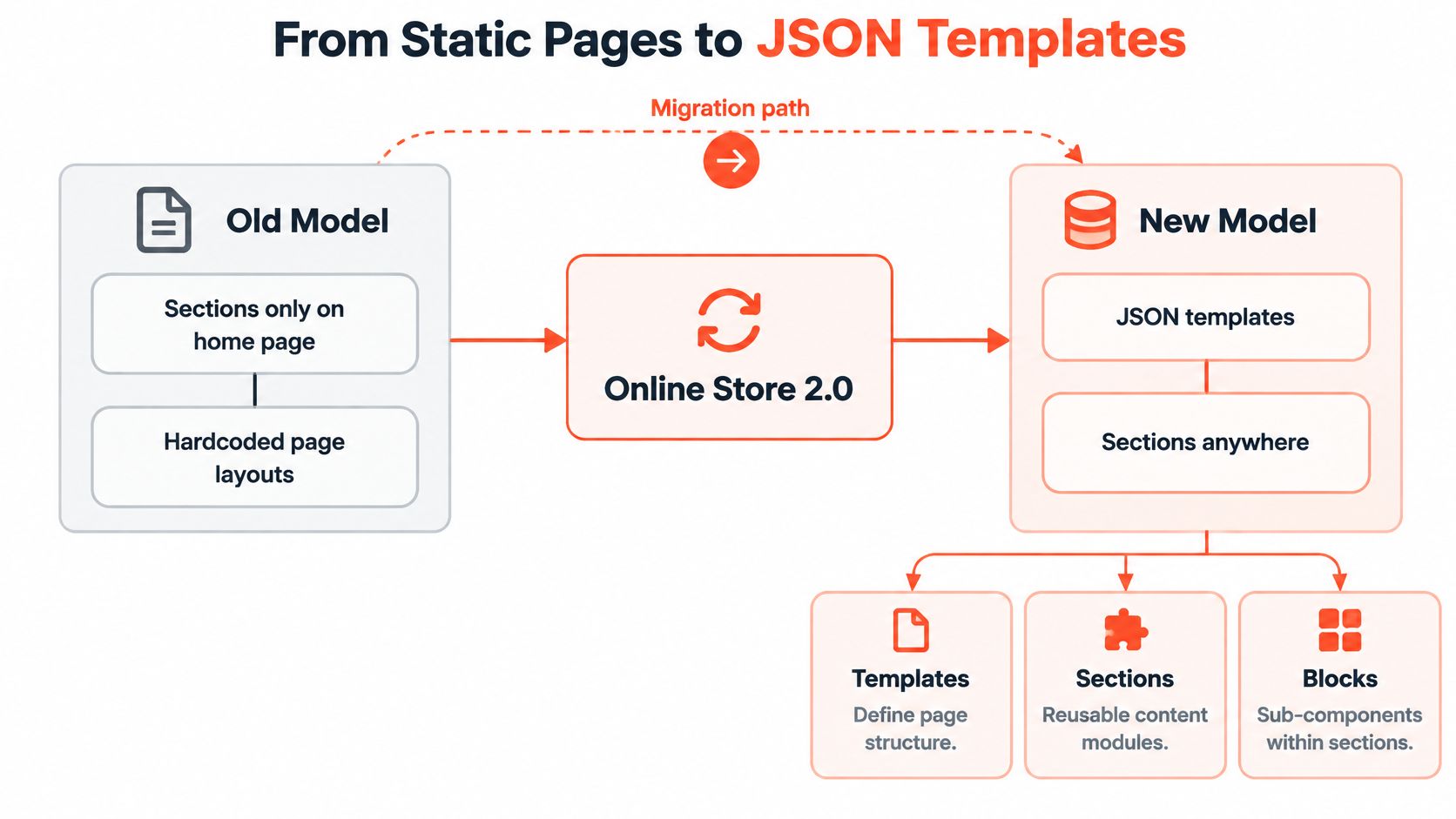
A product page shouldn't require a bespoke Liquid file every time marketing wants a different content arrangement. JSON templates separate page composition from presentation, so developers can maintain reusable modules while merchants control approved arrangements.
Shopify's Online Store 2.0 release on June 29, 2021 extended section-based customization beyond its earlier home-page focus to product, collection, and other page types. The resulting architecture uses JSON templates to store section instances, their configuration, and their order, as described in Shopify's JSON template documentation.
Separate composition from rendering
A Liquid template can contain rendering logic and markup. A JSON template instead describes which sections should appear and how they're configured. The Liquid sections do the rendering.
For example, a product composition might contain product information, supporting editorial content, recommendations, and a promotional module. The merchant can rearrange the permitted modules without editing their HTML.
The implementation boundary is important:
Templates own composition. They describe the page's section instances and ordering.
Sections own configurable modules. They translate settings and store data into rendered content.
Blocks own repeatable content within modules. Use them when merchants need to add, remove, or reorder related items.
This isn't a reason to make every heading or paragraph an independent section. Excessive fragmentation leaves merchants assembling basic layouts from disconnected parts.
Design within the limits
Shopify permits up to 25 sections per JSON template, 50 blocks per section, and 1,000 JSON templates per theme, according to the JSON template documentation linked above. Treat these as platform boundaries, not recommended targets.
Create alternate templates when the page structure differs. Don't create another template merely because a product needs different text or imagery. My recommendation is to keep a short inventory explaining each template's purpose, intended users, and owner.
Decision | Prefer this approach |
|---|---|
Different content, same layout | Reuse the composition and change its content inputs |
Meaningfully different page structure | Create a clearly named alternate template |
Repeated markup across modules | Extract an appropriate shared rendering fragment |
Independent merchant-controlled content | Consider a section or block |
The trade-off is freedom versus predictability. Merchants need meaningful controls, but developers still need to define supported combinations. A theme with unlimited-looking choices and unclear outcomes isn't flexible in practice; it's difficult to operate.
Setting Up Local Development with Shopify CLI
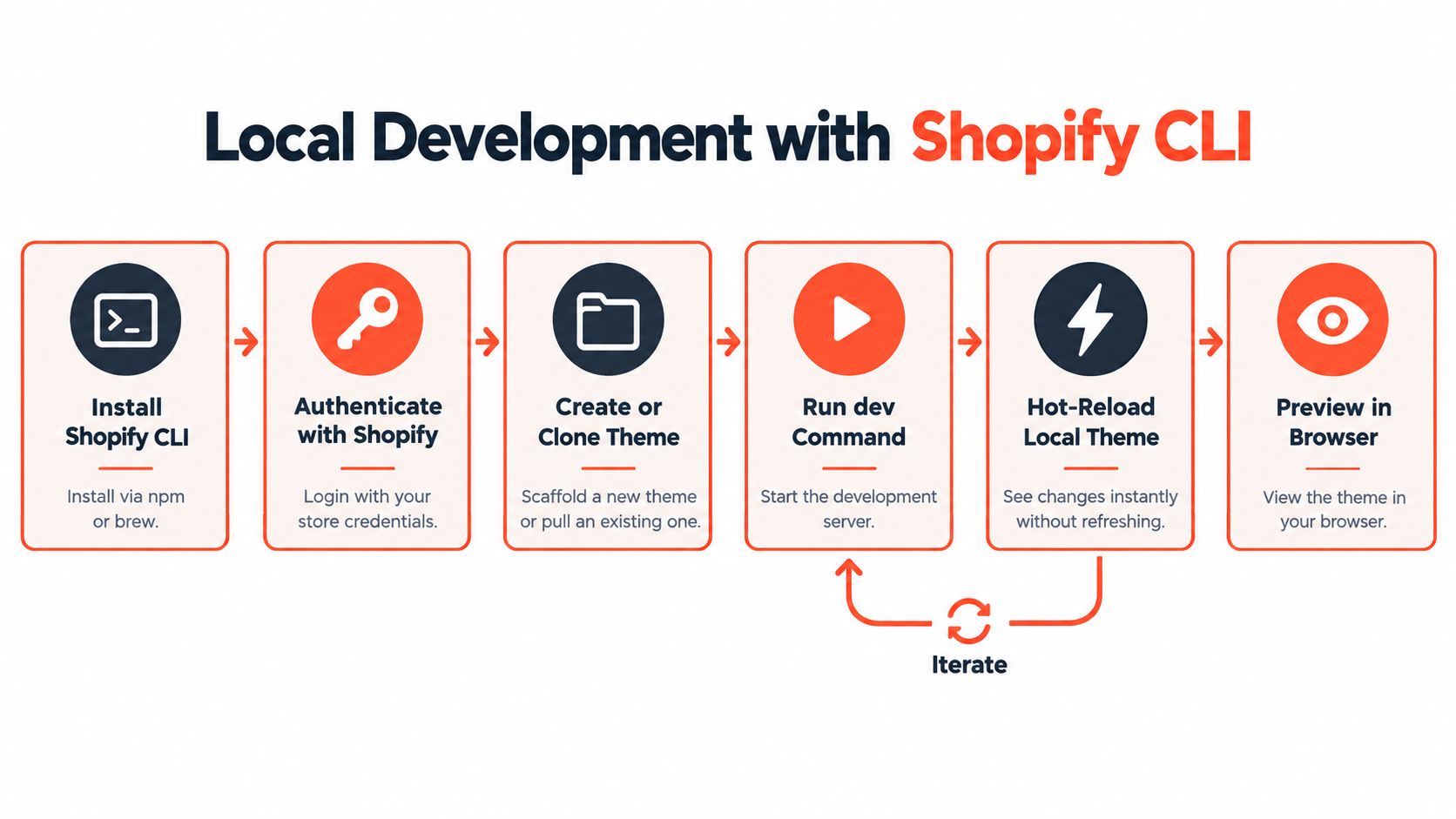
Set up the development loop before changing storefront behavior. You want a repeatable way to edit files, preview changes against store data, and catch structural problems without touching the published theme.
Use Shopify CLI with a compatible Node environment, an account authorized for the target store, and a repository under version control. Check the installed CLI's help output before copying older commands. In particular, use shopify theme dev for the development preview workflow rather than relying on older tutorials built around shopify theme serve.
The local loop should remain separate from deployment.
Choose a foundation you can maintain
Choosing a starting point for a new theme
Starting point | Best for | Trade-off |
|---|---|---|
Dawn | Learning established theme patterns and adapting a general storefront foundation | Existing interactions and styling need deliberate review |
Custom starter | Teams with documented component standards and release conventions | Your team owns the foundation's maintenance |
Private repository | Extending an established implementation | Inherited dependencies and assumptions need an audit |
Starting from nothing is not cleaner. You may replace understood code with new code that has not yet encountered production edge cases.
Establish a dependable edit and preview loop
Use shopify theme init when scaffolding a new project. When extending an existing implementation, clone its repository and inspect its README, dependency files, and build scripts before installing packages.
Run shopify theme dev from the theme directory and select the intended store through the supported authentication flow. Open the provided preview and confirm that you're looking at the expected catalog and theme before editing anything.
Check environment compatibility. Resolve Node and package-manager mismatches before investigating Liquid errors.
Confirm store authorization. A successful account login doesn't necessarily mean that account has the required access to the intended store.
Separate store and theme targets. Connecting to a store isn't the same decision as selecting a destination theme for a push.
Run structural checks. Use
shopify theme checkalongside browser testing, not instead of it.
A working preview proves that your development connection works. It doesn't prove that your deployment target is safe.
Make a small, reversible change and confirm that it appears in preview. Then run the checks and commit the baseline. That gives the team a known starting point before adding build tooling, custom interactions, or integrations that could complicate troubleshooting.
Building a Reusable Section with Schema and Blocks
Build a narrowly scoped featured-products section before attempting a page builder. Give the merchant a heading, a layout choice, and repeatable product-selection blocks. Keep product purchasing behavior outside this example so the component's responsibility stays clear.
The section file brings the rendering and merchant-facing controls together.

Connect settings to rendered output
Create sections/featured-products.liquid. This compact implementation uses ordinary links rather than depending on a product-card snippet that may not exist in your starter:
Add component CSS for the generated grid and list classes, then add the section through the theme editor. The layout control intentionally selects approved presentation variants rather than accepting arbitrary class names.
Shopify's schema model supports settings, blocks, presets, and placement rules. For a deeper implementation reference, use this guide to sections in Shopify.
Define the component's operating contract
Before expanding the example, review:
Defaults and empty states. Decide what editors see before selecting products.
Presets and placement. Make the component discoverable where it belongs.
Block limits. Define
max_blockswhen editorial needs justify a lower component-specific cap.Shared rendering. Replace the simple link with your existing card snippet only after confirming its required inputs.
When comparing reusable interface patterns, the ogBlocks component collection offers another reference point. Evaluate outside components against your theme's semantics and styling conventions rather than copying their dependencies wholesale.
Use the accompanying walkthrough as a visual supplement while testing your own section.
The same schema-driven approach can support testimonials or promotional content, but each component should retain a focused purpose.
Performance as an Acceptance Criterion
A fast launch preview isn't a durable performance strategy. Merchants will change imagery, add content, enable integrations, and run campaigns. Your implementation needs enough discipline and visibility to evaluate those changes without treating every slowdown as an emergency.
Shopify documents a minimum average Lighthouse performance score of 60 across home, product, and collection pages for Theme Store eligibility in its performance testing guidance. That's an eligibility requirement, not a guarantee that a particular storefront experience is satisfactory.
Set acceptance criteria before implementation
Capture baselines on representative home, product, and collection pages. Choose examples that reflect the catalog's actual complexity, including richer product media and integration-heavy experiences.
Use LCP, INP, and CLS as the current Core Web Vitals focus. The illustration below includes TTI and illustrative values; don't treat those labels or values as the acceptance criteria for your build.

Translate measurement into implementation decisions:
Protect initial rendering. Load critical CSS and JavaScript first, and defer behavior that isn't needed immediately.
Handle media deliberately. Supply responsive images, reserve their dimensions, and lazy-load below-the-fold media rather than the main visible image.
Review Liquid work. Inspect nested loops, repeated product or variant iteration, and expensive operations inside loops.
Budget composition. Use the smallest practical section count and scrutinize heavy above-the-fold modules.
A section budget doesn't have to begin as a universal numeric cap. It can define which modules require additional measurement, which interactions may load scripts, and which combinations aren't approved.
Measure merchant changes as well as code changes
Shopify's store performance improvement guidance identifies apps, animations, third-party code, and unused tag-manager scripts as potential performance problems. Shopify also optimizes image delivery through its CDN, so manual compression alone won't address the whole system.
That's why app embeds deserve isolated testing. Compare behavior before and after enabling an integration, and record what functionality justifies its cost.
Release standard: A new feature needs both a functional acceptance test and a performance comparison against the existing experience.
After launch, use Shopify's Web Performance Dashboard to inspect real-user results by page type, device, and geography. Synthetic tests help investigate a change; real-user measurements help determine where shoppers experience trouble.
Assign an owner to that review. A dashboard nobody checks won't protect the storefront when merchandising and integration requirements change.
Accessibility Built Into the Architecture
Adding alternative text doesn't make an interactive storefront accessible. Keyboard behavior, meaningful controls, focus management, and understandable errors need to be part of each component's implementation contract.
Shopify's Theme Store requirements include keyboard accessibility, visible focus states, and image alternative text. Its guidance also recommends automated accessibility testing and continuous integration checks. Those requirements are more useful as development inputs than as a checklist opened immediately before submission.
Specify behavior before polishing visuals
Take a navigation drawer. Before animating it, define how the trigger communicates its state, where focus moves when it opens, and how a keyboard user closes it. For a modal interaction, specify contained focus while open and restore focus to the initiating control when it closes.
A drawer that isn't modal needs a different interaction contract. Don't apply a focus trap automatically to every panel merely because it slides onto the screen.
Use semantic controls wherever possible. A button should perform an action; a link should go to a destination. Custom clickable containers create extra keyboard and state-management work that ordinary elements may avoid.
Component | Acceptance behavior to specify |
|---|---|
Variant selector | Clearly associated labels and understandable selection state |
Product form | Errors connected to the relevant inputs and announced appropriately |
Carousel | Keyboard-operable controls without forced disruptive movement |
Modal | Accessible name, dismissal behavior, and deliberate focus handling |
Animated module | Reduced-motion behavior that preserves access to content |
Combine automation with interaction testing
Put automated checks into the pull-request workflow, using Lighthouse or another suitable automated integration. Use WAVE or Accessibility Insights during browser review to investigate issues, then manually test the interactions automation can't fully judge.
Keyboard review. Move through the theme without a pointer and confirm visible focus throughout.
Screen-reader review. Check control names, state changes, and error announcements.
Editor variation. Test missing headings, reordered blocks, and empty content.
Motion preference. Honor
prefers-reduced-motionwithout hiding essential information.
The guide to ADA accessibility requirements can help frame broader audit discussions, but a theme checklist shouldn't be presented as a guarantee of legal compliance.
Retrofitting accessibility can require markup and JavaScript changes, not just extra attributes. Build the intended behavior while the component is still small enough to revise safely.
Testing, Deployment, and Post-Launch Governance
Shipping should follow a reviewed path from local development to an unpublished theme, then to a controlled publish decision. Use shopify theme push with an explicitly checked destination, or shopify theme package when a packaged handoff is appropriate.
Review the preview before publishing through the admin. Keep the previous release available for rollback, and record any accompanying configuration changes so reverting code doesn't leave the team guessing.
Put the release contract in the repository
Add a checklist to CONTRIBUTING that reviewers can execute:
Validate structure. Run Theme Check and inspect relevant Liquid, schema, and JSON changes.
Exercise purchase paths. Test variant selection, cart changes, checkout redirection, and app-embedded content.
Review representative pages. Repeat performance and accessibility acceptance checks against realistic content.
Record operational changes. Document new settings, dependencies, ownership, and rollback instructions.
Approve the destination. Confirm the store, theme, and publish responsibility before deployment.
For browser-test planning, Clearcote Labs' Playwright SDK drop-in tips provide an additional automation resource. Keep tests focused on observable shopper behavior rather than brittle implementation details.
Make maintenance part of delivery
Document the broader process in a Shopify theme pipeline, including review responsibilities and what happens when checks fail. Schedule post-release inspection rather than assuming a successful deployment ends the work.
A maintainable theme is one the next developer can change without reconstructing every earlier decision.
Keep a change log, retire unused modules, and revisit component budgets when requirements expand. Merchant control works best when the team can explain what's supported, measure what changed, and reverse a problematic release.
Presidio offers custom Shopify theme development, performance tuning, accessibility improvements, and ongoing storefront support. Visit Presidio to discuss a new theme or review an existing implementation, with a practical plan for reusable components, release checks, and long-term maintenance.

Jamie, Presidio’s Designer, leads the practice alongside Johnnie. With over 10 years of e-commerce experience, Jay is a Shopify expert, known for crafting innovative solutions that prevent tech debt.
Jaime
Senior Product Designer, 2020



