Presidio

Shopify states that Shop Pay can lift conversion by as much as 50% compared with guest checkout, while making Shop Pay available can increase lower-funnel conversion by 5% (Shopify's checkout research). That reframes Shopify checkout optimization. The highest-value work often isn't another product-page experiment. It's removing one point of friction after a shopper has already chosen the product, accepted the price, and started checkout.
Checkout performance depends on more than field count. Payment availability, mobile interactions, shipping transparency, trust, localization, analytics quality, and the technical durability of the implementation all matter. Shopify Plus teams also have a second concern: a checkout customization that converts today but depends on retired scripts can become a liability during the next platform upgrade.
The practical approach is straightforward. Measure the funnel by step, isolate the largest device-specific failure, ship durable fixes where the answer is obvious, and test only where the likely effect is uncertain.
Table of Contents
Why Checkout Is Where Conversion Lives or Dies
Cart abandonment makes checkout a high-stakes surface. Broader ecommerce research puts average cart abandonment at about 70.19% (CartDNA research reported by The Globe and Mail). Some abandoned carts were never likely to convert, but many represent shoppers who reached payment and encountered a preventable obstacle.
Checkout shoppers have stronger intent than visitors browsing a collection or product page. Their remaining objections are usually specific: a preferred payment method is missing, an address form takes too long, delivery costs appear late, or a mobile control fails. That makes checkout optimization a CRO problem and a technical-survivability problem. A short-term script workaround may improve one flow while creating upgrade risk after Shopify's checkout extensibility cutoffs.
Shopify's independent April 2023 study, completed with a Big Three global management consulting firm, found that Shopify's overall conversion rate exceeded competing ecommerce checkouts by up to 36%, with an average advantage of 15% (Shopify's checkout study). The study also reports that Shop Pay can lift conversion by as much as 50% versus guest checkout, while making it available can improve lower-funnel conversion by 5%. These figures support testing payment access, but they do not justify copying a tactic without checking its effect on your own customers, markets, and devices.
Why small fixes can matter more than broad CRO work
A catalog experiment may improve discovery or average order value. Checkout changes address shoppers who have already chosen a product and accepted the price. Enabling express wallets, allowing guest checkout, showing delivery costs earlier, or removing unnecessary fields can therefore target a measurable bottleneck instead of trying to create intent from scratch.
Baymard Institute identifies an average of 32 available checkout improvements on large-scale ecommerce sites and estimates that better checkout UX could increase conversion by 35% (Baymard checkout usability research). The practical lesson is scope, not a promise of automatic lift. Checkout is a system of shipping, account, form, payment, trust, and error-recovery decisions, so a polished layout can still leave the main failure untouched.
Practical rule: Prioritize the step where measured drop-off represents the largest recoverable revenue, not the tactic receiving the most attention.
Start with evidence before assigning engineering time. Compare completion by step, device, customer type, and payment path. Ship durable fixes when the failure is clear, and reserve experiments for uncertain trade-offs such as payment ordering, information density, or a Plus customization. Popularity is not prioritization. A fix that survives platform changes and removes a verified barrier is worth more than a fashionable redesign.
Instrumenting the Funnel Before You Touch Anything
A checkout change without clean measurement is a production opinion. Before modifying layout, payment ordering, or validation, build an event layer that lets the team answer one question: where do shoppers stop progressing?
Start with four canonical events:
Event | Trigger | Key Properties |
|---|---|---|
| A shopper enters checkout | Checkout ID, device type, customer status, cart value, market |
| Contact information passes validation | Checkout ID, device type, customer status, validation state |
| A delivery method is selected | Checkout ID, shipping method, price, market, device type |
| The order is successfully placed | Order ID, payment method, Shop Pay status, device type, customer status |
Define the primary metric as checkout completion rate = orders placed ÷ checkouts started. Then segment it by device, new versus returning customer, and payment method, including Shop Pay versus the standard checkout path. The workflow described in Shopify checkout conversion benchmarks places median checkout completion around 38% to 48%, with top-performing stores reaching 60% to 75%. The same benchmark source reports that mobile often trails desktop by 8 to 15 points within the same store.
Build the event layer deliberately
Shopify Analytics can provide a useful starting point, but its standard funnel views won't answer every operational question, particularly around new-customer splits and Shop Pay behavior. Use Shopify's Customer Events and custom pixel framework for first-party event collection, then send the normalized events to GA4 or another analytics system where step-level queries and cohort comparisons are available.
Keep event names stable. Don't let one team call an event checkout_begin while another uses checkout_started, because inconsistent naming makes historical comparisons unreliable. Include a shared checkout identifier so the team can connect multiple events to one attempt without counting reloads as new shoppers.
Validate the data before using it
Run test orders across desktop and mobile, guest and returning sessions, standard payment and accelerated payment paths, and the markets that matter commercially. Confirm that an abandoned checkout produces a start event without a completion event, while a successful order produces the full sequence.
Baymard's research reports an average checkout flow of 5.1 steps and 11.3 form fields, with 17% of users abandoning specifically because checkout was too complex (Baymard's checkout optimization research). Those figures are useful context, but your own step data should drive the decision. If the sharpest drop occurs after shipping selection on mobile, reducing payment fields isn't the next sprint. If payment completion collapses for first-time customers using cards, investigate payment errors and trust before redesigning the order summary.
Friction Removals That Earn the Highest Lift
The strongest Shopify checkout optimization work removes friction without adding another dependency. Start with native settings and supported capabilities before installing an app or writing custom code. Every extra extension introduces review, maintenance, and performance considerations.
Put familiar payment paths first
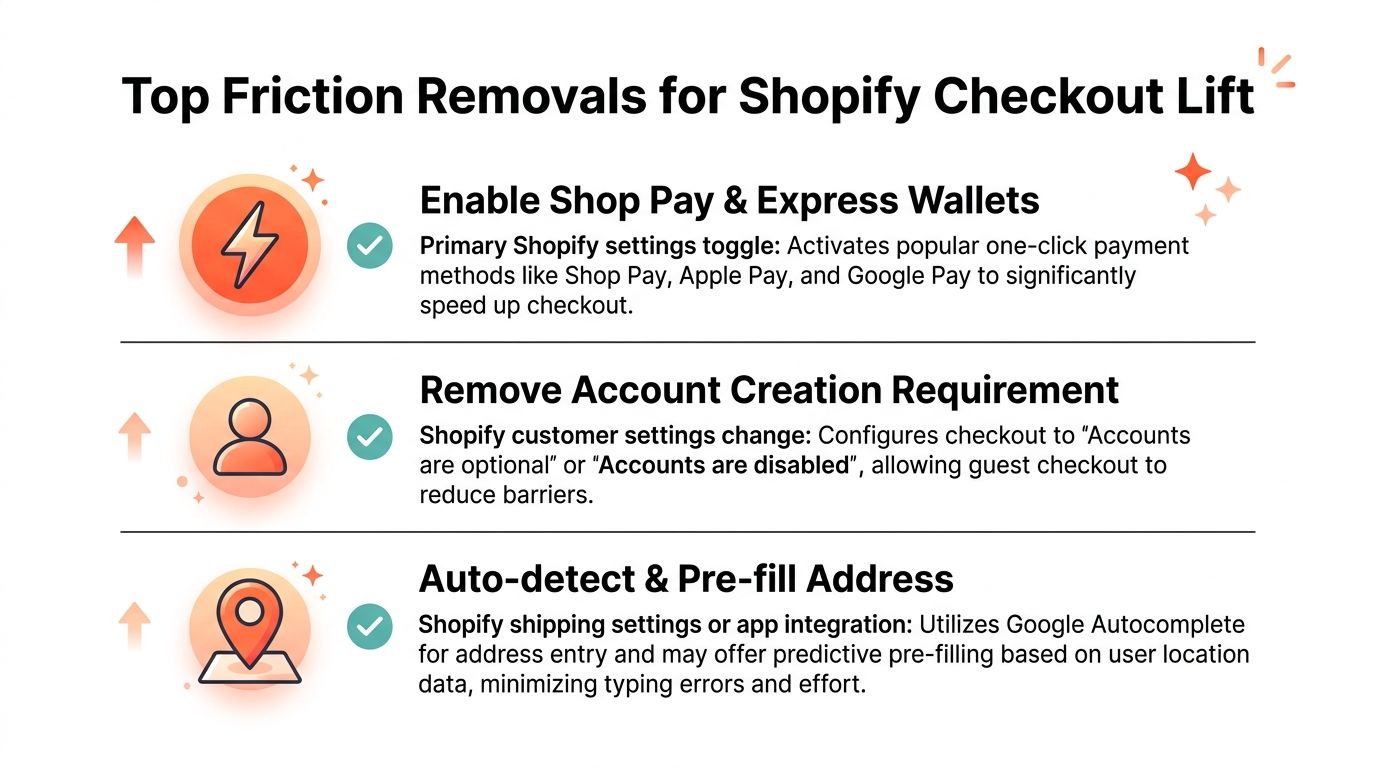
Enable Shop Pay and the relevant accelerated wallets for your markets. Express payment reduces typing and makes the payment step more familiar, especially on mobile. Shopify's own study reports the conversion effects cited earlier, while the presence of Shop Pay can help shoppers who don't select it directly.
Don't confuse more options with better choice architecture. Present the methods customers use, keep labels clear, and verify that wallet buttons render correctly across devices and browsers. A payment method that appears in configuration but fails during a real mobile session isn't an optimization.
Remove avoidable form work
Allow guest checkout. Account creation belongs after purchase unless the business has a genuine operational reason to require it before payment. Shopify's customer account model supports a lower-friction path, so forcing registration usually creates work without improving the transaction.
Review every field in the information and shipping steps:
Company name: Hide it for DTC customers unless the store serves B2B buyers.
Address line 2: Keep it optional and unobtrusive unless delivery operations require it.
Address entry: Use Shopify's native address lookup and confirm that suggestions populate the correct fields.
Shipping display: Show the relevant default option clearly, with price and delivery expectation visible before payment.
Order summary: Keep essential totals accessible on mobile without forcing repeated scrolling.
These changes should map to events. Removing company name affects contact or shipping completion. Better address lookup affects shipping progress. Clear shipping costs can prevent a shopper from starting checkout with an incorrect expectation.
Resolve cost uncertainty before checkout
A shipping or tax surprise is often a trust problem disguised as a pricing problem. Use the cart to communicate shipping thresholds, estimated delivery information, and applicable costs before checkout begins. The Shopify cart abandonment resource is useful when connecting these pre-checkout interventions to recovery work.
Lower-impact adjustments still deserve consideration when they're inexpensive and aligned with the business. Remove tipping prompts if the brand doesn't use tipping, and review marketing consent defaults with legal and privacy owners rather than treating opt-in design as a conversion shortcut. The correct setting depends on jurisdiction and policy, so a higher opt-in rate isn't automatically a better outcome.
The best friction removal is specific: identify the event that fails, change the setting or extension responsible, and verify that the same event improves without creating a new error elsewhere.
Shopify Plus Levers You Should Not Overlook
Shopify Plus gives teams more control over checkout, but it doesn't make arbitrary checkout code a sound strategy. The durable path is Checkout Extensibility, which replaces brittle direct edits with supported app-based extensions and Functions.
Shopify Functions can handle delivery, payment, and cart-line logic that previously depended on legacy scripts. That includes rules for payment or delivery availability, discounts, bundles, and order conditions. Checkout UI Extensions can place approved content and functionality in defined checkout areas, including trust messaging, custom fields, and pickup-related experiences.
Custom payment methods provide another route for region-specific processors, wallets, and buy-now-pay-later experiences without forcing the merchant to maintain a separate payment gateway integration for every use case. Availability and eligibility depend on Shopify's platform capabilities, the merchant's plan, and the relevant API access.
Retire customization that cannot survive upgrades
The hard cutoff for Thank you and Order status customizations passed on August 28, 2025, and legacy script-tag and checkout customizations stopped working on those surfaces (Shopify checkout extensibility tracking guidance). Checkout.liquid, ScriptTag-based discounts, and multi-step checkout hacks shouldn't remain in production as a long-term foundation.
The migration question isn't, “Can we rebuild this?” Ask whether the old feature produced measurable value. Rebuild a discount rule that protects margin or a validation that prevents operational errors. Remove a decorative injection that adds maintenance but has no evidence of improving completion.
Plus Lever | Friction It Solves | Legacy Approach It Replaces |
|---|---|---|
Shopify Functions | Delivery, payment, discount, and cart-rule complexity | Script-based rules and fragile checkout logic |
Checkout UI Extensions | Trust content, custom fields, and pickup information | Direct checkout.liquid edits and injected markup |
Custom payment methods API | Region-specific payment and wallet requirements | Bespoke gateway maintenance |
Checkout Editor and app blocks | Controlled placement of approved checkout features | Manual code changes across checkout surfaces |
Plan for governance, not just implementation
Some capabilities require Shopify Plus, while others depend on a Plus organization and access to the relevant Checkout Extensibility features or beta programs. Production deployment can also require Shopify review or approval, so the release plan must include more than development and QA.
A maintainable implementation has a clear owner, a documented purpose, an event-level success metric, and a removal plan if the feature stops earning its operational cost. More detail on migration decisions is available in Shopify checkout extensibility planning.
When to Ship and When to A/B Test
Testing is valuable when the answer is uncertain and the store can collect enough clean observations to distinguish signal from noise. It's wasteful when the change removes an obvious barrier or when the traffic cannot support the decision.
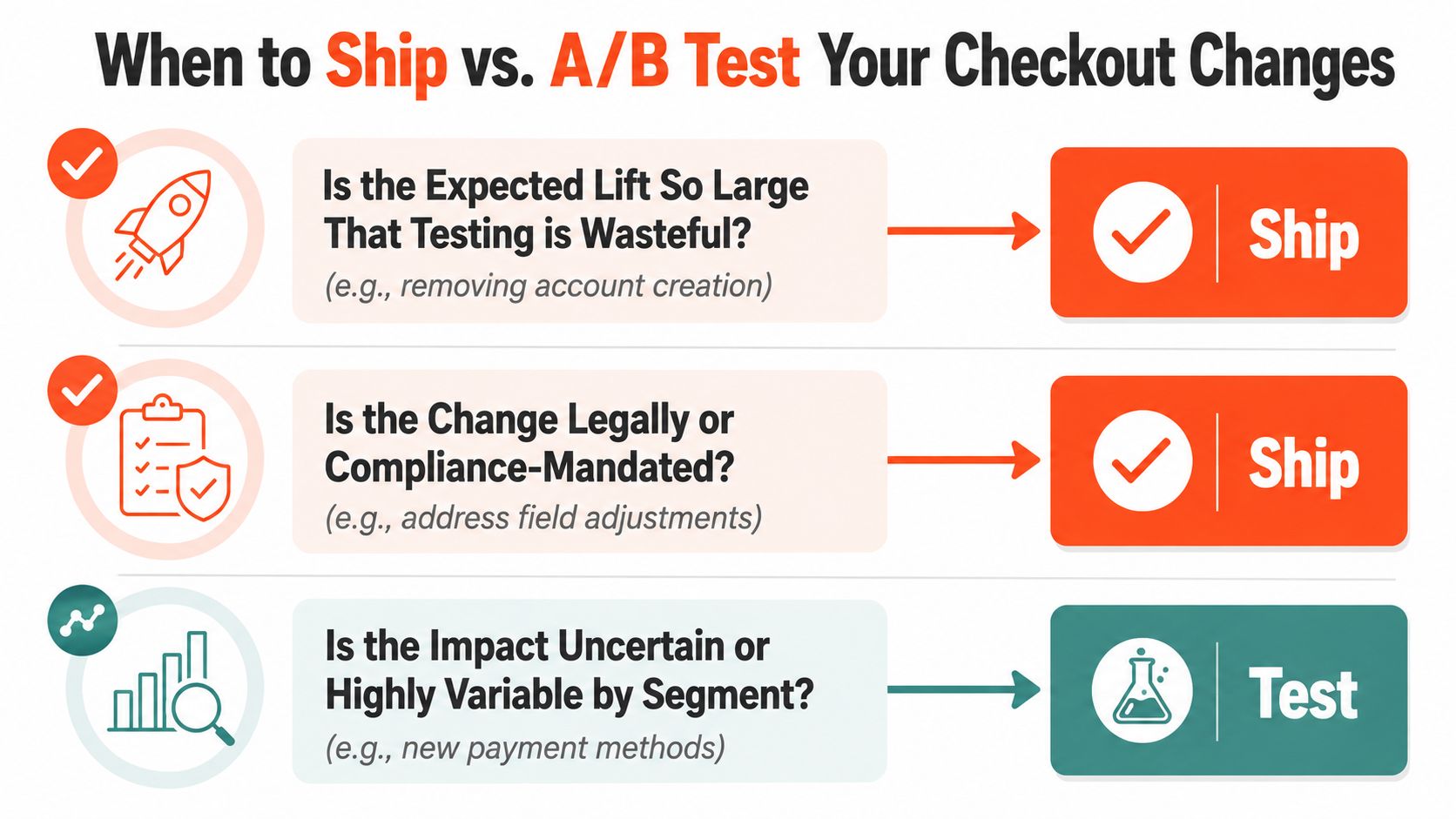
Use three questions before opening an experiment.
Ship obvious barriers
Removing a required account-creation step, fixing a broken wallet button, or correcting a validation error usually belongs in the ship column. These changes address clear friction and often affect basic task completion rather than a subtle preference. Delaying them for a test can leave a known defect in production while the team waits for a statistical answer it doesn't need.
Test uncertain preferences
Copy, button treatment, trust-signal order, shipping messages, and new payment methods can behave differently by device, market, and customer type. Those changes are reversible, but their effect isn't always predictable. Test when the team can define a minimum meaningful lift, a measurement window, and a primary metric before launch.
At a 3% baseline completion rate, detecting a 5% relative lift requires roughly 180,000 sessions per variant, according to the supplied testing scenario (Shopify A/B testing guidance). That traffic requirement puts many smaller stores below the threshold for reliable tests of subtle checkout changes. Don't manufacture certainty by stopping an experiment early or treating noisy week-to-week movement as a winner.
Use a simple decision matrix
Question | Recommended action |
|---|---|
Is the barrier obvious and commercially serious? | Ship after QA and instrument the result |
Is the change required for compliance or platform support? | Ship through the durable supported path |
Is the effect uncertain or segment-dependent? | A/B test if traffic and tracking support it |
Can the change be reversed quickly? | Test when the likely lift is modest |
Is the data insufficient for a trustworthy test? | Use judgment, document the rationale, and monitor |
A practical default is to ship obvious wins and reserve experiments for changes plausibly below 10% relative lift. That isn't a universal law. It's a resource-allocation rule that protects engineering time and prevents teams from turning every checkout edit into an underpowered experiment.
The Mobile Reality Most Guides Get Wrong
Reducing fields helps only when form length causes the drop-off. Mobile checkout failures often come from interaction defects: the wrong keyboard opens, autofill targets the wrong input, a payment sheet sits behind browser controls, or the primary button is too close to another action.
Mobile usability issues appeared across many tested checkouts in the cited analysis, alongside problems involving payment availability, complexity, transparency, trust signals, and localization. The practical question is narrower: which interaction fails on a real device, and at what step? Treat mobile checkout as both a CRO problem and a technical-survivability problem. Fix defects that affect completion now, then keep the implementation on Shopify's supported extensibility path rather than relying on brittle checkout modifications.
Reproduce the failure instead of guessing
Test representative iOS and Android devices, not only a resized desktop browser. Capture a Device Mode trace in Chrome DevTools, log JavaScript errors and input events at each step, and replay sessions in Datadog or Heap when those tools are part of the merchant's stack.
Compare mobile and desktop completion by step. A device-specific divergence greater than 10 percentage points is a useful investigation threshold in the supplied operating method, but the trace should identify the failure rather than the threshold alone. Check keyboard changes, autofill behavior, viewport shifts, payment-sheet visibility, validation loops, and taps that do not register.
The first fixes usually involve browser semantics:
Native autofill: Use the correct
autocompletevalues and preserve editable fields so shoppers can correct mistakes.Keyboard control: Set
inputmodeappropriately for email, numeric, and text entry.Viewport safety: Reserve the bottom 80 pixels of the viewport for the primary action button, so browser and device UI do not obscure it.
Touch targets: Keep important controls comfortably tappable and separated from neighboring actions.
Repeat the same device trace after every fix and compare the event sequence. Field reduction can follow if the evidence still identifies form complexity as the bottleneck. Removing fields before fixing broken mobile behavior wastes the change.
The payment path deserves its own replay because wallet sheets and browser chrome can behave differently from standard card entry. Validate those flows on actual devices and confirm that any extension or payment customization remains supported after Shopify's checkout extensibility cutoffs.
An Operating Model for Ongoing Optimization
Checkout gains compound when the team treats them as an operating process rather than a redesign project. The cadence should be light enough to maintain and strict enough to prevent opinions from replacing evidence.
Set a recurring review rhythm
Weekly, review checkout completion and step-level drop-off against the funnel baseline. Segment the review by device, customer status, market, and payment method so a healthy aggregate doesn't hide a mobile or regional failure.
Monthly, record each ship-versus-test decision. Include the observed problem, proposed change, expected direction, implementation owner, measurement window, and reason for choosing deployment or experimentation.
Quarterly, re-baseline the funnel after seasonality, catalog changes, major promotions, and payment updates. A conversion target that made sense before a product mix change may no longer describe healthy performance.
The CRO lead should own the hypothesis backlog and business prioritization. The Shopify engineer should own checkout extensions, Shopify Functions, payment and delivery logic, tracking integrity, and the removal of legacy dependencies. Those responsibilities overlap during implementation, but they shouldn't become ownerless.
Rank work by impact and risk
Use a simple prioritization formula:
Expected revenue impact ÷ implementation risk
Expected impact should come from the affected step, its volume, the value of completed orders, and the plausible improvement range. Implementation risk includes review requirements, payment edge cases, localization, accessibility, support burden, and the chance that an extension interferes with another checkout component.
This filter usually pushes decorative additions down the backlog. An extra trust badge may look useful, but it should lose priority if it doesn't address a measured trust or payment drop-off. A payment rule that prevents an invalid method from appearing in a region may rank higher because it removes confusion and operational failure at the same time.
Every optimization needs an exit condition. If the team can't define how it will know a change worked, it isn't ready to ship.
Reprioritize when conditions change
Start a new prioritization cycle after:
New payment methods: Validate rendering, eligibility, and completion by market and device.
Checkout extensibility deprecations: Replace unsupported dependencies before they fail in production.
A completion decline: Investigate any week-over-week drop greater than 5% before launching unrelated CRO work.
Plus API changes: Review Functions, extensions, payment logic, and tracking for compatibility.
Every shipped change needs a documented hypothesis, a measurement window, and a post-mortem. Add the result to an internal playbook, including unsuccessful attempts. The next team should inherit evidence, not folklore.
For brands that need hands-on support, Presidio works on Shopify and Shopify Plus checkout extensibility, custom development, CRO audits, and technical implementation planning. Visit Presidio to discuss a checkout roadmap that improves measurable friction while keeping the underlying implementation maintainable.



