Presidio

Your checkout looks polished until a customer reaches the final steps and encounters a custom script, a loyalty widget, or a discount rule that no longer behaves as it did in the old checkout.liquid template. The code may still sit in the admin, the app may still appear installed, and orders may still process, but the customization can be unsupported, plan-gated, or difficult to maintain.
That's the central issue behind customizing the Shopify checkout page today. Shopify has moved checkout work away from arbitrary Liquid edits and toward an extension-based architecture built around the checkout editor, checkout UI extensions, Shopify Functions, and Web Pixels. The practical challenge isn't adding more code. It's deciding what belongs in each layer, auditing what already exists, and migrating without weakening a revenue-critical flow.
Table of Contents
Evaluating Standard Shopify vs Shopify Plus Customization Capabilities
Implementing Checkout Extensibility with UI Extension Blocks
Understanding Key Concepts of Checkout Customization
A merchant who wants to change checkout often starts by looking for a theme file. That instinct makes sense because storefront branding still lives closely with the theme. Checkout is different. Shopify manages checkout and customer account customization in a separate editor under Settings > Checkout, while custom checkout UI is added through approved app blocks and checkout UI extensions rather than unrestricted theme edits. Shopify's checkout customization guidance describes this separation clearly.
Start with four building blocks:
Branding controls handle visual presentation, including colors, typography, logos, and other supported styling choices. Use the checkout editor or checkout branding API for these changes.
Checkout UI extensions add customer-facing modules such as trust messages, loyalty redemption interfaces, custom fields, and promotional content.
Shopify Functions execute business rules, including discount, bundle, order, payment, or delivery logic where the relevant customization flow supports it.
Web Pixels and customer events replace legacy tracking patterns that depended on additional scripts or direct browser injection.
The reason for this separation is governance. A branding adjustment shouldn't require custom JavaScript, and a discount rule shouldn't be hidden inside a visual component. Keeping presentation and logic apart makes ownership clearer, testing easier, and future upgrades safer.
Practical rule: Treat checkout as a controlled application surface, not as another theme template.
Plan access affects the map. Basic, Shopify, and Advanced merchants can use supported checkout branding and settings, plus compatible apps available for their plan. Shopify documents that checkout UI extensions for the Information, Shipping, and Payment steps are available only to Shopify Plus stores. That restriction matters before anyone designs a loyalty or upsell experience around a specific checkout step.
If your broader objective is to reduce friction across the buying journey, research on how to improve tour operator conversion rates can provide useful conversion context. The implementation decision, however, must begin with Shopify's extension boundaries, not with a mockup that assumes unrestricted access.
Evaluating Standard Shopify vs Shopify Plus Customization Capabilities
A store may already depend on checkout.liquid for loyalty messages, shipping notices, or payment instructions. Moving those changes to Shopify's extension model requires more than copying markup. The plan determines where app UI can appear, while Shopify's APIs determine which business logic remains supported and upgrade-safe.
Shopify's current model treats checkout work as a phased migration, not a theme edit. Branding and supported settings remain in the checkout and accounts editor under Settings > Checkout. Custom interface elements use checkout UI extensions and app blocks, while deeper placement in the Information, Shipping, and Payment steps depends on Plus access and the relevant extension target. Before estimating a migration, map every existing checkout.liquid change to a supported surface, an app extension, or a Shopify Function.
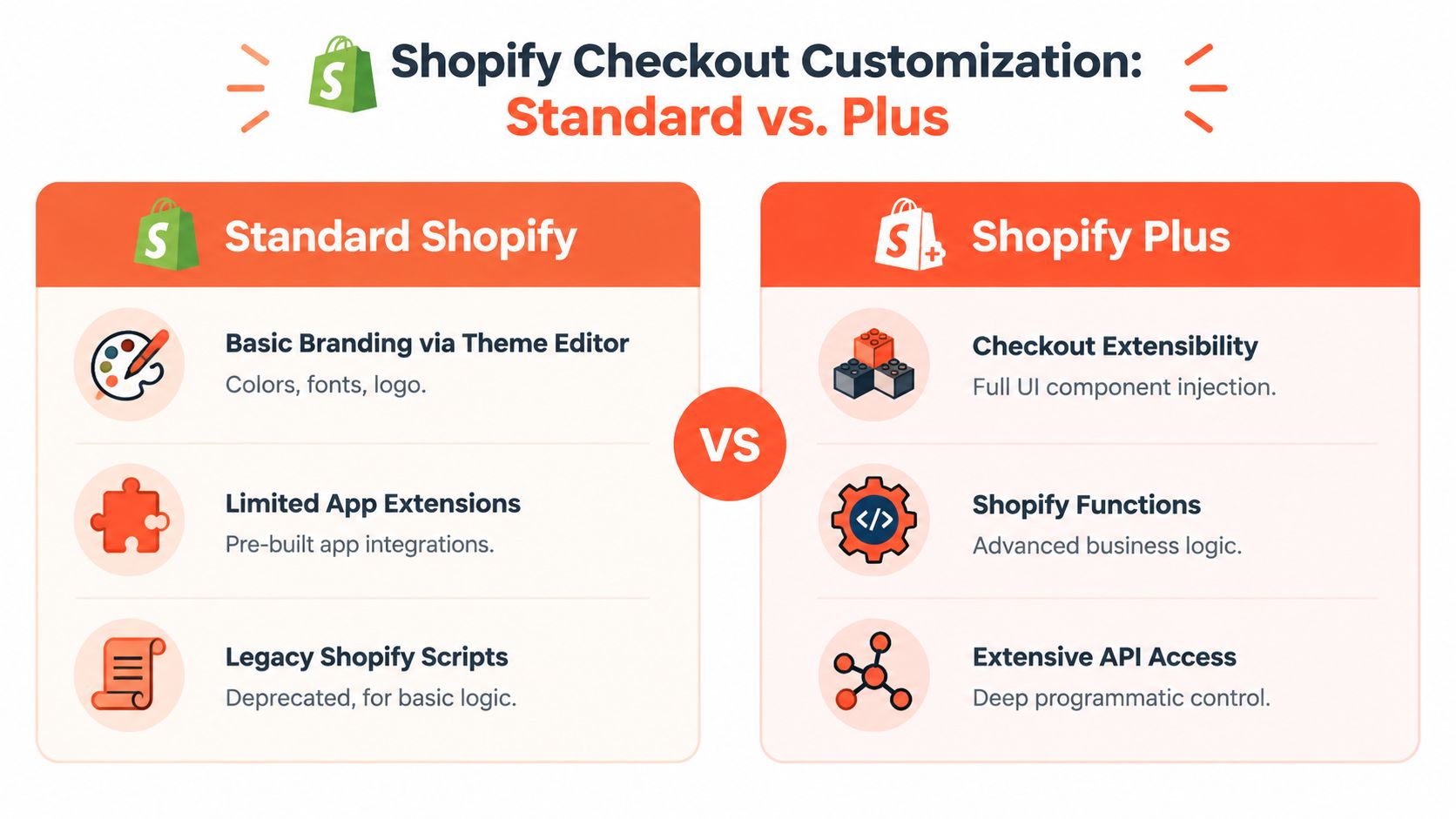
What standard Shopify supports
Standard plans can provide a reliable baseline:
Brand presentation: Configure supported colors, fonts, logos, and checkout styling through Shopify's checkout editor.
Compatible app features: Install apps that expose supported blocks or pixels for the store's available surfaces and permissions.
Business settings: Configure shipping, payment, discounts, and checkout behavior through Shopify's native admin controls.
Post-purchase and account capabilities: Use app-based experiences where Shopify and the app support the merchant's plan.
That coverage suits stores seeking branded checkout presentation, standard payment and discount configuration, and analytics based on Shopify's approved customer-event model. It does not cover every request for custom content inside the Information, Shipping, or Payment steps. A checkout.liquid feature that depends on direct DOM access, arbitrary JavaScript, or a precise legacy insertion point needs redesign rather than a simple transfer.
What Plus changes
Shopify Plus stores can use checkout UI extension targets on the Information, Shipping, and Payment steps, subject to the selected API and configuration rules. This makes Plus a practical option for step-specific loyalty redemption, checkout messaging, or other app-driven UI that standard plans cannot place where required.
Plus still does not restore arbitrary browser JavaScript or pixel-level control. Payment and delivery behavior must use their dedicated customization flows, while discount and order rules should move into Shopify Functions or compatible app implementations. Review the commercial purpose, measurement plan, and maintenance owner before treating a plan upgrade as the solution. This Shopify checkout optimization resource offers a useful framework for that evaluation.
Requirement | Standard Shopify | Shopify Plus |
|---|---|---|
Core branding controls | Supported through checkout editor | Supported through checkout editor and broader enterprise workflows |
In-checkout UI on Information, Shipping, and Payment | Plan and target limitations apply | Checkout UI extensions are available for these steps, subject to Shopify's APIs |
Discount and order logic | Native settings and compatible apps | Functions and Plus-compatible app implementations |
Arbitrary | Not the modern customization model | Deprecated for covered checkout surfaces |
Governance priority | Keep apps compatible and scope controlled | Manage extensions, releases, permissions, and migration debt |
Choose Plus only when the requirement depends on a capability the current plan cannot provide. Otherwise, an upgrade can add cost, release coordination, and extension ownership without improving the checkout outcome. For every migrated customization, record its new owner, required permissions, target surface, test coverage, and rollback approach. That governance record is what keeps the replacement safer to update than the original file edit.
Implementing Checkout Extensibility with UI Extension Blocks
Shopify announced checkout extensibility in 2023 as an app-based, upgrade-safe replacement for checkout.liquid, including experiences for post-purchase, Thank You, and Order Status pages. Shopify's announcement about the checkout extensibility rollout also describes the broader move toward controlled extension points instead of unsandboxed browser JavaScript and shared-file edits.
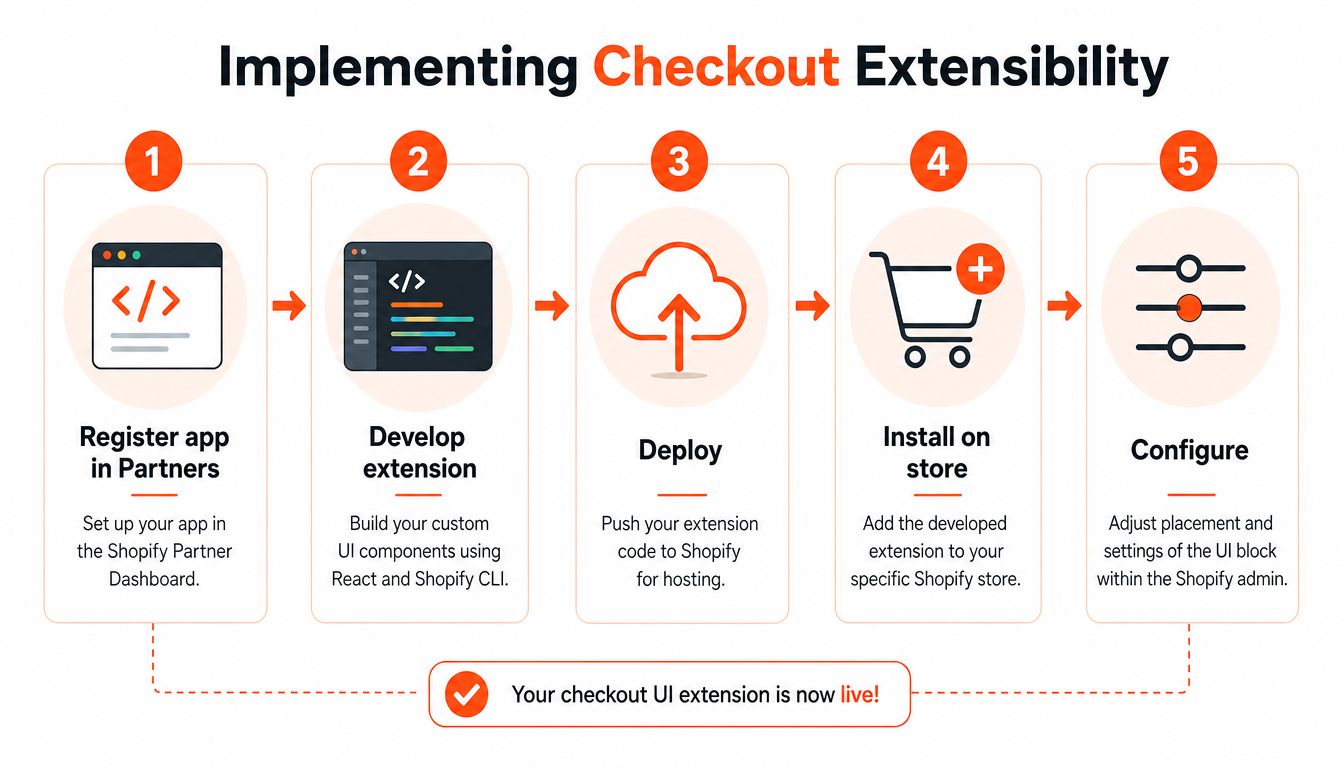
A reliable implementation starts in the Shopify Partner Dashboard. Create or select the app that will own the extension, configure the required app settings, and use Shopify CLI to scaffold a checkout UI extension. The exact generated files depend on the extension target and API version, but the working pattern is consistent: a manifest describes the extension, source files define the component, and the deployed app exposes the block to the merchant admin.
Build the smallest useful component
Choose one customer task rather than recreating an entire legacy checkout interface. Good candidates include:
A concise trust message near supported checkout content.
A custom field that captures delivery instructions or another operational input.
A loyalty redemption block that reads the customer's available balance through the app's approved data flow.
A promotional banner that explains a relevant offer without competing with address, shipping, or payment fields.
Use the extension's APIs for checkout data and interaction. Don't query the page DOM, inject arbitrary scripts, or assume a selector will remain stable. Shopify's sandbox and extension targets exist specifically to reduce that kind of fragility.
After local development, deploy the extension to Shopify and install the app on a development or test store. Open the checkout editor, locate the app block, and place it only in a supported target. Configure merchant-facing settings in the editor or app admin rather than hard-coding copy, colors, and eligibility rules into the component.
The visual block should remain focused on presentation and interaction. If it needs to determine whether an order qualifies for a discount, delegate that rule to Shopify Functions or the appropriate checkout customization API. This avoids duplicating commercial logic in several places.
A practical walkthrough can be paired with Presidio's Shopify checkout extensibility guide, particularly when the project includes several extensions, existing app dependencies, or a Plus implementation that needs controlled releases.
Use the following video as a supplementary implementation reference:
Test the extension with real checkout states, including empty and populated carts, logged-in and guest customers, eligible and ineligible shoppers, and mobile layouts. Publish only after the app block renders correctly and its failure behavior is harmless. A checkout extension should enhance the flow, never prevent a customer from completing it.
Migrating from checkout.liquid into the Extension Framework
Legacy migration begins with an inventory, not a rebuild. Shopify's guidance treats the move away from checkout.liquid and script-based customizations as an operational project because existing code may contain branding, pricing logic, analytics, affiliate tags, surveys, or hidden dependencies. Shopify's enterprise guidance on checkout extensibility migration emphasizes upgrade reports that help inventory current customizations before replacement work starts.
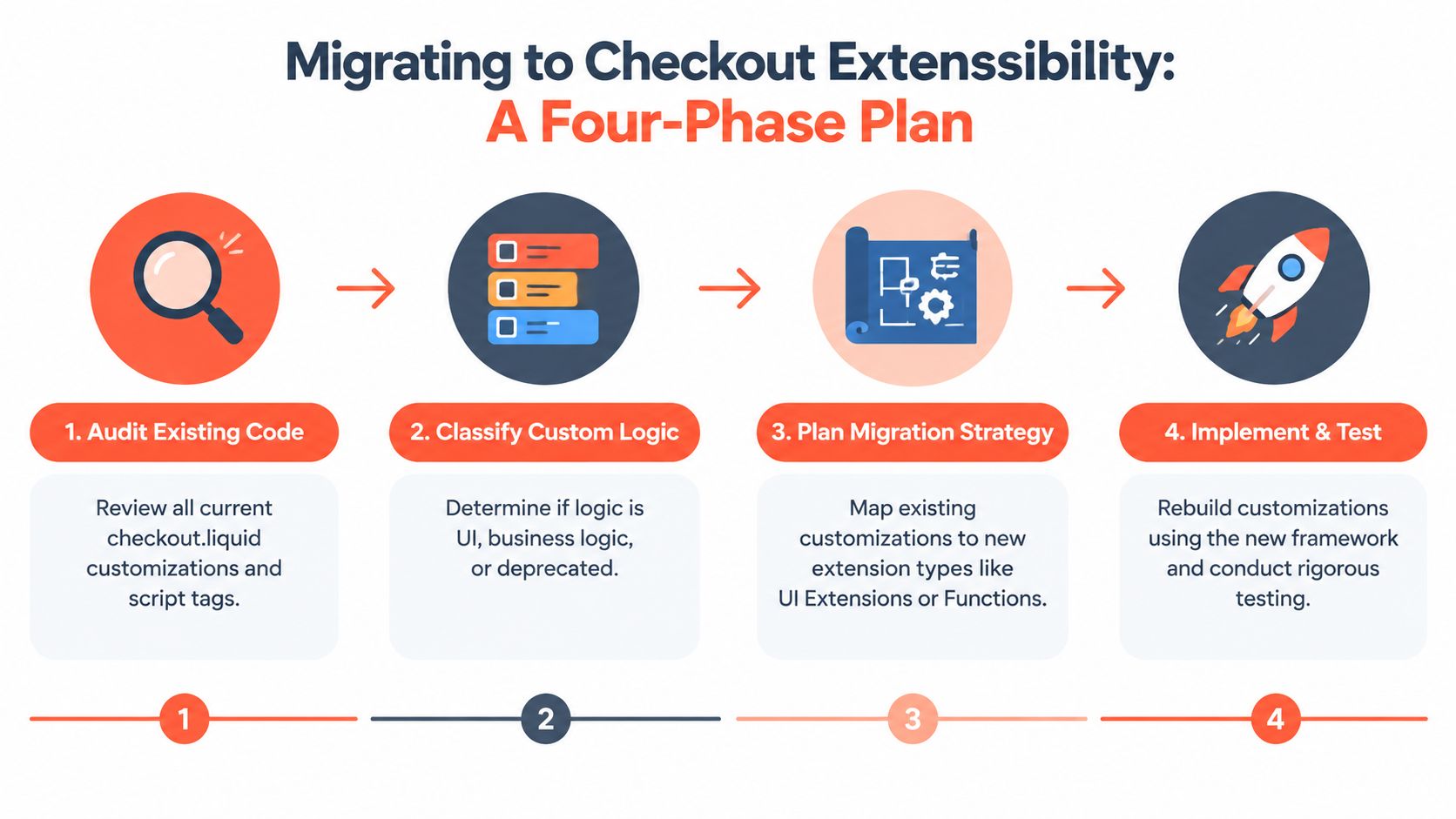
Phase one involves an evidence-based audit
Copy every relevant snippet into a controlled repository before changing the live configuration. Record where each item runs, who owns it, what business outcome it supports, which app or vendor depends on it, and what happens if it fails.
A useful audit record includes:
Source:
checkout.liquid, additional scripts, app configuration, or theme dependency.Purpose: branding, user interface, pricing, discounting, shipping, payment, analytics, affiliate tracking, or post-purchase content.
Trigger: checkout step, customer state, product condition, discount condition, or order event.
Dependencies: APIs, metafields, app embeds, external services, and data permissions.
Replacement: checkout branding, UI extension, Shopify Function, Web Pixel, customer event, or native setting.
Validation owner: the person responsible for approving the replacement.
Phase two separates appearance from behavior
A logo adjustment belongs in checkout branding. A banner belongs in a UI extension if Shopify supports its target. A bundle qualification rule belongs in a Function. A conversion tag belongs in Web Pixels or another approved customer-event implementation.
The classification prevents a common mistake: rebuilding a single large checkout.liquid file as a single large extension. The extension framework works best when each component has a narrow responsibility and a defined owner.
Phase three maps dependencies before coding
Check whether every desired target is available on the store's plan. Confirm that the selected app supports Checkout Extensibility, and verify that payment or delivery behavior uses the dedicated customization APIs rather than assumptions inherited from old scripts.
Phase four stages the replacement
Build and test on a development or staging store, compare the old and new outcomes, and preserve a rollback path until the team has validated orders, discounts, shipping, payment, analytics, and post-purchase behavior. Don't delete legacy code merely because the replacement renders once. Remove it after the replacement has passed the agreed acceptance checks and the team has documented the change.
Migration rule: Preserve the business requirement, not the old implementation.
The hardest failures are silent. A checkout can look normal while a tracking tag stops firing or an app no longer receives the event it expects. That's why migration hygiene matters as much as component development.
Applying Shopify Scripts and Functions for Business Logic
A checkout rule should answer a business question in a deterministic way. Does the cart qualify for a discount? Should a bundle receive special treatment? Is a delivery option available for this combination of products? Those decisions belong in logic services, not in a visual checkout block.
Shopify's modern pattern separates presentation from logic. The branding editor or checkout branding API handles look and feel, Shopify Functions handle discount, bundle, and order-rule behavior, and checkout UI extensions present customer-facing modules. Shopify's styling documentation supports this division.
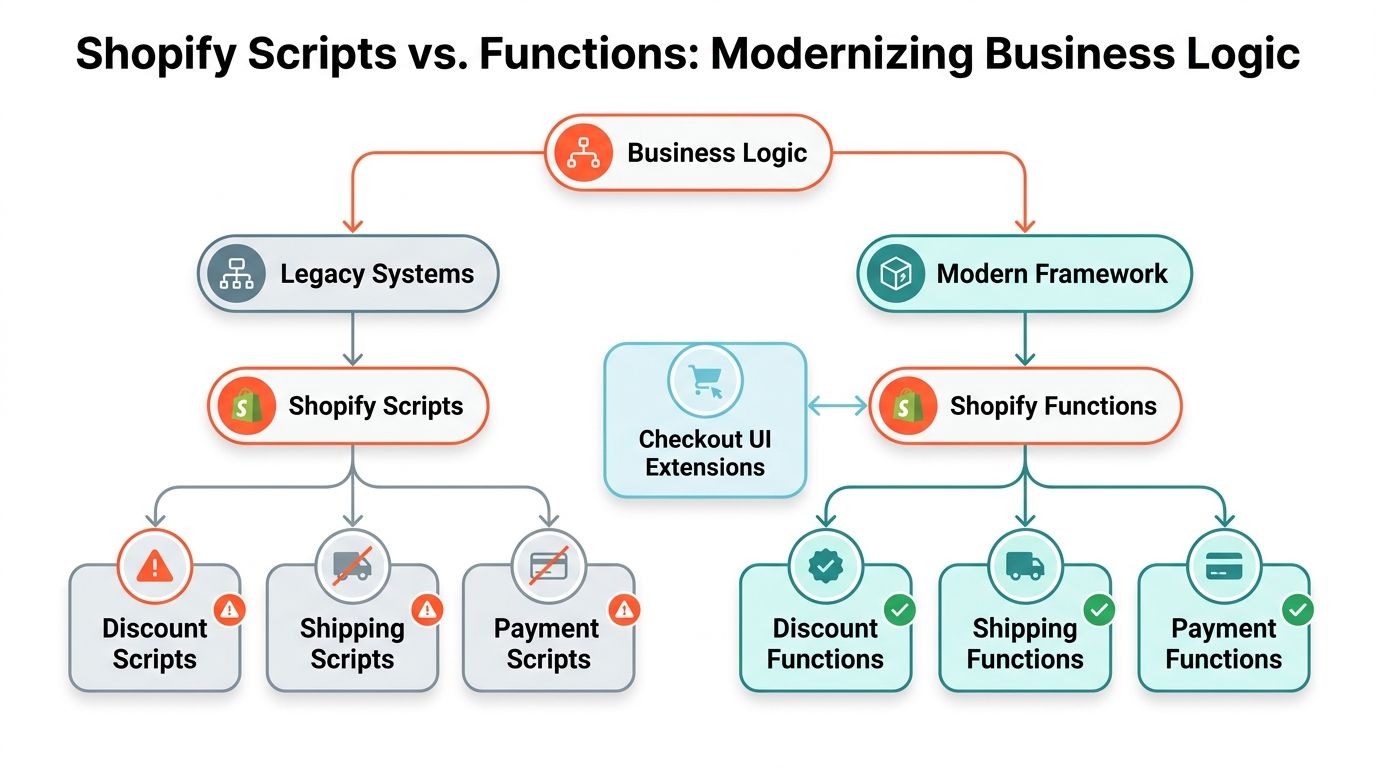
Use Functions for decisions
A discount Function can evaluate cart lines, customer context, product data, and configured conditions, then return the supported discount outcome. A bundle Function can apply a rule when qualifying products appear together. An order or delivery customization can modify supported behavior through its dedicated Shopify flow.
The Function shouldn't be responsible for rendering a loyalty balance or explaining an offer. It should expose the outcome through the supported data and configuration model. The UI extension can then explain eligibility, request a redemption action, and show the result without embedding the pricing rule itself.
This architecture also improves version control. Store Function code, extension code, configuration, and test fixtures together, then review changes as a business rule change rather than as an unstructured checkout edit. Keep the rule's inputs explicit. If a discount depends on a product tag, customer state, or cart threshold, document that dependency and test both qualifying and non-qualifying carts.
Avoid the legacy script trap
Shopify Scripts may still appear in older implementations, but preserving them as the foundation for new work creates migration debt. Don't hide new conditions inside a script because it seems faster. Map the behavior to the current Function or checkout customization flow, then remove the obsolete path after validation.
For teams comparing implementation patterns, a focused Shopify Scripts to Functions guide can help translate old discount and order-rule assumptions into an extension-oriented design. A post-purchase offer has a different presentation and governance model, so a separate 1 Click Upsell Playbook can be useful when the commercial objective is increasing post-purchase value rather than changing the core payment flow.
Keep checkout UI sparse. Every block competes for attention with address, shipping, payment, and order review information. A technically valid extension can still damage usability if it adds unnecessary copy, duplicate offers, or controls that customers don't need to complete the order.
Testing Compliance and Troubleshooting Checkout Changes
Checkout testing must cover behavior, data, accessibility, and failure handling. A block that works in a developer preview can still fail when a discount is invalid, a payment method changes, a customer declines consent, or a mobile shopper loses connectivity.
Shopify's checkout model also creates a recurring misconception. Merchants often ask how to make pixel-level edits, but Shopify limits checkout customization to approved app blocks, branding controls, and supported extension targets. Shopify's explanation of checkout customization boundaries is a useful reference when a design request exceeds the platform's supported model.
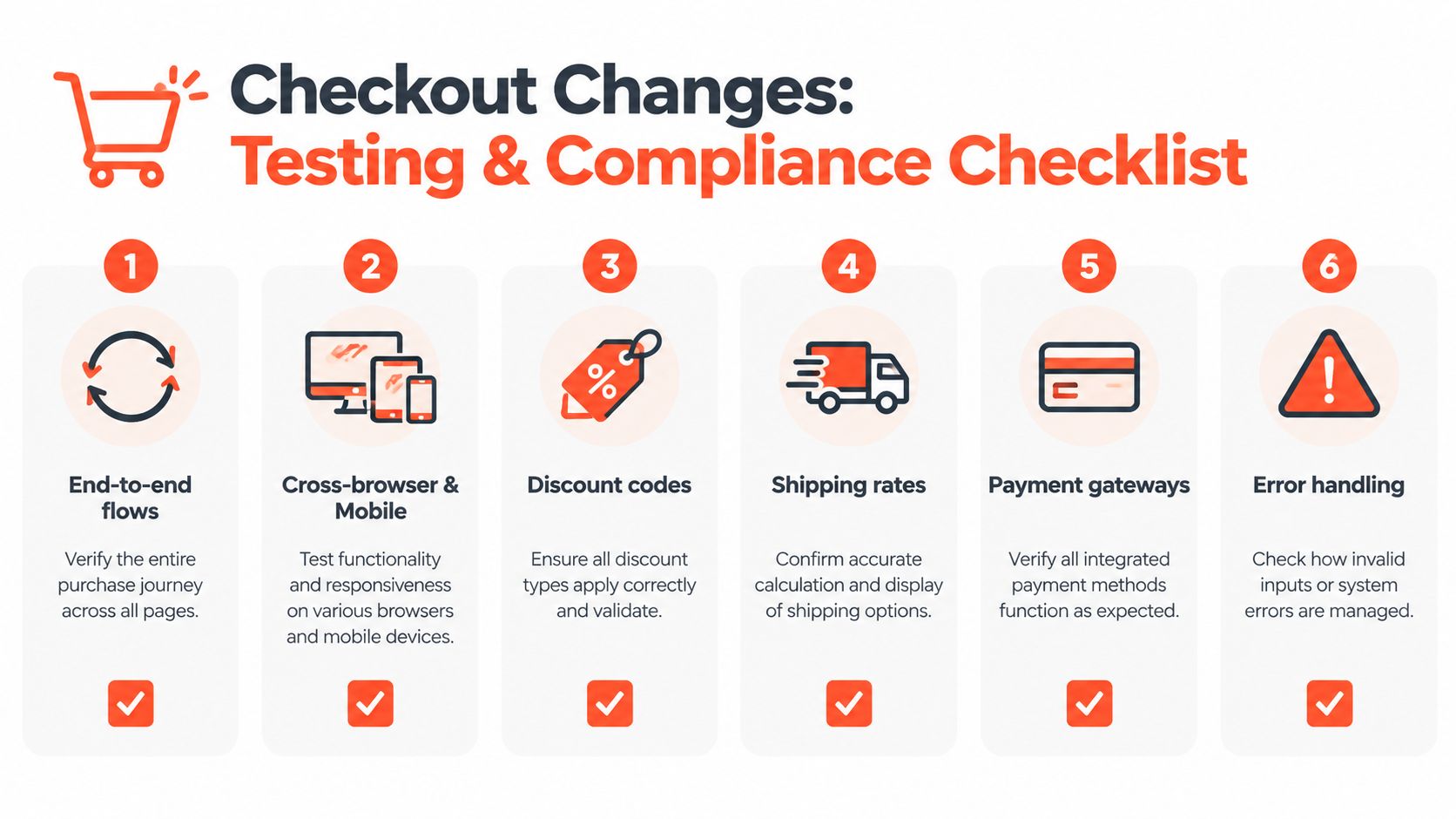
Validate the complete purchase path
Run controlled test orders rather than stopping when the extension appears. Record the expected outcome for each scenario and compare the actual order, customer event, discount, shipping option, payment result, and post-purchase state.
End-to-end flow: Test product selection, cart, checkout, payment, confirmation, and order status behavior.
Discount behavior: Check eligible, ineligible, conflicting, expired, and manually entered discount conditions.
Shipping behavior: Confirm that each relevant destination and cart condition produces the expected supported delivery options.
Payment behavior: Test the payment methods the store offers, including failure and retry paths.
Error handling: Verify that invalid input produces a clear message and doesn't block unrelated checkout actions.
Analytics: Confirm that Web Pixels or customer events receive the intended events and that duplicate legacy tags aren't still active.
Test on supported browsers and mobile devices. Review keyboard navigation, focus order, contrast, labels, and screen-reader output. A custom field that looks fine visually may be unusable for keyboard or assistive-technology users.
Troubleshoot from the boundary inward
If a block doesn't appear, first check the store plan, extension target, app installation, publication status, and checkout editor placement. If the block appears but behaves incorrectly, inspect its API calls and configuration rather than searching for DOM selectors. If analytics fail, inspect the customer-event setup, consent behavior, pixel activity, and event payloads.
Release discipline: Change one checkout capability at a time, test the surrounding purchase path, and document the rollback action before publication.
Keep a clean record of which legacy scripts were removed and which approved replacement now owns their function. That record helps marketing, operations, development, and support teams diagnose issues without reintroducing deprecated code. It also turns future upgrades into a controlled maintenance task rather than a rediscovery exercise.
Conclusion and Best Practices
Customizing Shopify checkout now rewards disciplined architecture more than clever template edits. Audit checkout.liquid and script dependencies, classify each requirement, move presentation into branding controls or UI extensions, move business rules into Shopify Functions, and move tracking into approved customer-event and pixel workflows.
The strongest implementations protect upgrade safety, governance, performance, accessibility, and measurement together. Start with a migration inventory, test on a development store, validate real purchase paths, and publish only when every owner understands the new source of truth.
Presidio helps Shopify and Shopify Plus brands plan and implement checkout extensibility, including custom UI extensions, Functions, migration support, and ongoing optimization. Visit Presidio to discuss an audit or a structured replacement plan for legacy checkout customizations.



