Presidio

A product page can convert 0.10% of its traffic at the low end and 49.73% at the high end. That range comes from an independent benchmark of 2,687 stores, which also found an average product-page conversion rate of 7.91% and a median of 5.97%. Those figures make one point difficult to ignore: a Shopify product page template isn't a decorative wrapper around product data. It's part of your revenue infrastructure. (Independent product page conversion benchmark)
The practical challenge goes beyond arranging a product gallery, price, description, and buy button. A template has to help different product families sell, give content teams control over product-specific information, stay fast as apps accumulate, and remain usable with a keyboard or screen reader. The strongest implementation is usually not the most elaborate one. It's the one that gives shoppers the right information at the right moment without creating a maintenance problem for the team operating the catalog.
Table of Contents
Why Your Shopify Product Page Template Is a Conversion Infrastructure Problem
Optimizing for Performance and Accessibility Without Compromising Conversion
Why Your Shopify Product Page Template Is a Conversion Infrastructure Problem
The gap between 0.10% and 49.73% shows how much product-page effectiveness can vary before checkout begins. A weak page can leave shoppers uncertain about variants, materials, delivery, fit, or returns. A well-structured page answers those questions close to the purchase decision and keeps the primary action visible.
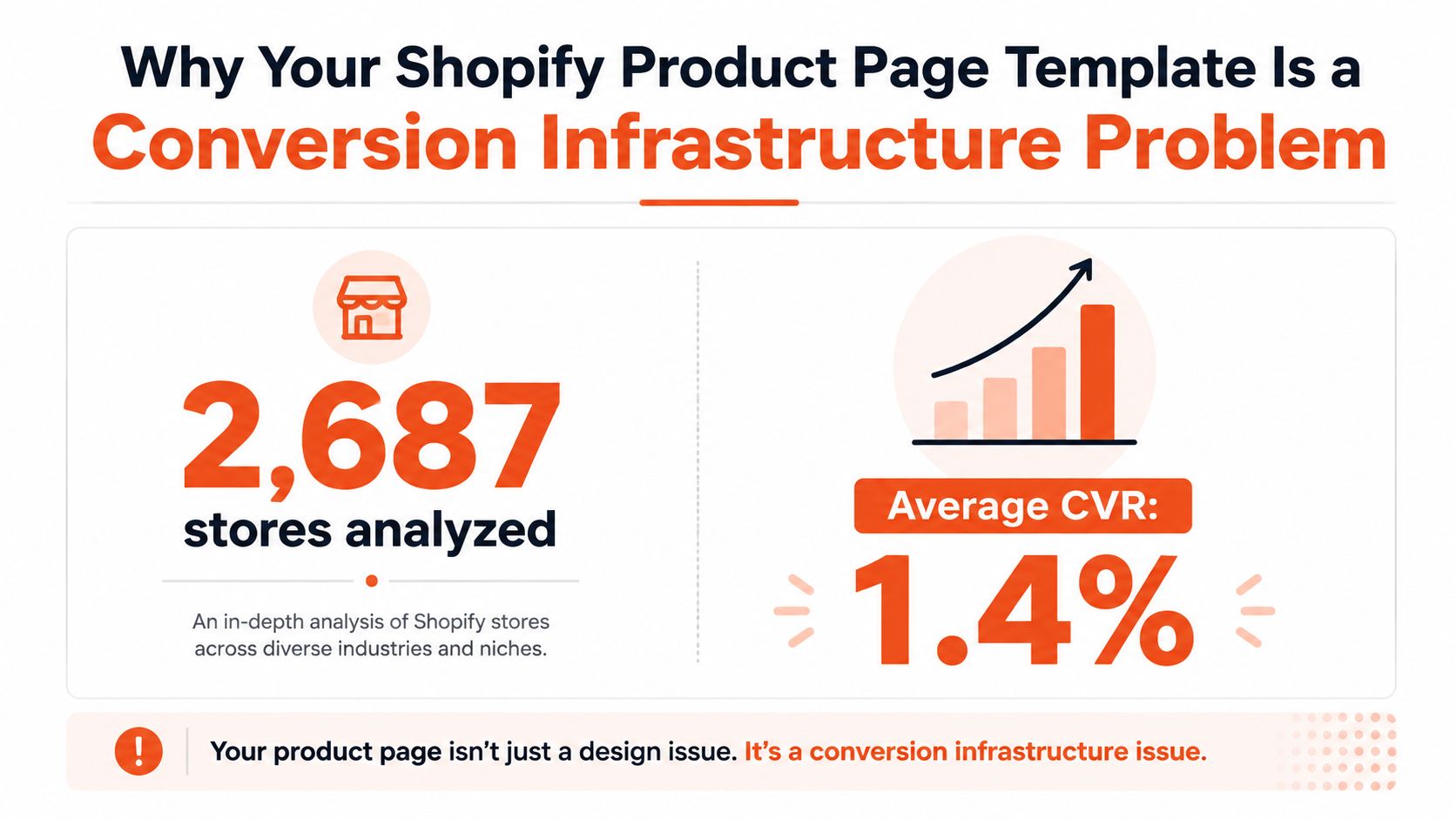
The infographic's displayed average differs from the 7.91% average reported in the benchmark, so use the linked benchmark as the source for the verified figures. The important operational lesson stays the same. Product templates deserve the same discipline as any other conversion surface, including a clear hypothesis, a defined success metric, and a controlled release process.
Layout decisions affect buyer confidence
A product page has a sequence. The visitor sees the product, identifies the relevant option, checks the price and availability, evaluates evidence, and decides whether the next action feels safe. If the template breaks that sequence, shoppers have to reconstruct the information themselves.
That's why hero media, variant controls, trust cues, specifications, reviews, and the add-to-cart form need to work as one system. Baymard's benchmark of 344 ecommerce sites and 1,654 annotated product-page examples identifies recurring problems including unclear variant selection, weak information hierarchy, and insufficient trust cues. (Baymard product-page UX benchmark)
Practical rule: Treat every product-page block as a response to a buyer question or hesitation. If a block can't justify its position, content, or interaction, it may be adding noise rather than persuasion.
Generic templates fail across varied catalogs
A single layout can work for a narrow catalog with consistent products. It often performs poorly when the store sells products with different buying logic. A mattress needs dimensions, firmness, materials, and delivery information. A skincare product needs usage instructions, ingredients, and suitability guidance. A technical accessory may need compatibility data and installation details.
The template therefore becomes infrastructure when it supports those differences without forcing developers to duplicate an entire page for every SKU. A maintainable system separates shared structure from product-specific content. The structure handles hierarchy and interaction. Product data supplies the details.
That distinction also changes how you judge a redesign. A visually impressive page that requires hard-coded edits for every product isn't a successful implementation. It has shifted work from the shopper to the merchant, and that cost grows with every new product family, locale, promotion, and operational update.
Understanding Shopify Product Page Template Architecture
A Shopify product template controls the core buying experience, including media, content, variant selection, and the add-to-cart form. In a modern Online Store theme, the template usually acts as a JSON configuration that arranges sections, while Liquid section files define their markup, logic, and available settings. The Shopify product template architecture documents this relationship.
That split determines where production changes belong. JSON controls which sections appear, their order, and their configured settings. Liquid controls the rendered HTML, form logic, accessibility attributes, and reusable behavior inside each section. A merchant can change merchandising order in the theme editor. A developer must change Liquid when the component needs different structure or behavior.
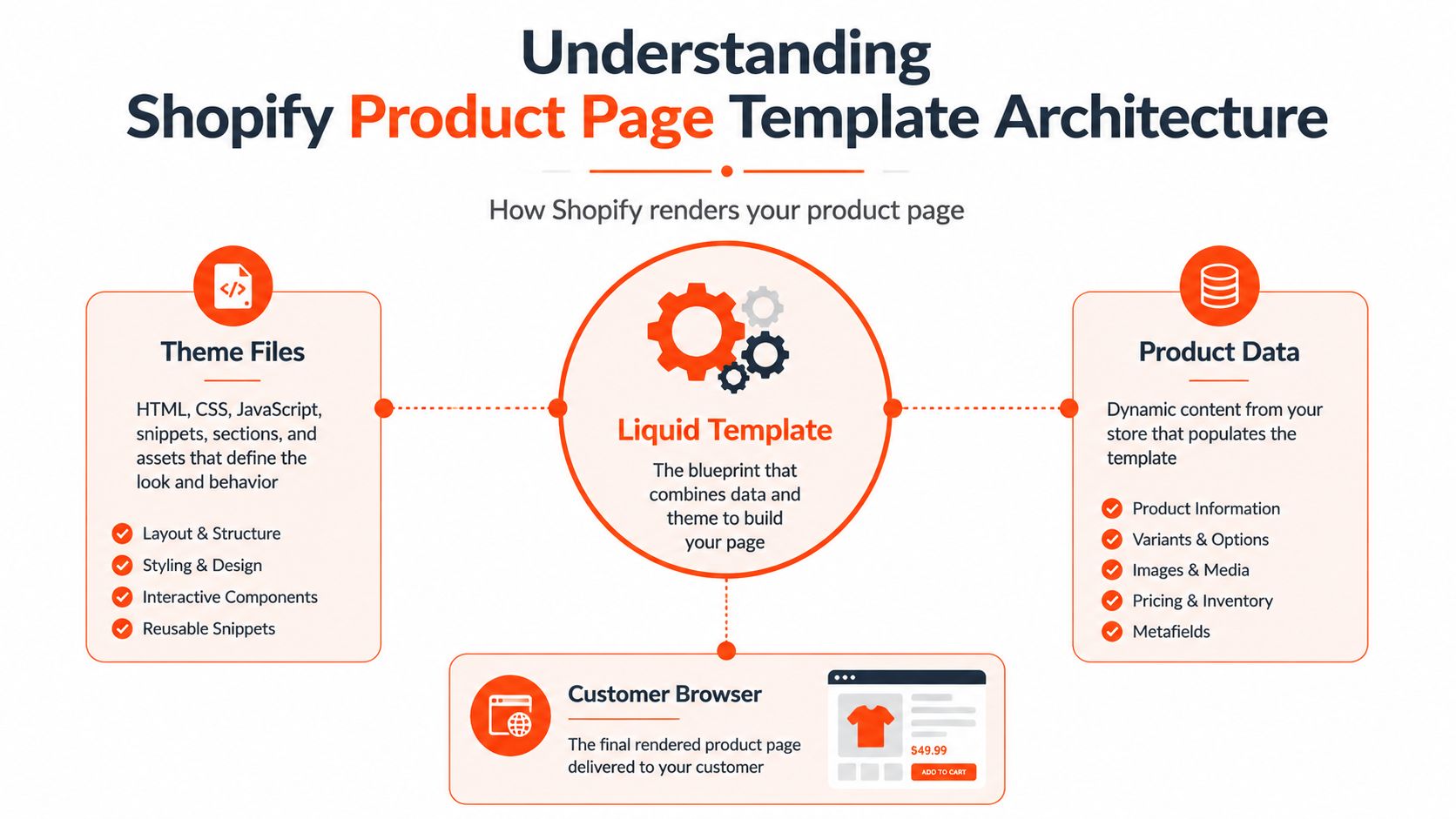
The layers that work together
A product page combines four connected layers:
Template configuration: A JSON template defines the page's sections, order, and settings.
Section rendering: Liquid section files output HTML, product values, form behavior, and editor controls.
Product data: Built-in fields, variants, media, metafields, and dynamic sources provide the content.
Browser behavior: CSS and JavaScript manage responsive presentation, gallery interaction, variant updates, and other client-side features.
Sections are reusable units with their own settings scope. They can contain blocks such as an information row, accordion, or trust item, while the product template determines each section's position. The guide to how sections work in Shopify themes provides a closer explanation of this composition.
Product records carry operational context
Shopify's product details area includes built-in product insights for net sales, net sales over time, net sales by channel, and net units sold by traffic source. Shopify defines net sales as unit price multiplied by units sold, minus discounts and returns, with results compared against the previous 90-day period. (Shopify product insights documentation)
The storefront therefore connects directly to merchandising and reporting work. Product templates sit on product records that help teams review assortment, pricing, channel performance, and changes made to the page.
Metafields and dynamic sources make product-specific content manageable at scale. A section can accept a product metafield and display different care instructions, specifications, or supporting content without a separate Liquid file for each product. Metaobjects can hold structured records for materials, size guidance, or category education shared across several products. This approach keeps one maintainable layout while allowing each product family to answer its own buying questions.
Building a High-Converting Product Template Step by Step
Start with the product family, not the visual mood board. Before opening the theme editor, list the questions shoppers ask, the options they must select, the evidence they need, and the information that changes between products. That inventory tells you whether the default product template is enough or whether a dedicated alternate template makes sense.

Create a focused template variant
In the theme editor, open the page selector, choose the product type, and create a new product template based on the existing default or another suitable foundation. Give it a name that describes the product family rather than a campaign that will soon become meaningless. Configure the section order, then assign the template to the relevant products in the Shopify admin.
Keep the first version restrained. A practical foundation usually includes:
Media gallery: Put the strongest product view first, support it with detail images, and make the selected variant's media relationship clear.
Purchase panel: Keep title, price, option selectors, availability, quantity, and add-to-cart behavior together.
Trust bar: Surface concise delivery, returns, warranty, or payment information near the decision point.
Specifications accordion: Hide secondary detail without hiding essential purchase information.
Social proof grid: Use reviews or customer imagery where it answers a real objection, not just to fill space.
Baymard's findings on variant clarity, information hierarchy, and trust cues support this prioritization. A page shouldn't make the visitor hunt for the option that changes the price, availability, or displayed media.
Keep Liquid logic predictable
Use Shopify's product form rather than building a parallel cart mechanism. The selected variant should drive the price, compare-at price where relevant, availability state, SKU, and media behavior. A simplified Liquid pattern might look like this:
{% assign current_variant = product.selected_or_first_available_variant %}
Then render values from current_variant, while JavaScript updates the interface when a shopper changes an option. The important detail is that the server-rendered default state must be complete and understandable before client-side enhancements run.
Inventory messaging needs equal care. Show a clear available, unavailable, or sold-out state, and announce updates when a variant change alters the purchase status. Don't use urgency language that the inventory system can't support.
Before publishing, test one meaningful change against the current template. Shopify's documented workflow supports an A/B test with a 50/50 traffic split and one winning metric, such as conversion or revenue. (Shopify theme template documentation)
A video can help teams understand the editor workflow, but don't treat a walkthrough as a substitute for testing the actual theme, products, and apps in your store.
The build is complete when the template gives shoppers a coherent decision path and gives operators a manageable editing surface. More blocks aren't a sign of maturity. Clear ownership of each block is.
Scaling Dynamic Content with Metafields and Dynamic Sources
The difficult part of a Shopify product page template usually begins after launch. Building one shared layout is straightforward compared with maintaining accurate, product-specific content across a catalog. Hard-coding an FAQ, care guide, shipping note, or compatibility statement into a shared section creates a dangerous compromise. Either every product shows generic information, or someone edits the theme whenever one product changes.
Metafields solve the ownership problem by moving variable content into product data. Define fields for information that belongs to the product, then expose those fields through dynamic sources in the relevant theme section. A clothing catalog might use structured fields for fit notes and fabric composition. A furniture catalog might use dimensions, assembly guidance, and care instructions. A supplement catalog might separate usage information from ingredients and warnings.

Give each content type a clear owner
Use the data model to distinguish content that changes by product, product family, market, and operation:
Product-specific fields: Fit, dimensions, compatibility, ingredients, or included components.
Category-level records: Shared education about a material, care method, or use case.
Operational fields: Delivery notes, pickup availability, warranty terms, or changing fulfillment guidance.
Localized content: Translated descriptions and answers managed through the store's localization workflow.
For repeated structures, metaobjects can hold reusable records. A product can reference a material record, and that record can contain its name, explanation, care guidance, and related content. This avoids copying the same paragraph into many product records and gives the content team one place to correct it.
Build FAQs for maintenance, not decoration
A scalable FAQ section should read from structured product data rather than contain a fixed list of questions in the theme code. The questions should match actual product concerns, and the answers should remain editable without a developer. Shopify community guidance commonly points merchants toward metafields or dynamic sources for this reason, especially when different products need different FAQs. (Shopify community discussion of product FAQs)
FAQ and schema work should follow the content, not replace it. Use valid structured data only when the visible page contains the same answers, keep the markup aligned with the rendered content, and account for localization when answers vary by market. The useful question isn't whether an FAQ block exists. It's whether the product page answers remain accurate, specific, indexable, and easy for the team to update.
For implementation decisions involving section settings, data connections, and reusable theme structures, Shopify theme customization guidance can sit alongside Shopify's own documentation. The goal is a small number of flexible components, not a growing collection of nearly identical templates.
Optimizing for Performance and Accessibility Without Compromising Conversion
Visual polish is easy to review. Performance and accessibility failures often surface only on a slower connection, with keyboard input, through a screen reader, or after a variant update changes the page. That makes them harder to catch during design reviews and more expensive to fix after launch.
Shopify recommends testing high-traffic templates, including product pages, with tools such as Lighthouse and WAVE. (Shopify website accessibility guidance) Product-page reviews should also cover heading order, price semantics, focus behavior, variant controls, and announcements for stock or price changes. These checks belong in the product template because dynamic content can break an otherwise accessible sitewide system.
Treat every interactive addition as a cost
Reviews, swatches, subscriptions, bundles, recommendation widgets, and accordions can support the buying decision. Each may also add JavaScript, duplicate controls, shift the layout, or create a keyboard trap. Adding an app changes the template's execution path and gives more systems responsibility for the purchase flow.
Load the primary product image and purchase information early. Lazy-load supporting gallery media when appropriate, defer scripts that do not affect the first interaction, reserve dimensions for images and embeds, and inspect where third-party code enters the page. A small visual footprint does not mean a small performance cost.
A useful performance review asks:
Does the first viewport show the product identity, price, selected options, and purchase action?
Does a variant change update price, media, availability, and accessibility announcements without an unexpected full-page refresh?
Do reviews and recommendations load after the core purchase interface?
Can a shopper complete the key actions without waiting for a non-essential widget?
For implementation details on speed tuning and third-party script impact, see these Shopify performance optimization services.
Run a product-page accessibility gate
Use Lighthouse and WAVE as aids, not as the entire audit. Test keyboard input, zoom, mobile layouts, a screen reader, and products with long titles, multiple options, unavailable variants, and changed prices.
A product template is not accessible because the homepage passes a scan. The product template must preserve usable names, focus order, semantics, and feedback after every interactive feature is added.
Confirm that headings follow a logical order, price and compare-at price use meaningful semantics, tabs expose their state, and swatches have labels beyond color alone. Variant changes should announce relevant updates. Accordions must work without a mouse, while error messages should sit near the control requiring correction.
Presidio can support technical auditing, speed tuning, and accessibility improvements alongside theme work. Whether the review is handled internally or by an agency, make these checks part of the template release process, not a sitewide checkbox.
Testing, Validating, and Iterating Your Product Template
A product template should ship with a measurement plan, not only a publish button. State the hypothesis in operational terms: showing compatibility information beside the selector may reduce uncertainty for a product family. Choose one primary outcome, such as conversion or revenue, and treat supporting metrics as diagnostics.
A clean experiment changes one meaningful element or one coherent component group. Changing the gallery, purchase panel, trust bar, and copy together can produce a result without showing which change caused it. Shopify's testing workflow can support a 50/50 traffic split with one winning metric. (Shopify template testing guidance)
Validate before the theme reaches customers
Use a staging or unpublished theme with representative products from every family. Include products with many variants, missing optional fields, long descriptions, unavailable options, subscription rules, discounts, and localized content. A template that works for an easy SKU can still fail when dynamic content is incomplete or product logic becomes complex.
A pre-publish checklist should include:
Browser coverage: Check current desktop and mobile browsers used by your audience.
Responsive behavior: Test narrow screens, rotated devices, zoom, long titles, and large images.
Variant integrity: Confirm selection updates the correct media, price, availability, SKU, and purchase state.
Form behavior: Test add to cart, quantity changes, accelerated checkout, errors, and sold-out states.
Structured data: Verify that product, offer, review, and FAQ markup reflects visible content.
Accessibility: Complete keyboard, focus, screen-reader, heading, label, and announcement checks.
App interactions: Disable or isolate third-party widgets to identify conflicts and unnecessary loading.
Segment the question before reading the result
Product families rarely share the same buying process. Test a structure against products with similar decisions, then check whether the result holds across relevant categories or price tiers. A layout that clarifies a technical product may distract shoppers choosing an impulse-oriented item.
Use product insights to connect template changes with product-level behavior. Review net sales, trends over time, channels, and traffic sources by product family rather than treating the store as one uniform population. Compare the results with the original hypothesis, then check whether the same pattern appears across products using the tested template. This helps distinguish a template effect from a promotion, inventory change, or unusually strong SKU.
Do not declare a winner because one day looks better. Look for a stable directional result, investigate anomalies, and document the exact template, metafield, dynamic source, and product group involved. Then roll out the winning structure to the appropriate family, restore the control, or run a narrower follow-up test.
Presidio builds and supports maintainable Shopify and Shopify Plus themes, custom storefront features, performance improvements, accessibility remediation, and CRO testing programs. If your product page template needs scalable metafield architecture or a cleaner path from experiment to production, visit Presidio to discuss the implementation.

Jamie, Presidio’s Designer, leads the practice alongside Johnnie. With over 10 years of e-commerce experience, Jay is a Shopify expert, known for crafting innovative solutions that prevent tech debt.
Jaime
Senior Product Designer, 2020



