Presidio

Modern Shopify frontend development sits at 38.4% of the global web development market, while React is used by 65.1% of developers, but the winning approach is not just choosing a popular framework. It balances fast page loads, maintainable architecture, and business features that improve conversion, with performance as the essential foundation.
A familiar pattern plays out in ecommerce teams. A brand launches a new product filter, adds a review widget, installs a personalization app, and refreshes the mobile navigation. Every change seems reasonable in isolation. Then shoppers report that the collection page feels sluggish, the product grid jumps while loading, and the add-to-cart button occasionally takes a moment to respond.
The team may describe the problem as a marketing issue, a Shopify limitation, or a temporary side effect of the release. In practice, it's often a frontend front end problem. The browser is doing too much work, the theme has accumulated too many dependencies, and no one owns the trade-off between shipping another feature and preserving a fast, stable buying experience.
Table of Contents
Why Frontend Development Matters for Ecommerce
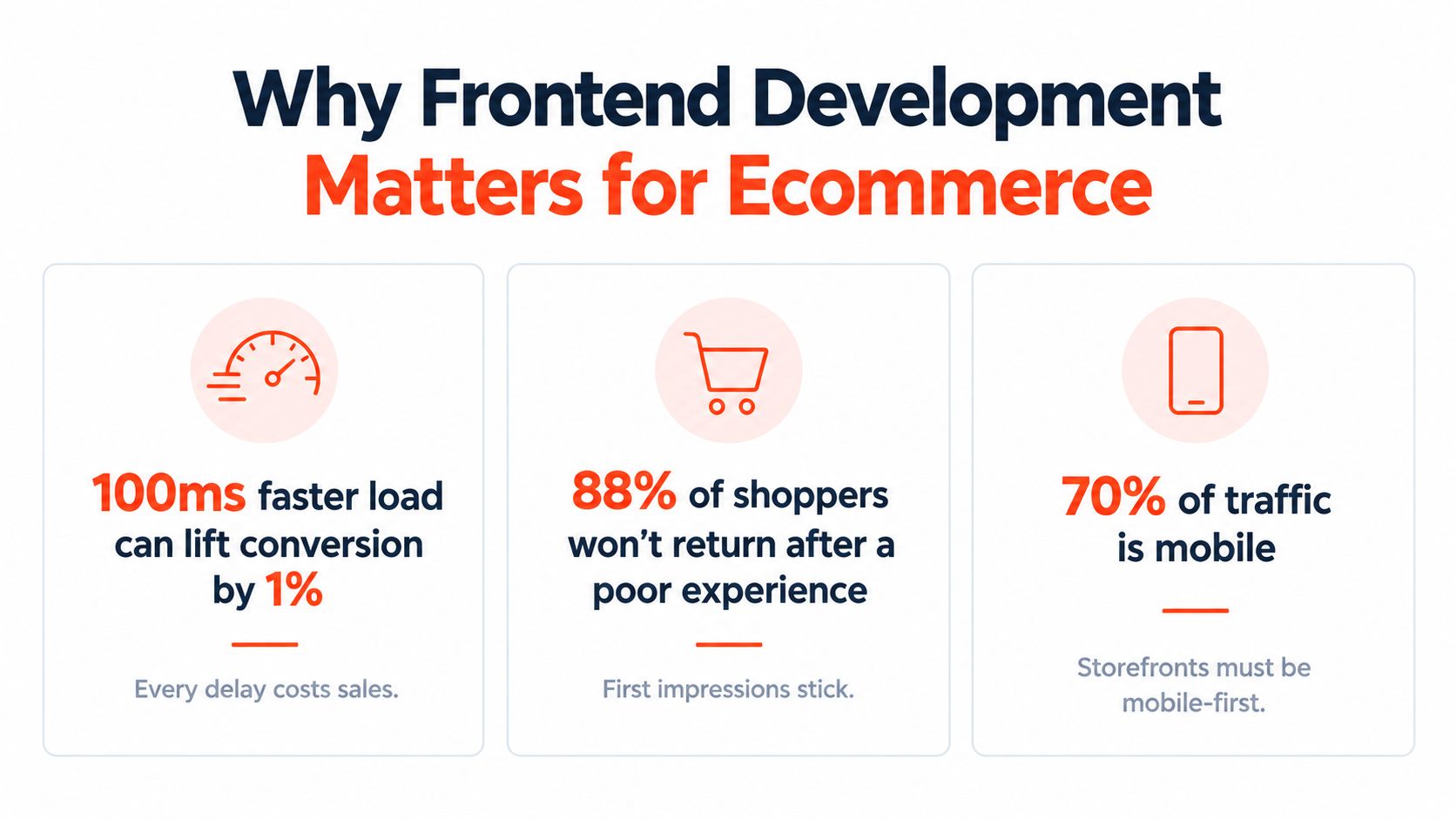
A storefront is where business intent becomes a customer experience. Merchandising decides which products appear, marketing writes the offer, and operations manages inventory, but frontend code determines whether a shopper can understand, move through, and act on those decisions without friction.
Consider a collection page after a rushed update. The filter control opens slowly because several scripts compete for the main thread. Product cards change height when images arrive because the layout has no dependable dimensions. A promotional banner loads late and pushes the product grid downward. None of these failures necessarily breaks the checkout technically, yet each one adds uncertainty at the exact moment a shopper is deciding whether to continue.
That's why frontend work deserves a place in commercial planning, not just a ticket in the development backlog. A fast filter can make product discovery feel effortless. A stable product detail page keeps the add-to-cart control where the shopper expects it. A restrained script strategy reduces the number of systems the team must debug when a release goes wrong.
The cost of treating the browser as an afterthought
Backend logic usually has clearer ownership. A team can assign responsibility for inventory, payments, fulfillment, and integrations. Frontend deterioration is more gradual. A developer adds one app block, a marketer adds one tracking tag, and a designer requests one more animation. Over time, the browser inherits a collection of decisions that no single person made deliberately.
The business impact appears in several forms:
Lost attention: Slow rendering gives mobile shoppers more time to abandon the page or return to search results.
Lower merchandising efficiency: A filter or sort control that feels unreliable discourages shoppers from exploring the catalog.
Release risk: More scripts, components, and app overrides create more places for a small theme change to cause an unexpected regression.
Higher support cost: Developers spend time tracing conflicts between vendors instead of building improvements that customers can see.
Weaker accessibility: Custom interactions often skip keyboard behavior, focus management, labels, or usable error states.
Practical rule: Every storefront feature has a user-facing cost, a browser cost, and a maintenance cost. Review all three before approving it.
The answer isn't to avoid rich experiences. Product quizzes, subscriptions, bundles, reviews, personalization, and dynamic merchandising can all support growth. The answer is to make performance and maintainability acceptance criteria from the beginning, then measure the result with real devices and representative pages.
Frontend isn't the decorative layer added after “real” ecommerce work is complete. It is the operating surface of the store. When that surface becomes slow or unpredictable, the business pays through weaker discovery, less confident purchasing, and a development team that moves more cautiously.
Understanding the Frontend Technology Stack
A useful Shopify frontend starts with a layered mental model. Each layer solves a different problem, and each layer can also introduce debt when teams use it to compensate for a problem belonging somewhere else.
Start with the document and presentation layers
HTML provides structure. Product titles, prices, descriptions, navigation, forms, and buttons need meaningful elements before JavaScript adds behavior. Semantic markup improves resilience because browsers, search engines, assistive technologies, and future developers can understand the page without reverse-engineering a component tree.
CSS controls presentation and layout. A disciplined CSS system defines spacing, typography, responsive behavior, states, and reusable patterns. The failure mode isn't CSS itself. It's a growing collection of exceptions, tightly coupled selectors, duplicated rules, and one-off styles added to fix the previous fix.
JavaScript supplies behavior. It should enhance the page where interaction genuinely requires it, such as a cart drawer, variant selector, predictive search, or product filter. It shouldn't automatically turn every content block into a client-rendered application.
Shopify themes combine Liquid templates with HTML, CSS, JavaScript, sections, blocks, and settings that merchants can manage through the admin. This approach often gives teams a strong balance between editorial flexibility, server-rendered content, and operational simplicity.
Choose frameworks for a reason
React and similar frameworks encourage component reuse and can make complex interfaces easier to organize. They also bring decisions about state, bundling, rendering boundaries, testing, hydration, and team conventions. A framework is valuable when it reduces complexity that the team has. It isn't valuable merely because the ecosystem is fashionable.
A conventional theme is often the sensible choice for a content-rich storefront with standard commerce flows and a team that wants merchants to control sections. A headless implementation can make sense when a brand needs a custom frontend application, multiple commerce backends, unusual interaction models, or a composable content architecture. The cost is greater responsibility for deployment, caching, preview workflows, accessibility, analytics, and integration maintenance.
Teams evaluating a custom data layer should understand how Shopify exposes products, collections, carts, and other commerce capabilities through its APIs. The Shopify Storefront API guide is useful context when deciding whether a headless model solves a genuine business constraint or adds another technical surface.
The right stack is the smallest one that supports the experience, the team, and the operating model. More abstraction can improve consistency, but it can also hide browser costs. Fewer layers can simplify delivery, but only if the codebase has clear conventions and reusable primitives.
The Current State of Frontend Development
Frontend development has moved from document assembly to user experience engineering. The web began with simple HTML documents, then gained dedicated styling and scripting capabilities before evolving toward dynamic applications. Key milestones include CSS in 1996, JavaScript in 1995, AJAX in 2005, Node.js in 2009, and React in 2013, as documented in this history of frontend development.
That history matters to Shopify teams because every capability added to the browser also added responsibility for the people shipping it. A static page had limited client-side work. A modern storefront may coordinate product data, variant state, predictive search, cart updates, personalization, analytics, animations, and third-party widgets. The customer sees one page. The engineering team operates a system.
The market signals strategic importance
A recent industry summary places frontend development at 38.4% of the global web development market, making it the largest development-type segment. The same source projects the broader global web development services market to grow from $87.75 billion in 2026 to $134.17 billion by 2031, at a compound annual growth rate of 8.87%. These figures come from the front-end development statistics summary.
React's reported 65.1% usage among developers also shows how strongly modern frontend work has concentrated around JavaScript frameworks. That concentration can help companies hire, share patterns, and reuse ecosystem knowledge. It can also encourage teams to select React by default, even when a theme, progressive enhancement, or a simpler server-rendered approach would better suit the storefront.
The business lesson is more important than the framework ranking. Frontend decisions now affect a meaningful share of web investment because they shape the customer interface, the delivery process, and the cost of future change.
Popularity doesn't remove trade-offs
A familiar framework may shorten onboarding, but it doesn't automatically produce a fast storefront. A component library may improve consistency, but it can also ship unused code. A headless setup may enable flexibility, but it transfers more operational work to the merchant and agency.
For ecommerce leaders, architecture should answer practical questions:
Decision | Business question |
|---|---|
Theme or headless | Which model gives the team the needed experience without unnecessary operational work? |
App or custom feature | Will this dependency remain valuable enough to justify its scripts and maintenance? |
Shared component or one-off block | Can future campaigns reuse the capability without creating another exception? |
Client-side behavior or server-rendered content | Does the interaction require browser execution, or is JavaScript being used by habit? |
The strongest frontend strategy treats technology as a means of controlling operating cost. Teams should choose tools they can test, observe, update, and remove, not just tools that make the first release look impressive.
Measuring Frontend Performance for Shopify Stores
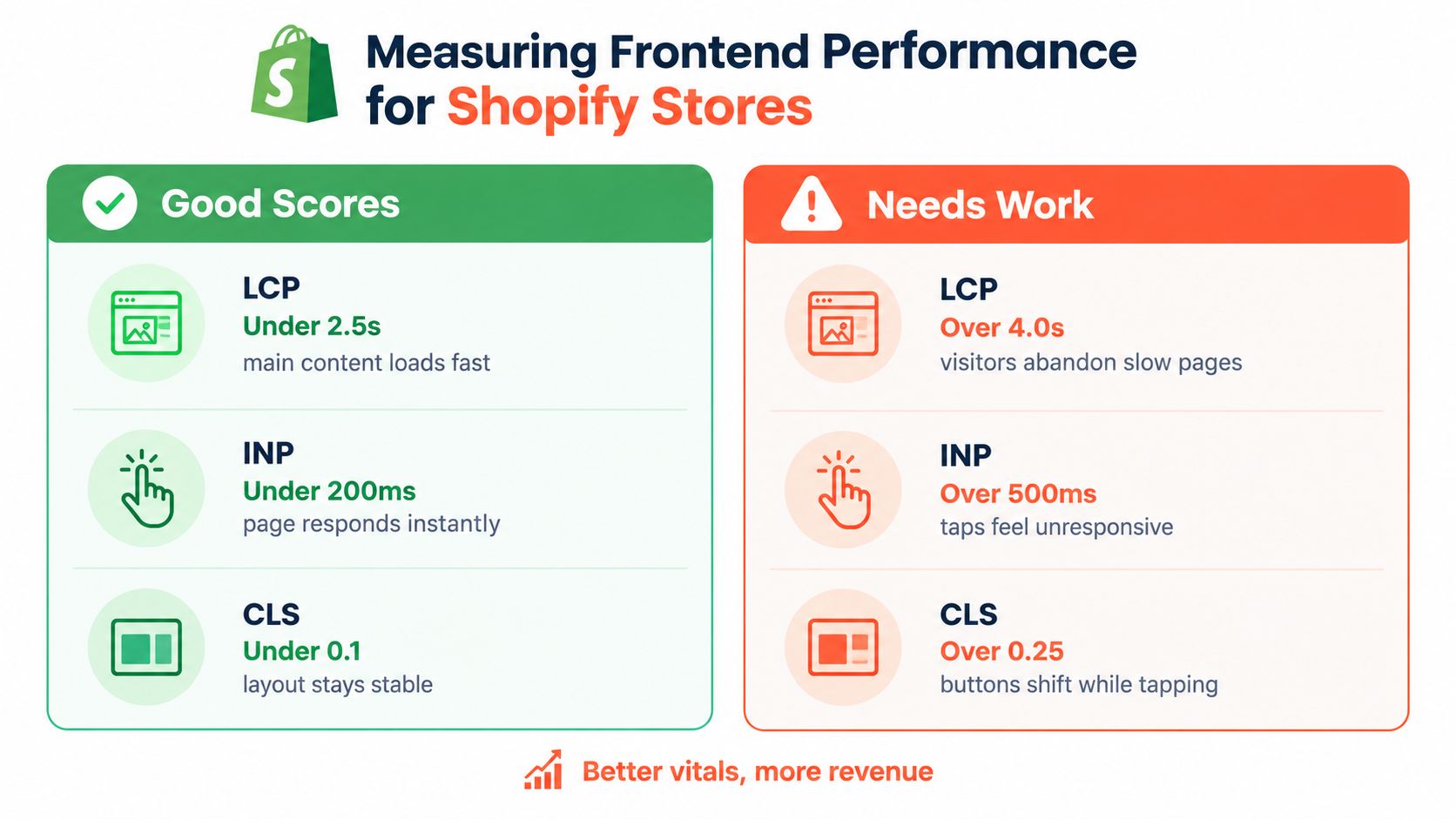
Performance measurement becomes useful when each metric maps to a shopper action. Google's Core Web Vitals provide three practical benchmarks for that purpose: Largest Contentful Paint under 2.5 seconds, Interaction to Next Paint under 200 milliseconds, and Cumulative Layout Shift under 0.1, as explained in this Core Web Vitals guide for ecommerce.
Read the metrics as user experience signals
LCP measures perceived loading speed. It focuses attention on the main content a visitor expects to see, often a product image, hero section, or prominent heading. Render-blocking CSS and JavaScript, oversized media, slow app embeds, and excessive client-side work can delay it. On Shopify, start by examining the critical path for the first viewport rather than optimizing a minor component below the fold.
INP measures responsiveness during interaction. A shopper experiences poor INP when filtering, selecting a variant, opening a cart drawer, or adding an item produces a visible pause. Large JavaScript bundles, expensive event handlers, repeated rendering, and third-party scripts can compete for the main thread. The remedy may be smaller components, less state work, deferred behavior, or removing a script that doesn't justify its cost.
CLS measures visual stability. A layout that shifts while a shopper taps a button creates both frustration and input errors. Reserve space for images, banners, reviews, and embedded content. Define dependable dimensions and avoid inserting promotional elements above controls after the initial layout has been calculated.
A performance review should combine lab testing, field data where available, browser traces, and device testing. A score alone won't tell you whether a filter feels slow on a mid-range phone or whether a specific app causes a long task. A practical web performance audit checklist can help teams organize the investigation before making changes.
Fix architecture before polishing symptoms
Start with the page types that matter commercially. Test collection pages with filters, product pages with variant logic, the cart experience, and landing pages used in campaigns. Record the page with and without optional app features when that comparison is possible.
Then work through the likely sources of cost:
Reduce render blocking: Keep critical styles focused and defer nonessential scripts.
Control third parties: Review each app embed, tag, widget, and tracking tool for actual business value.
Stabilize the first viewport: Reserve space for images and promotional content before asynchronous content arrives.
Trim hydration work: Don't make static product grids or editorial sections depend on client-side execution without a clear reason.
Measure after each meaningful change: A faster lab result that breaks filtering or merchandising isn't a successful optimization.
The Shopify performance optimization guide offers further context for turning these principles into storefront work. Performance isn't a final polish pass. It constrains component design, app selection, image handling, and release review from the first build.
Modern Architecture Patterns for Commerce Interfaces
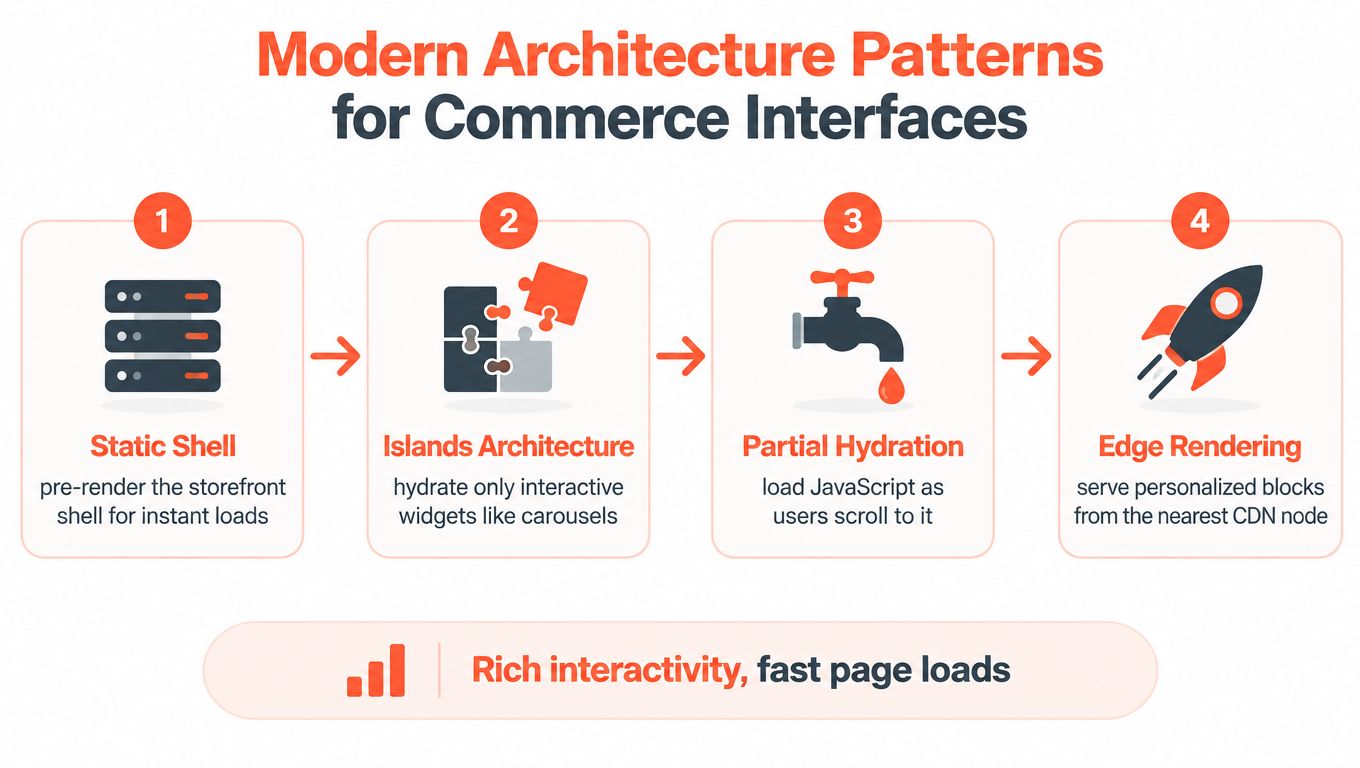
A rich storefront doesn't need to make the entire page interactive. In many cases, shoppers need only a few active regions: a variant selector, a search field, a cart drawer, a carousel, or a personalization module. The rest can remain dependable HTML that renders without asking the browser to initialize a large application.
Keep static content static
Islands architecture treats interactive components as separate islands inside a mostly static page. A product grid, editorial introduction, and merchandising copy can arrive as HTML, while a filter or quick-add control receives the JavaScript it needs.
Partial hydration takes that idea further by loading or activating behavior selectively. A component can hydrate when it becomes relevant, when a shopper interacts with it, or when the device and connection make the cost reasonable. This reduces the JavaScript executed on the client, which lowers CPU time, memory pressure, and the risk of long tasks.
The pattern is particularly useful for content-heavy commerce pages. A promotional carousel may need interaction, but the surrounding campaign copy doesn't. A recommendation block may require personalization, while the product title, price, and primary image should remain straightforward content.
The best interactive component is often the one that doesn't force the rest of the page to become interactive.
This architecture can improve first paint and responsiveness by deferring nonessential work and avoiding the cost of large bundles. It doesn't eliminate complexity. Teams still need clear component boundaries, loading states, analytics behavior, and accessible fallbacks.
Match rendering to the customer journey
Use a static shell for the content that establishes trust and context. Hydrate the product controls that directly support purchase intent. Defer lower-priority features such as below-the-fold carousels, secondary recommendations, and optional animations.
Edge rendering can help when the storefront must assemble region-specific or personalized content close to the shopper, but it introduces caching and invalidation decisions. Teams need to define which parts are safe to cache, which vary by user or market, and what happens when a personalization service is unavailable.
Headless commerce can support these patterns, but it isn't a prerequisite for thoughtful rendering. Shopify themes can also apply progressive enhancement and restrained client-side behavior. The Shopify headless commerce overview can help teams compare the flexibility of a composable frontend with the operational simplicity of a theme-based storefront.
The architectural objective is not maximum interactivity. It is the right amount of interactivity at the right time, with the smallest client-side cost that still supports the buying journey.
Future-Proofing Your Frontend Development Approach
The framework race is becoming a distraction. The durable question for ecommerce teams is how to keep a storefront operable when AI tools generate components faster than humans can review them.
AI-assisted development can standardize boilerplate and speed up routine implementation. That makes TypeScript, automated checks, design-system governance, and code review more valuable, not less. Generated code still needs to fit the storefront's conventions, respect server and client boundaries, preserve accessibility, and avoid adding another dependency that nobody plans to maintain.
Govern the output, not just the prompt
A prompt can produce a functional component while missing the operational context around it. It may duplicate an existing pattern, introduce a new state library, render content on the client without need, or create an interaction that works with a mouse but not a keyboard.
A production workflow should require every generated change to answer specific questions:
Where does this component belong? It should fit an existing domain, feature boundary, or design-system pattern.
What does it load? Review bundle impact, third-party requests, images, fonts, and client-side dependencies.
How does it fail? Test empty states, slow responses, unavailable services, invalid inputs, and unusual product data.
Can shoppers operate it accessibly? Check keyboard navigation, focus behavior, names, roles, contrast, and announcements.
Who owns it later? Assign responsibility for updates, monitoring, documentation, and removal.
This process matters because app sprawl and AI-generated code create similar problems. Both make it easy to add capability without deciding who will pay the maintenance cost. A lean storefront needs a dependency inventory, a clear removal process, and a rule that every new app or component earns its place through measurable business value.
Fix the delivery seams
Many performance and accessibility regressions begin before code reaches production. A design handoff may omit responsive states. A developer may receive no guidance for loading or error behavior. Testing may happen only after the feature is complete, when changing the interaction is expensive. Post-launch cleanup then competes with campaign deadlines and gets postponed.
The solution is process instrumentation, not another framework. Add performance checks to pull requests where practical. Review representative product and collection pages before release. Include keyboard and screen-reader checks in acceptance criteria. Compare the cost of a feature against the scripts, states, analytics events, and support work it introduces.
A design system helps when it contains real, tested primitives rather than a gallery of disconnected components. TypeScript helps when teams use it to define meaningful contracts rather than suppressing errors. Automated tests help when they cover the customer paths that matter, not only the code that is easiest to test.
The future-proof frontend is not the one with the newest stack. It is the one a team can understand six months later, measure under real conditions, change without fear, and simplify when a feature no longer earns its cost.
Presidio builds and supports Shopify storefronts, themes, apps, headless implementations, performance improvements, and accessibility-focused ecommerce experiences. If your store has accumulated app sprawl, AI-generated code, or frontend performance issues, visit Presidio to discuss a maintainable audit and improvement plan.

Jamie, Presidio’s Designer, leads the practice alongside Johnnie. With over 10 years of e-commerce experience, Jay is a Shopify expert, known for crafting innovative solutions that prevent tech debt.
Jaime
Senior Product Designer, 2020



