Outrank AI

Your next product launch is ready, but customer service still checks the Shopify admin before answering delivery questions. Sales has a different customer record in the CRM, and finance is matching ERP invoices against exported orders. Integrating ERP and CRM should remove those handoffs, but connecting the systems without agreeing on ownership can make the confusion harder to untangle.
Table of Contents
When Customer Data and Operations Stop Talking to Each Other
Mapping Orders, Inventory, and Customers Without Creating New Silos
Why Integration Is Mostly a Data Problem Wearing a Connector Mask
Shopify-Specific Realities That Change the Integration Blueprint
When Customer Data and Operations Stop Talking to Each Other
Consider a DTC brand preparing to launch a replenishment product. A returning customer changes their delivery address, buys through Shopify, and contacts support about an earlier purchase. The support agent sees their history in the CRM, while the warehouse team works from an ERP record containing the old address.
Nobody has deliberately entered bad information. Each employee has updated the system they're responsible for, and nobody has defined which update should govern the next shipment.
Marketing might send a back-in-stock message before operations releases the stock for sale. A sales representative might promise availability that's already committed to wholesale orders. Finance then has to explain why the customer's payment, shipment, and invoice don't tell the same story.
Follow the customer promise
Start discovery with a customer journey, not a connector catalog. Trace a purchase from its commercial promise through payment, allocation, shipment, and any return. At each handoff, ask what the employee needs to know and where they get that information.
Customer service: Can an agent distinguish a paid order from an allocated or shipped order?
Marketing: Does a replenishment campaign use sellable availability or merely incoming stock?
Finance: Can someone connect a storefront transaction to its accounting record without matching spreadsheets manually?
Operations: Who approves changes after the warehouse begins work?
If an agency partner also handles sales relationships or project delivery, UI Lib's guide to the best CRM tools for agencies can support that separate software evaluation. Keep the evaluation distinct from the brand's integration design: choosing a CRM doesn't settle who controls operational data.
Discovery rule: Document the customer promise that each handoff must preserve before deciding which fields to synchronize.
Before the next launch or peak season, collect representative problem orders and walk through them with sales, service, operations, and finance together. Those examples give the team something more useful than a request to sync everything: an agreed description of what must work.
What Each System Owns Before Anything Gets Wired Together
A restaurant provides a useful mental model. The CRM is the hostess and server who recognize the customer, understand preferences, and record commitments. The ERP is the kitchen and supply operation that manage ingredients, preparation, and costs.
The storefront is the dining room where the customer experiences the result. A friendly server can promise a meal, but someone must confirm that the kitchen can prepare it. Likewise, a well-stocked kitchen doesn't automatically know what a returning guest expects.
The distinction is easier to discuss when the responsibilities sit side by side.
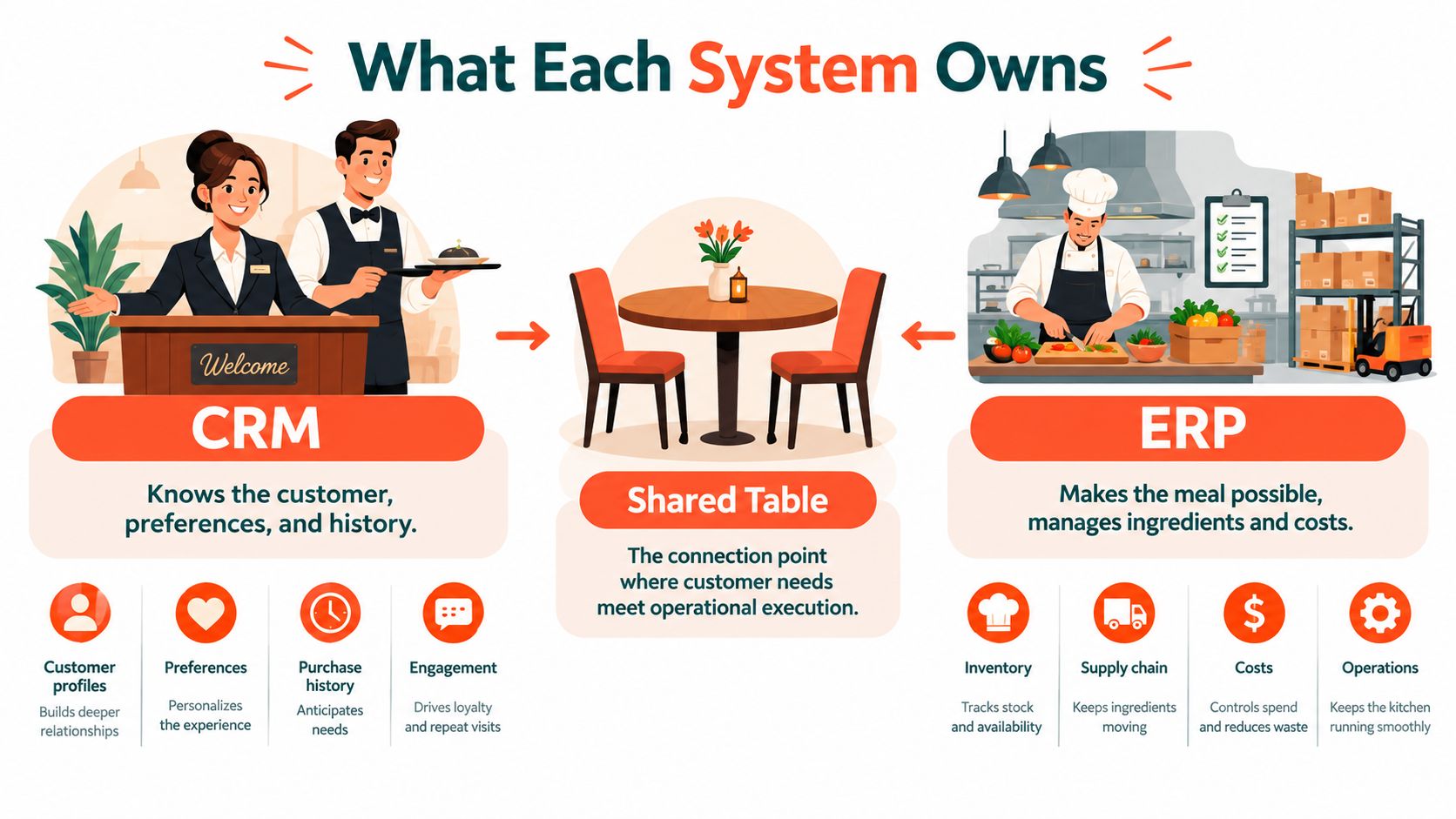
Separate relationships from execution
Use the following as a starting allocation, not an immutable rule:
CRM responsibilities: Leads, accounts, opportunities, relationship history, and customer commitments belong with the people managing commercial relationships.
ERP responsibilities: Product masters, operational pricing, inventory, fulfillment, invoicing, and returns belong with the teams executing and accounting for those commitments.
Storefront responsibilities: Checkout captures the purchase as the customer experienced it. Ecommerce behavior provides context that doesn't necessarily belong in an accounting record.
These systems are mainstream business infrastructure: Eurostat's e-business integration data reports that 46.45% of EU enterprises used ERP and 28.51% used CRM in 2025, with ERP adoption reaching 88.71% among large enterprises. Adoption alone doesn't establish an integration design, but it explains why connecting commercial and operating workflows matters beyond specialist use cases.
Assign authority at the field level
A customer isn't a single ownership decision. Marketing preferences, billing terms, delivery addresses, and service notes can require different authorities. Give each team control over the fields it understands and a defined route for requesting changes elsewhere.
Accounting obligations need their own review. Resources such as EndureGo Tax's Odoo ERP for ATO compliance are relevant when discussing Australian accounting requirements, but an integration shouldn't be treated as proof of compliance.
The practical deliverable is an ownership matrix signed off by business owners. It should distinguish who creates a record, who may change it, and who merely consumes it. That distinction prevents a shared customer view from becoming unrestricted shared editing.
The Four Patterns Most Ecommerce Teams Actually Choose
Don't choose an integration pattern because a vendor demonstrates a successful order transfer. Choose it based on what your team can operate when an order fails, a field changes, or a warehouse becomes unavailable.
Point-to-point connections, middleware, iPaaS, and embedded bridges aren't completely separate technical categories. An iPaaS is hosted middleware, and a native bridge may use the same APIs as a custom connection. The useful distinction is where transformation, orchestration, and operational responsibility sit.
Integration patterns at a glance
Pattern | Best fit | Ecommerce trade-off |
|---|---|---|
Point-to-point | A narrow workflow with stable requirements and an engineering owner | Direct control, but your team must build recovery, monitoring, and change management |
Middleware | Complex routing or business rules requiring a shared integration layer | Flexible orchestration, with infrastructure and software maintenance to own |
iPaaS | Teams that want managed tooling and reusable connectors | Less infrastructure work, but platform constraints and workflow complexity still need scrutiny |
Embedded or native bridge | Standard workflows closely matching the bridge's supported model | Convenient setup, with less room for unusual pricing, fulfillment, or customer rules |
Point-to-point can be a sensible choice when the scope is deliberately small. A custom Shopify-to-ERP order flow isn't automatically brittle; it becomes difficult to maintain when developers bury undocumented business decisions inside it. Don't expand a narrow connector into an invisible enterprise integration layer.
Middleware is appropriate when the brand needs explicit orchestration across Shopify, CRM, ERP, and warehouse systems. It gives engineers somewhere to implement routing and shared transformations. That control comes with responsibility for deployments, incident handling, and keeping the layer understandable.
Evaluate operations, not just configuration
An iPaaS can reduce infrastructure work, but it doesn't remove design work. Ask who can diagnose a failed transformation, how workflows are versioned, and whether operators can replay transactions safely. A visual builder isn't necessarily a workflow that a nontechnical employee can troubleshoot.
An embedded bridge deserves consideration when its supported behavior matches your business. Inspect its treatment of order edits, partial fulfillment, and customer updates before accepting a demonstration of the happy path.
Choose the pattern your team can recover, not merely the one your team can configure.
Assess order volume through burst behavior, not just averages. A launch, wholesale import, or backlog replay may stress the system differently from ordinary trading. For every candidate, request a walkthrough of a failed order and the recovery process. That reveals more than a list of supported applications.
Mapping Orders, Inventory, and Customers Without Creating New Silos
Field mapping starts too late if the team hasn't agreed what each field means. A CRM account, Shopify customer, and ERP debtor might represent related entities without being interchangeable records.
Build a data contract for each shared domain. Record its owner, identifiers, permitted updates, delivery expectations, and reconciliation rules. This gives developers an operational specification rather than a spreadsheet of similar-looking field names.
Use an ownership map to make those decisions visible.
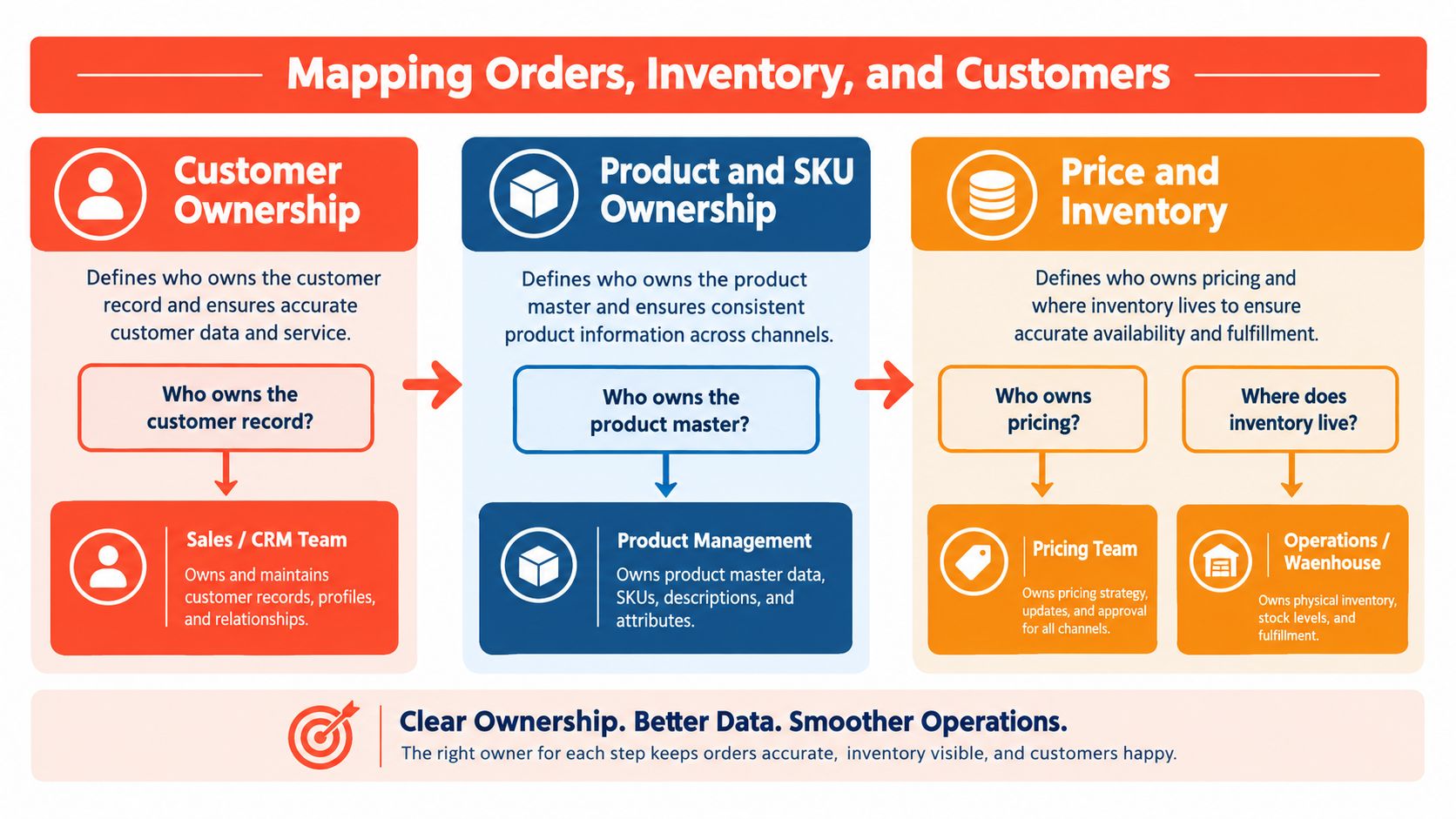
Identify records without guessing
Maintain a cross-reference between source identifiers. Don't use email as the only customer key: customers can change addresses, and a business buyer may have several contacts. Establish a matching policy and route uncertain matches for review instead of merging them without oversight.
For products, distinguish the product family, sellable variant, SKU, and operational item. A bundle sold through Shopify may need a different fulfillment representation in the ERP. Write that transformation down, including what happens when merchandising changes the bundle.
Preserve order-line identity through downstream processing. With split shipments, a single order status can hide which items remain outstanding. Define how fulfillment events map back to individual lines and how service teams should interpret partial completion.
Match timing to the business decision
Different workflows deserve different delivery expectations:
Inventory: Publish sellable availability from the designated authority, accounting for reservations and wholesale commitments. Don't trigger back-in-stock messages from a receipt that hasn't been released.
Pricing: Separate current catalog prices from the price accepted on an existing order. Define approval rules for bespoke or wholesale terms.
Customer changes: Send authorized updates in the agreed direction, while preserving the address captured on historical transactions.
Financial reconciliation: Use controlled comparisons, potentially in a nightly batch, to identify missing or mismatched records.
Checkout-facing decisions need sufficiently fresh data or a defined fallback. Financial reconciliation usually benefits more from completeness and traceability than immediate propagation.
During a systems integration services review, ask for these contracts alongside the architecture diagram. Then test them against a bundle, an amended address, a split shipment, and a wholesale reservation. If the contract can't explain those examples, adding more mapped fields won't resolve the ambiguity.
Why Integration Is Mostly a Data Problem Wearing a Connector Mask
Real-time, bidirectional synchronization isn't a default architecture. It's a set of permissions and conflict-resolution decisions. If Shopify, CRM, and ERP can all overwrite the same field, the team needs a business rule for deciding which change is valid.
The underlying data deserves scrutiny before automation expands its reach. Grant Thornton's digital transformation survey found that only 16% of respondents rated their data quality as excellent, while 32% said their data needed improvement for technology initiatives; it also identified integration challenges as the leading expected obstacle.
Define a canonical model that people understand
A canonical data model is a shared vocabulary for the information exchanged between systems. Keep it focused on actual workflows: customer identity, order acceptance, sellable availability, fulfillment progress, and financial status.
Don't copy the entire ERP schema into the integration layer and call it standardization. That makes the other systems adapt to an implementation detail rather than a business concept. Equally, don't flatten every domain into generic customer and order objects that omit distinctions operators need.
Define the meaning of each status, its permitted transitions, and the evidence required to change it.
Conflicting updates: Resolve them through domain authority or review, not just whichever timestamp is newest.
Financial changes: Preserve approval and audit requirements instead of allowing arbitrary overwrites.
Change governance: Require the relevant business owner to approve altered mappings and rules.
Architecture principle: Shared visibility doesn't require shared write access.
Make AI a controlled consumer first
The next useful step isn't giving an assistant unrestricted access to operational systems. It's supplying trustworthy, permissioned context. A manufacturing study published through Endeavor Business Media found that 55% of executives wanted more ERP functionality embedded in CRM in 2025, supporting the relevance of bringing operational context into customer-facing workflows.
For ecommerce, start with read-only assistance: summarizing order history, explaining fulfillment progress, or suggesting eligible products. Include freshness information and restrict sensitive financial fields.
Discount approval, inventory allocation, and refunds should remain controlled actions. An orchestration layer can validate a proposed action against permissions and current business rules before execution. AI readiness is therefore a reason to strengthen governance, not a reason to skip it.
Shopify-Specific Realities That Change the Integration Blueprint
For a Shopify implementation, treat the Shopify Order as the authoritative record of what the customer purchased through the storefront. Let the ERP govern downstream accounting and operational execution where those responsibilities belong. Don't force either system to replace the other's distinct transaction history.
The storefront-to-warehouse relationship should make those boundaries explicit.
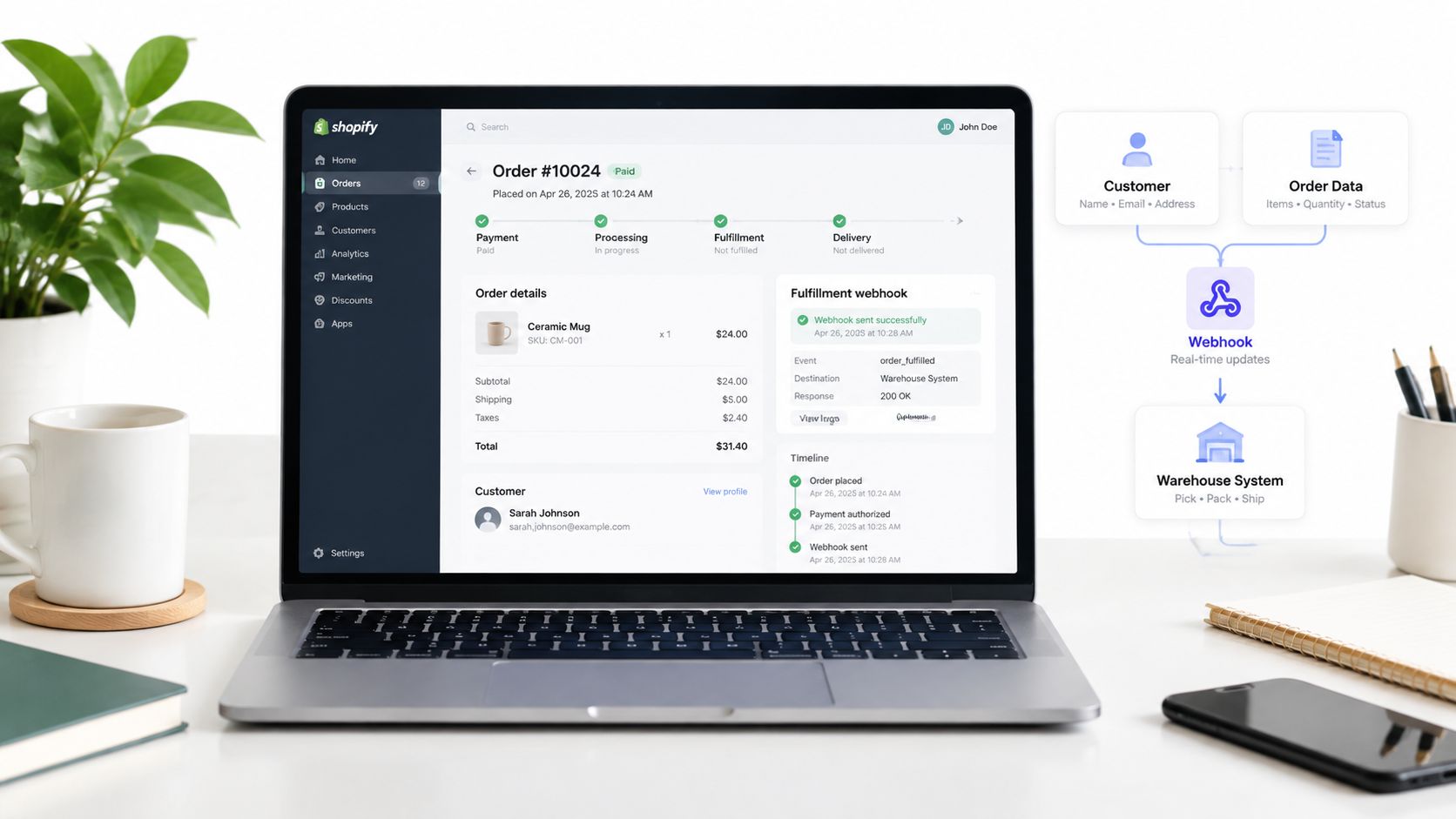
Sequence commercial capture before downstream enrichment
Use the Shopify Customer identifier to connect storefront activity to the broader customer model. Don't assume every Shopify customer needs an ERP customer account, or that every CRM lead should become a Shopify customer. Define creation criteria around the workflows that require those records.
For Draft Orders, decide when a bespoke sale becomes eligible for operational processing. A quotation under negotiation shouldn't accidentally trigger fulfillment. Preserve the agreed price when the sale is accepted rather than recalculating it from a later catalog update.
Map Shopify locations to operational fulfillment sources explicitly. Keep location identity attached to inventory and fulfillment updates, and define how fulfillment webhooks inform customer-facing status. For delivery-specific planning, Routelink's Shopify local delivery workflow help is a useful resource to evaluate alongside warehouse workflows.
Resolve rules before adding channels
Review Shopify Functions and discounts as rule-bearing checkout components. Decide where eligibility is maintained and how checkout receives the information it needs. Don't make a fragile dependency on a slow back-office response the only route to a valid purchase.
For Shopify Plus B2B catalogs, verify the intended account and price context before export. For subscriptions, distinguish a continuing agreement from each resulting order. For international expansion, preserve the transaction's currency and tax context rather than assuming the domestic mapping applies unchanged.
Use the accompanying video as a visual reference while discussing the integration workflow.
A sensible implementation sequence starts with accepted orders and traceable downstream processing, then adds operational status and availability. Add relationship enrichment and more complex selling rules after the core transaction path passes testing. That limits the number of moving parts the team must diagnose during the pilot.
Where Integrations Quietly Fail and How to Catch Them Early
A connector can return a successful response while the business transaction remains wrong. An ERP record may exist under the wrong customer, a fulfillment update may reference the wrong line, or a retry may create another order. Monitor business outcomes as well as transport success.
A survey-based ERP–CRM integration study, involving 52 companies and interviews with 12 IT managers and executives between June and December 2023, reported technical complexities for 48% of respondents and resistance to organizational change for 42%, while 79% reported improved operational efficiency and 82% higher customer satisfaction after integration. These are limited-sample findings, not failure-mode frequencies or guaranteed results.
Use the checklist to test your own implementation rather than infer how often each problem occurs.

Require evidence before go-live
Duplicate customers: Inspect ambiguous matches and confirm that operators can correct links without deleting transaction history.
Conflicting inventory: Compare availability by item and location. Alert on stale updates, not only failed requests.
Lost orders during retries: Use durable queues and idempotent writes, so repeating the same business operation doesn't create another order.
Price drift: Compare accepted line prices, discounts, currency, and relevant totals across the transaction path.
Rollback gaps: Test how to pause exports, isolate affected records, and restore service without replaying completed work indiscriminately.
An error queue needs a named operator, a readable explanation, and replay tooling. Record correlation identifiers so support can follow a transaction across systems. Define compensating actions for work that can't be undone, such as an already-dispatched shipment.
Test the human recovery path
Use least-privilege access, protect credentials, and restrict payloads to necessary data. Include authorization failures and inaccessible systems in testing.
For a Shopify API integration review, request demonstrations of interrupted processing and recovery, not just successful exports. Have finance, service, and operations run the recovery procedure themselves. If only the original developer can resolve an exception, the operating model isn't ready.
A Phased 90-Day Roadmap Teams Can Actually Run
Treat this 90-day roadmap as a proposed delivery cadence, not a promise that every integration fits the schedule. Progress should depend on exit criteria, not calendar pressure.
Use the timeline to assign deliverables and accountable owners.
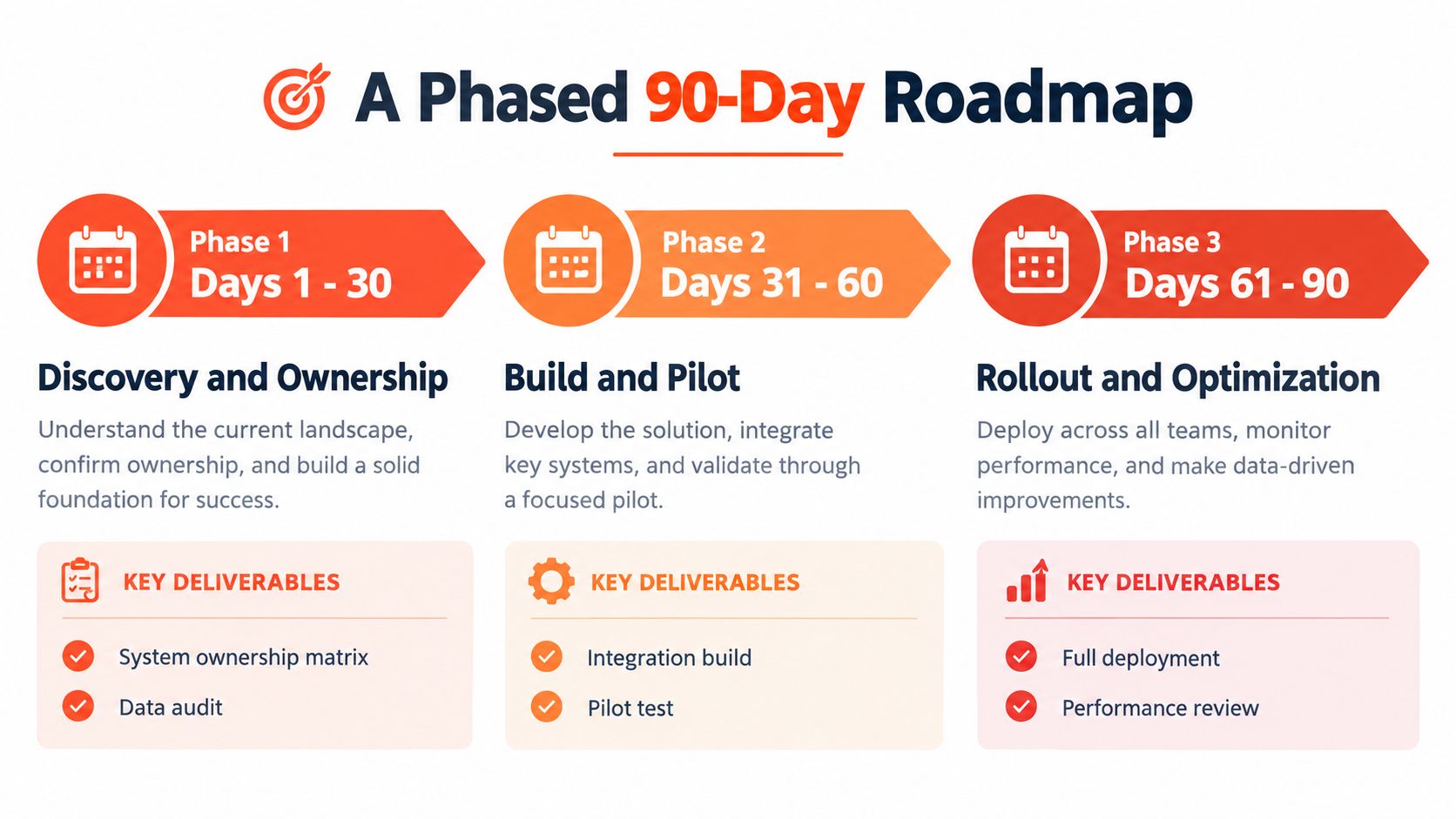
Advance only when the operating model is ready
Days 1–30, discovery and ownership: Audit representative records, approve the ownership matrix, and document data contracts. Exit when business owners resolve disputed responsibilities.
Days 31–60, build and pilot: Implement the core transaction path and recovery controls. Exit when operators can reconcile pilot orders and handle exceptions without developer intervention.
Days 61–90, rollout and optimization: Expand deliberately, review incidents, and refine procedures. Exit when monitoring, support ownership, and change approval are established.
Use a Shopify integration services assessment to turn those deliverables into a scoped backlog. Keep unresolved governance decisions visible instead of disguising them as implementation tasks. A connector is ready only when the people running it know what to do next.
Presidio offers Shopify systems integration and ERP connectivity alongside custom development and ongoing support. Bring your ownership questions, representative problem orders, and upcoming launch requirements to scope a maintainable Shopify, ERP, and CRM integration around the workflows your team needs.

Jamie, Presidio’s Designer, leads the practice alongside Johnnie. With over 10 years of e-commerce experience, Jay is a Shopify expert, known for crafting innovative solutions that prevent tech debt.
Jaime
Senior Product Designer, 2020



