Presidio

Core Web Vitals are Google's three real-user metrics for loading, responsiveness, and visual stability: LCP, INP, and CLS. A good experience means LCP occurs within 2.5 seconds, INP stays below 200 milliseconds, and CLS stays below 0.1.
You've opened your Shopify store on your phone, and everything looks fine. Yet a customer describes a blank product image, an add-to-cart button that seems stuck, or a product grid that jumps beneath their finger. Those complaints describe different problems, even though shoppers might call all of them a slow website.
Table of Contents
Why Your Shopify Store Feels Slow to Shoppers
A shopper opens a clothing product page from your latest campaign. The title appears, but the main photo is still missing. They select a size and see no response. Just as they reach for the purchase button, a promotional message shifts it down the page. They leave before completing the purchase.
This is an illustrative shopping moment, not a measured case study. It shows why looking ready and being usable aren't the same thing. A merchant who checks a familiar page may notice its design without testing the actions customers need to take.

Separate the shopper's complaints
A Shopify storefront has something in common with a physical shop. Opening the doors is only the start if the merchandise is hidden, a sales assistant ignores a request, or shelves shift while customers browse. Each problem points to a different part of the shopping experience:
Missing merchandise: The page frame is visible, but the main content, such as a hero image, has not appeared.
Unanswered requests: A shopper taps a control, such as a size option or add-to-cart button, and gets no clear response.
Moving shelves: The shopper loses their place when content, such as a product grid or promotion, changes position unexpectedly.
These distinctions help you give your developer a useful description. Instead of asking them to make the store faster, name the page, the action you took, and what happened on screen.
Merchant check: Open a product page, choose a variant, and try its controls. Watch whether the page responds and the layout stays predictable.
A Shopify store audit can help you examine these moments alongside the wider buying journey. Start with the customer's specific experience, then investigate what may be causing it. Each complaint points to a different measurement, which the next section explains.
Core Web Vitals Explained in Plain English
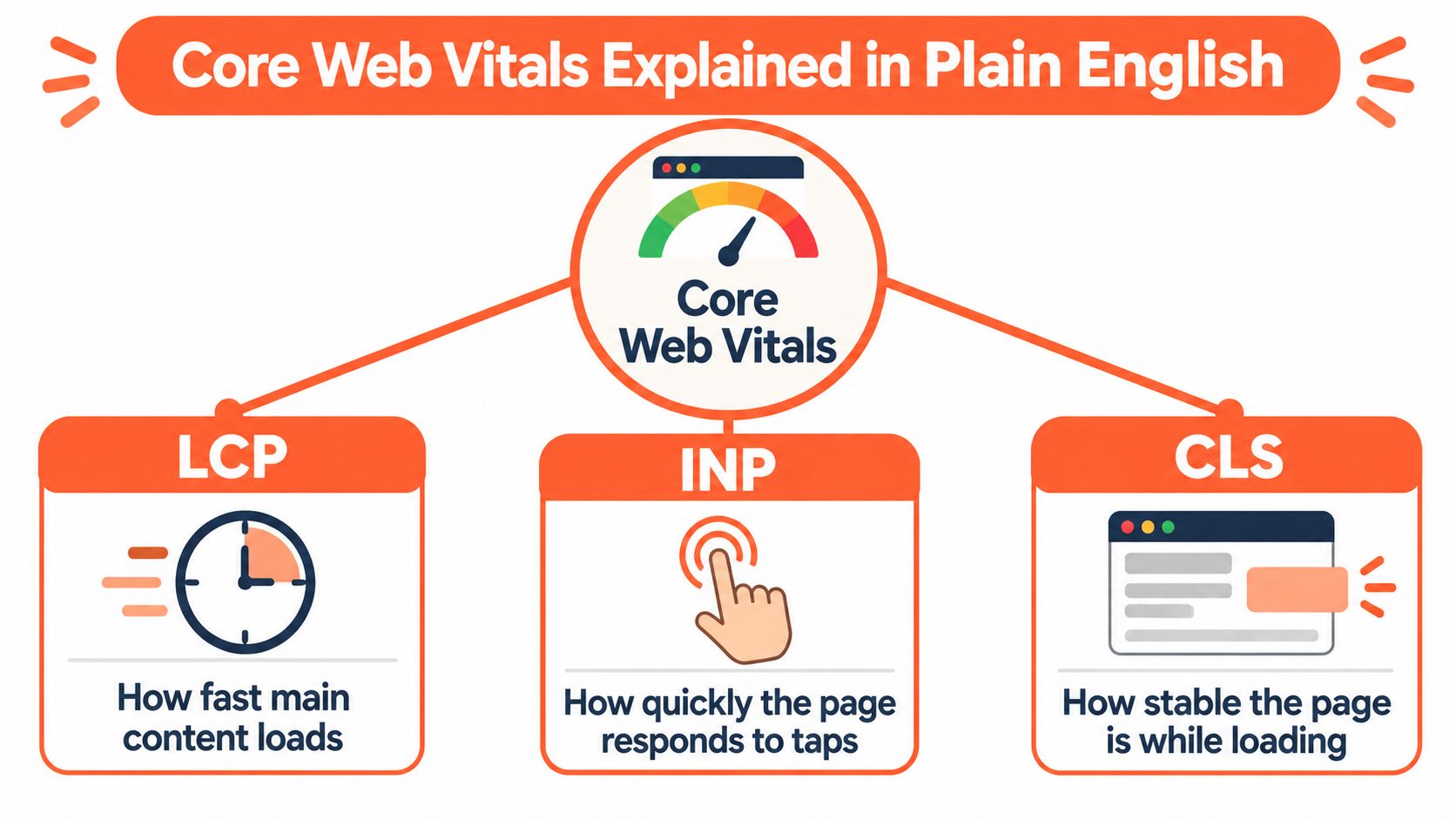
A storefront works well when shoppers can see the main merchandise, get a visible response to their taps, and browse without the page shifting around. Core Web Vitals measure these separate parts of a visit, rather than reducing the experience to one overall speed score. Largest Contentful Paint, Interaction to Next Paint, and Cumulative Layout Shift give merchants and developers shared terms for discussing what shoppers see.
This concept map connects each metric to the experience it measures.
Real visits matter more than a perfect demonstration
Field data comes from actual visitors. A laboratory test examines a page under selected conditions, which can help identify issues, but one clean demonstration cannot show whether customers consistently get the same experience.
Performance assessment uses a percentile, so a particularly fast visit does not settle the question. Developers need to see how the page performs across visitor experiences. This matters on a Shopify store because shoppers may arrive on different devices and connections.
The names and measures have changed over time. Google introduced the Web Vitals initiative in 2020, then incorporated Core Web Vitals into its page-experience systems. In March 2024, INP replaced First Input Delay, or FID. INP considers responsiveness across a visit, while FID focused on the first interaction.
Loading, responding, and staying still are separate responsibilities. Treat them as parts of one shopping experience, not interchangeable achievements.
For a companion resource on how to improve site performance metrics, see Up North Media's Core Web Vitals guide. Keep the discussion tied to storefront moments, such as a hero image appearing, an add-to-cart tap receiving a response, or a product grid shifting while someone browses.
The embedded video offers another way to follow the visual explanation.
The useful mental model is straightforward: a page needs to show its important content, respond to shopper actions, and keep its layout steady. A strong result in one area does not make up for a weakness in another.
LCP INP and CLS Thresholds That Define Good
Core Web Vitals Good Thresholds at a Glance
The thresholds below are typically assessed at the 75th percentile of user experiences, according to Google's Core Web Vitals guidance.
Metric | What It Measures | Good Threshold |
|---|---|---|
LCP | When the largest visible content element renders | Within 2.5 seconds of navigation |
INP | How quickly the page visually responds to interactions | Below 200 milliseconds |
CLS | Unexpected movement of page content | Below 0.1 |
LCP measures the arrival of the main content
On a Shopify homepage, the largest visible element might be the hero image. On a product page, it might be the main product photograph. A prominent headline or promotional banner can also be the element being measured.
LCP isn't the moment every part of the page finishes loading. It concerns the arrival of the largest visible content element. A shopper might already see navigation and smaller details while still waiting for the content that gives the page its purpose.
A useful diagnostic question is: which important element remains missing when the page first appears? Don't assume the logo or the first visible text is what determines this metric.
INP measures visible response during interaction
A shopper selects a size, opens a filter, or taps add to cart. INP concerns how quickly the page visibly responds to those interactions throughout the visit.
That distinction prevents a common misunderstanding: a quick page arrival doesn't establish quick interaction. The product image can appear promptly while the controls still feel unresponsive.
INP also isn't the time until an entire business process finishes. Focus on whether the page provides a timely visual response to the shopper's action.
CLS measures unexpected movement
CLS addresses stability, not elapsed loading time. Its threshold is a score, not a duration.
Suppose a shopper is reading a product card when a banner appears above the grid and pushes the cards downward. That unexpected movement is the kind of behavior CLS measures. A page can deliver content promptly and still feel awkward because shoppers keep losing their place.
For diagnosis, use the table to classify the complaint before proposing a fix. Waiting for the main image, waiting for a tap response, and chasing moving content require different investigations.
Why Passing One Metric Does Not Mean Passing All
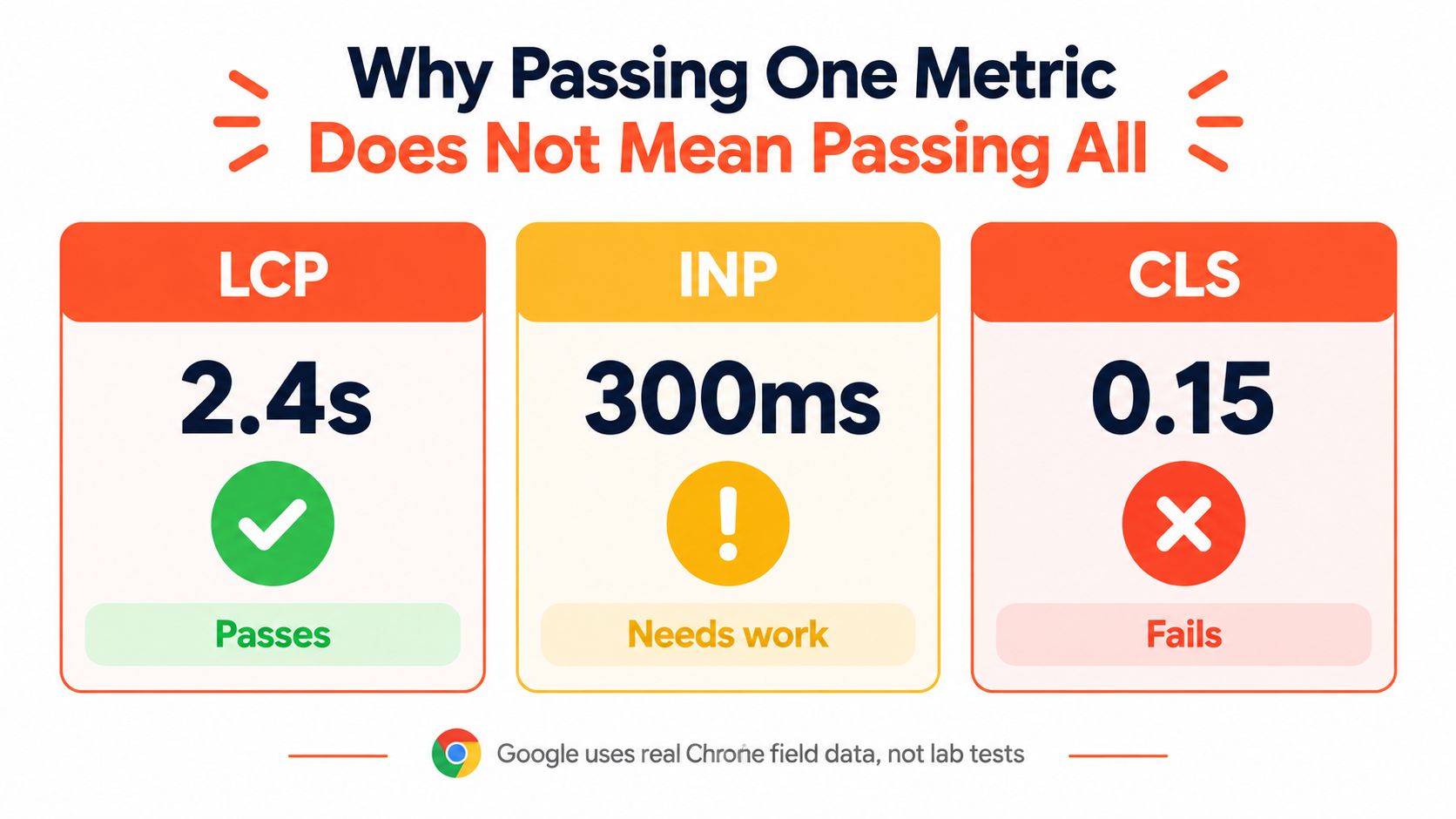
A storefront can perform well on an individual metric without delivering a consistently good overall experience. The Chrome UX Report, or CrUX, makes that distinction visible through measurements from actual Chrome users rather than a single simulated visit.
In the January 2025 dataset, 66.2% of origins had good LCP, 77.8% had good CLS, and 85.8% had good INP, but only 51.3% achieved good results across all metrics simultaneously, as reported in the Chrome UX Report dataset announcement. These are broad web measurements, not Shopify-specific pass rates.
The illustration below shows the underlying principle: individual results can disagree.
Read the combined result carefully
The dataset doesn't establish what's wrong with your particular store. It establishes why an individual green result isn't enough evidence to stop investigating.
For merchants, the practical interpretation is straightforward:
Separate results reveal different weaknesses: A favorable loading result doesn't resolve a poor interaction or stability result.
Field measurements describe experienced performance: They help you judge whether improvements reach visitors, not just your test environment.
A combined assessment needs a combined response: Review each metric before deciding that the store is performing adequately.
A laboratory result remains useful for diagnosing a problem under controlled conditions. Treat it as evidence about that test, not proof that the customer experience is settled.
Keep SEO expectations realistic
Google states that its ranking systems use Core Web Vitals, as described in its guidance referenced above. It also makes clear that satisfying them doesn't guarantee a particular search position.
Your product pages still need to answer the shopper's search intent. Performance work doesn't replace useful product information, relevant content, or the other considerations involved in search ranking.
Priority lens: Improve the experience customers actually receive. Don't turn a passing assessment into a promised ranking or revenue outcome.
The balanced merchant decision is to give performance a defined place in the development roadmap while continuing to improve merchandising and content. You don't need to choose between a useful page and a usable page.
Where Core Web Vitals Break on Shopify Stores
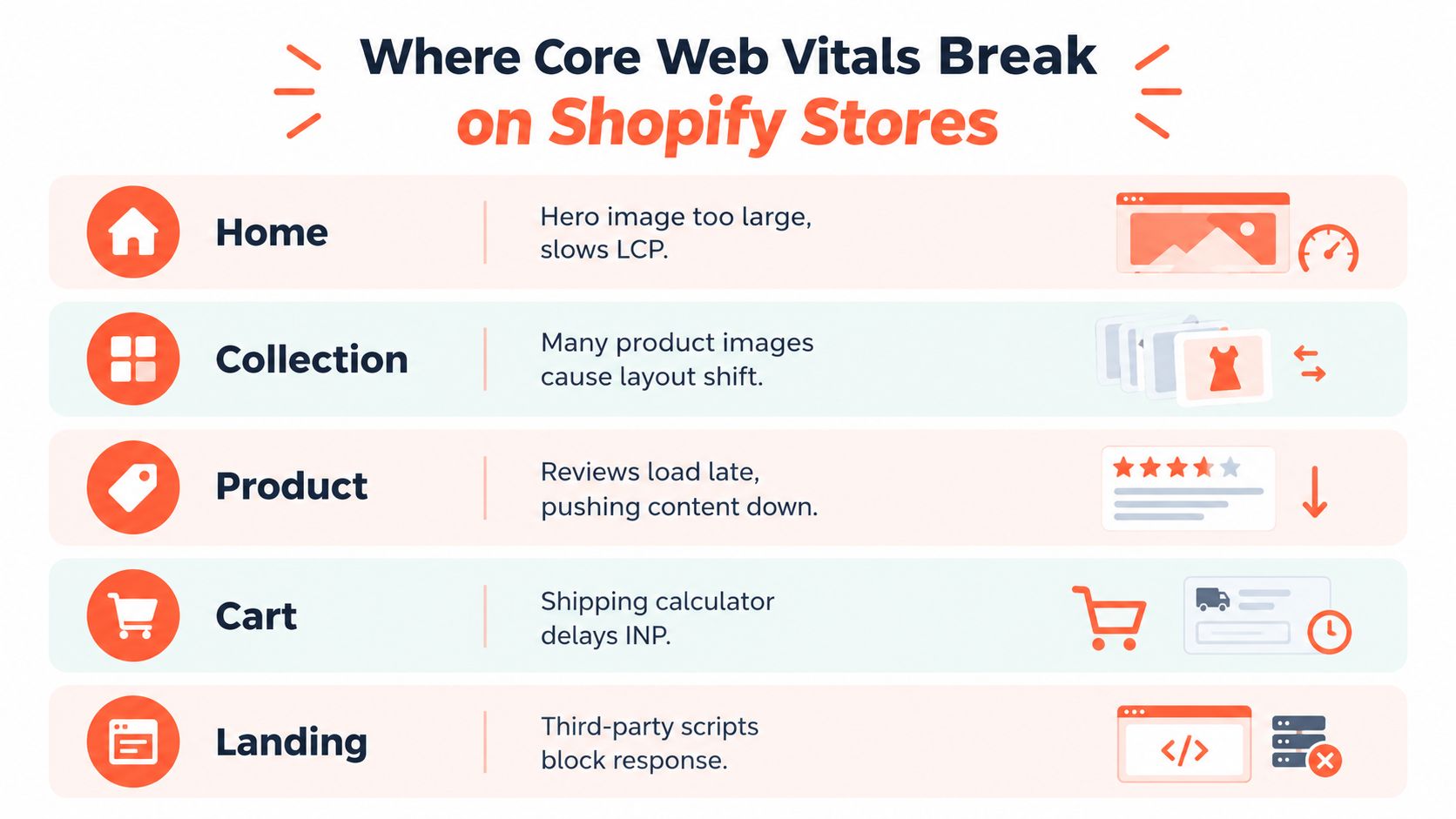
Walk through your store as a customer would, starting with the homepage and moving toward the cart. The following examples are diagnostic scenarios, not claims that every Shopify store has these problems. They connect familiar page elements to the behavior worth investigating.
On the homepage, a campaign hero may leave the main promotional area empty while smaller elements appear. On a collection page, product cards may move as images arrive. Those symptoms belong to different metrics even if both appear during loading.
This checklist shows where to look across familiar templates.
Follow the purchase journey
A product page may introduce reviews or recommendations after its initial content appears. If those additions don't have reserved space, they can push information away from the shopper's current position. Font loading is another detail to include when investigating an unstable layout.
The cart requires interaction testing, not just a screenshot. Try changing quantities and using shipping controls. If the page hesitates before acknowledging an action, ask your developer to examine the code running during that moment.
A campaign landing page may look polished while several third-party tools compete for browser processing time. Testing its controls can reveal problems that aren't obvious when you only inspect the design.
Storefront observation | Investigation to request |
|---|---|
Main promotional content appears late | Identify the largest visible asset and its delivery path |
Product cards move after appearing | Inspect image space and late-added elements |
Controls feel unresponsive | Examine scripts running during the interaction |
Recommendations push content downward | Check whether their space is reserved |
A guide to choosing a Shopify theme can support decisions about your store's foundation. Evaluate candidate themes through the features and shopping actions you'll use, not just their demo appearance.
The useful handoff is specific: name the template, describe the action, and record what the shopper sees. Your developer can then investigate the responsible asset, script, or layout behavior instead of guessing.
Improvement Priorities for Steady Compliance
Start with the mobile shopping journey, not a desktop homepage score. Choose representative home, collection, product, cart, and landing pages, then give your developer a prioritized list of observed problems. The objective is sustained compliance across important templates.
Chrome's CrUX data aggregates real-user experiences over 28 days, making it useful for monitoring releases and regressions rather than judging success from a single test, as explained in Chrome's guidance on real-time Core Web Vitals debugging. That guidance also supports treating each metric through its own engineering mechanism.
Match the work to the failing metric
For LCP, prioritize the main asset: Ask your developer to examine delivery delays, server and content-delivery-network latency, and resources that prevent the browser from displaying important content. Use the Shopify hero image size guide when reviewing homepage imagery.
For INP, reduce competing browser work: Split or defer nonessential JavaScript, shorten interaction handlers, and review app code that runs during shopping actions. Don't remove useful functionality blindly; identify what's interfering with responsiveness.
For CLS, reserve space: Give images, banners, recommendations, and other late-arriving content a predictable place before they appear.
For another resource to discuss with your developer, Netco Design LLC's fixes for Core Web Vitals can accompany your implementation checklist. Use recommendations selectively, based on the problems your store exhibits.
Keep a record of what changed, which template it affected, and which metric it was intended to improve.
Make monitoring part of maintenance
Test changes before release, then review field results as newer visits enter the reporting window. An immediate laboratory improvement is encouraging, but it isn't a substitute for checking the customer experience afterward.
Assign someone to review performance when the team adds an app, changes a campaign template, or introduces a merchandising widget. A lean, maintainable implementation is easier to support when developers know which features must remain responsive and which layout spaces must stay predictable.
Presidio offers Shopify technical audits, performance tuning, and ongoing development support for storefronts, themes, and apps. Visit Presidio to discuss your mobile shopping journey and build a practical roadmap for improving loading, responsiveness, and layout stability.



