Presidio

A Shopify store can look healthy in the admin while its organic performance deteriorates. The growth team launches thousands of products, adds review and merchandising apps, and enables filters across every collection. Search Console fills with indexing requests, category pages feel sluggish on mobile, and nobody can explain why Google keeps crawling URLs that don't deserve to rank.
That isn't a metadata problem. Technical SEO for ecommerce is a resource-allocation problem. You need to decide which URLs search engines should discover, crawl, render, index, and revisit, then make the storefront enforce those decisions across product templates, collection filters, variants, pagination, and third-party scripts. The practical priority is simple: protect crawl capacity for pages that can earn demand, and keep those pages fast enough to work for real shoppers.
Table of Contents
The Ecommerce Technical SEO Problem Most Stores Miss
A large catalog creates more than product pages. It creates collection paths, variant URLs, filtered states, sorting URLs, pagination, search results, tracking parameters, app-generated alternates, and links exposed through JavaScript. A store may publish a clean product architecture, then let its theme and apps multiply that architecture into a noisy URL graph.
The result is often counterintuitive. The important product page may be technically indexable, but Googlebot spends time requesting near-duplicates and low-value filter combinations first. Meanwhile, the category page that should distribute internal authority is slowed by review widgets, recommendation engines, analytics tags, and other scripts competing for the browser's main thread.
The engineering question: Which URLs deserve search engine resources, and what does every installed app cost the pages that matter?
That question changes the audit. A sitemap review still matters, but it won't reveal every URL Googlebot discovers through filters or internal links. A Lighthouse run can identify useful lab issues, but it won't tell you whether real shoppers struggle with variant selection or add-to-cart interactions. Canonical tags help consolidate duplicates, but they don't prevent a crawler from requesting every unwanted URL in the first place.
A storefront is a graph, not a list
Think of the store as a graph with valuable nodes and wasteful edges. Product and category pages are usually the commercial nodes. Facet combinations, sort states, and session parameters create additional paths into the same inventory. Every path needs an explicit policy.
For each URL pattern, ask:
Should Googlebot crawl it? If the answer is no, prevent discovery or request access where appropriate.
If crawled, should it enter the index? A crawlable page can still carry a
noindexdirective or consolidate to another URL.Does it represent a distinct search intent? A useful brand or category landing page may deserve indexation. A random combination of size, color, and sort order usually doesn't.
Can the page render its commercial content efficiently? Price, availability, product identity, and key links shouldn't depend on a pile of app scripts.
The strongest ecommerce programs manage these decisions as part of release engineering. They inspect the rendered HTML, crawl representative templates, review Search Console behavior, and measure field performance after theme or app changes. The weakest programs treat technical SEO as a quarterly checklist, then wonder why every catalog expansion introduces another indexing and speed problem.
Crawl Budget and Indexability Explained
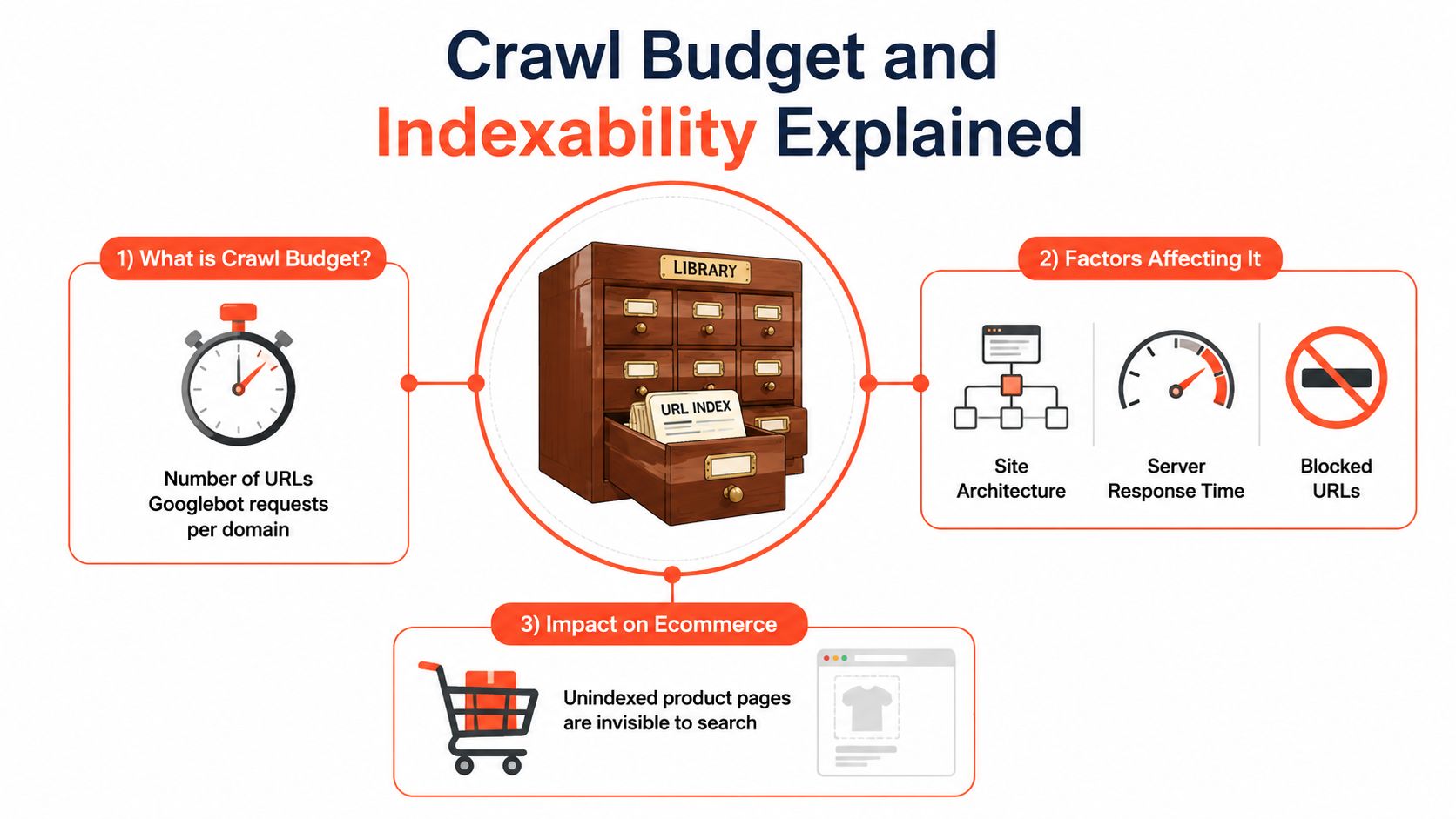
Crawl budget is the number of URLs Googlebot requests from a domain within a given period. It isn't an unlimited inspection service. A useful analogy is a library with one librarian and a fixed daily quota. If the shelves contain thousands of duplicate parameter URLs, the librarian may spend less time reaching the product and category pages that deserve regular discovery.
Indexability answers a different question. A URL can be crawled successfully and still be excluded from Google's index because of noindex, canonicalization, duplicate signals, insufficient value, or other processing decisions. Crawlability asks whether Googlebot can fetch the page. Indexability asks whether the page should be retained and shown in search.
Read the evidence in the right order
Start with Google Search Console. Review the Page indexing report for excluded URLs, inspect important pages individually, and check the Crawl Stats report for request patterns and response behavior. Search Console shows Google's interpretation of the site, but it won't always expose every path created by client-side interactions or app code.
Server logs provide the operational view. They show which URLs Googlebot requests, which response codes it receives, how often it revisits parameter patterns, and whether valuable templates are being reached. For a large Shopify implementation, combine log data with a crawler export and a list of revenue-driving products and collections.
Then classify URLs into working buckets:
Crawl and index: Core categories, useful subcategories, and unique product pages.
Crawl but don't index: Necessary user paths that offer little standalone search value.
Don't crawl: Parameters that create no meaningful content difference and generate waste.
Consolidate: True duplicates or alternate URLs that should pass signals to one preferred address.
Robots directives, canonical tags, and noindex aren't interchangeable. A blocked URL may prevent Google from seeing a canonical tag. A noindex page still consumes crawl resources if Google can discover it. A canonical tag is a hint, not permission to create unlimited duplicate URLs. The implementation must match the business purpose of the URL.
Faceted Navigation and Parameter URLs
Faceted navigation is where ecommerce architecture becomes an indexation problem. A collection with color, size, brand, price, and rating controls can generate a large URL space, even when most combinations show nearly the same inventory as the parent category. The issue isn't that filters exist. The issue is allowing every possible state to become a crawlable candidate for search.
Use a decision tree rather than applying noindex or canonicalization indiscriminately.
Decide based on demand and distinct value
A filter state should remain indexable when it maps to a meaningful query, serves a materially distinct product set, has a clear internal linking role, and can support unique page content. A brand facet on a marketplace may qualify. A collection page for a commercially important product type may qualify. In both cases, build it as a deliberate landing page, not as an accidental URL produced by a filter widget.
A combination such as red running shoes under a particular price may be useful for shoppers, but it usually doesn't deserve indexation unless search demand and business value justify a dedicated landing page. Sort parameters rarely add search value because they change ordering rather than meaning. Session IDs and tracking parameters should never create SEO destinations.
The practical approach recommended for large ecommerce sites is to classify parameter patterns into crawl and index buckets, use robots directives for zero-value parameters, apply noindex to crawlable but unwanted pages, and reserve canonicalization for true duplicates. Enterprise ecommerce technical SEO guidance also emphasizes that canonical tags shouldn't be used as a universal substitute for URL governance.
Filter Type | Example URL Pattern | Recommended Treatment | Why |
|---|---|---|---|
High-demand category facet |
| Create a dedicated indexable landing page when demand and inventory support it | It can represent a distinct intent and product set |
Granular combination |
| Usually | The combination is often too narrow and duplicative |
Sort state |
| Canonicalize or block according to the platform's behavior | Sorting changes order, not search meaning |
Tracking parameter |
| Prevent crawling and keep out of internal links | It adds attribution data, not content value |
Pagination |
| Test the rendered template and linking behavior, then preserve useful discovery paths without creating duplicate canonicals | Later products still need a crawlable discovery route |
Validate the policy with real behavior
Don't decide indexation from keyword intuition alone. Compare Search Console queries, internal link prominence, crawl logs, product demand, and revenue contribution. If a filter receives impressions and leads shoppers to a commercially important set, blocking it may remove useful long-tail visibility. If Google repeatedly crawls a parameter that has no impressions, no unique content, and no business purpose, it belongs in a waste bucket.
The strategic gap in many audits is that they say “canonicalize and noindex” without answering which combinations deserve to exist as search pages. Treat those combinations as products in the information architecture. Give approved pages stable URLs, unique headings, useful copy, clean canonicals, and prominent internal links. Keep everything else from competing with them.
Core Web Vitals for Product and Category Pages
A product page can rank, attract organic traffic, and still lose shoppers when its main image arrives late or its add-to-cart control freezes. Core Web Vitals connect those experience problems to three measurable benchmarks: Largest Contentful Paint should be 2.5 seconds or less, Interaction to Next Paint should be 200 milliseconds or less, and Cumulative Layout Shift should be 0.1 or less, as documented in the Core Web Vitals ecommerce analysis.
On product pages, LCP usually depends on the primary product image or the main content block. On category pages, the collection hero or a prominent product-grid element may become the LCP element. CLS often comes from review widgets, promotional badges, payment messaging, and dynamic prices loading without reserved space. INP reveals delays when shoppers select variants, open filters, change quantities, or add products to the cart.
Use field data to choose the fix
Lighthouse helps isolate a rendering problem, but it represents a controlled lab visit. Field data captures actual devices, connections, and interaction patterns. Start with Search Console's Core Web Vitals report, then compare field and lab findings in PageSpeed Insights. For bulk analysis, the Chrome User Experience API can segment performance by page type when the site has enough real-user data.
An aggregate score is not a diagnosis. Separate the homepage, product detail pages, and product listing pages. A fast product template can conceal a category template that delays filter interactions. A polished desktop result can also hide poor mobile responsiveness.
Vital | Good Threshold | What It Measures | Typical Ecommerce Failure | Primary Fix |
|---|---|---|---|---|
LCP | 2.5 seconds or less | Time until the main content element appears | Hero media is delayed by lazy loading or competing requests | Prioritize the hero image, reduce its payload, and remove render-blocking work |
INP | 200 milliseconds or less | Responsiveness across user interactions | App scripts block add-to-cart, filters, or variant selection | Break up long tasks and defer non-critical JavaScript |
CLS | 0.1 or less | Visual stability during loading | Widgets and badges shift content after the initial paint | Reserve fixed dimensions for dynamic content |
Fix the template, not just the symptom
Preload the important hero asset, not every image in a product gallery. Reserve space for reviews, recommendations, and promotional modules before their content arrives. Defer scripts that do not support the first meaningful interaction, and verify whether an app injects code on pages where its feature is absent.
On Shopify, apply Shopify performance optimization techniques with field diagnostics. The practical priority is the page types receiving organic landings and the interactions that help shoppers select and purchase products. A better lab score matters only when it reflects those improvements.
Performance belongs in crawl and indexation decisions because slow templates consume attention from both search engines and shoppers. Improving the product and category templates that deserve organic visibility supports a cleaner priority system, while trimming unnecessary third-party code reduces delays on pages that matter commercially.
Canonicalization, Structured Data, and Hreflang
Canonicalization works when it reflects a clear preferred URL. Every important product and collection page should normally identify itself as canonical, while genuine alternates should consolidate to the preferred version. Problems arise when a theme, an app, and a custom routing layer each emit different canonical signals.
Audit variant URLs, sort states, pagination, campaign parameters, and any marketplace copies. Don't canonicalize a page because it has a parameter. First determine whether the parameter changes the product set or represents a distinct search intent. A canonical tag should consolidate duplicates, not hide an unresolved architecture.
Keep product data aligned with the page
Product structured data should describe what shoppers can see and buy. Common entities include Product, Offer, AggregateRating, Review, and BreadcrumbList. Price, currency, availability, product identity, and review information need to agree with the visible state, especially when the store supports multiple currencies, pre-orders, or temporary stock changes.
Use product page SEO guidance when reviewing the relationship between page content and markup. Structured data can support rich-result eligibility, but adding every available property won't compensate for contradictory or incomplete visible content. Validate the output with Google's Rich Results Test, then crawl templates with Screaming Frog to find repeated errors across the catalog.
Treat international signals as a linked system
For international stores, hreflang needs reciprocal references. Each regional or language version should identify its alternatives, include a self-reference, and use x-default for the fallback experience. A common failure is pointing hreflang to a URL that then canonicalizes to a different regional page. The alternate URL, canonical URL, and visible regional experience need to agree.
Shopify Markets can handle hreflang generation when configured correctly, but it doesn't remove the need to inspect the rendered output. Review country and language mappings after market changes, confirm return links, and test pages that have different inventory or currency behavior.
A useful release checklist includes:
Canonical output: One preferred URL appears in the rendered head, without chains or conflicting app-injected tags.
Schema accuracy: Markup matches visible price, availability, reviews, and breadcrumbs.
Regional integrity: Hreflang references resolve, return correctly, and don't point at contradictory canonicals.
Template coverage: Product, collection, search, and variant states are tested separately.
Interaction to Next Paint and Third-Party JavaScript
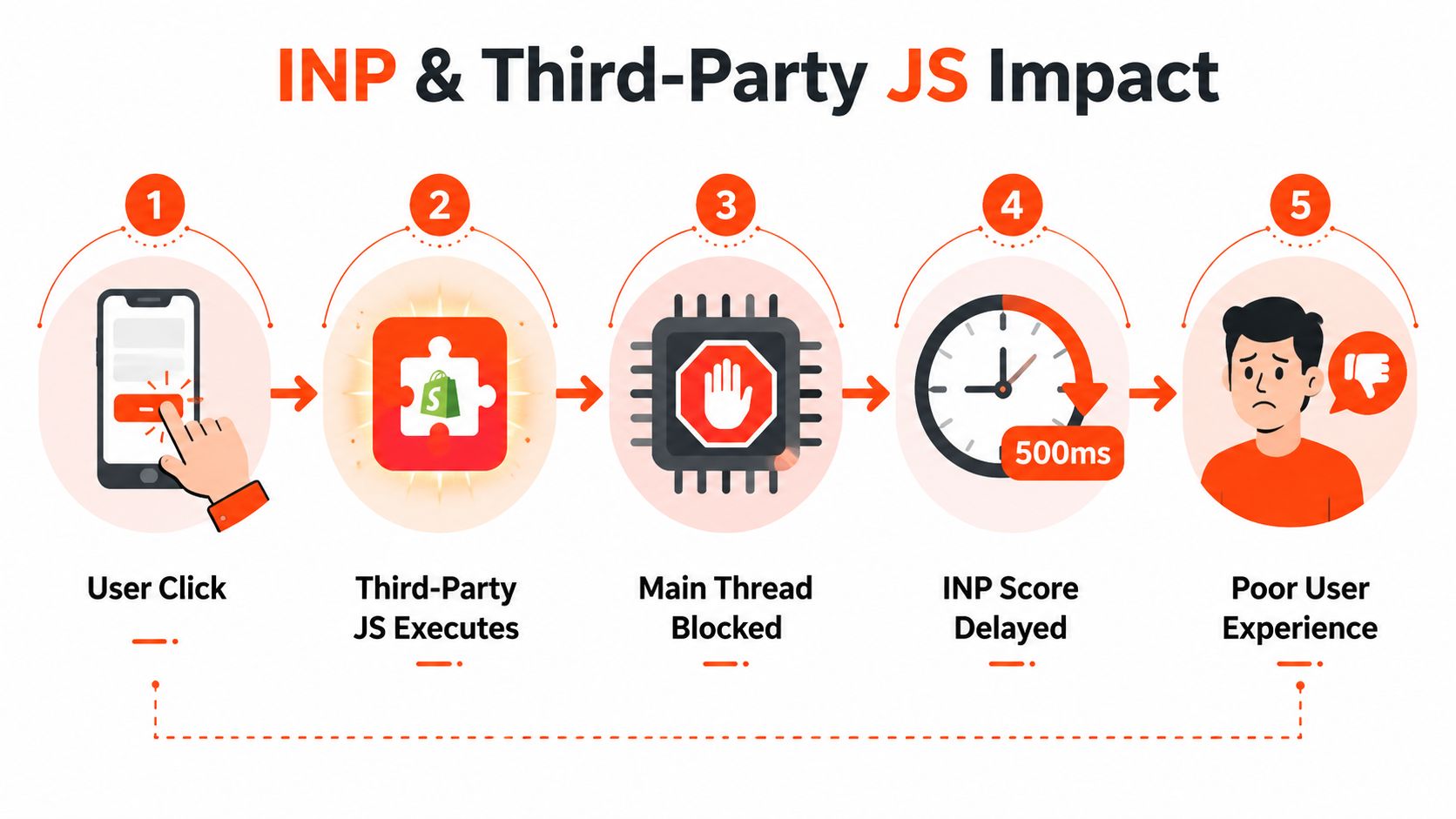
On Shopify stores, the hardest responsiveness problems often come from third-party JavaScript, not from product photography. Reviews, upsells, analytics, chat, experimentation, subscriptions, and personalization tools can all execute on the same page, and each one competes for main-thread time during the exact interactions that drive revenue.
INP is especially revealing because it measures responsiveness beyond the first click. A shopper may load a page acceptably, then experience a delay while selecting a variant or opening a filter because an app script is processing unrelated work. Image compression won't solve that queue.
Measure the cost before removing features
Use Chrome DevTools Performance, WebPageTest, or Treo to identify long tasks, script execution time, and main-thread blocking. Test product and collection templates on mobile hardware, then repeat the interaction sequence:
Open a product page.
Change a variant.
Add the product to cart.
Open a collection filter.
Change or clear the filter.
Continue to the next meaningful interaction.
Record which scripts execute before and during each delay. An app that loads on every page but supports only post-purchase messaging is an obvious candidate for conditional loading. A review widget may be valuable on product pages but unnecessary on collection pages.
The honest trade-off: Keep an app only when its measured commercial contribution justifies the responsiveness cost.
Remove unused apps first. Replace overlapping tools next. Defer non-critical scripts after that, and isolate essential functionality so it loads only where the shopper needs it. Live chat and aggressive upsell tools may hurt INP, but the correct decision isn't ideological. Compare their observed commercial value with the interaction cost, then make the choice visible to marketing and engineering.
Shopify Specific Technical SEO Constraints
Shopify gives teams a reliable commerce foundation, but its opinions become visible in SEO work. Liquid templates, platform-generated routes, theme conventions, app embeds, and limited server-level control all shape how Google sees the store.
Canonical drift commonly appears when an app injects alternate URLs or when variant paths are treated as independent pages without a deliberate policy. Collection templates can also expose pagination and filter states through client-side behavior, creating weak or poorly linked URLs. The fix isn't to fight the platform everywhere. It's to identify which controls belong in Liquid, which belong in app configuration, and which require a custom storefront decision.
Where Shopify stores lose control
Variant URLs: Decide whether variants need individual search destinations. If they don't, consolidate them consistently and keep internal links focused on the parent product.
Collection pagination: Confirm that later products remain discoverable in rendered HTML and that empty or invalid pages don't become indexable soft errors.
App embeds: Inspect every script and embed after installation. A feature that loads globally can degrade templates that never display it.
Product schema: Shopify may provide baseline product markup, but reviews, availability, price changes, and market-specific values often require theme or app-level review.
Checkout and account routes: These areas are platform-controlled, so verify that they aren't appearing as meaningful search destinations and avoid assuming theme edits govern every route.
A Liquid theme keeps the team close to the platform and can be an efficient choice for complex catalog work. A headless or composable storefront offers more rendering and routing control, but it also creates more infrastructure to maintain. The right choice depends on whether the SEO problem is caused by the platform's constraints or by a theme and app stack that hasn't been governed.
For implementation patterns covering canonical tags, indexable page types, broken links, and Shopify-specific controls, use Shopify SEO best practices. A lean theme with carefully selected apps usually beats a feature-heavy storefront whose scripts and URL rules nobody owns.
A Prioritized Technical SEO Roadmap
A defensible backlog starts with evidence, not a long audit export. Assign each issue to a URL pattern, a page type, an owner, and a verification method.
Tier one for the current sprint
Begin with Search Console indexing data, crawl stats, a representative crawl, and logs if available. Fix canonical chains, identify valuable pages excluded from the index, control low-value facet parameters, and verify product structured data on product and collection templates. The success signal is a cleaner relationship between intended indexable URLs and URLs Google processes.
Tier two for the next month
Audit third-party scripts against product and category interactions. Defer non-critical app JavaScript, remove unused embeds, and replace heavy hero sliders where a static asset serves the same merchandising purpose. Use field Core Web Vitals data, especially INP at the 75th percentile, to verify that real shoppers experience the improvement.
Tier three for the next quarter
Rework collection taxonomy, turn strategically valuable filter states into stable landing pages, consolidate near-duplicate variants, and implement hreflang for international markets. Measure organic sessions and search visibility for category pages, not just the number of URLs submitted in a sitemap.
Two mistakes recur. Teams optimize lab Core Web Vitals while ignoring field data, and they block parameters that still generate useful long-tail demand without validating queries, logs, or revenue. The better operating model is selective: index what deserves demand, crawl what supports discovery, and remove everything that only creates noise.
Presidio helps Shopify and Shopify Plus teams turn that operating model into maintainable storefront work, including technical audits, structured data reviews, performance tuning, app consolidation, and custom theme or app development. Visit Presidio to assess your crawl and indexation priorities before the next catalog or app release.

Jamie, Presidio’s Designer, leads the practice alongside Johnnie. With over 10 years of e-commerce experience, Jay is a Shopify expert, known for crafting innovative solutions that prevent tech debt.
Jaime
Senior Product Designer, 2020



